## Installation
```javascript
tns plugin add nativescript-swipe-layout
```
## Usage
## NativeScript with Angular
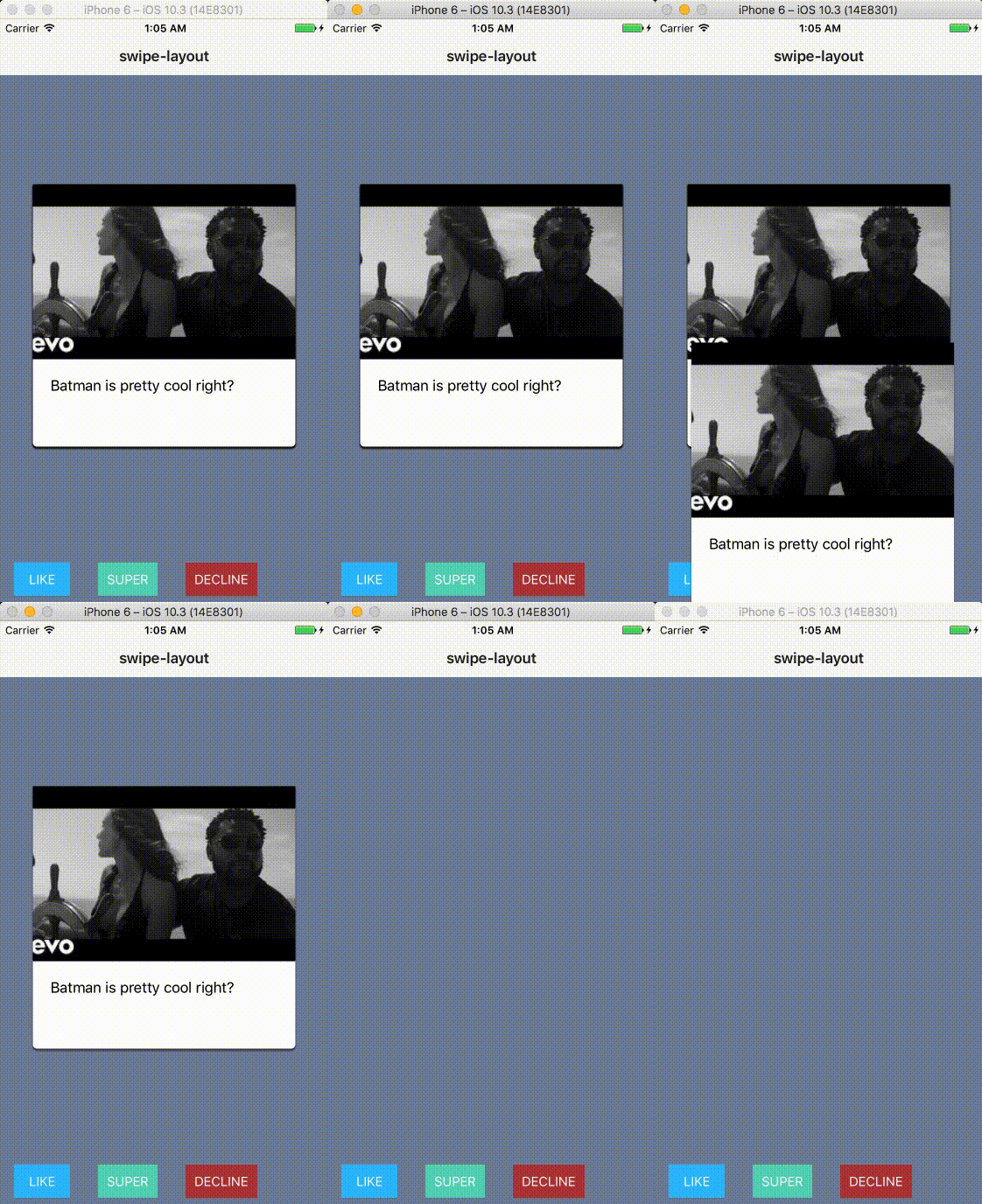
Here is an example of how you can use this plugin to build a tinder like stack of cards. Here, the plugin [nativescript-cardview](https://github.com/bradmartin/nativescript-cardview) is used.
### XML
#### app.component.html
```xml
```
### Component
#### app.component.ts
```typescript
import { Component, ElementRef, ViewChild } from "@angular/core";
.
. // other imports
.
registerElement("CardView", () => CardView);
registerElement('SwipeLayout', () => SwipeLayout);
@Component({
selector: "ns-app",
templateUrl: "app.component.html",
})
export class AppComponent {
private _swipeLayouts: Array;
private currentSwipeLayout: SwipeLayout;
public swipeLayoutAnimated: ANIMATION_STATE;
public gestureMode: GESTURE_MODE;
public cards: Array = [{ // dumb cards
img: "https://img.youtube.com/vi/GGhKPm18E48/mqdefault.jpg",
test: "Batman is pretty cool right?"
},
{
img: "https://img.youtube.com/vi/GGhKPm18E48/mqdefault.jpg",
test: "Batman is pretty cool right?"
}, {
img: "https://img.youtube.com/vi/GGhKPm18E48/mqdefault.jpg",
test: "Batman is pretty cool right?"
}, {
img: "https://img.youtube.com/vi/GGhKPm18E48/mqdefault.jpg",
test: "Batman is pretty cool right?"
}, {
img: "https://img.youtube.com/vi/GGhKPm18E48/mqdefault.jpg",
test: "Batman is pretty cool right?"
}, {
img: "https://img.youtube.com/vi/GGhKPm18E48/mqdefault.jpg",
test: "Batman is pretty cool right?"
}]
constructor(private fonticon: TNSFontIconService) {
this._swipeLayouts = new Array();
this.swipeLayoutAnimated = ANIMATION_STATE.ON_EVENTS; // Will animate only on swipe down and up events
this.gestureMode = GESTURE_MODE.DRAG; // Cards will be draggable
}
swipeLayoutLoaded(event) {
this._swipeLayouts.push(event.object); // Since it's an Array everytime a SwipeLayout load we add it
}
ngAfterViewInit(): void {
this.currentSwipeLayout = this._swipeLayouts[this._swipeLayouts.length - 1];
}
private next() {
this._swipeLayouts.pop();
this.currentSwipeLayout = this._swipeLayouts[this._swipeLayouts.length - 1];
}
swipeLeftCallback(swipeLeftEvent: SwipeLeftEventData) { // never called (not binded to the XML)
console.log('swipeLeft');
this.next();
}
swipeRightCallback(swipeRightEvent: SwipeRightEventData) { // never called (not binded to the XML)
console.log('swipeRight');
this.next();
}
swipeUpCallback(swipeUpEvent: SwipeUpEventData) { // called once the swipe up animation is done
console.log('swipeUp');
this.next();
}
swipeDownCallback(swipeDownEvent: SwipeDownEventData) { // called once the swipe down animation is done
console.log('swipeDown');
this.next();
}
decline() { // red button on tap callback
let that = this;
this.currentSwipeLayout.animateSwipeRight().then(() => {
that.next();
console.log('swipeLeft done');
});
}
like() { // blue button on tap callback
let that = this;
this.currentSwipeLayout.animateSwipeLeft().then(() => {
that.next();
console.log('swipeRight done');
});
}
super() { // green button on tap callback
let that = this;
this.currentSwipeLayout.animateSwipeUp().then(() => {
that.next();
console.log("swipeUp done");
});
}
}
```
## API
Further reading [here](https://github.com/rhanb/nativescript-swipe-layout/blob/master/API.MD).
### Properties
| Property | Type | Default | Description |
| --- | --- | --- | --- |
| `swipeRight` | `function` | `null` | Callback called when the layout is swiped to the right and the swipe animation is done. |
| `swipeLeft` | `function` | `null` | Callback called when the layout is swiped to the left and the swipe animation is done. |
| `swipeUp` | `function` | `null` | Callback called when the layout is swiped up and the swipe animation is done. |
| `swipeDown` | `function` | `null` | Callback called when the layout is swiped down and the swipe animation is done. |
| `animationState` | `ANIMATION_STATE` | `ANIMATION_STATE.ALWAYS` | Enable to perform animation when swipe events are fired, not at all or only on swipe events with a callback |
| `gestureMode` | `GESTURE_MODE` | `GESTURE_MODE.SWIPE` | Allow to choose between the `drag` behavior or the `swipe` behavior |
### Methods
| Method | Return | Parameters | Description |
| --- | --- | --- | --- |
| `animateSwipeRight` | `Promise`| None | Method to manually start the swipe right animation. |
| `animateSwipeLeft` | `Promise`| None | Method to manually start the swipe left animation |
| `animateSwipeUp` | `Promise`| None | Method to manually start the swipe up animation |
| `animateSwipeDown` | `Promise`| None | Method to manually start the swipe down animation |
| `swipe` | `Promise`| (swipeEvent: SwipeEventData) | Method to manually start the swipe animation but has a parameter. From the direction given, will perform the right animation |
All the method abose can be override, you can customise the animations as you want. If you wan't to override the animation which is performed on a swipe event you'll have to override the `swipe` method, since it's the one which is called when the event is fired :fire:
## NativeBaguette 🥖
[](https://github.com/rkhayyat) | [](https://github.com/rhanbIT) | [](https://github.com/triniwiz) | [](https://github.com/bradmartin) | [](https://github.com/jlooper) |
:---: |:---: |:---: |:---: |:---: |
[rkhayyat](https://github.com/rkhayyat) |[rhanb](https://github.com/rhanbIT) |[triniwiz](https://github.com/triniwiz) |[bradmartin](https://github.com/bradmartin) |[jlooper](https://github.com/jlooper) |
---
_Source: https://npm.io/package/nativescript-swipe-layout · Machine-readable twin of the npm.io package page. Health data is recomputed on every publish._
 ](https://github.com/rkhayyat) | [
 ](https://github.com/rhanbIT) | [
 ](https://github.com/triniwiz) | [
 ](https://github.com/bradmartin) | [
 ](https://github.com/jlooper) |
:---: |:---: |:---: |:---: |:---: |
[rkhayyat](https://github.com/rkhayyat) |[rhanb](https://github.com/rhanbIT) |[triniwiz](https://github.com/triniwiz) |[bradmartin](https://github.com/bradmartin) |[jlooper](https://github.com/jlooper) |
---
_Source: https://npm.io/package/nativescript-swipe-layout · Machine-readable twin of the npm.io package page. Health data is recomputed on every publish._
](https://github.com/jlooper) |
:---: |:---: |:---: |:---: |:---: |
[rkhayyat](https://github.com/rkhayyat) |[rhanb](https://github.com/rhanbIT) |[triniwiz](https://github.com/triniwiz) |[bradmartin](https://github.com/bradmartin) |[jlooper](https://github.com/jlooper) |
---
_Source: https://npm.io/package/nativescript-swipe-layout · Machine-readable twin of the npm.io package page. Health data is recomputed on every publish._