# nav-spa
> Give you SPA normal URL-based state navigation
Latest version **1.0.1** (published 2019-07-19) · MIT license · 0 weekly downloads
## Install
```sh
npm install nav-spa
pnpm add nav-spa
yarn add nav-spa
bun add nav-spa
```
## Health
**Score 15/100 (F)** — status: abandoned.
Positive: no vulnerabilities.
Warnings: low downloads; no types; no esm support.
Negative: abandoned; low maintenance score.
## Facts
| | |
|---|---|
| Version | 1.0.1 |
| Published | 2019-07-19 |
| First published | 2019-07-19 |
| Weekly downloads | 0 |
| License | MIT |
| TypeScript types | none |
| Module format | CommonJS |
| Dependencies | 6 |
| Unpacked size | 171.3 KB |
| Known vulnerabilities | 0 |
| Install scripts | no |
| GitHub stars | 0 |
| Author | Sandro Hawke |
| Maintainers | sandhawke |
| Keywords | sandhawke |
## Links
- npm: https://www.npmjs.com/package/nav-spa
- Repository: https://github.com/sandhawke/nav-spa
- Homepage: https://github.com/sandhawke/nav-spa#readme
- Issues: https://github.com/sandhawke/nav-spa/issues
- npm.io page: https://npm.io/package/nav-spa
## Dependencies (6)
- [debug](https://npm.io/package/debug.md) ^4.1.0
- [delay](https://npm.io/package/delay.md) ^4.3.0
- [keyed-set](https://npm.io/package/keyed-set.md) ^0.6.2
- [eventemitter3](https://npm.io/package/eventemitter3.md) ^4.0.0
- [shallow-equal](https://npm.io/package/shallow-equal.md) ^1.2.0
- [when-dom-ready](https://npm.io/package/when-dom-ready.md) ^1.2.12
## Recent versions
- 1.0.1 (latest) — 2019-07-19
- 1.0.0 — 2019-07-19
## README
# nav-spa
[![NPM version][npm-image]][npm-url]
This code makes URL navigation in your
[SPA](https://en.wikipedia.org/wiki/Single-page_application) look just
like classic [HATEOAS](https://en.wikipedia.org/wiki/HATEOAS)
websites, where the URL tells people what's going on. Every state (if
you want) can be bookmarked, shared, and even edited by hand in the
address bar. We put things in the query string by default, but if you
provide parse+unparse functions, state can also be encoded using the path
and/or hash.
Alternatives include more established options like react-router-redux,
or using architectures like service-workers to get SPA performance,
without actually being a SPA. This seemed simpler to me.
---
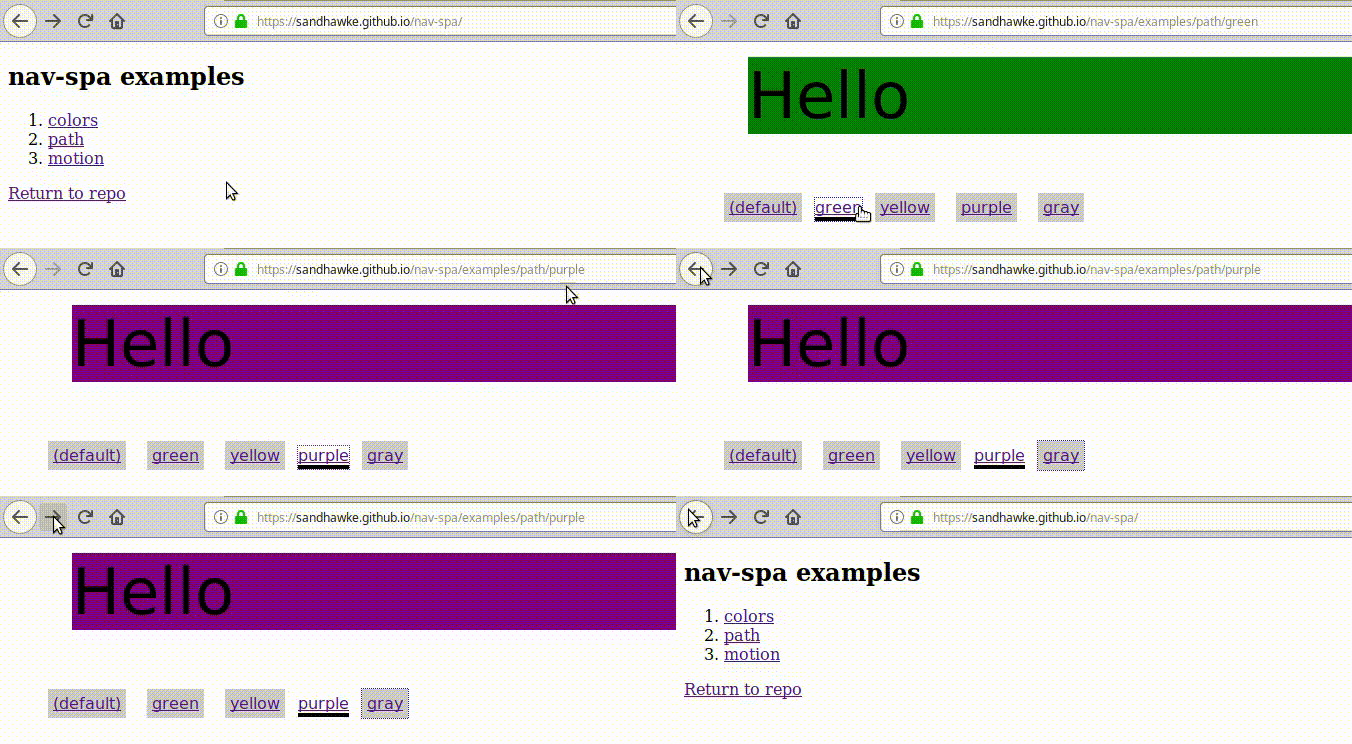
There are currently [some
examples](https://sandhawke.github.io/nav-spa), running on github
pages. The simplest ('colors') is something like:
```js
const nav = require('nav-spa')
nav.on('change-color', ({key, oldValue, newValue}) => {
console.log('Nav-state property %o changed value from %o to %o',
key, oldValue, newValue)
if (!newValue) newValue = 'white'
document.getElementById('test').style.backgroundColor = newValue
document.title = `Hello in ${newValue}`
})
```
The state-changing navigation in this case is set-up by HTML
like this:
```html
green
yellow
```
This module looks for `data-link-to-state` attributes and adds the
right href to get us to that state. The state is a JS expression which
is eval'd to produce a state overlay object. And properties not
mentioned in the overlay remain unchanged; set them to null or '' to
remove them. They're always strings, so for our purposes '' === null
== undefined. (Actually, you can provide a non-string and we'll
JSON.stringify it for you, but it's always handed back to you as a
string.) If your expression evals to function, it's called, passing it
the current state, and letting it return the new state.
You can get that URL manually with `nav.link(...)` or go ahead and
jump there, perhaps in an onclick handler, with `nav.jump(...)`. The
.jump function has an option to skip putting it in browser history.
The module also sets some CSS classes on the links, so you can show
users which of the states they are currently in. It shouldn't matter
how they got to that state.
The "motion" example shows you can even change the url state at the
browser frame rate. Seems to work okay, about as fast as that
animation done without this library (see cheating.html in the same
directory to compare.). For that example, we don't put the state in
the browser history. (Imagine clicking back through your history, one
animation frame at a time!)
## Custom Paths
By default we store all the state in query parameters. You can (and
probable should) provide functions to map some state properties into
the pathname (and/or hash).
If you store state in the pathname, your web server will have to serve
up this SPA for all those URLs (but still let your CSS and JS files
through). You also need to include a link.rel=start to the one that's
the starting empty state.
Example "path" shows this in action, modifying "colors" by adding this
code:
```js
nav.customPath = { parse, unparse }
function parse (path) {
path = path.slice(1) // skip the leading slash
if (path === '') return { }
if (/^\w+$/.test(path)) return { color: path }
return 'NotFound'
}
function unparse (state) {
if (state.color) return '/' + state.color
return '/'
}
```
Your parse function takes a path and returns an object like { prop:
value, prop2: value2, ... } with whatever state it gleaned. It returns
the magic string 'NotFound' if it can't deal with this. In practice
that NotFound flag is used to limit what URLs we intercept clicks on.
Your unparse function takes a state object, like what parse produced,
and returns string which encodes some or all of that state.
This module automatically detects when state is encoded in a string
and then skips encoding it in the query parameters. (It does this by
calling your parse function on the string to see what will be able to
extracted. It gives errors on the console if it detects a situation
where parse and unparse are not acting as inverse functions of each
other.)
[npm-image]: https://img.shields.io/npm/v/nav-spa.svg?style=flat-square
[npm-url]: https://npmjs.org/package/nav-spa
---
_Source: https://npm.io/package/nav-spa · Machine-readable twin of the npm.io package page. Health data is recomputed on every publish._