# ng-admin
> ng-admin [](https://travis-ci.org/marmelab/ng-admin) ========
Latest version **1.0.13** (published 2018-02-26) · MIT license · 0 weekly downloads
## Install
```sh
npm install ng-admin
pnpm add ng-admin
yarn add ng-admin
bun add ng-admin
```
## Health
**Score 5/100 (F)** — status: abandoned.
Positive: no vulnerabilities.
Warnings: low downloads; no types; no esm support; large bundle.
Negative: insecure dependencies; abandoned; low maintenance score.
## Facts
| | |
|---|---|
| Version | 1.0.13 |
| Published | 2018-02-26 |
| First published | 2015-07-20 |
| Weekly downloads | 0 |
| License | MIT |
| TypeScript types | none |
| Module format | CommonJS |
| Node | >=4.2.0 |
| Dependencies | 26 |
| Unpacked size | 15.8 MB |
| Known vulnerabilities | 0 (+15 in 4 direct dependencies) |
| Install scripts | no |
| GitHub stars | 3899 |
| Maintainers | floo51, fzaninotto, zaninottof |
## Links
- npm: https://www.npmjs.com/package/ng-admin
- Repository: https://github.com/marmelab/ng-admin
- Homepage: https://github.com/marmelab/ng-admin#readme
- Issues: https://github.com/marmelab/ng-admin/issues
- npm.io page: https://npm.io/package/ng-admin
## Dependencies (26)
- [rangy](https://npm.io/package/rangy.md) ^1.3.0
- [angular](https://npm.io/package/angular.md) ~1.6.1
- [core-js](https://npm.io/package/core-js.md) ^0.6.1
- [numeral](https://npm.io/package/numeral.md) ^1.5.3
- [jsonlint](https://npm.io/package/jsonlint.md) ^1.6.2
- [humane-js](https://npm.io/package/humane-js.md) ^3.2.2
- [nprogress](https://npm.io/package/nprogress.md) ^0.2.0
- [papaparse](https://npm.io/package/papaparse.md) ^4.1.1
- [ui-select](https://npm.io/package/ui-select.md) 0.18.1
- [codemirror](https://npm.io/package/codemirror.md) ^5.2.0
- [es6-promise](https://npm.io/package/es6-promise.md) ^2.3.0
- [restangular](https://npm.io/package/restangular.md) ~1.5.2
- [textangular](https://npm.io/package/textangular.md) 1.4.3
- [admin-config](https://npm.io/package/admin-config.md) ^0.12.4
- [font-awesome](https://npm.io/package/font-awesome.md) ^4.3.0
- [nginflection](https://npm.io/package/nginflection.md) ^1.1.10
- [bootstrap-sass](https://npm.io/package/bootstrap-sass.md) ^3.3.7
- [ng-file-upload](https://npm.io/package/ng-file-upload.md) ^7.0.12
- [lodash.debounce](https://npm.io/package/lodash.debounce.md) 4.0.8
- [angular-sanitize](https://npm.io/package/angular-sanitize.md) ^1.3.15
- [angular-numeraljs](https://npm.io/package/angular-numeraljs.md) ^1.1.6
- [angular-translate](https://npm.io/package/angular-translate.md) ^2.11.0
- [angular-ui-router](https://npm.io/package/angular-ui-router.md) ~0.4.0
- [node-libs-browser](https://npm.io/package/node-libs-browser.md) ^0.5.0
- [angular-ui-bootstrap](https://npm.io/package/angular-ui-bootstrap.md) ~1.2.1
- [angular-ui-codemirror](https://npm.io/package/angular-ui-codemirror.md) github:jpetitcolas/ui-codemirror#di
## Recent versions
- 1.0.13 (latest) — 2018-02-26
- 1.0.0-beta1 (next) — 2016-09-29
- 1.0.12 — 2017-12-18
- 1.0.11 — 2017-12-18
- 1.0.10 — 2017-12-07
- 1.0.9 — 2017-11-17
- 1.0.8 — 2017-11-16
- 1.0.7 — 2017-10-02
- 1.0.6 — 2017-04-27
- 1.0.5 — 2017-04-05
- 1.0.4 — 2017-04-04
- 1.0.3 — 2017-04-03
- 1.0.2 — 2017-03-17
- 1.0.1 — 2017-03-08
- 1.0.0 — 2017-01-27
- … 15 more at https://npm.io/package/ng-admin/versions
## README
ng-admin [](https://travis-ci.org/marmelab/ng-admin)
========
[](https://gitter.im/marmelab/ng-admin?utm_source=badge&utm_medium=badge&utm_campaign=pr-badge&utm_content=badge)
Plug me to your RESTFul API to get a complete administration interface (datagrid, filters, complex form widgets, multi-model relationships, dashboard) in no time! Beyond simple CRUD, ng-admin lets you build sophisticated GUIs without getting in your way.
[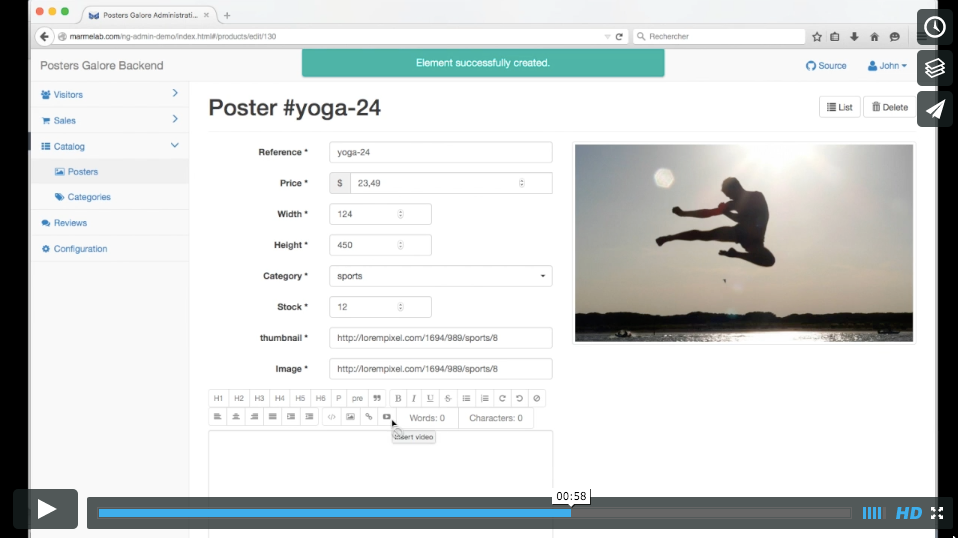](https://vimeo.com/143909685)
* [Online demo](http://marmelab.com/ng-admin-demo/) ([source](https://github.com/marmelab/ng-admin-demo))
* [Documentation](http://ng-admin-book.marmelab.com/)
## Installation
The current ng-admin version (master) depends on Angular.js 1.6. If you need compatibility with Angular 1.3, use [ng-admin 0.9](https://github.com/marmelab/ng-admin/releases/tag/v0.9.1).
Grab ng-admin from your favorite package manager:
```sh
npm install ng-admin --save
# or
yarn add ng-admin
```
### With a Module Bundler
`ng-admin` is fully compatible with Webpack, and should also be compatible with all
available major module bundlers. If you use one of them, you just have to add this line:
``` js
const myApp = angular.module('myApp', [
require('ng-admin'),
// ...
]);
```
**Important note:** as we include HTML templates using `require` to prevent the AJAX
request implied by `templateUrl`, you will need to configure your module bundler
to deal with HTML. It can be accomplished with Webpack using the HTML loader:
``` js
module.exports = {
// ...
module: {
loaders: [
// ...
{ test: /\.html$/, loader: 'html' },
]
},
};
```
If your module bundler also supports SASS or CSS, you can also include stylesheets using:
``` js
// SASS version
require('ng-admin/lib/sass/ng-admin.scss');
// CSS version
require('ng-admin/build/ng-admin.min.css');
```
Using a module bundler, you would also be able to generate the source map for all your JavaScript
and stylesheets, helping you to hunt even the most obscure bugs.
### Without a Module Bundler
If you don't have a module bundler, don't worry: you can still include `ng-admin` with a `
```
## Bootstrapping your Admin
Add the `ng-admin.min.css` and `ng-admin.min.js` to the HTML, add a `
`, and configure the admin:
``` html
My First Admin
```
## Getting Started
See the [Getting Started](doc/Getting-started.md) dedicated chapter for a step-by-step tutorial aimed at beginners.
## Usage Examples
* You can find a simple configuration in the [blog admin demo](examples/blog/config.js), where the entities are posts, comments, and tags. The remote REST API is simulated in the browser, using [FakeRest](https://github.com/marmelab/FakeRest).
* The [Posters Galore demo](http://marmelab.com/ng-admin-demo/) ([source](https://github.com/marmelab/ng-admin-demo)) is a more complete example of an e-commerce administration, with custom authentication, pages, directives and modules, all well organized via WebPack. The remote REST API is also simulated in the browser, using [FakeRest](https://github.com/marmelab/FakeRest).
## Configuration Reference
An administration in ng-admin is made of one *application* containing several *entities*. Each entity has up to 5 *views*, and each view has many *fields*.
```
application
|-header
|-menu
|-dashboard
|-entity[]
|-creationView
|-editionView
|-deletionView
|-showView
|-listView
|-field[]
|-name
|-type
```
See [Configuration API Reference](doc/Configuration-reference.md) dedicated chapter for more details.
**Tip**: You won't find the related classes in the ng-admin project. In fact, the admin configuration API exists as a standalone, framework-agnostic library, called [admin-config](https://github.com/marmelab/admin-config). Don't hesitate to browse the source of that library to learn more.
## Relationships
Ng-admin supports relationships between entities in read and write views, and provides specialized field types for that: `reference`, `referenced_list`, `reference_many`, and `embedded_list`. The [Relationships Reference chapter](doc/Relationships.md) describes in more details which field type to use for which case.
Also, the Fields section of the [Configuration API Reference chapter](doc/Configuration-reference.md) has a list of all settings for each of these field types.
## Menu Configuration
By default, ng-admin creates a sidebar menu with one entry per entity. If you want to customize this sidebar (labels, icons, order, adding submenus, etc), you have to define menus manually.
See [Menus Configuration](doc/Menus.md) dedicated chapter.
## Dashboard Configuration
The home page of a ng-admin application is called the Dashboard. Use it to show important pieces of information to the end user, such as latest entries, or charts.
See [Dashboard Configuration](doc/Dashboard.md) dedicated chapter.
## Customizing the API Mapping
All HTTP requests made by ng-admin to your REST API are carried out by [Restangular](https://github.com/mgonto/restangular), which is like `$resource` on steroids.
The REST specification doesn't provide enough detail to cover all requirements of an administration GUI. ng-admin makes some assumptions about how your API is designed. All of these assumptions can be overridden by way of [Restangular's request and response interceptors](https://github.com/mgonto/restangular#addresponseinterceptor).
That means you don't need to adapt your API to ng-admin; ng-admin can adapt to any REST API, thanks to the flexibility of Restangular.
See the [Customizing the API Mapping](doc/API-mapping.md) dedicated chapter.
## Theming
You can override pretty much all the HTML generated by ng-admin, at different levels.
See the [Theming](doc/Theming.md) dedicated chapter.
## Translation
The ng-admin interface uses English as the default language, but supports switching to another language, thanks to [angular-translate](https://angular-translate.github.io/).
See the [Translation](doc/Translation.md) dedicated chapter.
## Adding Custom Pages
For each entity, ng-admin creates the necessary pages for Creating, Retrieving, Updating, and Deleting (CRUD) this entity. When you need to achieve more specific actions on an entity, you have to add a custom page - for instance a page asking for an email address to send a message to. How can you route to a specific page and display it in the ng-admin layout?
See the [Adding Custom Pages](doc/Custom-pages.md) dedicated chapter.
## Adding Custom Types
When you map a field between a REST API response and ng-admin, you give it a type. This type determines how the data is displayed and edited. It is very easy to customize existing ng-admin types and add new ones.
See the [Adding Custom Types](doc/Custom-types.md) dedicated chapter.
## Getting Ready For Production
To build the ng-admin source with the dependencies you need, and to get hints about performance boosters, head to the [Getting Ready For Production](doc/Production.md) dedicated chapter.
## News
Follow the [marmelab blog](http://marmelab.com/blog/) for news about ng-admin (tutorials, plugins, new releases, etc).
You should also watch the [ng-admin release page on GitHub](https://github.com/marmelab/ng-admin/releases) for announcements on new releases, and complete changelog.
## Support
Ng-admin is an open-source project, with a community getting larger every day. You will get help by asking politely in any the following channels:
* [StackOverflow](http://stackoverflow.com/questions/tagged/ng-admin)
* [Gitter (live chat)](https://gitter.im/marmelab/ng-admin) [](https://gitter.im/marmelab/ng-admin?utm_source=badge&utm_medium=badge&utm_campaign=pr-badge&utm_content=badge)
Please give as much context as possible, including and admin configuration snippet, and the response from the API you're mapping.
## Looking For a Material UI / React.js version?
[marmelab/admin-on-rest](https://github.com/marmelab/admin-on-rest), by the same team, uses a different architecture but provides a similar service: an admin GUI for REST APIs, this time with React.js, Redux, react-router, and material UI.
## Contributing
Your feedback about the usage of ng-admin in your specific context is valuable, don't hesitate to [open GitHub Issues](https://github.com/marmelab/ng-admin/issues) for any problem or question you may have.
All contributions are welcome: please send us a Pull Request for any new feature / bug fix in your fork that you consider worth giving back.
Also, if you have some experience with ng-admin, please answer questions from newcomers in any of the support channels (see above).
### Installing Dependencies
Install npm dependencies (for tests) by calling the `install` target:
```sh
make install
```
### Running the example app
To test your changes, run the example app, which is bundled with a sample REST api, by calling:
```sh
make run
```
Then, connect to `http://localhost:8000/` to browse the admin app. This task uses webpack-dev-server, which means that the browser will reload the page as soon as one file in the source is updated. This makes the blog app our preferred live testing environment.
### Testing
ng-admin has unit tests (powered by karma) and end to end tests (powered by protractor). Launch the entire tests suite by calling:
```sh
make test
```
**Tip:** If you are working on Karma tests, you can prevent from relaunching the whole process by disabling single-run:
```
./node_modules/.bin/karma start src/javascripts/test/karma.conf.js
```
### Releasing
Before releasing a new version, concatenate and minify the JS and CSS sources into minified scripts with:
```sh
make build
git add build
git commit -m 'update built files'
git push origin master
git tag vx.x.x
# create a new tag
git push origin --tags
# publish to npm
npm publish
```
**Tip**: Don't commit built files in Pull Requests, it forces rebases on other PRs. The core team will take care of regularly updating these built files.
## License
ng-admin is licensed under the [MIT Licence](LICENSE), and sponsored by [marmelab](http://marmelab.com).
---
_Source: https://npm.io/package/ng-admin · Machine-readable twin of the npm.io package page. Health data is recomputed on every publish._