# ng-input-file
> A component that wraps input[type=file] element styled with Material, enables user to choose file from local device or Google drive
Latest version **1.0.1** (published 2019-05-22) · MIT license · 0 weekly downloads
## Install
```sh
npm install ng-input-file
pnpm add ng-input-file
yarn add ng-input-file
bun add ng-input-file
```
## Health
**Score 25/100 (F)** — status: abandoned.
Positive: has types; esm support; no vulnerabilities.
Warnings: low downloads.
Negative: abandoned; low maintenance score.
## Facts
| | |
|---|---|
| Version | 1.0.1 |
| Published | 2019-05-22 |
| First published | 2018-09-15 |
| Weekly downloads | 0 |
| License | MIT |
| TypeScript types | bundled |
| Module format | ESM + CommonJS |
| Dependencies | 1 |
| Unpacked size | 274.7 KB |
| Known vulnerabilities | 0 |
| Install scripts | no |
| GitHub stars | 2 |
| Author | Bob Lee |
| Maintainers | bob-lee |
| Keywords | angular, material, component, service, file input, drag and drop, google drive, google drive picker api |
## Links
- npm: https://www.npmjs.com/package/ng-input-file
- Repository: https://github.com/bob-lee/ng-notes
- Homepage: https://github.com/bob-lee/ng-notes#readme
- Issues: https://github.com/bob-lee/ng-notes/issues
- npm.io page: https://npm.io/package/ng-input-file
## Dependencies (1)
- [tslib](https://npm.io/package/tslib.md) ^1.9.0
## Alternatives
- [@progress/kendo-ooxml](https://npm.io/package/@progress/kendo-ooxml.md) — 152.1K weekly downloads
- [@progress/kendo-react-ripple](https://npm.io/package/@progress/kendo-react-ripple.md) — 8.0K weekly downloads
- [@progress/kendo-react-orgchart](https://npm.io/package/@progress/kendo-react-orgchart.md) — 4.3K weekly downloads
- [@praxisui/dynamic-fields](https://npm.io/package/@praxisui/dynamic-fields.md) — 2.4K weekly downloads
- [@mesalvo/react-ui](https://npm.io/package/@mesalvo/react-ui.md) — 1.7K weekly downloads
## Recent versions
- 1.0.1 (latest) — 2019-05-22
- 1.0.0 — 2019-05-17
- 0.1.1 — 2018-10-14
- 0.1.0 — 2018-10-13
- 0.0.9 — 2018-10-13
- 0.0.8 — 2018-10-12
- 0.0.7 — 2018-10-12
- 0.0.6 — 2018-10-12
- 0.0.5 — 2018-09-22
- 0.0.4 — 2018-09-18
- 0.0.3 — 2018-09-18
- 0.0.2 — 2018-09-16
- 0.0.1 — 2018-09-15
## README
# ng-input-file
[](https://www.npmjs.com/package/ng-input-file)
[](https://opensource.org/licenses/mit-license.php)
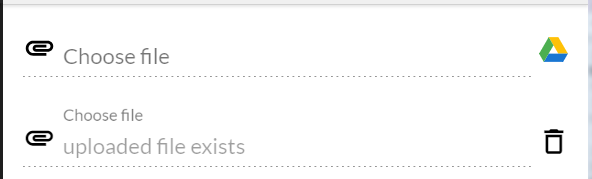
This library provides a component `input-file` that wraps a legacy `input[type=file]` element styled with `Material` components, enables user to choose file from local device (supports drag-and-drop) or Google drive (needs extra setup below). This library assumes your application is already using `@angular/material` and one of the themes:
 ```html
```
`input-file` component emits `(files)` output whenever user chooses or removes a file. By default, the component accepts `image/*, video/*` and you can override it by providing optional input like `[accept]="'image/*'"`.
To support `drag-and-drop`, you'd need to pass in an element that will serve as a dropbox to the component:
```html
```
To enable Google drive, you'd need to import `GoogleDriveService` and initialize it with [your developer information](https://developers.google.com/drive/api/v3/picker) like below:
```javascript
import { NgInputFileComponent, GoogleApiConfig, GoogleDriveService } from 'ng-input-file';
const GOOGLE_CONFIG: GoogleApiConfig = {
developerKey: 'your-developer-key',
appId: 'your-app-id',
clientId: 'your-client-id'
}
export class MyComponent {
constructor(private googleDrive: GoogleDriveService) {
this.googleDrive.init(GOOGLE_CONFIG);
}
```
A [Stackblitz demo](https://stackblitz.com/edit/angular-ng-input-file) is available to show the usage.
```
// to install
npm install ng-input-file --save
yarn add ng-input-file
// in app.module.ts
import { NgInputFileModule } from 'ng-input-file';
@NgModule({
imports: [
NgInputFileModule,
// in template
// in component
import { NgInputFileComponent } from 'ng-input-file';
@ViewChild('input1')
private input1: NgInputFileComponent;
fileChanged({ files }) {
console.log(`fileChanged ${files.length}`, files, this.input1.filename);
}
```
---
_Source: https://npm.io/package/ng-input-file · Machine-readable twin of the npm.io package page. Health data is recomputed on every publish._
```html
```
`input-file` component emits `(files)` output whenever user chooses or removes a file. By default, the component accepts `image/*, video/*` and you can override it by providing optional input like `[accept]="'image/*'"`.
To support `drag-and-drop`, you'd need to pass in an element that will serve as a dropbox to the component:
```html
```
To enable Google drive, you'd need to import `GoogleDriveService` and initialize it with [your developer information](https://developers.google.com/drive/api/v3/picker) like below:
```javascript
import { NgInputFileComponent, GoogleApiConfig, GoogleDriveService } from 'ng-input-file';
const GOOGLE_CONFIG: GoogleApiConfig = {
developerKey: 'your-developer-key',
appId: 'your-app-id',
clientId: 'your-client-id'
}
export class MyComponent {
constructor(private googleDrive: GoogleDriveService) {
this.googleDrive.init(GOOGLE_CONFIG);
}
```
A [Stackblitz demo](https://stackblitz.com/edit/angular-ng-input-file) is available to show the usage.
```
// to install
npm install ng-input-file --save
yarn add ng-input-file
// in app.module.ts
import { NgInputFileModule } from 'ng-input-file';
@NgModule({
imports: [
NgInputFileModule,
// in template
// in component
import { NgInputFileComponent } from 'ng-input-file';
@ViewChild('input1')
private input1: NgInputFileComponent;
fileChanged({ files }) {
console.log(`fileChanged ${files.length}`, files, this.input1.filename);
}
```
---
_Source: https://npm.io/package/ng-input-file · Machine-readable twin of the npm.io package page. Health data is recomputed on every publish._