# ng-jalali-calendar
> Jalali calendar component for Angular4+ applications
Latest version **1.0.0** (published 2018-07-30) · MIT license · 0 weekly downloads
## Install
```sh
npm install ng-jalali-calendar
pnpm add ng-jalali-calendar
yarn add ng-jalali-calendar
bun add ng-jalali-calendar
```
## Health
**Score 25/100 (F)** — status: abandoned.
Positive: has types; esm support; no vulnerabilities.
Warnings: low downloads.
Negative: abandoned; low maintenance score.
## Facts
| | |
|---|---|
| Version | 1.0.0 |
| Published | 2018-07-30 |
| First published | 2018-07-26 |
| Weekly downloads | 0 |
| License | MIT |
| TypeScript types | bundled |
| Module format | ESM + CommonJS |
| Dependencies | 1 |
| Unpacked size | 294.5 KB |
| Known vulnerabilities | 0 |
| Install scripts | no |
| GitHub stars | 4 |
| Author | Mehran Majidi |
| Maintainers | me.majidi |
| Keywords | Angular, Angular calendar, Angular 6, Angular 4, ng-jalali calendar, Angular jalali Calendar, jalaali, jalali, persian, khorshidi, shamsi, date, calendar, conversion, convert, تقویم شمسی, persian, persian calendar, shamsi calendar |
## Links
- npm: https://www.npmjs.com/package/ng-jalali-calendar
- Repository: https://github.com/me-majidi/ng-jalali-calendar
- Issues: https://github.com/me-majidi/ng-jalali-calendar/issues
- npm.io page: https://npm.io/package/ng-jalali-calendar
## Dependencies (1)
- [tslib](https://npm.io/package/tslib.md) ^1.9.0
## Alternatives
- [@js-joda/timezone](https://npm.io/package/@js-joda/timezone.md) — 383.4K weekly downloads
- [chartjs-adapter-moment](https://npm.io/package/chartjs-adapter-moment.md) — 210.8K weekly downloads
- [strftime](https://npm.io/package/strftime.md) — 171.2K weekly downloads
- [vue-flatpickr-component](https://npm.io/package/vue-flatpickr-component.md) — 115.8K weekly downloads
- [timepicker](https://npm.io/package/timepicker.md) — 51.0K weekly downloads
## Recent versions
- 1.0.0 (latest) — 2018-07-30
- 0.0.4 — 2018-07-28
- 0.0.3 — 2018-07-26
- 0.0.2 — 2018-07-26
- 0.0.1 — 2018-07-26
## README

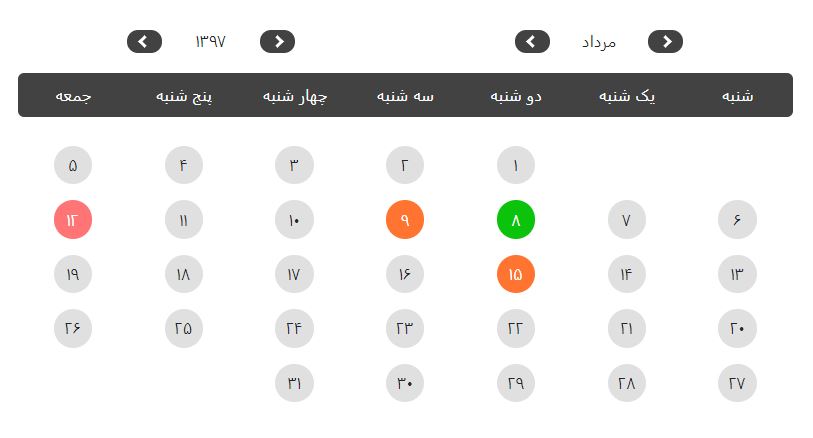
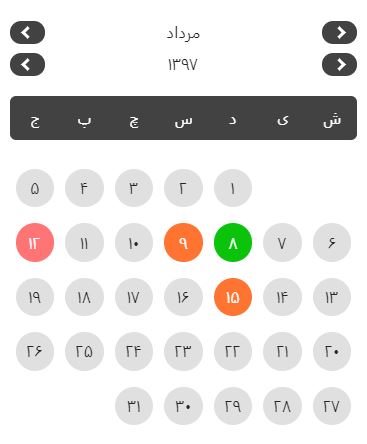
Ng-Jalali-Calendar
Jalali calendar for Angular4+ applications
 ## Table of contents
- [Online Demo](https://me-majidi.github.io/ng-jalali-calendar/)
- [Installation](https://www.npmjs.com/package/ng-jalali-calendar#installation)
- [Usage](https://www.npmjs.com/package/ng-jalali-calendar#usage)
- [API](https://www.npmjs.com/package/ng-jalali-calendar#api)
- [Example](https://www.npmjs.com/package/ng-jalali-calendar#example)
## Installation
```shell
npm install --save ng-jalali-calendar
```
## Usage
Import `NgJalaliCalendarModule` in your module
```typescript
import { NgModule } from '@angular/core';
import { NgJalaliCalendarModule } from 'ng-jalali-calendar'
@NgModule({
imports: [ NgJalaliCalendarModule ]
})
export class YourModule { }
```
afterward, add the `ng-jalali-component` tag into the component where you want to use the calendar :
```html
```
## API
**Inputs:**
Input | Type | Description
--- | --- | ---
selectedDates | String[] | dates that you want to be selected on the calendar
**Events:**
| Output | $event | Description |
| --- | ---- | --- |
| dateSelected | String | emitted when selecting a date |
> the module works with dates in `YYYY/MM/DD` format
## Example
```typescript
import { Component, OnInit } from '@angular/core';
@Component({
selector : 'app-example',
templateUrl: './example.component.html',
styleUrls : [ './example.component.css' ]
})
export class ExampleComponent implements OnInit {
selectedDate: string = '';
selectedDates: string[] = [
'1397/5/22',
'1397/12/1'
'1397/01/5'
];
constructor () {}
ngOnInit () {
}
onSelectDate(event: string) {
this.selectedDate = event;
}
}
```
```html
```
---
_Source: https://npm.io/package/ng-jalali-calendar · Machine-readable twin of the npm.io package page. Health data is recomputed on every publish._
## Table of contents
- [Online Demo](https://me-majidi.github.io/ng-jalali-calendar/)
- [Installation](https://www.npmjs.com/package/ng-jalali-calendar#installation)
- [Usage](https://www.npmjs.com/package/ng-jalali-calendar#usage)
- [API](https://www.npmjs.com/package/ng-jalali-calendar#api)
- [Example](https://www.npmjs.com/package/ng-jalali-calendar#example)
## Installation
```shell
npm install --save ng-jalali-calendar
```
## Usage
Import `NgJalaliCalendarModule` in your module
```typescript
import { NgModule } from '@angular/core';
import { NgJalaliCalendarModule } from 'ng-jalali-calendar'
@NgModule({
imports: [ NgJalaliCalendarModule ]
})
export class YourModule { }
```
afterward, add the `ng-jalali-component` tag into the component where you want to use the calendar :
```html
```
## API
**Inputs:**
Input | Type | Description
--- | --- | ---
selectedDates | String[] | dates that you want to be selected on the calendar
**Events:**
| Output | $event | Description |
| --- | ---- | --- |
| dateSelected | String | emitted when selecting a date |
> the module works with dates in `YYYY/MM/DD` format
## Example
```typescript
import { Component, OnInit } from '@angular/core';
@Component({
selector : 'app-example',
templateUrl: './example.component.html',
styleUrls : [ './example.component.css' ]
})
export class ExampleComponent implements OnInit {
selectedDate: string = '';
selectedDates: string[] = [
'1397/5/22',
'1397/12/1'
'1397/01/5'
];
constructor () {}
ngOnInit () {
}
onSelectDate(event: string) {
this.selectedDate = event;
}
}
```
```html
```
---
_Source: https://npm.io/package/ng-jalali-calendar · Machine-readable twin of the npm.io package page. Health data is recomputed on every publish._