# ng-otp-input
> A fully customizable, one-time password input component for the web built with Angular.
Latest version **2.0.10** (published 2026-04-13) · MIT license · 0 weekly downloads
## Install
```sh
npm install ng-otp-input
pnpm add ng-otp-input
yarn add ng-otp-input
bun add ng-otp-input
```
## Health
**Score 55/100 (C)** — status: active.
Positive: has types; esm support; no vulnerabilities.
Warnings: low downloads.
## Facts
| | |
|---|---|
| Version | 2.0.10 |
| Published | 2026-04-13 |
| First published | 2019-05-16 |
| Weekly downloads | 0 |
| License | MIT |
| TypeScript types | bundled |
| Module format | ESM + CommonJS |
| Dependencies | 1 |
| Unpacked size | 74.4 KB |
| Known vulnerabilities | 0 |
| Install scripts | no |
| GitHub stars | 119 |
| Author | jitender |
| Maintainers | code-farmz |
| Keywords | angular, angular-otp, otp-input, otp, angular-otp-input, ng-otp, ngx-otp, ng-otp-input, ngx-otp-input, one-time-password, password-input, two-factor-auth, 2fa, angular-component, input-component, angular-forms, reactive-forms, angular-otp-field, custom-input, ng-input, otp-field, auth, angular-ui, frontend, otp-verification, otp-angular, otp input angular, angular otp password box, angular otp verification |
## Links
- npm: https://www.npmjs.com/package/ng-otp-input
- Repository: https://github.com/code-farmz/ng-otp-input
- Homepage: https://github.com/code-farmz/ng-otp-input#readme
- Issues: https://github.com/code-farmz/ng-otp-input/issues
- npm.io page: https://npm.io/package/ng-otp-input
## Dependencies (1)
- [tslib](https://npm.io/package/tslib.md) ^2.3.0
## Alternatives
- [@clerk/clerk-expo](https://npm.io/package/@clerk/clerk-expo.md) — 133.6K weekly downloads
- [@pothos/plugin-authz](https://npm.io/package/@pothos/plugin-authz.md) — 12.4K weekly downloads
- [@bounded-sh/client](https://npm.io/package/@bounded-sh/client.md) — 3.2K weekly downloads
- [@luigi-project/plugin-auth-oauth2](https://npm.io/package/@luigi-project/plugin-auth-oauth2.md) — 2.3K weekly downloads
- [@nocobase/plugin-verification](https://npm.io/package/@nocobase/plugin-verification.md) — 2.0K weekly downloads
## Recent versions
- 2.0.10 (latest) — 2026-04-13
- 2.0.9 — 2025-07-31
- 2.0.8 — 2025-05-21
- 2.0.7 — 2025-02-10
- 2.0.6 — 2024-12-27
- 2.0.5 — 2024-12-01
- 2.0.4 — 2024-12-01
- 2.0.3 — 2024-12-01
- 2.0.2 — 2024-11-28
- 2.0.1 — 2024-11-27
- 1.9.4 — 2024-11-27
- 2.0.0 — 2024-11-27
- 1.9.3 — 2023-09-06
- 1.9.2 — 2023-05-24
- 1.8.6 — 2023-05-24
- … 32 more at https://npm.io/package/ng-otp-input/versions
## README
[](https://badge.fury.io/js/ng-otp-input) [](https://www.npmjs.com/package/ng-otp-input) [](https://www.npmjs.com/package/ng-otp-input)
A fully customizable, one-time password (OTP) input component for the web built with Angular.
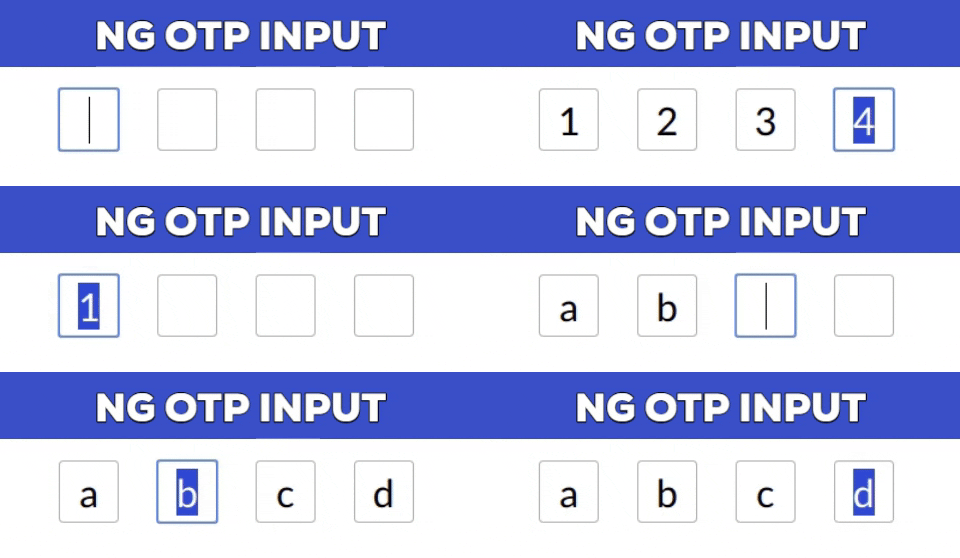
[**Demo**](https://code-farmz.github.io/ng-otp-input) | [**Edit on StackBlitz**](https://stackblitz.com/github/code-farmz/ng-otp-input)
---
## Installation
#### For Angular 16 and above:
```bash
npm install --save ng-otp-input
```
#### For Angular 12 to 15:
```bash
npm install --save ng-otp-input@1.9.3
```
#### For Angular 11 and below:
```bash
npm install --save ng-otp-input@1.8.1
```
---
## Major Changes in v2
- Requires Angular 16 or above.
- Emits `null` instead of an empty string if no value is supplied.
- Fully supports **Reactive Forms** (`formControl` and `ngModel` are supported from v2.0.5 onwards).
- Deprecated the custom `formCtrl` input property. Use `formControl` instead.
---
## Usage
### Import the Module
For **Modules**:
```typescript
import { NgOtpInputModule } from 'ng-otp-input';
@NgModule({
imports: [
...otherModules,
NgOtpInputModule,
],
})
export class AppModule {}
```
For **Standalone Components**:
```typescript
import { NgOtpInputComponent } from 'ng-otp-input';
@Component({
standalone: true,
imports: [NgOtpInputComponent],
})
export class YourComponent {}
```
### Add the Component to Your Template
```html
```
---
## API Reference
### Component Inputs/Outputs
| Name | Type | Required | Default | Description |
|-----------------|----------|----------|---------|-----------------------------------------------------------------------------|
| `disabled` | boolean | No | `false` | Disables all inputs when set to `true`. |
| `onOtpChange` | `Output` | No | -- | Emits the OTP value on change. Not required if using `formControl`. |
| `onBlur` | `Output` | No | -- | Triggered when focus is lost from the component. |
| `setValue` | function | No | -- | Allows programmatic setting of the component value. |
| `config` | object | Yes | `{ length: 4 }` | Configuration object for customization (see **Config Options** below). |
---
### Config Options
| Name | Type | Required | Default | Description |
|-------------------|---------|----------|------------|----------------------------------------------------------------------------------------------|
| `allowNumbersOnly` | boolean | No | `false` | Restricts input to numeric values only. |
| `disableAutoFocus` | boolean | No | `false` | Prevents automatic focus on load or when setting the value. |
| `containerClass` | string | No | -- | Adds a custom CSS class to the container element. |
| `containerStyles` | object | No | -- | Customizes the container styles. Check [NgStyle](https://angular.io/api/common/NgStyle). |
| `inputStyles` | object | No | -- | Customizes the styles of individual inputs. |
| `inputClass` | string | No | -- | Adds a custom CSS class to each input box. |
| `isPasswordInput` | boolean | No | `false` | Masks input as password fields. |
| `length` | number | Yes | `4` | Sets the number of OTP inputs to render. |
| `letterCase` | string | No | -- | Converts input to `Upper` or `Lower` case. |
| `placeholder` | string | No | -- | Sets a placeholder for each input box. |
| `separator` | char | No | -- | Inserts a separator character between input boxes. |
| `showError` | boolean | No | `false` | Highlights inputs with red borders if `formControl` is invalid, dirty, or touched. |
| `inputMode` | string | No | `text` | Numeric if allow number only is true otherwise supplied value or text |
---
## Advanced Features
### Updating Component Value
- Use `formControl` or `ngModel` (v2.0.5 and above) for updates.
- For earlier versions, use `setValue`:
```typescript
@ViewChild(NgOtpInputComponent, { static: false }) ngOtpInput: NgOtpInputComponent;
updateOtpValue() {
this.ngOtpInput.setValue('12345'); // Replace with your OTP value.
}
```
---
### Disabling Inputs
- Use the `disabled` property or set the `FormControl` to a disabled state (v2.0.5+).
- For earlier versions, use `disable` method:
```typescript
this.ngOtpInput.otpForm.disable();
```
---
### Focus on a Specific Input
```typescript
const eleId = this.ngOtpInput.getBoxId(0);
this.ngOtpInput.focusTo(eleId);
```
---
## License
[](https://github.com/code-farmz/ng-otp-input/blob/master/LICENSE)
---
## Contributing
Show your support by starring the repo! Feel free to open [issues](https://github.com/code-farmz/ng-otp-input/issues/new) or contribute via [pull requests](https://github.com/code-farmz/ng-otp-input/compare).
---
_Source: https://npm.io/package/ng-otp-input · Machine-readable twin of the npm.io package page. Health data is recomputed on every publish._