# ngx-roles-selector
> An Angular Component that allows the user to select multiple roles of interest from a list of specified roles, separated by different permissions name.
Latest version **1.2.1** (published 2023-03-03) · 0 weekly downloads
## Install
```sh
npm install ngx-roles-selector
pnpm add ngx-roles-selector
yarn add ngx-roles-selector
bun add ngx-roles-selector
```
## Health
**Score 25/100 (F)** — status: abandoned.
Positive: has types; esm support; no vulnerabilities.
Warnings: low downloads.
Negative: abandoned; low maintenance score.
## Facts
| | |
|---|---|
| Version | 1.2.1 |
| Published | 2023-03-03 |
| First published | 2021-08-24 |
| Weekly downloads | 0 |
| TypeScript types | bundled |
| Module format | ESM + CommonJS |
| Dependencies | 1 |
| Unpacked size | 136.1 KB |
| Known vulnerabilities | 0 |
| Install scripts | no |
| Author | Salim Zakari |
| Maintainers | salimzakari |
| Keywords | roles and permissons, dynamic roles selector, angular permissions |
## Links
- npm: https://www.npmjs.com/package/ngx-roles-selector
- Homepage: https://ngx-roles-selector.netlify.app/
- npm.io page: https://npm.io/package/ngx-roles-selector
## Dependencies (1)
- [tslib](https://npm.io/package/tslib.md) ^2.2.0
## Recent versions
- 1.2.1 (latest) — 2023-03-03
- 1.2.0 — 2023-03-03
- 1.1.0 — 2022-01-13
- 1.0.9 — 2022-01-13
- 0.1.1 — 2021-10-26
- 0.1.0 — 2021-10-26
- 0.0.9 — 2021-10-10
- 0.0.8 — 2021-09-14
- 0.0.7 — 2021-09-14
- 0.0.5 — 2021-09-14
- 0.0.4 — 2021-09-05
- 0.0.3 — 2021-08-24
- 0.0.2 — 2021-08-24
## README
# Roles Selector
An Angular Component that allows the user to select multiple roles of interest from a list of specified roles, separated by different permissions name.
## Dependencies
* [Angular](https://angular.io/)
* [Angular material](https://material.angular.io/)
## Features
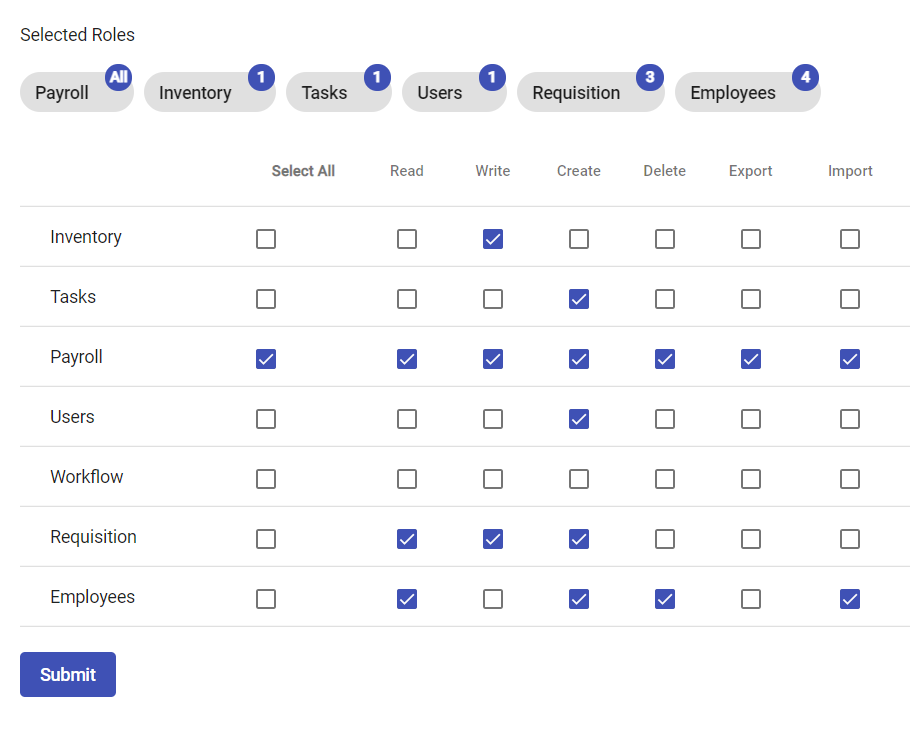
* Component rendering roles and permission.
* Component rendering pre selected roles and permission.
* Tags to show which Roles have been selected.
* Bagdes on each tag to show number of permission selected for a role.
* Add and remove roles and permissions via checkboxes
## Example
## Demo
[Demo Application](https://ngx-roles-selector.netlify.app/)
## Note
You need to have @angular/material installed in your project, as it is a Peer Dependency.
## Installation
After installing the above dependencies. Install ngx-roles-selector via.
```bash
npm i ngx-roles-selector
```
Once installed you need to import our main module in your application module:
```javascript
import { RolesSelectorModule } from 'ngx-roles-selector';
@NgModule({
declarations: [AppComponent, ...],
imports: [RolesSelectorModule, ...],
bootstrap: [AppComponent]
})
export class AppModule {
}
```
## Usage
ngx-roles-selector.
```html
```
Create your form in the component ts file.
Inside the constructor of your component.ts file create a form with empty roles formarray via
```typescript
constructor(
private fb: FormBuilder
) {
this.form = this.fb.group({
roles: this.fb.array([])
})
}
```
Make sure to import missing FormBuilder import.
Declare and initialize roleList property sample:
```typescript
roleList: any[] = [
{
name: "Inventory",
},
{
name: "Tasks"
},
{
name: "Payroll"
},
{
name: "Users"
},
{
name: "Workflow"
},
{
name: "Requisition"
},
{
name: "Employees"
}
]
```
Declare and initialize permissions property, sample:
```typescript
permissions: string[] = ['read', 'write', 'create', 'delete',"export","import"]
```
Declare and initialize existing roles and permissions if available, sample:
```typescript
permittedRoles = [
{
name: "Payroll",
read: true,
write: true,
create: true,
delete: true,
export: true,
import: true,
},
]
```
Finnaly create a get method to return roles as formarray, sample:
```typescript
get roles() {
return this.form.get('roles') as FormArray;
}
```
To disable selection add you can pass a boolean to the disabled prop. For example:
```html
```
---
_Source: https://npm.io/package/ngx-roles-selector · Machine-readable twin of the npm.io package page. Health data is recomputed on every publish._