# ngx-social-button
> Social login/share buttons for Angular 6, 7, 8
Latest version **1.0.4** (published 2019-06-18) · MIT license · 0 weekly downloads
## Install
```sh
npm install ngx-social-button
pnpm add ngx-social-button
yarn add ngx-social-button
bun add ngx-social-button
```
## Health
**Score 25/100 (F)** — status: abandoned.
Positive: has types; esm support; no vulnerabilities.
Warnings: low downloads.
Negative: abandoned; low maintenance score.
## Facts
| | |
|---|---|
| Version | 1.0.4 |
| Published | 2019-06-18 |
| First published | 2019-06-17 |
| Weekly downloads | 0 |
| License | MIT |
| TypeScript types | bundled |
| Module format | ESM + CommonJS |
| Dependencies | 1 |
| Unpacked size | 808.6 KB |
| Known vulnerabilities | 0 |
| Install scripts | no |
| Author | Jiangqi Li |
| Maintainers | johnnieli |
| Keywords | angular, angular6, angular7, angular8, ngx, ngx social button, ngx facebook button, ngx google button, ngx wechat button, angular6 social button, angular social button, angular facebook button, angular google button, angular wechat button, ng6-social-button, angular-6-social-button, ng-social-button, ng6-social-button, angular social login, angular facebook login, angular google login, social authentication, angular social authentication, social-authentication, social-login, google-authentication, angular-google-authentication, facebook-authentication, angular-facebook-authentication |
## Links
- npm: https://www.npmjs.com/package/ngx-social-button
- Repository: https://github.com/JohnnieLi/ngx-social-button
- Homepage: https://github.com/JohnnieLi/ngx-social-button.git#readme
- Issues: https://github.com/JohnnieLi/ngx-social-button.git/issues
- npm.io page: https://npm.io/package/ngx-social-button
## Dependencies (1)
- [tslib](https://npm.io/package/tslib.md) ^1.9.0
## Alternatives
- [@clerk/clerk-expo](https://npm.io/package/@clerk/clerk-expo.md) — 133.6K weekly downloads
- [@pothos/plugin-authz](https://npm.io/package/@pothos/plugin-authz.md) — 12.4K weekly downloads
- [@bounded-sh/client](https://npm.io/package/@bounded-sh/client.md) — 3.2K weekly downloads
- [@luigi-project/plugin-auth-oauth2](https://npm.io/package/@luigi-project/plugin-auth-oauth2.md) — 2.3K weekly downloads
- [@nocobase/plugin-verification](https://npm.io/package/@nocobase/plugin-verification.md) — 2.0K weekly downloads
## Recent versions
- 1.0.4 (latest) — 2019-06-18
- 1.0.3 — 2019-06-18
- 1.0.2 — 2019-06-17
## README
Social login/share buttons for Angular 6, 7, 8

+ AOT Compatible
## Reference
Original project : sabyasachibiswal https://github.com/sabyasachibiswal/angular5-social-login
Last project: ng6-social-button https://www.npmjs.com/package/ng6-social-button
Built by using Angular6 **ng generate library**
### Scope
1. FaceBook Login/Share buttons
2. Google Login button
3. LinkedIn Login/Share buttons
3. Other(weChat) buttons are coming soon
4. ...

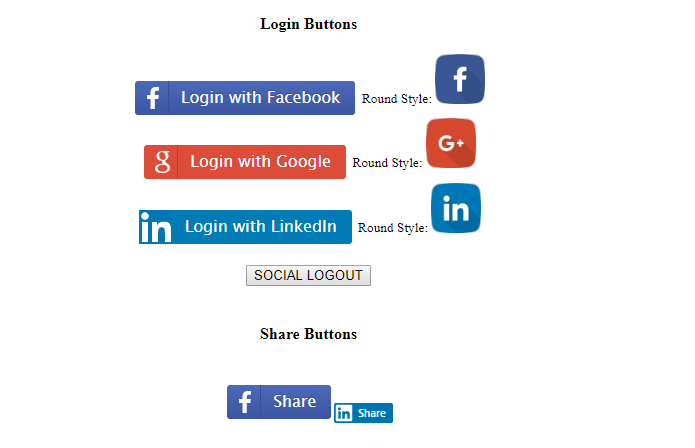
### Get started
### Install via npm
```
npm install --save ngx-social-button
```
### Import the module
There are two ways to import the module
**option 1**
```typescript
...
import {
NgxSocialButtonModule,
SocialServiceConfig
} from "ngx-social-button";
// Configs
export function getAuthServiceConfigs() {
let config = new SocialServiceConfig()
.addFacebook("Your-Facebook-app-id")
.addGoogle("Your-Google-Client-Id")
.addLinkedIn("Your-LinkedIn-Client-Id");
return config;
}
@NgModule({
imports: [
...
NgxSocialButtonModule
],
providers: [
...
{
provide: SocialServiceConfig,
useFactory: getAuthServiceConfigs
},
],
bootstrap: [...]
})
```
**option 2**
```typescript
...
import {
NgxSocialButtonModule,
FacebookLoginProvider,
GoogleLoginProvid,
SocialServiceConfig
} from "ngx-social-button";
// Configs
export function getAuthServiceConfigs() {
let config = new SocialServiceConfig(
[
new FacebookLoginProvider("Your-Facebook-app-id"),
new GoogleLoginProvid("Your-Google-Client-Id")
]
);
return config;
}
@NgModule({
imports: [
...
NgxSocialButtonModule
],
providers: [
...
{
provide: SocialServiceConfig,
useFactory: getAuthServiceConfigs
},
],
bootstrap: [...]
})
```
### Usage
**option 1: Use buttons**
*in social.component.ts*
```typescript
import { Component } from '@angular/core';
import {
SocialService
} from "ngx-social-button";
@Component({
selector: 'app-social',
templateUrl: './social.component.html',
styleUrls: ['./social.component.css']
})
export class SocialComponent {
shareObj = {
href: "FACEBOOK-SHARE-LINK",
hashtag:"#FACEBOOK-SHARE-HASGTAG"
};
constructor(private socialAuthService: SocialService){}
signOut(){
if(this.socialAuthService.isSocialLoggedIn()){
this.socialAuthService.signOut().catch((err)=>{
});
}
}
getSocialUser(socialUser){
console.log(socialUser);
}
}
```
*in social.component.html*
```html
...
...
```
**option 2: Use providers with custom button**
*in social.component.ts*
```typescript
import { Component } from '@angular/core';
import {
SocialService,
FacebookLoginProvider,
GoogleLoginProvider
} from "ngx-social-button";
@Component({
selector: 'app-social',
templateUrl: './social.component.html',
styleUrls: ['./social.component.css']
})
export class SocialComponent {
shareObj = {
href: "FACEBOOK-SHARE-LINK",
hashtag:"#FACEBOOK-SHARE-HASGTAG"
};
constructor(private socialAuthService: SocialService){}
signOut(){
if(this.socialAuthService.isSocialLoggedIn()){
this.socialAuthService.signOut().then(()=>{
...
}).catch((err)=>{
...
});
}
}
public socialSignIn(socialPlatform : string) {
let socialPlatformProvider;
if(socialPlatform == "facebook"){
socialPlatformProvider = FacebookLoginProvider.PROVIDER_TYPE;
}else if(socialPlatform == "google"){
socialPlatformProvider = GoogleLoginProvider.PROVIDER_TYPE;
}
this.socialAuthService.signIn(socialPlatformProvider).then(
(socialUser) => {
console.log(socialPlatform+" sign in data : " , socialUser);
// Now sign-in with userData
...
});
}
public facebookSharing(shareObj: any){
this.socialAuthService.facebookSharing(shareObj);
}
}
```
*in social.component.html*
```html
...
...
```
----
## Login Buttons API
| Property | Description | Type | Default |
|-------------|:--------------------------------:|--------------------------:|------------------------:|
| (socialUser)| trigger when signin done | EventEmitter<{SocialUser}>| - |
| [scopes] | social custom scopes | [string] | facebook:['email', 'public_profile'] |
| [style] ? | change button style if be:'round' | [string] | - |
## Share Buttons API
| Property | Description | Type | Default |
|-------------|:--------------------------------:|--------------------------:|------------------------:|
| [share] | social share object | object | facebook:{href:Current_URL, hashtag: null} |
| | | | linkedin:{href:Current_URL} |
## SocialUser Object API
| Property | Description | Type |
|-------------|:--------------------------------:|--------------------------:|
| provider | social provider: facebook/google/wechat | string |
| id | user id | string |
| email | social user's email | string |
| name | social user's name | string |
| image | social profile image URL | string |
| accessToken?| return oauth2.0 accessToken if has | string |
| idToken? | return oauth2.0 idToken if has | string |
----
## Social Client/App Id
### Facebook App Id :
You need to create your own app by going to [Facebook Developers](https://developers.facebook.com/) page. Sign in and Add new app under My Apps and configure Valid OAuth redirect URIs.
### Google Client Id :
Follow this official documentation on [how to Create a Google API Console project and client ID](https://developers.google.com/identity/sign-in/web/sign-in#before_you_begin).
### Angular Twitter sharing, using API directly
```
Twitter
```
---
_Source: https://npm.io/package/ngx-social-button · Machine-readable twin of the npm.io package page. Health data is recomputed on every publish._