# npm-extras
> npm cli helpers
Latest version **0.1.0** (published 2020-11-21) · MIT license · 0 weekly downloads
## Install
```sh
npm install npm-extras
pnpm add npm-extras
yarn add npm-extras
bun add npm-extras
```
Provides the commands `npm-do`, `npm-pkg`, `npm-deep`, `npm-subdir`, `npm-release`.
## Health
**Score 15/100 (F)** — status: abandoned.
Positive: no vulnerabilities.
Warnings: low downloads; no types; no esm support; pre 1.0.
Negative: abandoned; low maintenance score.
## Facts
| | |
|---|---|
| Version | 0.1.0 |
| Published | 2020-11-21 |
| First published | 2017-11-24 |
| Weekly downloads | 0 |
| License | MIT |
| TypeScript types | none |
| Module format | CommonJS |
| Node | >=4 |
| Dependencies | 5 |
| Unpacked size | 2.1 MB |
| Known vulnerabilities | 0 |
| Install scripts | no |
| GitHub stars | 0 |
| Author | Miguel Castillo |
| Maintainers | manchagnu |
| Keywords | npm, cli, recursive |
## Links
- npm: https://www.npmjs.com/package/npm-extras
- Repository: https://github.com/MiguelCastillo/npm-extras
- Homepage: https://github.com/MiguelCastillo/npm-extras#readme
- Issues: https://github.com/MiguelCastillo/npm-extras/issues
- npm.io page: https://npm.io/package/npm-extras
## Dependencies (5)
- [glob](https://npm.io/package/glob.md) ^7.1.6
- [belty](https://npm.io/package/belty.md) ^5.2.2
- [execa](https://npm.io/package/execa.md) ^4.1.0
- [listr](https://npm.io/package/listr.md) ^0.14.3
- [subarg](https://npm.io/package/subarg.md) ^1.0.0
## Alternatives
- [@salesforce/cli](https://npm.io/package/@salesforce/cli.md) — 389.7K weekly downloads
- [@mintlify/cli](https://npm.io/package/@mintlify/cli.md) — 208.9K weekly downloads
- [@grafana/e2e-selectors](https://npm.io/package/@grafana/e2e-selectors.md) — 128.7K weekly downloads
- [mintlify](https://npm.io/package/mintlify.md) — 112.0K weekly downloads
- [@intlayer/cli](https://npm.io/package/@intlayer/cli.md) — 22.8K weekly downloads
## Recent versions
- 0.1.0 (latest) — 2020-11-21
- 0.0.10 — 2018-09-19
- 0.0.9 — 2017-12-05
- 0.0.8 — 2017-11-29
- 0.0.7 — 2017-11-29
- 0.0.6 — 2017-11-29
- 0.0.5 — 2017-11-27
- 0.0.4 — 2017-11-27
- 0.0.3 — 2017-11-27
- 0.0.2 — 2017-11-24
- 0.0.1 — 2017-11-24
- 0.0.0 — 2017-11-24
## README
# npm-extras
[](https://greenkeeper.io/)
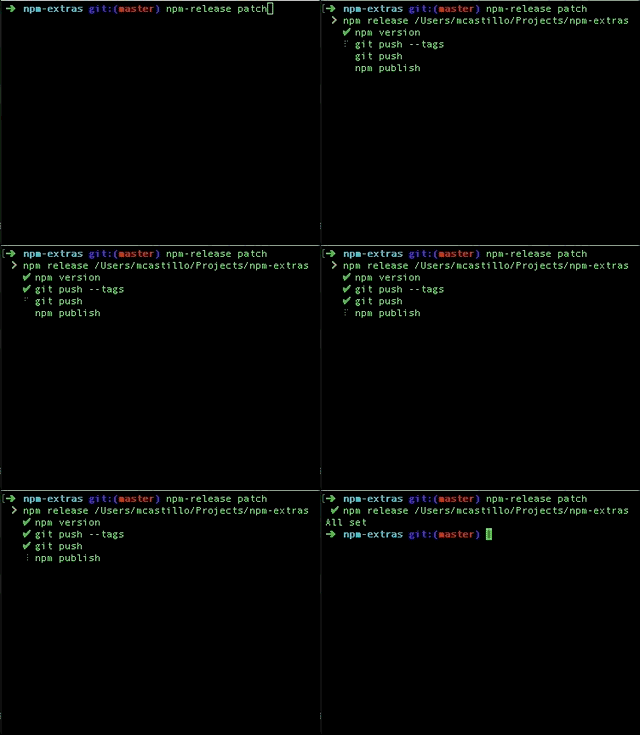
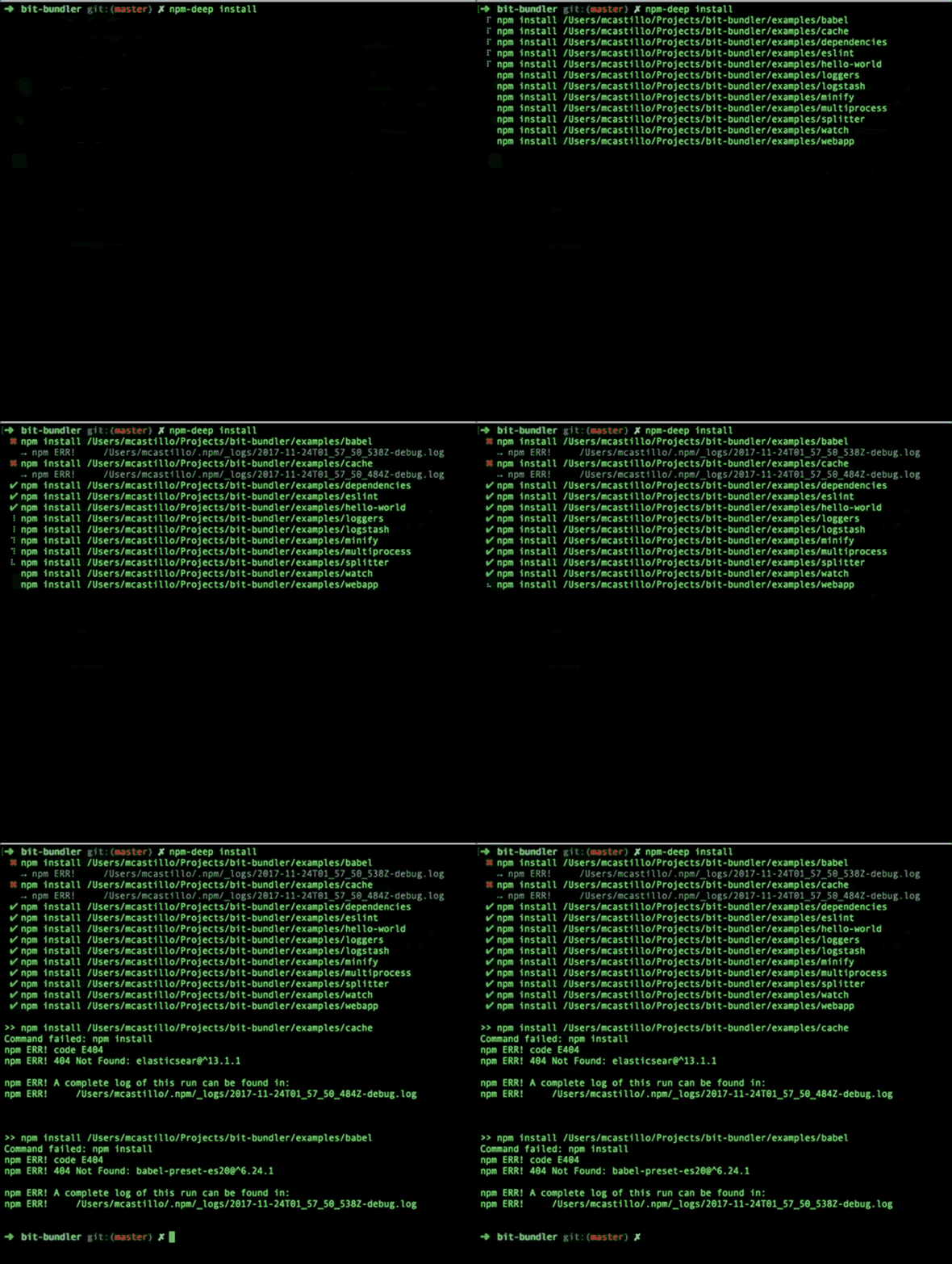
Run npm commands concurrently in directories that have `package.json` files.
 ## Install
```
$ npm install npm-extras -g
```
## npm-do
`npm-do` runs concurrent npm commands. You can opitonal specify the flag `--deep` to run npm commands in deeply nested subdirectories that have a `package.json` file as well. An npm command is the action for npm to execute. For example, when running `npm install` the command is `install`.
If no npm command is specified, then `npm-do` will run `npm install`.
### examples
Consider a directories structure such as
```
- root/
- package.json
- examples
- bit-bundler
- package.json
- babel
package.json
- eslint
- package.json
```
`npm-do install` will run `npm install` in the `root` directory. If you specify the `--deep` flag, `npm-do` will do a deep search for `package.json` files and will run `npm install` concurrently. E.g it will run `npm install` in `root`, `examples/bit-bundler`, `examples/bit-bundler/babel`, and `examples/eslint` concurrently.
- The following example will run `npm install`.
```
$ npm-do install --deep
```
- run "npm update"
```
$ npm-do update --deep
```
- run an npm script called "build"
```
$ npm-do run build --deep
```
- install a couple of modules in all sub directories as dev dependencies
```
$ npm-do install bit-bundler eslint --save-dev --deep
```
## npm-subdir
`npm-subdir` will run npm commands concurrently in all subdirectories (deeply nested) with `package.json` files; excluding root. Given the sample structure in `npm-do`, `npm-subdir install` will run `npm install` in `examples/bit-bundler`, `examples/bit-bundler/babel`, and `examples/eslint`.
## npm-deep
`npm-deep` will run npm commands in the root directory as well as subdirectories (deeply nested) with `package.json` files. This is an alias for `npm-do --deep`. Given the sample structure in `npm-do`, `npm-deep install` will run `npm install` in `root`, `examples/bit-bundler`, `examples/bit-bundler/babel`, and `examples/eslint`.
## npm-release
This is a helper command that will:
1. Update the package.json version based on the input
2. Create a git tag
3. Push changes related to the release to git, including the tag
4. Publish new version of the npm module to the npm registry
### options
- deep. This flag will be used to determine if sub directories should also be processed. Defaults to false.
- message. This is the message used when creating the git tag.
- version. This is the version for updating the packge.json file. This value is handed off to `npm version`, so it will be helpful to take a look [here](https://docs.npmjs.com/cli/version) for more details. This defaults to "minor".
### examples
- Publishing with all defaults. version is minor and the message is in the format of "Release v%s" where "%s" is the new version generated.
```
$ npm-release
```
- Updating the version to patch
```
$ npm-release patch
```
- Updating the version to major with a tag message
```
$ npm-release major -m "Major update with breaking changes"
```
- Alternatively, you can choose to supply the version as an option
```
$ npm-release --version 3.1.2
```
## npm-pkg
Command to print to console one or more fields from package.json files. `npm-pkg` also supports pacakge.json file in sub directories via the `--deep` flag.
### Examples
- Print the version of the package.json in the current directory.
```
$ npm-pkg version
```
- Print the version of package.json files in the current and sub directories.
```
$ npm-pkg version --deep
```
- Print the name, dependencies, and scripts in the current and sub directories
```
$ npm-pkg name dependencies scripts --deep
```
---
_Source: https://npm.io/package/npm-extras · Machine-readable twin of the npm.io package page. Health data is recomputed on every publish._