# paper-ripple
> Material Design Ripple effect in pure JS & CSS. PaperRipple lets you add a Material Design ripple effect to UI elements.
Latest version **0.3.0** (published 2017-06-01) · MIT license · 0 weekly downloads
## Install
```sh
npm install paper-ripple
pnpm add paper-ripple
yarn add paper-ripple
bun add paper-ripple
```
## Health
**Score 15/100 (F)** — status: abandoned.
Positive: no vulnerabilities.
Warnings: low downloads; no types; no esm support; pre 1.0.
Negative: abandoned; low maintenance score.
## Facts
| | |
|---|---|
| Version | 0.3.0 |
| Published | 2017-06-01 |
| First published | 2015-11-21 |
| Weekly downloads | 0 |
| License | MIT |
| TypeScript types | none |
| Module format | CommonJS |
| Dependencies | 0 |
| Known vulnerabilities | 0 |
| Install scripts | no |
| GitHub stars | 59 |
| Author | Bohdan Shtepan |
| Maintainers | virtyaluk |
| Keywords | paper, paper ui, paper ripple, material design, polymer, material design lite, mdl |
## Links
- npm: https://www.npmjs.com/package/paper-ripple
- Repository: https://github.com/virtyaluk/paper-ripple
- Issues: https://github.com/virtyaluk/paper-ripple/issues
- npm.io page: https://npm.io/package/paper-ripple
## Alternatives
- [@mdxeditor/editor](https://npm.io/package/@mdxeditor/editor.md) — 962.4K weekly downloads
- [mmdb-lib](https://npm.io/package/mmdb-lib.md) — 680.9K weekly downloads
- [playcanvas](https://npm.io/package/playcanvas.md) — 36.2K weekly downloads
- [@glw907/cairn-cms](https://npm.io/package/@glw907/cairn-cms.md) — 967 weekly downloads
- [markdown-to-confluence](https://npm.io/package/markdown-to-confluence.md) — 103 weekly downloads
## Recent versions
- 0.3.0 (latest) — 2017-06-01
- 0.2.0 — 2015-12-08
- 0.1.0 — 2015-11-21
## README
PaperRipple v0.3.0
[](https://travis-ci.org/virtyaluk/paper-ripple) [](https://codeclimate.com/github/virtyaluk/paper-ripple) [](https://gemnasium.com/virtyaluk/paper-ripple) [](https://doc.esdoc.org/github.com/virtyaluk/paper-ripple/)
> Material Design Ripple effect in pure JS & CSS.
**PaperRipple** lets you add a Material Design [ripple effect](https://www.google.com/design/spec/animation/responsive-interaction.html#responsive-interaction-surface-reaction) to UI elements.
## :dvd: Install
##### Bower:
```bash
$ bower install paper-ripple
```
##### NPM:
```bash
$ npm install paper-ripple --save
```
## How it looks like
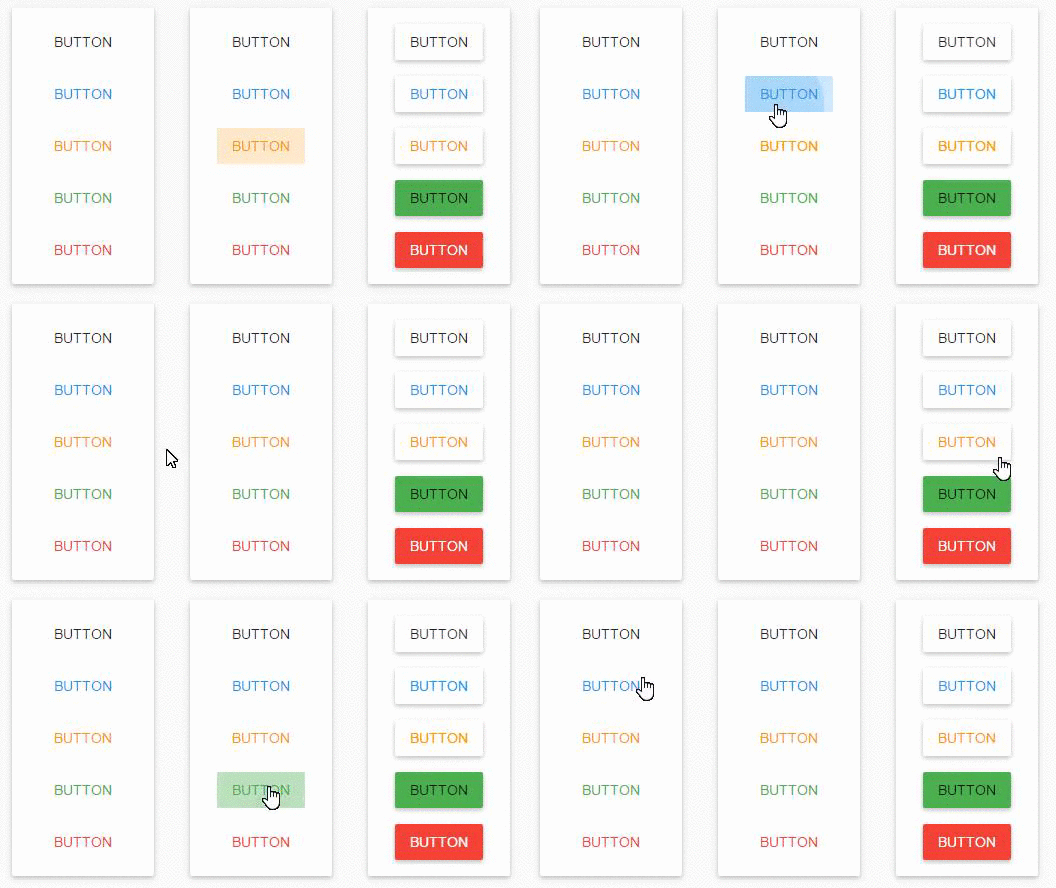
Live example at [codepen](http://codepen.io/virtyaluk/full/BoMXKM/).
## :clipboard: Usage
First, you need to include **PaperRipple** JS and CSS files to your HTML-page.
Assume, you have next HTML:
````html
````
Your JS will look like:
```js
// // Getting all the buttons
var button = document.querySelectorAll('button.paper-button');
// Traversing the buttons
[].forEach.call(buttons, function(button) {
// New PaperRipple for the button
var ripple = new PaperRipple();
// Adding ripple container to the button
button.appendChild(ripple.$);
// Subscribing to 'mousedown' and 'mouseup' button events to activate ripple effect
// when a user clicks on the button.
button.addEventListener('mousedown', function(ev) {
ripple.downAction(ev);
});
button.addEventListener('mouseup', function() {
ripple.upAction();
});
});
```
__NOTE:__ It's important that each element you add the ripple to must be relative position.
If you prefer to work with modules in JS, **PaperRipple** exports itself in AMD, CommonJS and as global variable if no `require` or `module` were found. In addition, under `dist\systemjs` you may find **PaperRipple** as SystemJS module.
Even more, if you prefer to work with jQuery you may find jQuery plugin based on **PaperRipple** under `dist` folder. So, the previous example may be simplified to the next:
```js
$('button.paper-button').paperRipple();
```
### Configuration
You may pass additional options to the constructor to control **PaperRipple** behavior:
```js
var ripple = new PaperRipple(cfg);
```
If you have DOM element you want to use as **PaparRipple** element, pass it to the constructor. But be careful, **PaperRipple** element must follow next structure:
```html
```
```js
var rippleEl = document.querySelector('.paper-ripple'),
ripple = new PaperRipple(rippleEl);
assert(ripple.$ === rippleEl); // true
```
Or you may pass object containing next options:
* `initialOpacity`: *Number* - Defaults to `0.25`. The initial opacity of the each wave.
* `opacityDecayVelocity`: *Number* - Defaults to `0.8`. How fast (opacity per second) the wave fades out.
* `recenters`: *Boolean* - Defaults to `false`. If `true`, waves will exhibit a gravitational pull towards the center of their container as they fade away.
* `center`: *Boolean* - Defaults to `false`. If `true`, waves will center inside its container.
* `round`: *Boolean* - Defaults to `false`. If `true`, ripple effect will apply within a circle.
* `target`: *HTMLElement* - Defaults to `null`. Target DOM element as the container for the waves.
```js
var ripple = new PaperRipple({
initialOpacity: 0.3,
recenters: true
});
```
Each of these options may be changed after initializing:
```js
ripple.center = true;
ripple.opacityDecayVelocity = 0.7;
```
**NOTE:** Changing of `$`, `$background` or `$waves` after initialization not recommended.
### Styling
Use CSS color property to style the ripple:
```css
.paper-ripple {
color: #FF9800;
}
```
**NOTE:** CSS color property is inherited so it is not required to set it on the `.paper-ripple` directly.
## :green_book: Browser Support
- Chrome
- Firefox
- Safari
- Opera
- IE9+
__NOTE:__ IE9 doesn't support `classList` on `HTMLElement` object and `requestAnimationFrame`. You need to polyfill it. My choice: classList - [`bower install classlist`](https://github.com/components/classList.js) or [`npm install classlist-polyfill`](https://github.com/yola/classlist-polyfill); requestAnimationFrame - [`bower install window.requestanimationframe`](https://github.com/Polyfiller/window.requestAnimationFrame) or [`npm install window.requestanimationframe`](https://github.com/Polyfiller/window.requestAnimationFrame).
## :mortar_board: Docs
**PaperRipple** JS has an excellent documentation. [Esdoc](https://github.com/nanopx/gulp-esdoc) is used to generate it. To generate it by yourself do following:
Clone the repo:
```bash
$ git clone https://github.com/virtyaluk/paper-ripple.git
```
Install dependencies:
```bash
$ npm install -g gulp && npm install
```
Generate the docs:
```bash
$ gulp docs
```
Docs will be available under `docs` folder in the root of the project.
## Running tests
Install dependencies:
```bash
$ npm install
```
Run them:
```bash
$ gulp test
```
## :calendar: Changelog
### 0.2.0 (December 07, 2015)
* Added new `round` property on main `PaperRipple` class.
### 0.3.0 (June 01, 2017)
* Fixes typo in jQuery plugin code.
* Fixes [support of IE browsers](https://github.com/virtyaluk/paper-ripple/issues/1).
## :green_book: License
[Licensed under the MIT license.](https://github.com/virtyaluk/paper-ripple/blob/master/LICENSE)
Copyright (c) 2017 Bohdan Shtepan
---
> [modern-dev.com](http://modern-dev.com) ·
> GitHub [@virtyaluk](https://github.com/virtyaluk) ·
> Twitter [@virtyaluk](https://twitter.com/virtyaluk)
---
_Source: https://npm.io/package/paper-ripple · Machine-readable twin of the npm.io package page. Health data is recomputed on every publish._