# photosaic
> Build beautiful mosaic images from input images and photos you provide.
Latest version **0.2.1** (published 2020-06-26) · MIT license · 0 weekly downloads
## Install
```sh
npm install photosaic
pnpm add photosaic
yarn add photosaic
bun add photosaic
```
## Health
**Score 15/100 (F)** — status: abandoned.
Positive: no vulnerabilities.
Warnings: low downloads; no types; no esm support; pre 1.0.
Negative: abandoned; low maintenance score.
## Facts
| | |
|---|---|
| Version | 0.2.1 |
| Published | 2020-06-26 |
| First published | 2020-06-13 |
| Weekly downloads | 0 |
| License | MIT |
| TypeScript types | none |
| Module format | CommonJS |
| Dependencies | 10 |
| Unpacked size | 239.8 KB |
| Known vulnerabilities | 0 (+4 in 1 direct dependencies) |
| Install scripts | yes |
| GitHub stars | 179 |
| Author | Lance Whatley |
| Maintainers | whatl3y |
## Links
- npm: https://www.npmjs.com/package/photosaic
- Repository: https://github.com/whatl3y/photosaic
- Homepage: https://github.com/whatl3y/photosaic#readme
- Issues: https://github.com/whatl3y/photosaic/issues
- npm.io page: https://npm.io/package/photosaic
## Dependencies (10)
- [gulp](https://npm.io/package/gulp.md) ^4.0.2
- [sharp](https://npm.io/package/sharp.md) ^0.25.4
- [minimist](https://npm.io/package/minimist.md) ^1.2.5
- [typescript](https://npm.io/package/typescript.md) ^3.9.2
- [@types/node](https://npm.io/package/@types/node.md) ^14.0.1
- [@types/sharp](https://npm.io/package/@types/sharp.md) ^0.25.0
- [gulp-plumber](https://npm.io/package/gulp-plumber.md) ^1.2.1
- [@types/minimist](https://npm.io/package/@types/minimist.md) ^1.2.0
- [gulp-sourcemaps](https://npm.io/package/gulp-sourcemaps.md) ^2.6.5
- [gulp-typescript](https://npm.io/package/gulp-typescript.md) ^6.0.0-alpha.1
## Recent versions
- 0.2.1 (latest) — 2020-06-26
- 0.2.0 — 2020-06-22
- 0.1.6 — 2020-06-19
- 0.1.5 — 2020-06-19
- 0.1.4 — 2020-06-18
- 0.1.3 — 2020-06-18
- 0.1.2 — 2020-06-18
- 0.1.1 — 2020-06-18
- 0.1.0 — 2020-06-17
- 0.0.5 — 2020-06-15
- 0.0.4 — 2020-06-15
- 0.0.3 — 2020-06-15
- 0.0.2 — 2020-06-15
- 0.0.1 — 2020-06-13
## README
# photosaic
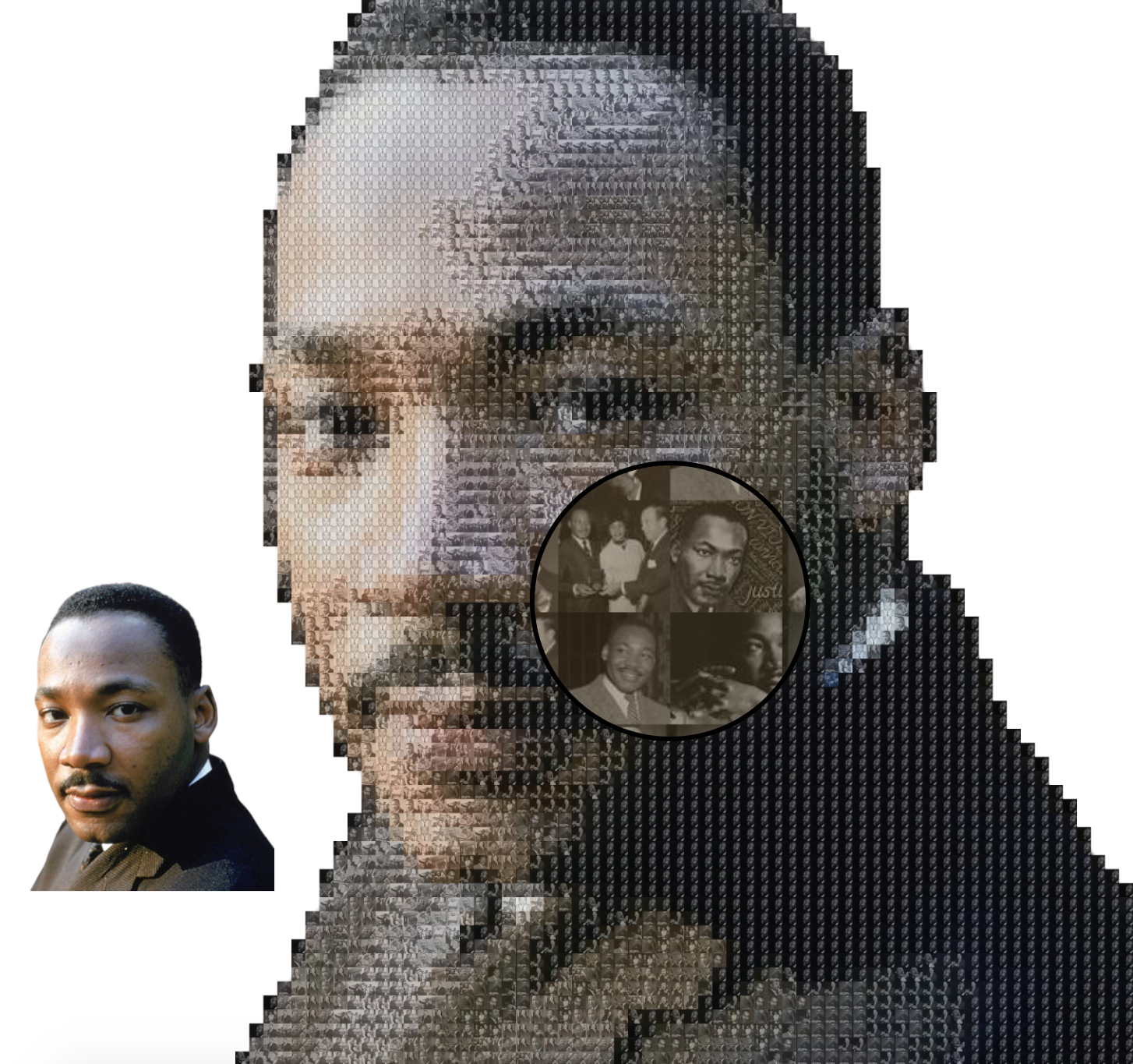
Create beautiful mosaics of an image from an original you specify, and are made up of many small images/photos you also provide!
 ## Install
```sh
$ npm install -s photosaic
```
## Usage
```js
import fs from 'fs'
import Photosaic from 'photosaic'
const mosaic = Photosaic(`./targetImgForMosaic.png`, [
`./subImg1.png`,
`./subImg2.png`,
`./subImg3.png`,
])
const finalMosaicBuffer = await mosaic.build()
await fs.promises.writeFile(`./finalMosaic.png`, finalMosaicBuffer)
```
### Main Image Type
- `type PhotosaicImage = string | Buffer | Readable`: main abstraction of an "image" used by Photosaic
- `string`: the full file path of the image on the local file system
- `Buffer`: a raw buffer of an image
- `Readable`: a [readable stream](https://nodejs.org/api/stream.html#stream_class_stream_readable) of an image to be piped to a writable stream
### Constructor
- `Photosaic(sourceImg, subImages, options?)`: factory function containing functionality to build mosaics
- `sourceImg: PhotosaicImage`: The image of the final mosaic that will be created
- `subImages: PhotosaicImage[]`: The small, subImages that will be used to build the mosaic
- `options?`: additional options you can provide to customize the output mosaic created
- `options.gridNum?: number = 10`: The final mosaic will be made up of a `gridNum x gridNum` grid of subImages
- `options.intensity?: number = 0.5`: Number between 0-1 indicating the opacity of the shading on the subImages to help make the output image clearer. 0 is fully transparent shading (main image will be impossible to see), 1 is fully opaque (subImages will be impossible to make out). The default of 0.5 should be fine in most cases.
- `options.outputType?: string = 'png'`: The output type of the final mosaic. To preserve transparency in the image, use the default, 'png'.
- `options.outputWidth?: number = 400`: Number of pixels the output mosaic's width will be (height will auto scale). The larger the width, the bigger the mosaic and the larger in size the final mosaic will be. The larger the output the longer it takes to generate a mosaic
- `options.algo?: 'closestColor' | 'random' = 'closestColor'`: How the subImages will be dispersed throughout when building the mosaic.
- `'random'` selects one of the subImages randomly each iteration to be inserted in that slice of the mosaic
- `'closestColor'` selects the subImage that is closest to the average color of the slice of the main image that the subImage is getting inserted to build the mosaic.
### `options.algo` differences
#### closestColor
#### random
## Install
```sh
$ npm install -s photosaic
```
## Usage
```js
import fs from 'fs'
import Photosaic from 'photosaic'
const mosaic = Photosaic(`./targetImgForMosaic.png`, [
`./subImg1.png`,
`./subImg2.png`,
`./subImg3.png`,
])
const finalMosaicBuffer = await mosaic.build()
await fs.promises.writeFile(`./finalMosaic.png`, finalMosaicBuffer)
```
### Main Image Type
- `type PhotosaicImage = string | Buffer | Readable`: main abstraction of an "image" used by Photosaic
- `string`: the full file path of the image on the local file system
- `Buffer`: a raw buffer of an image
- `Readable`: a [readable stream](https://nodejs.org/api/stream.html#stream_class_stream_readable) of an image to be piped to a writable stream
### Constructor
- `Photosaic(sourceImg, subImages, options?)`: factory function containing functionality to build mosaics
- `sourceImg: PhotosaicImage`: The image of the final mosaic that will be created
- `subImages: PhotosaicImage[]`: The small, subImages that will be used to build the mosaic
- `options?`: additional options you can provide to customize the output mosaic created
- `options.gridNum?: number = 10`: The final mosaic will be made up of a `gridNum x gridNum` grid of subImages
- `options.intensity?: number = 0.5`: Number between 0-1 indicating the opacity of the shading on the subImages to help make the output image clearer. 0 is fully transparent shading (main image will be impossible to see), 1 is fully opaque (subImages will be impossible to make out). The default of 0.5 should be fine in most cases.
- `options.outputType?: string = 'png'`: The output type of the final mosaic. To preserve transparency in the image, use the default, 'png'.
- `options.outputWidth?: number = 400`: Number of pixels the output mosaic's width will be (height will auto scale). The larger the width, the bigger the mosaic and the larger in size the final mosaic will be. The larger the output the longer it takes to generate a mosaic
- `options.algo?: 'closestColor' | 'random' = 'closestColor'`: How the subImages will be dispersed throughout when building the mosaic.
- `'random'` selects one of the subImages randomly each iteration to be inserted in that slice of the mosaic
- `'closestColor'` selects the subImage that is closest to the average color of the slice of the main image that the subImage is getting inserted to build the mosaic.
### `options.algo` differences
#### closestColor
#### random
 ### Methods
Assuming `const photosaic = Photosaic(source, subImgs, opts)`, the methods below are exposed on `photosaic`
- `photosaic.build(): Promise`: create a mosaic and return the result in a raw Buffer
- `photosaic.setSourceImage(newSrc: PhotosaicImage) => PhotosaicImage`: reset source image created in mosaic
- `photosaic.setSubImages(subImgs: PhotosaicImage[]) => PhotosaicImage[]`: reset subImages used to build mosaic
- `photosaic.addSubImage(img: PhotosaicImage): PhotosaicImage[]`: add an image to the subImage list to build mosaic
- `photosaic.imgToStream(img: PhotosaicImage): Readable`: convert a PhotosaicImage to a Readable stream
- `photosaic.imgToBuffer(img: PhotosaicImage): Promise`: convert a PhotosaicImage to a raw Buffer
### Tracking Mosaic Progress
Depending on the options provided (specifically `gridNum` and `outputWidth`) and
the hardware you're running to build the mosaic, it could take several to tens of minutes
for `photosaic.build()` to complete. Therefore, `photosaic` has an `EventEmitter`, `photosaic.emitter`
you can listen for `processing` events to get the progress of the mosaic being built.
There will be a total of `2 * gridNum^2` iterations processed.
```js
const photosaic = Photosaic(source, subImgs, opts)
photosaic.emitter.on('processing', (iteration) => {
console.log(`Currently processing '${iteration}' subImage for the mosaic`)
})
await photosaic.build()
// Currently processing '1' subImage for the mosaic
// Currently processing '2' subImage for the mosaic
// Currently processing '3' subImage for the mosaic
// ...
```
### CLI Task
You can use the following task to create a mosaic via the CLI with files on your local file system.
```sh
$ npm install -s photosaic
$ node ./node_modules/photosaic/dist/tasks/createMosaic.js -i ./pathToMosaicFile.js --dir ./path/to/sub/images -g 40 -w 1000
```
---
_Source: https://npm.io/package/photosaic · Machine-readable twin of the npm.io package page. Health data is recomputed on every publish._
### Methods
Assuming `const photosaic = Photosaic(source, subImgs, opts)`, the methods below are exposed on `photosaic`
- `photosaic.build(): Promise`: create a mosaic and return the result in a raw Buffer
- `photosaic.setSourceImage(newSrc: PhotosaicImage) => PhotosaicImage`: reset source image created in mosaic
- `photosaic.setSubImages(subImgs: PhotosaicImage[]) => PhotosaicImage[]`: reset subImages used to build mosaic
- `photosaic.addSubImage(img: PhotosaicImage): PhotosaicImage[]`: add an image to the subImage list to build mosaic
- `photosaic.imgToStream(img: PhotosaicImage): Readable`: convert a PhotosaicImage to a Readable stream
- `photosaic.imgToBuffer(img: PhotosaicImage): Promise`: convert a PhotosaicImage to a raw Buffer
### Tracking Mosaic Progress
Depending on the options provided (specifically `gridNum` and `outputWidth`) and
the hardware you're running to build the mosaic, it could take several to tens of minutes
for `photosaic.build()` to complete. Therefore, `photosaic` has an `EventEmitter`, `photosaic.emitter`
you can listen for `processing` events to get the progress of the mosaic being built.
There will be a total of `2 * gridNum^2` iterations processed.
```js
const photosaic = Photosaic(source, subImgs, opts)
photosaic.emitter.on('processing', (iteration) => {
console.log(`Currently processing '${iteration}' subImage for the mosaic`)
})
await photosaic.build()
// Currently processing '1' subImage for the mosaic
// Currently processing '2' subImage for the mosaic
// Currently processing '3' subImage for the mosaic
// ...
```
### CLI Task
You can use the following task to create a mosaic via the CLI with files on your local file system.
```sh
$ npm install -s photosaic
$ node ./node_modules/photosaic/dist/tasks/createMosaic.js -i ./pathToMosaicFile.js --dir ./path/to/sub/images -g 40 -w 1000
```
---
_Source: https://npm.io/package/photosaic · Machine-readable twin of the npm.io package page. Health data is recomputed on every publish._