# piglow
> javascript interface for the piglow
Latest version **3.0.1** (published 2016-09-16) · MIT license · 0 weekly downloads
## Install
```sh
npm install piglow
pnpm add piglow
yarn add piglow
bun add piglow
```
## Health
**Score 15/100 (F)** — status: abandoned.
Positive: no vulnerabilities.
Warnings: low downloads; no types; no esm support.
Negative: abandoned; low maintenance score.
## Facts
| | |
|---|---|
| Version | 3.0.1 |
| Published | 2016-09-16 |
| First published | 2013-09-11 |
| Weekly downloads | 0 |
| License | MIT |
| TypeScript types | none |
| Module format | CommonJS |
| Dependencies | 2 |
| Known vulnerabilities | 0 |
| Install scripts | no |
| GitHub stars | 37 |
| Author | Manuel Ernst |
| Maintainers | zaphod1984 |
| Keywords | pimoroni, piglow, raspberry pi, led, i2c |
## Links
- npm: https://www.npmjs.com/package/piglow
- Repository: https://github.com/seriousManual/node-piglow
- Homepage: https://github.com/seriousManual/node-piglow#readme
- Issues: https://github.com/seriousManual/node-piglow/issues
- npm.io page: https://npm.io/package/piglow
## Dependencies (2)
- [i2c](https://npm.io/package/i2c.md) 0.2.3
- [sigmund](https://npm.io/package/sigmund.md) ^1.0.0
## Recent versions
- 3.0.1 (latest) — 2016-09-16
- 3.0.0 — 2016-08-14
- 2.2.2 — 2015-05-26
- 2.2.1 — 2015-05-26
- 2.2.0 — 2014-12-14
- 2.1.0 — 2014-07-27
- 2.0.2 — 2014-04-08
- 2.0.1 — 2014-04-07
- 2.0.0 — 2014-03-29
- 1.0.2 — 2014-03-23
- 1.0.1 — 2014-03-21
- 1.0.0 — 2014-03-20
- 0.10.2 — 2014-02-20
- 0.10.1 — 2013-11-11
- 0.9.0 — 2013-11-06
- … 17 more at https://npm.io/package/piglow/versions
## README
# node-piglow [](https://travis-ci.org/seriousManual/node-piglow)
**v2 does not contain the commandline interface and the animations interface anymore. They are moved to two seperate modules. ([node-piglow-cli](https://github.com/zaphod1984/node-piglow-cli) and [node-piglow-animations](https://github.com/zaphod1984/node-piglow-animations))**
**v3 removes node 0.10 and 0.12 support and only works for node versions >4**
[](https://nodei.co/npm/piglow/)
[](https://nodei.co/npm/piglow/)
The piGlow is a little LED-Board for the [Raspberry Pi](http://www.raspberrypi.org/) sold by [Pimoroni](http://shop.pimoroni.com/products/piglow). It features 18 LEDs in six different colors (white, blue, green, yellow, orange, red) arranged like a vortex:

This module offers an interface to control the individual LEDs.
In action video:
http://www.youtube.com/watch?v=s-rD8PfAke8
## TOC
* [Installation](#installation)
* [Setup](#setup)
* [Invocation](#invocation)
* [Adressing](#adressing)
* [Transactions](#transactions)
* [Animations](#animations)
* [CLI](#command-line-interface)
* [Mocking](#mocking)
* [Used in](#used-in)
## Installation
````bash
$ npm install piglow
````
## Setup
````bash
$ sudo vi /etc/modules
````
Add these two lines
````bash
i2c-bcm2708
i2c-dev
````
````bash
$ sudo vi /etc/modprobe.d/raspi-blacklist.conf
````
Comment out blacklist i2c-bcm2708
````
#blacklist i2c-bcm2708
````
## Invocation
```javascript
var piGlow = require('piglow');
//callback fires when board is initialized
piGlow(function(error, pi) {
pi.all;
});
```
## Adressing


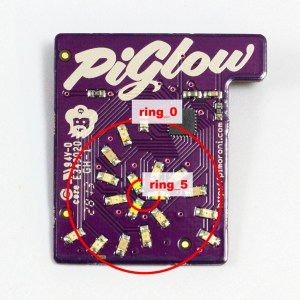
To each LED a brightness value between 0 (off) and 255 (freakin' bright) can be assigned.
If one preferrs percentage values, as a convenience function all values smaller than 1 are treated as percentage values. Note that the value of '1' is not treated as 100% but as the brightness value of 1!
### Individual LEDs
```javascript
//parameter sets the brightness:
pi.l_0_0 = 100; //sets LED 1 of leg 1 to a brightness of 100 (of 255)
pi.l_0_1 = 10; //sets LED 2 of leg 1 to a brightness of 10
pi.l_0_1 = 0.5; //sets LED 2 of leg 1 to a brightness of 50% (=brightness of 127)
...
pi.l_2_5 = 200; //sets LED 6 of leg 3 to a brightness of 200
//shorthand form:
pi.l_0_0; //sets LED 1 of leg 1 to a brightness of 255
```
### Legs
```javascript
pi.leg_0 = 100; //sets all LEDs of leg 1 to a brightness of 100
//shorthand
pi.leg_0; //sets all LEDs of leg 1 to 255
```
### Rings
```javascript
pi.ring_0 = 100; //sets LED 1 of leg 1, LED 1 of leg 2 and LED 1 of leg 3 to 100
//shorthand
pi.ring_0; //sets LED 1 of leg 1, LED 1 of leg 1 and LED 1 of leg 2 to 255
```
As the rings are distinguishable by color (order from outer ring to the inner: red, orange, yellow, green, blue, white), they can be adressed via the ring's color:
```javascript
pi.red = 100; //sets the first ring to a brightness of 100
//shorthand
pi.red; //sets the first ring to maximum brightness
```
### All LEDs
```javascript
pi.all = 100; //set all LEDs to 100
//shorthand
pi.all; //set all LEDs to 255 (watch your eyes)
pi.reset; //set all LEDs to 0
```
### Random
```javascript
pi.random = 0.5;
//shorthand
pi.random;
```
The propbability of lighting up can be defined (`pi.random = 0.1;`) and is otherwise calculated via this formula: `(0.4 + Math.random() * 0.2);`.
The brightness is calculated via this formula: `parseInt(MAX_VALUE / 2 + (MAX_VALUE / 2 * Math.random()), 10)`
## Transactions
Each parameter that is set causes the backend to transfer the complete set of values to the piglow board.
Thus the following operation would cause three write operations:
```javascript
pi.l_0_1 = 100;
pi.l_0_2 = 100;
pi.l_0_3 = 100;
```
The piglow-interface offers the possibility to open up a transaction and to commit it when all changes have been made. So the following code will cause only one write to the hardware board:
```javascript
pi.startTransaction();
pi.l_0_1 = 100;
pi.l_0_2 = 100;
pi.l_0_3 = 100;
pi.commitTransaction();
```
This benefits performance especially when the LEDs are changed in high frequency.
## Animations
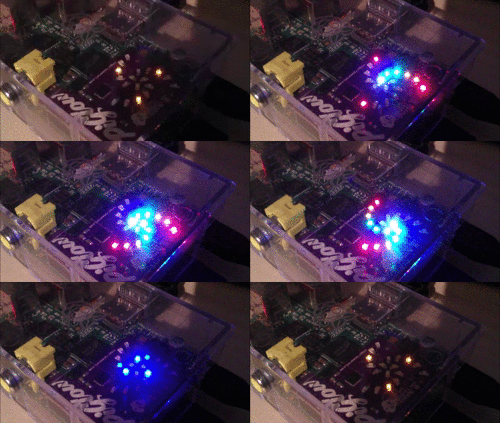
Do you like your piglow animated? Checkout [piglow-animations](https://www.npmjs.org/package/piglow-animations)!
## Command-Line-Interface
[node-piglow-cli](https://www.npmjs.org/package/piglow-cli) wraps piglow and offers a command line interface. You can than invoke the piglow like this (lights up the red LEDs):
```bash
$ piglow --red
```
Possible use cases:
* use it in your Makefile to indicate a sucessfull built
* use it in your CI server to indicate failed (or sucessfull) built
* ...
## Mocking
This module also exposes its internal structure, with the possibility to invoke the piGlow interface with a injected mocking backend.
There are two backends, `BackendMock` prints the piglow data as JSON, `BackendMockPrettyPrint` structures the data in a readable way.
```javascript
var piGlow = require('piglow');
var PiGlowBackendMock = piGlow.BackendMock;
var piGlowInterface = piGLow.piGlowInterface;
var myMock = new PiGlowBackendMock();
var myInterface = piGlowInterface(myMock);
//lets hack
myInterface.ring_0 = 255;
```
This way the module can be used in a non raspi environment for development or with a testing mock for unit tests.
To implement your own mocks follow this interface:
```javascript
function PiGlowMock() {}
PiGlowMock.prototype.update = function(piGlowConfiguration, callback) {
/*
piGlowConfiguration is a object in the following form:
{
"l_0_0":0, "l_0_1":0, "l_0_2":0, "l_0_3":0, "l_0_4":0, "l_0_5":0,
"l_1_0":0, "l_1_1":0, "l_1_2":0, "l_1_3":0, "l_1_4":0, "l_1_5":0,
"l_2_0":0, "l_2_1":0, "l_2_2":0, "l_2_3":0, "l_2_4":0, "l_2_5":0
}
*/
};
```
## Used in
- *[piglow-system](https://www.npmjs.com/package/piglow-system)*
a system utlity tool that shows metrics about your system
- *[piglow-clock](https://www.npmjs.com/package/piglow-clock)*
a binary watch implemented via the piglow
---
_Source: https://npm.io/package/piglow · Machine-readable twin of the npm.io package page. Health data is recomputed on every publish._