# plexanisync-mapping-assistant
> PlexAniSync Mapping Assistant
Latest version **2.0.0-rc14** (published 2024-03-09) · MPL-2.0 license · 0 weekly downloads
> **Deprecated.** This package is deprecated.
## Install
```sh
npm install plexanisync-mapping-assistant
pnpm add plexanisync-mapping-assistant
yarn add plexanisync-mapping-assistant
bun add plexanisync-mapping-assistant
```
Provides the command `plexanisync-mapping-assistant`.
## Health
**Score 10/100 (F)** — status: deprecated.
Negative: deprecated.
## Facts
| | |
|---|---|
| Version | 2.0.0-rc14 |
| Published | 2024-03-09 |
| First published | 2024-03-03 |
| Weekly downloads | 0 |
| License | MPL-2.0 |
| TypeScript types | none |
| Module format | ESM + CommonJS |
| Node | >= 18 |
| Dependencies | 12 |
| Unpacked size | 65.8 KB |
| Known vulnerabilities | 0 |
| Install scripts | no |
| GitHub stars | 14 |
| Author | Soitora |
| Maintainers | soitora |
| Keywords | tmdb, themoviedb, tvdb, thetvdb, imdb, plexanisync, plex, anilist, node |
## Links
- npm: https://www.npmjs.com/package/plexanisync-mapping-assistant
- Repository: https://github.com/Soitora/PlexAniSync-Mapping-Assistant
- Homepage: https://github.com/Soitora/PlexAniSync-Mapping-Assistant#readme
- Issues: https://github.com/Soitora/PlexAniSync-Mapping-Assistant/issues
- npm.io page: https://npm.io/package/plexanisync-mapping-assistant
## Dependencies (12)
- [chai](https://npm.io/package/chai.md) ^5.1.0
- [axios](https://npm.io/package/axios.md) ^1.6.7
- [chalk](https://npm.io/package/chalk.md) ^5.3.0
- [mocha](https://npm.io/package/mocha.md) ^10.3.0
- [pjson](https://npm.io/package/pjson.md) ^1.0.9
- [config](https://npm.io/package/config.md) ^3.3.11
- [dotenv](https://npm.io/package/dotenv.md) ^16.4.5
- [js-yaml](https://npm.io/package/js-yaml.md) ^4.1.0
- [tvdbapi](https://npm.io/package/tvdbapi.md) ^2.1.0
- [inquirer](https://npm.io/package/inquirer.md) ^9.2.15
- [clipboardy](https://npm.io/package/clipboardy.md) ^4.0.0
- [node-themoviedb](https://npm.io/package/node-themoviedb.md) ^0.2.8
## Alternatives
- [@expo/fingerprint](https://npm.io/package/@expo/fingerprint.md) — 6.2M weekly downloads
- [@azure/monitor-opentelemetry-exporter](https://npm.io/package/@azure/monitor-opentelemetry-exporter.md) — 850.0K weekly downloads
- [@azure/monitor-opentelemetry](https://npm.io/package/@azure/monitor-opentelemetry.md) — 624.0K weekly downloads
- [@posthog/ai](https://npm.io/package/@posthog/ai.md) — 423.3K weekly downloads
- [fakefilter](https://npm.io/package/fakefilter.md) — 63.9K weekly downloads
## Recent versions
- 2.0.0-rc14 (latest) — 2024-03-09
- 2.0.0-rc13 — 2024-03-05
- 2.0.0-rc10 — 2024-03-05
- 2.0.0-rc9 — 2024-03-03
## README

# [PlexAniSync](https://github.com/RickDB/PlexAniSync/) Mapping Assistant
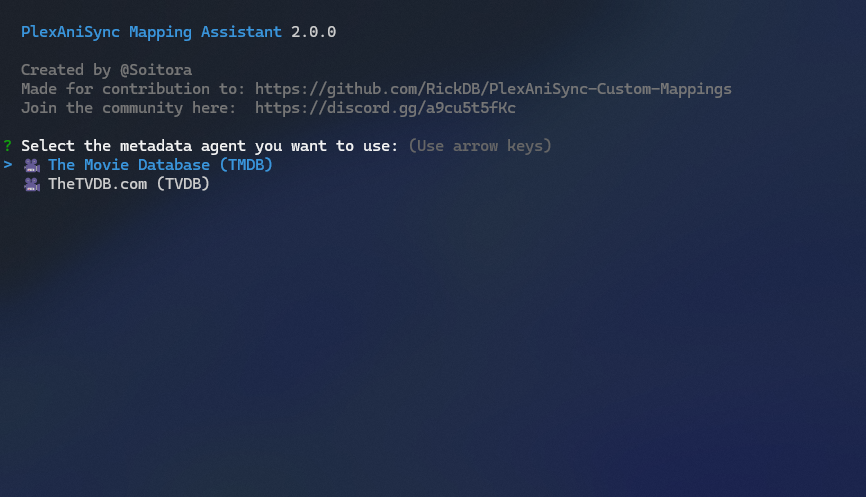
TheMovieDB/TheTVDB Mapping Assistant for [PlexAniSync](https://github.com/RickDB/PlexAniSync/), specifically, for contribution to the [custom mappings](https://github.com/RickDB/PlexAniSync-Custom-Mappings) project.

### Repositories
[](https://github.com/RickDB/PlexAniSync/)
[](https://github.com/RickDB/PlexAniSync-Custom-Mappings/)
## Guide
### Step 1: Prerequisites
Make sure you have `Node.js` and `npm` installed on your machine.
If not, you can download and install them from [Node.js official website](https://nodejs.org/).
### Step 2: Clone the Repository
Clone the repository to your local machine using the following command:
```bash
git clone https://github.com/Soitora/PlexAniSync-Mapping-Assistant.git
```
### Step 3: Navigate to Project Directory
Change into the project directory:
```bash
cd PlexAniSync-Mapping-Assistant
```
### Step 4: Install Dependencies
Run the following command to install project dependencies:
```bash
npm install
```
### Step 5: Create .env file
Copy the provided `.env.example` file to a new file named `.env`:
```bash
cp .env.example .env
```
### Step 6: Edit .env File
Open the `.env` file in a text editor and fill in the environment variables with appropriate values.
> [!NOTE]
>- You do not need both `TMDB_APIKEY` and `TVDB_APIKEY` to run this, only one is required at minimum.
>- You do not need to tweak/add `DUMMY_QUERY` unless that doesn't work for you.
>- Both `PLEX_TOKEN` and `PLEX_API` is also optional, but highly recommended for `guid` in the output.
### Step 7: Configuration
You can copy `config/default.yaml.example` as `config/default.yaml` to use custom settings.
Read [here](https://github.com/node-config/node-config/wiki/Configuration-Files) for more regarding configuration files.
#### Settings:
- `preferMetadata`
- Possible values: `tmdb`, `tvdb`
- `preferMedia`
- Possible values: `tv`, `movie`
- `copyResults`
- Possible values: `true`, `false`
- `saveResults`
- Possible values: `true`, `false`
- `inputFilePath`
- A valid path to a TXT input file, see the README example.
- `outputFilePath`
- A valid path for the output YAML files, see the README example.
#### Default config:
```yaml
userConfig:
preferMetadata: "tmdb"
preferMedia: "tv"
copyResults: "true"
saveResults: "false"
inputFilePath: "batch/input.txt"
outputFilePath: "batch/output/"
```
#### Examples:
##### Changing metadata agent
This is useful if you for example only want to use TVDB, and maybe always save results to a file as well, then you can change
```yaml
userConfig:
preferMetadata: "tvdb"
saveResults: "true"
```
##### Changing output paths
This is useful if you for example you want the processed files to be output to a folder on your Desktop
```yaml
userConfig:
inputFilePath: "C:/Users/USER/Desktop/Scraper/input.txt"
outputFilePath: "C:/Users/USER/Desktop/Scraper/"
```
### Step 8: Run the Assistant
You can now run the mapping assistant using the following command:
```bash
npm run assistant
```
### Auto-scraping (Optional)
If you would prefer to input a large number of IDs, and have the program output a file for you, you can do it using this script.
Make sure that you fill `batch\input.txt` with a newline-seperated list of IDs.
```bash
npm run auto
```
### Debugging (Optional)
If you need to debug and test towards API directly, you can use the following command:
```bash
npm run debug
```
### Testing (Optional)
To run tests to make sure the API is spitting out the correct information, use the following command:
```bash
npm test
```
## Scripts
- `assistant`: Runs the assistant script
- `debug`: Runs the debug script to see raw outputs of APIs
## Issues
If you have any issues, please open a new issue in the [Issues](https://github.com/Soitora/PlexAniSync-Mapping-Assistant/issues) section of this repository.
### Credits
Thank you to all the people who have contributed!

## License
Copyright © 2023 Soitora

This Source Code Form is subject to the terms of the Mozilla Public
License, v. 2.0. If a copy of the MPL was not distributed with this
file, You can obtain one at http://mozilla.org/MPL/2.0/.