# prompt-checkbox
> Multiple-choice/checkbox prompt. Can be used standalone or with a prompt system like [Enquirer].
Latest version **2.2.0** (published 2017-07-08) · MIT license · 0 weekly downloads
## Install
```sh
npm install prompt-checkbox
pnpm add prompt-checkbox
yarn add prompt-checkbox
bun add prompt-checkbox
```
## Health
**Score 15/100 (F)** — status: abandoned.
Positive: no vulnerabilities.
Warnings: low downloads; no types; no esm support.
Negative: abandoned; low maintenance score.
## Facts
| | |
|---|---|
| Version | 2.2.0 |
| Published | 2017-07-08 |
| First published | 2016-09-21 |
| Weekly downloads | 0 |
| License | MIT |
| TypeScript types | none |
| Module format | CommonJS |
| Node | >=5.0 |
| Dependencies | 3 |
| Known vulnerabilities | 0 |
| Install scripts | no |
| GitHub stars | 22 |
| Author | Jon Schlinkert |
| Maintainers | jonschlinkert |
| Keywords | answer, answers, ask, checkbox, choice, choices, cli, command, enquirer, enquirerprompt, input, inquire, inquirer, interact, list, menu, multiple-choice, password, prompt, prompts, question, readline, stdin, stdout, terminal, tty, ui |
## Links
- npm: https://www.npmjs.com/package/prompt-checkbox
- Repository: https://github.com/enquirer/prompt-checkbox
- Issues: https://github.com/enquirer/prompt-checkbox/issues
- npm.io page: https://npm.io/package/prompt-checkbox
## Dependencies (3)
- [debug](https://npm.io/package/debug.md) ^2.6.8
- [ansi-cyan](https://npm.io/package/ansi-cyan.md) ^0.1.1
- [prompt-base](https://npm.io/package/prompt-base.md) ^4.0.2
## Alternatives
- [@salesforce/cli](https://npm.io/package/@salesforce/cli.md) — 389.7K weekly downloads
- [@mintlify/cli](https://npm.io/package/@mintlify/cli.md) — 208.9K weekly downloads
- [@grafana/e2e-selectors](https://npm.io/package/@grafana/e2e-selectors.md) — 128.7K weekly downloads
- [mintlify](https://npm.io/package/mintlify.md) — 112.0K weekly downloads
- [@intlayer/cli](https://npm.io/package/@intlayer/cli.md) — 22.8K weekly downloads
## Recent versions
- 2.2.0 (latest) — 2017-07-08
- 2.1.2 — 2017-06-05
- 2.1.1 — 2017-06-05
- 2.1.0 — 2017-06-02
- 2.0.1 — 2017-05-24
- 2.0.0 — 2017-05-23
- 1.0.2 — 2017-05-23
- 1.0.1 — 2017-05-21
- 1.0.0 — 2017-05-21
- 0.5.1 — 2017-05-05
- 0.5.0 — 2017-04-12
- 0.4.2 — 2016-12-07
- 0.4.1 — 2016-12-05
- 0.4.0 — 2016-10-17
- 0.3.3 — 2016-10-17
- … 3 more at https://npm.io/package/prompt-checkbox/versions
## README
# prompt-checkbox [](https://www.npmjs.com/package/prompt-checkbox) [](https://npmjs.org/package/prompt-checkbox) [](https://npmjs.org/package/prompt-checkbox) [](https://travis-ci.org/enquirer/prompt-checkbox)
> Multiple-choice/checkbox prompt. Can be used standalone or with a prompt system like [Enquirer](http://enquirer.io).
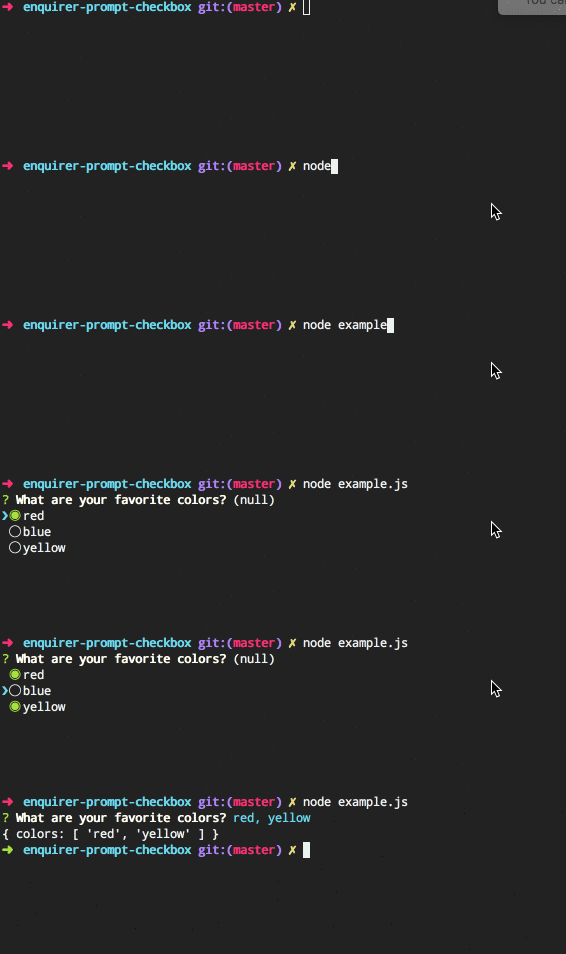
## Install
Install with [npm](https://www.npmjs.com/):
```sh
$ npm install --save prompt-checkbox
```
## Usage
```js
var Prompt = require('prompt-checkbox');
var prompt = new Prompt({
name: 'colors',
message: 'What are your favorite colors?',
choices: [
'red',
'blue',
'yellow'
]
});
// promises
prompt.run()
.then(function(answers) {
console.log(answers)
})
.catch(function(err) {
console.log(err)
})
// async
prompt.ask(function(answers) {
console.log(answers)
});
```
## Special features
Features you won't find with other prompts!
### Choices function
Define choices as a function. This allows you to dynamically generate the choices when the question is asked.
```js
var prompt = new Prompt({
name: 'colors',
message: 'What are your favorite colors?',
choices: function() {
// dynamically build choices
return ['red', 'blue', 'green'];
}
});
```
### Choice groups
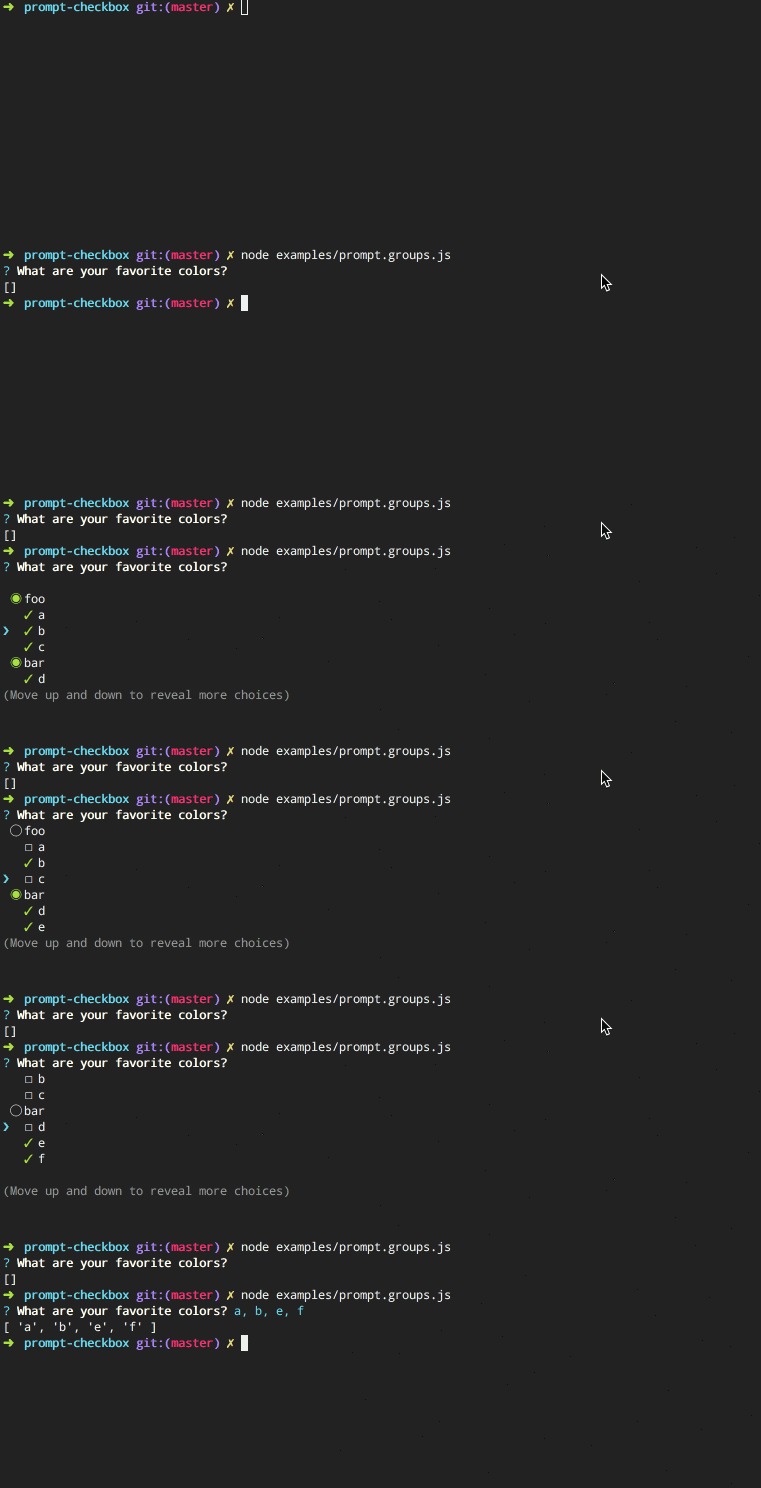
**Easy to configure!**
Just pass an object of arrays on `choices`, and each key in the object will be used as the group "toggle":
```js
var Prompt = require('prompt-checkbox');
var prompt = new Prompt({
name: 'install',
message: 'Which packages do you want to install?',
choices: {
dependencies: ['generate', 'micromatch'],
devDependencies: ['mocha', 'kind-of']
}
});
```
### Radio choices
Adds `all` and `none` choices, which select or deselect all choices, respectively. Named "radio choices" since it acts like a hybrid between checkboxes and radio buttons.
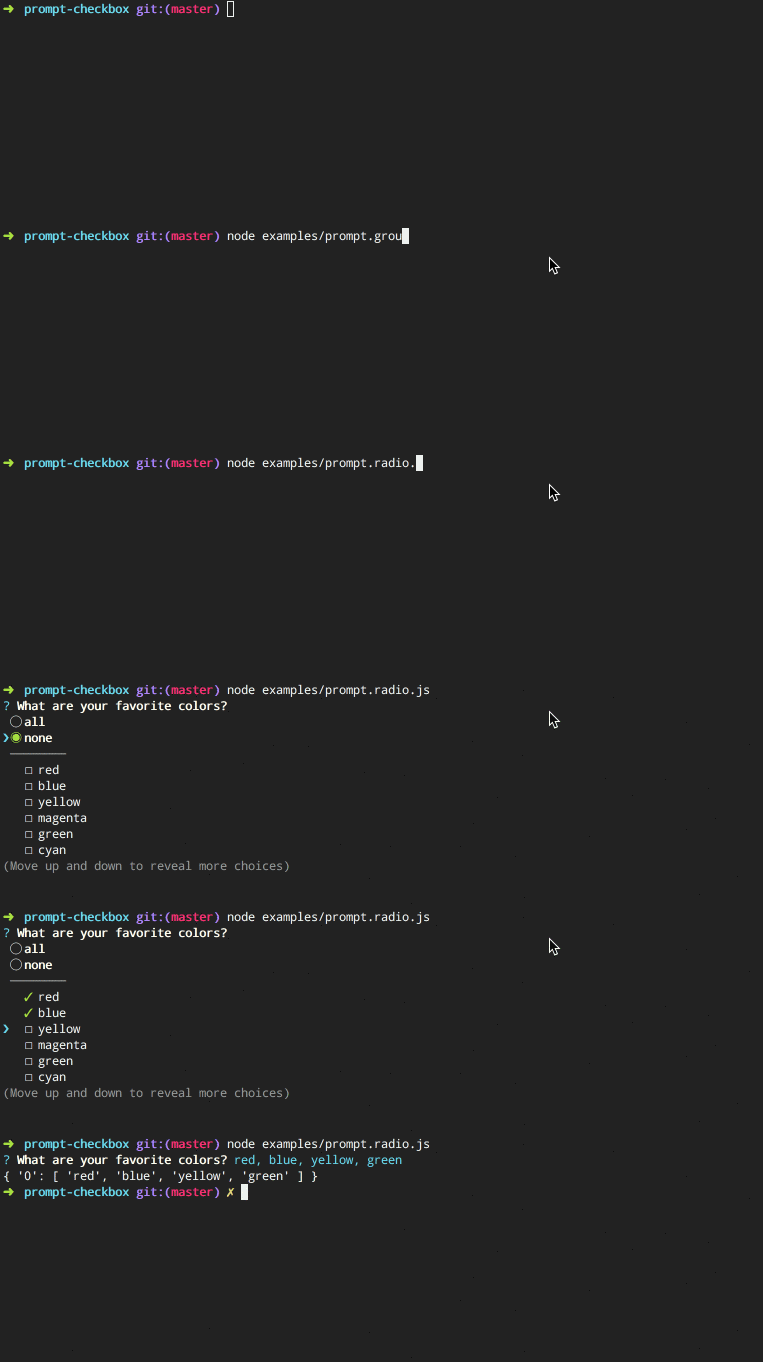
**Code example**
```js
var Prompt = require('prompt-checkbox');
var prompt = new Prompt({
name: 'install',
message: 'Which packages do you want to install?',
radio: true,
choices: ['foo', 'bar', 'baz']
});
```
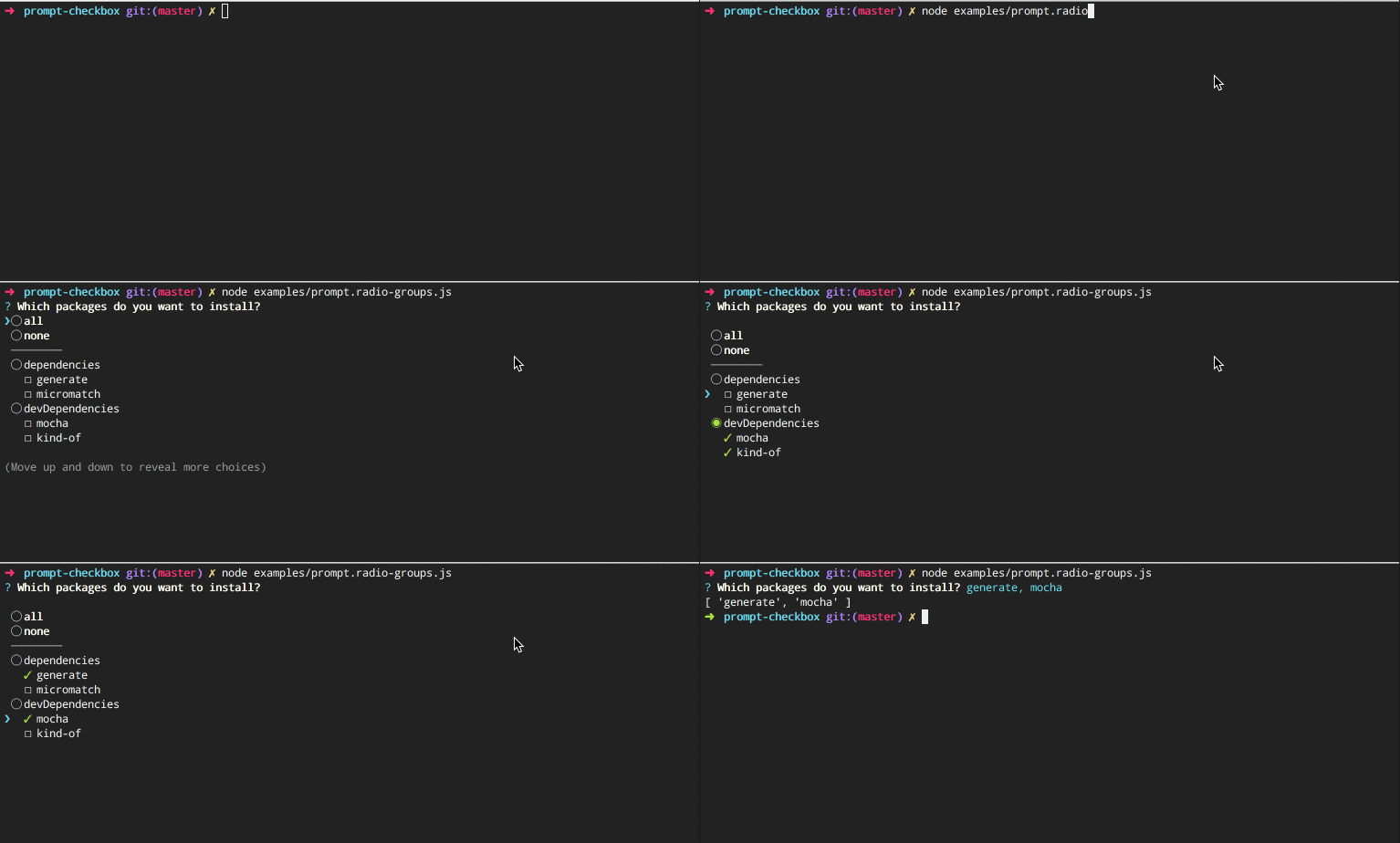
### Radio groups
Use "radio" choices with choice groups.
```js
var Prompt = require('prompt-checkbox');
var prompt = new Prompt({
name: 'install',
message: 'Which packages do you want to install?',
radio: true,
choices: {
dependencies: ['generate', 'micromatch'],
devDependencies: ['mocha', 'kind-of']
}
});
```
## options
The following options are either specific to prompt-checkbox, or have behavior that differs in some way from the built-in options from [prompt-base](https://github.com/enquirer/prompt-base). _(Any other options from [prompt-base](https://github.com/enquirer/prompt-base) may be used as well.)_
### options.default
**Type**: `string|number|array`
**Default**: `undefined`
Specify the "default" choices to check when the prompt is initialized. Default can be a choice name (string), index (number), or an array of choice names or indices.
**Examples**
Specify default as a string (choice name):
```js
var prompt = new Prompt({
name: 'colors',
message: 'Best flavor?',
default: 'chocolate',
choices: ['chocolate'] // <= hmm, I wonder what they'll choose?
});
```
Specify an array of defaults (choice names or indices):
```js
var prompt = new Prompt({
name: 'colors',
message: 'Favorite colors?',
default: [1, 'blue'],
choices: ['red', 'blue', 'yellow']
});
```
### options.radio
**Type**: `boolean`
**Default**: `undefined`
Enable hybrid radio-checkbox support, which adds `all` and `none` radio options for toggling all options on and off.
```js
var Prompt = require('prompt-checkbox');
var prompt = new Prompt({
name: 'colors',
message: 'What are your favorite colors?',
radio: true,
choices: [
'red',
'blue',
'yellow'
]
});
```
### options.transform
**Type**: `function`
**Default**: `undefined`
Modify answer values before they're returned.
**Example**
Use `options.transform` and the `prompt.choices.get()` method to convert answers (checked choices) to an array of objects (versus of an array of strings).
```js
var Prompt = require('prompt-checkbox');
var prompt = new Prompt({
name: 'colors',
message: 'What are your favorite colors?',
choices: ['red', 'blue', 'yellow'],
transform: function(answer) {
// - "this" is the prompt instance
// - "this.choices.get()" returns the choice object for each choice
return answer ? answer.map(this.choices.get.bind(this.choices)) : [];
}
});
```
## Keypresses
In addition to the keypresses that are supported by [prompt-base](https://github.com/enquirer/prompt-base), the following keypress offer different behavior that is specific to checklists:
* down - move the pointer (cursor) down one row for each keypress
* up - move the pointer (cursor) up one row for each keypress
* i - toggle all choices to the opposite of their current state.
* a - enable or disable all choices
* space - toggle a choice
* number - toggle the choice at the given index (starting at 1)
## Usage with [enquirer](http://enquirer.io)
Register the prompt with enquirer:
```js
var Enquirer = require('enquirer');
var enquirer = new Enquirer();
enquirer.register('checkbox', require('prompt-checkbox'));
```
### Enquirer examples
For formatting questions, [enquirer](http://enquirer.io) supports either:
* declarative, inquirer-style question format
* functional format using the `.question` method.
**Inquirer-style questions**
Declarative questions format, similar to `inquirer`.
```js
var questions = [
{
name: 'color',
message: 'What is your favorite color?',
type: 'checkbox',
default: 'blue',
choices: ['red', 'yellow', 'blue']
}
];
enquirer.prompt(questions)
.then(function(answers) {
console.log(answers)
});
```
Or:
```js
enquirer.prompt({
name: 'color',
message: 'What is your favorite color?',
type: 'checkbox',
default: 'blue',
choices: ['red', 'yellow', 'blue']
})
.then(function(answers) {
console.log(answers)
});
```
**Functional-style questions**
Use the `.question` method to pre-register questions, so they can be called later. Also, the `message` may be passed as the second argument, or as a property on the question options.
```js
enquirer.question('letter', 'What are your favorite letters?', {
type: 'checkbox', //<= specify the prompt type
choices: ['a', 'b', 'c']
});
enquirer.question('numbers', {
type: 'checkbox', //<= specify the prompt type
message: 'What are your favorite numbers?',
choices: ['1', '2', '3']
});
// pass the name(s) or questions to ask
enquirer.prompt(['letters', 'numbers'])
.then(function(answers) {
console.log(answers)
});
```
## About
### Related projects
* [enquirer](https://www.npmjs.com/package/enquirer): Intuitive, plugin-based prompt system for node.js. | [homepage](http://enquirer.io "Intuitive, plugin-based prompt system for node.js.")
* [prompt-base](https://www.npmjs.com/package/prompt-base): Base prompt module used for creating custom prompts. | [homepage](https://github.com/enquirer/prompt-base "Base prompt module used for creating custom prompts.")
* [prompt-choices](https://www.npmjs.com/package/prompt-choices): Create an array of multiple choice objects for use in prompts. | [homepage](https://github.com/enquirer/prompt-choices "Create an array of multiple choice objects for use in prompts.")
* [prompt-question](https://www.npmjs.com/package/prompt-question): Question object, used by Enquirer and prompt plugins. | [homepage](https://github.com/enquirer/prompt-question "Question object, used by Enquirer and prompt plugins.")
### Contributing
Pull requests and stars are always welcome. For bugs and feature requests, [please create an issue](../../issues/new).
### Running tests
Running and reviewing unit tests is a great way to get familiarized with a library and its API. You can install dependencies and run tests with the following command:
```sh
$ npm install && npm test
```
### Author
**Jon Schlinkert**
* [github/jonschlinkert](https://github.com/jonschlinkert)
* [twitter/jonschlinkert](https://twitter.com/jonschlinkert)
### License
Copyright © 2017, [Jon Schlinkert](https://github.com/jonschlinkert).
Released under the [MIT License](LICENSE).
***
_This file was generated by [verb-generate-readme](https://github.com/verbose/verb-generate-readme), v0.6.0, on July 08, 2017._
---
_Source: https://npm.io/package/prompt-checkbox · Machine-readable twin of the npm.io package page. Health data is recomputed on every publish._