# prompt-confirm
> Confirm (yes/no) prompt. Can be used standalone or with a prompt system like [Enquirer].
Latest version **2.0.4** (published 2018-05-31) · MIT license · 0 weekly downloads
## Install
```sh
npm install prompt-confirm
pnpm add prompt-confirm
yarn add prompt-confirm
bun add prompt-confirm
```
## Health
**Score 15/100 (F)** — status: abandoned.
Positive: no vulnerabilities.
Warnings: low downloads; no types; no esm support.
Negative: abandoned; low maintenance score.
## Facts
| | |
|---|---|
| Version | 2.0.4 |
| Published | 2018-05-31 |
| First published | 2016-10-13 |
| Weekly downloads | 0 |
| License | MIT |
| TypeScript types | none |
| Module format | CommonJS |
| Node | >=6.0 |
| Dependencies | 2 |
| Unpacked size | 9.4 KB |
| Known vulnerabilities | 0 |
| Install scripts | no |
| GitHub stars | 43 |
| Author | Jon Schlinkert |
| Maintainers | doowb, jonschlinkert |
| Keywords | answer, answers, ask, checkbox, choice, cli, command, confirm, enquirer, enquirerprompt, input, inquire, inquirer, interact, list, menu, password, prompt, prompts, question, readline, stdin, stdout, terminal, tty, ui |
## Links
- npm: https://www.npmjs.com/package/prompt-confirm
- Repository: https://github.com/enquirer/prompt-confirm
- Issues: https://github.com/enquirer/prompt-confirm/issues
- npm.io page: https://npm.io/package/prompt-confirm
## Dependencies (2)
- [ansi-cyan](https://npm.io/package/ansi-cyan.md) ^0.1.1
- [prompt-base](https://npm.io/package/prompt-base.md) ^4.0.1
## Alternatives
- [@salesforce/cli](https://npm.io/package/@salesforce/cli.md) — 389.7K weekly downloads
- [@mintlify/cli](https://npm.io/package/@mintlify/cli.md) — 208.9K weekly downloads
- [@grafana/e2e-selectors](https://npm.io/package/@grafana/e2e-selectors.md) — 128.7K weekly downloads
- [mintlify](https://npm.io/package/mintlify.md) — 112.0K weekly downloads
- [@intlayer/cli](https://npm.io/package/@intlayer/cli.md) — 22.8K weekly downloads
## Recent versions
- 2.0.4 (latest) — 2018-05-31
- 2.0.3 — 2018-05-31
- 2.0.2 — 2018-05-31
- 2.0.1 — 2018-05-31
- 2.0.0 — 2018-05-28
- 1.2.0 — 2017-07-08
- 1.1.1 — 2017-06-05
- 1.1.0 — 2017-06-01
- 1.0.2 — 2017-05-28
- 1.0.1 — 2017-05-28
- 1.0.0 — 2017-05-22
- 0.2.1 — 2016-10-20
- 0.2.0 — 2016-10-13
## README
# prompt-confirm [](https://www.npmjs.com/package/prompt-confirm) [](https://npmjs.org/package/prompt-confirm) [](https://npmjs.org/package/prompt-confirm) [](https://travis-ci.org/enquirer/prompt-confirm) [](https://ci.appveyor.com/project/enquirer/prompt-confirm)
> Confirm (yes/no) prompt. Can be used standalone or with a prompt system like [Enquirer](http://enquirer.io).
Please consider following this project's author, [Jon Schlinkert](https://github.com/jonschlinkert), and consider starring the project to show your :heart: and support.
## Install
Install with [npm](https://www.npmjs.com/):
```sh
$ npm install --save prompt-confirm
```
## Usage
**Question**
Pass a string or question object to the constructor:
```js
const Confirm = require('prompt-confirm');
const prompt = new Confirm('Do you like chocolate?');
// or
const prompt = new Confirm({
name: 'chocolate',
message: 'Do you like chocolate?'
});
```
**Run the prompt**
You can use one of the following two methods for running the prompt:
```js
// async
prompt.ask(function(answer) {
console.log(answer);
});
// or promise
prompt.run()
.then(function(answer) {
console.log(answer);
});
```
**Examples**
```js
const confirm = new Confirm('Like chocolate?')
.ask(function(answer) {
console.log(answer);
});
const confirm = new Confirm('Like chocolate?')
.run()
.then(function(answer) {
console.log(answer);
});
```
## Usage with [enquirer](http://enquirer.io)
```js
const Enquirer = require('enquirer');
const enquirer = new Enquirer();
enquirer.register('confirm', require('prompt-confirm'));
```
### Enquirer example
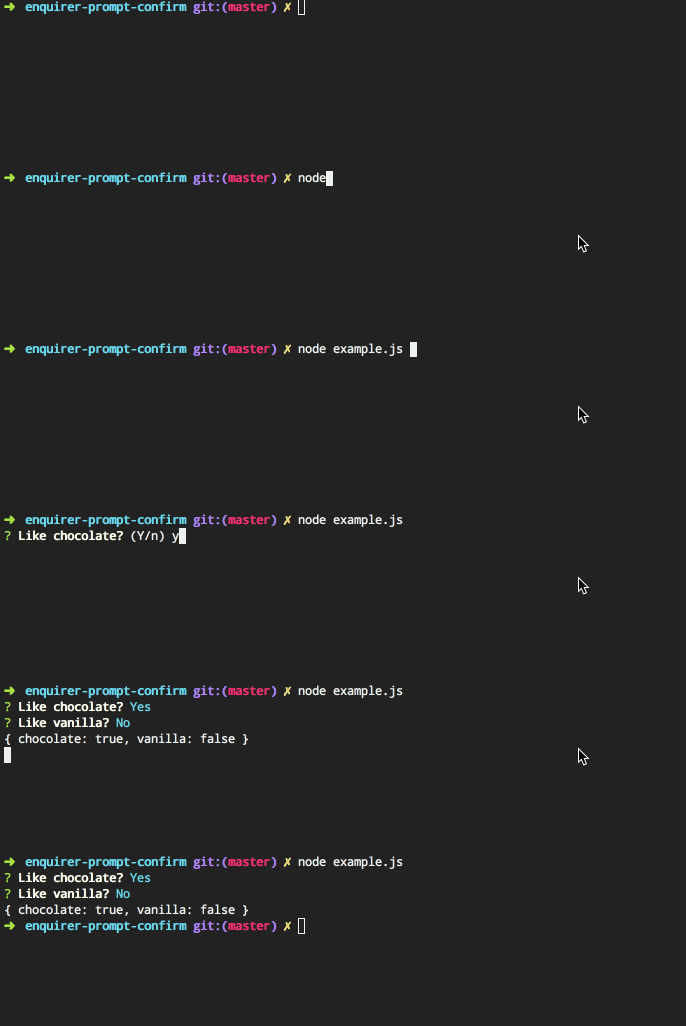
[Enquirer](http://enquirer.io) supports either the declarative object-oriented (inquirer-style) question format or a more expressive format using the `.question` method.
**Declarative**
Inquirer-style declarative format (takes an array or object):
```js
const questions = [
{
type: 'confirm',
name: 'chocolate',
message: 'Like chocolate?'
},
{
type: 'confirm',
name: 'vanilla',
message: 'Like vanilla?'
}
];
enquirer.ask(questions)
.then(function(answers) {
console.log(answers)
});
```
**Expressive**
Pre-define questions and easily compose prompts by passing the name(s) of the prompts to run:
```js
enquirer.question('chocolate', 'Like chocolate?', {type: 'confirm'});
enquirer.question('vanilla', 'Like vanilla?', {type: 'confirm'});
enquirer
.prompt(['chocolate', 'vanilla'])
.then(function(answers) {
console.log(answers)
});
```
## About
Contributing
Pull requests and stars are always welcome. For bugs and feature requests, [please create an issue](../../issues/new).
Running Tests
Running and reviewing unit tests is a great way to get familiarized with a library and its API. You can install dependencies and run tests with the following command:
```sh
$ npm install && npm test
```
Building docs
_(This project's readme.md is generated by [verb](https://github.com/verbose/verb-generate-readme), please don't edit the readme directly. Any changes to the readme must be made in the [.verb.md](.verb.md) readme template.)_
To generate the readme, run the following command:
```sh
$ npm install -g verbose/verb#dev verb-generate-readme && verb
```
### Related projects
You might also be interested in these projects:
* [enquirer-prompt](https://www.npmjs.com/package/enquirer-prompt): Base prompt module used for creating custom prompt types for Enquirer. | [homepage](https://github.com/jonschlinkert/enquirer-prompt "Base prompt module used for creating custom prompt types for Enquirer.")
* [enquirer](https://www.npmjs.com/package/enquirer): Intuitive, plugin-based prompt system for node.js. | [homepage](http://enquirer.io "Intuitive, plugin-based prompt system for node.js.")
* [prompt-checkbox](https://www.npmjs.com/package/prompt-checkbox): Multiple-choice/checkbox prompt. Can be used standalone or with a prompt system like [Enquirer](http://enquirer.io). | [homepage](https://github.com/enquirer/prompt-checkbox "Multiple-choice/checkbox prompt. Can be used standalone or with a prompt system like [Enquirer].")
* [prompt-radio](https://www.npmjs.com/package/prompt-radio): Radio prompt. Can be used as a standalone prompt, or as a plugin for [Enquirer](http://enquirer.io). | [homepage](https://github.com/enquirer/prompt-radio "Radio prompt. Can be used as a standalone prompt, or as a plugin for [Enquirer].")
### Contributors
| **Commits** | **Contributor** |
| --- | --- |
| 39 | [jonschlinkert](https://github.com/jonschlinkert) |
| 9 | [doowb](https://github.com/doowb) |
### Author
**Jon Schlinkert**
* [LinkedIn Profile](https://linkedin.com/in/jonschlinkert)
* [GitHub Profile](https://github.com/jonschlinkert)
* [Twitter Profile](https://twitter.com/jonschlinkert)
### License
Copyright © 2018, [Jon Schlinkert](https://github.com/jonschlinkert).
Released under the [MIT License](LICENSE).
***
_This file was generated by [verb-generate-readme](https://github.com/verbose/verb-generate-readme), v0.6.0, on May 28, 2018._
---
_Source: https://npm.io/package/prompt-confirm · Machine-readable twin of the npm.io package page. Health data is recomputed on every publish._