# react-antd-column-resize
> 欢迎使用 react-antd-column-resize
Latest version **1.0.3** (published 2023-09-13) · MIT license · 0 weekly downloads
## Install
```sh
npm install react-antd-column-resize
pnpm add react-antd-column-resize
yarn add react-antd-column-resize
bun add react-antd-column-resize
```
## Health
**Score 25/100 (F)** — status: abandoned.
Positive: has types; esm support; no vulnerabilities.
Warnings: low downloads.
Negative: abandoned; low maintenance score.
## Facts
| | |
|---|---|
| Version | 1.0.3 |
| Published | 2023-09-13 |
| First published | 2023-06-05 |
| Weekly downloads | 0 |
| License | MIT |
| TypeScript types | bundled |
| Module format | ESM + CommonJS |
| Dependencies | 2 |
| Unpacked size | 37.5 KB |
| Known vulnerabilities | 0 |
| Install scripts | no |
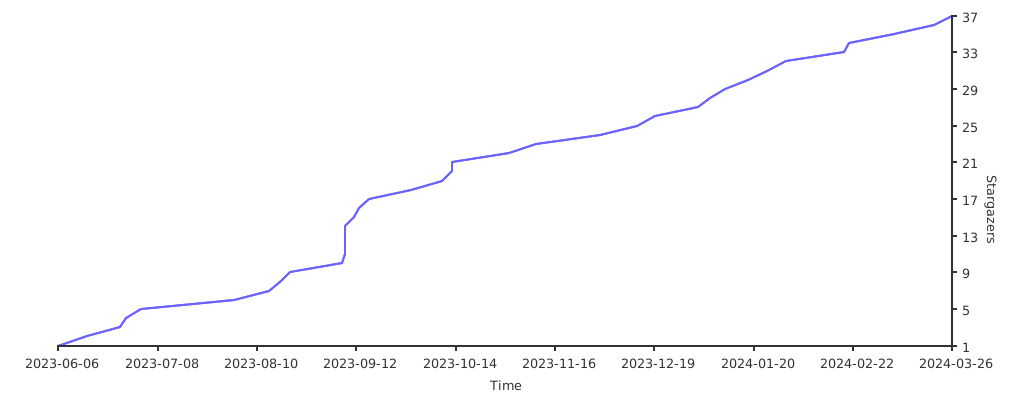
| GitHub stars | 73 |
| Maintainers | varown |
## Links
- npm: https://www.npmjs.com/package/react-antd-column-resize
- Repository: https://github.com/varown/react-antd-column-resize
- Homepage: https://varown.github.io/react-antd-column-resize/components/use-antd-column-resize
- Issues: https://github.com/varown/react-antd-column-resize/issues
- npm.io page: https://npm.io/package/react-antd-column-resize
## Dependencies (2)
- [rc-util](https://npm.io/package/rc-util.md) ^5.31.1
- [react-resizable](https://npm.io/package/react-resizable.md) ^3.0.5
## Recent versions
- 1.0.3 (latest) — 2023-09-13
- 1.0.2 — 2023-08-23
- 1.0.1 — 2023-08-23
- 1.0.0 — 2023-06-30
- 0.0.7 — 2023-06-21
- 0.0.6 — 2023-06-16
- 0.0.5 — 2023-06-14
- 0.0.4 — 2023-06-07
- 0.0.3 — 2023-06-06
- 0.0.2 — 2023-06-05
- 0.0.1 — 2023-06-05
## README
欢迎使用 react-antd-column-resize
> 中文文档 | [English](README_EN.md) [](https://npmjs.org/package/react-antd-column-resize) [](https://npmjs.org/package/react-antd-column-resize)
## 简介
react-antd-column-resize 是一个基于 react hooks 开发的 antd 表格(table)列宽拖动组件,
支持 antd4、antd5 和 ant-design/pro-components 以及所有基于 antd 开发的 table 组件。
其核心 hooks`useAntdColumnResize`,可以自定义拖动的最小宽度、最大宽度和默认宽度方便快捷。
已经使用 antd4、antd5 官网中的 table 示例例进行测试,可以正常使用。
## 安装
```bash
npm install --save react-antd-column-resize
# or use yarn
yarn add react-antd-column-resize
```
## 使用
```jsx
import { Button, Divider, Table } from 'antd';
import React from 'react';
import { useAntdColumnResize } from 'react-antd-column-resize';
const App = () => {
const columns = [
{
title: 'Name',
dataIndex: 'name',
key: 'name',
width: 200,
align: 'center',
},
{
title: 'Age',
dataIndex: 'age',
key: 'age',
width: 100,
},
{
title: 'Address',
dataIndex: 'address',
key: 'address',
width: 300,
},
{
title: 'phone',
dataIndex: 'phone',
key: 'phone',
fixed: 'right',
//width:"必须有一项不设置宽度,不然会造成拖动异常"
//width:"必须有一项不设置宽度,不然会造成拖动异常"
//width:"必须有一项不设置宽度,不然会造成拖动异常"
},
];
const data = [
{
key: '1',
name: 'John Doe',
age: 32,
address: '123 Street, City',
phone: '1588553336',
},
{
key: '2',
name: 'Jane Smith',
age: 28,
address: '456 Road, Town',
phone: '1588553336',
},
];
const { resizableColumns, components, tableWidth, resetColumns } =
useAntdColumnResize(() => {
return { columns, minWidth: 100 };
}, []);
return (
);
};
export default App;
```
## useAntdColumnResize API
useAntdColumnResize(setup: () => resizeDataType, dependencies: any[])
| 参数 | 说明 | 类型 | 默认值 |
| ------------ | -------------- | ------------------------------ | ------ |
| setup | 获取列配置函数 | `() => resizeDataType` | - |
| dependencies | 更新依赖项 | `any[]` | - |
### resizeDataType setup 返回数据类型
| 参数 | 说明 | 类型 | 默认值 |
| -------- | -------- | --------------------------- | ------ |
| columns | 列配置 | object[] antd table columns | - |
| minWidth | 最小宽度 | number | 120 |
| maxWidth | 最大宽度 | number | 2000 |
## useAntdColumnResize 返回数据
| 参数 | 说明 | 类型 | 默认值 |
| ---------------- | --------------- | --------------------------- | ------ |
| resizableColumns | 可拖动列配置 | object[] antd table columns | - |
| components | antd table 组件 | object | - |
| tableWidth | 表格宽度 | number | - |
| resetColumns | 重置列 | function | - |
## 注意事项(请一定阅读,请一定阅读,请一定阅读,尤其是第二项)
1. `columns` 设置每项 `width` 时,默认该项是可拖动项。
2. `columns` 至少需要一项不设置 `width`,否则会拖动异常,`minWidth` 默认是未设置项宽度的最小宽度。
原因:当 `columns` 每项设置的宽度之和小于表格宽度时,会造成拖动异常,所以需要至少一项不设置宽度,让其自适应。
3. `minWidth`、`maxWidth` 代表可拖动的距离,建议 `minWidth`等于 `columns` 设置的最小宽度项,最大宽度同理应大于`columns` 设置的最大宽度项。
4. 请不要欺骗`useAntdColumnResize`,`dependencies` 依赖项请按需添加,否则会造成无限循环。
### 贡献
如果对您有帮助希望动动您发财的小手,给个 star 吧!
欢迎贡献代码、提出问题或者改进建议。请查阅贡献指南了解更多详情。
## Stargazers over time
[](https://starchart.cc/varown/react-antd-column-resize)
---
_Source: https://npm.io/package/react-antd-column-resize · Machine-readable twin of the npm.io package page. Health data is recomputed on every publish._