# react-antd-search-select

> 基于React Antd远程 SearchSelect 组件，参数灵活可配置

Latest version **1.1.9** (published 2021-12-07) · ISC license · 0 weekly downloads

## Install

```sh
npm install react-antd-search-select
pnpm add react-antd-search-select
yarn add react-antd-search-select
bun add react-antd-search-select
```

## Health

**Score 15/100 (F)** — status: abandoned.

Positive: no vulnerabilities.

Warnings: low downloads; no types; no esm support.

Negative: abandoned; low maintenance score.

## Facts

| | |
|---|---|
| Version | 1.1.9 |
| Published | 2021-12-07 |
| First published | 2021-11-08 |
| Weekly downloads | 0 |
| License | ISC |
| TypeScript types | none |
| Module format | CommonJS |
| Dependencies | 3 |
| Unpacked size | 49.7 KB |
| Known vulnerabilities | 0 |
| Install scripts | no |
| Author | yanhuakang |
| Maintainers | yanhuakang |
| Keywords | react, antd, search select, select, remote select, remote search select, SearchSelect, search |

## Links

- npm: https://www.npmjs.com/package/react-antd-search-select
- Repository: https://gitee.com/yanhuakang/react-antd-search-select
- Homepage: https://blog.csdn.net/qq_41887214/article/details/121212227
- Issues: https://gitee.com/yanhuakang/react-antd-search-select/issues
- npm.io page: https://npm.io/package/react-antd-search-select

## Dependencies (3)

- [qs](https://npm.io/package/qs.md) ^6.10.1
- [prop-types](https://npm.io/package/prop-types.md) ^15.7.2
- [lodash.debounce](https://npm.io/package/lodash.debounce.md) ^4.0.8

## Alternatives

- [mobx-react](https://npm.io/package/mobx-react.md) — 2.8M weekly downloads
- [rc-tree](https://npm.io/package/rc-tree.md) — 2.6M weekly downloads
- [@react-oauth/google](https://npm.io/package/@react-oauth/google.md) — 1.3M weekly downloads
- [@wagmi/connectors](https://npm.io/package/@wagmi/connectors.md) — 877.0K weekly downloads
- [vee-validate](https://npm.io/package/vee-validate.md) — 836.4K weekly downloads

## Recent versions

- 1.1.9 (latest) — 2021-12-07
- 1.1.8 — 2021-12-03
- 1.1.7 — 2021-11-26
- 1.1.6 — 2021-11-26
- 1.1.5 — 2021-11-25
- 1.1.4 — 2021-11-25
- 1.1.3 — 2021-11-25
- 1.1.2 — 2021-11-11
- 1.1.1 — 2021-11-10
- 1.1.0 — 2021-11-10
- 1.0.2 — 2021-11-10
- 1.0.1 — 2021-11-08
- 1.0.0 — 2021-11-08

## README

# SearchSelect


## 介绍

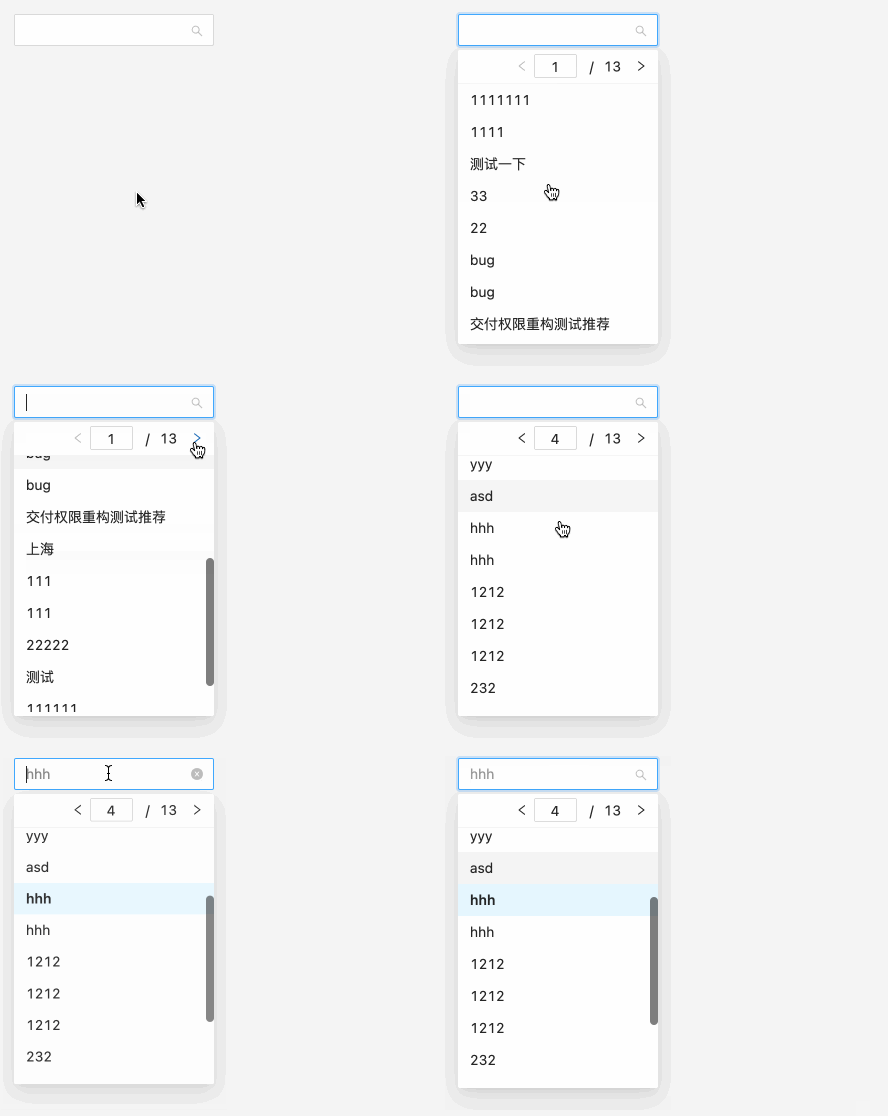
1. SearchSelect基于[React](https://react.docschina.org/)、[Ant Design](https://ant.design/index-cn)，适用于React + Ant Design项目
2. SearchSelect为受控组件
3. SearchSelect设计为一般PC常用远程搜索需求，接口、入参、出参等参数均可自定义配置

![sample](https://img-blog.csdnimg.cn/f6c0610c84d040349f417c6f7512d669.gif)


## 使用方式

### 安装

```js
npm i @liepin/react-search-select-pc
```


### 使用

#### 全局配置，定义你们的通用业务字段

**如果你大范围使用组件的话，非常建议你进行全局配置**

```jsx
// @/components/search-select.jsx
import React from 'react'
import SearchSelect from '@liepin/react-search-select-pc'
import { axios } from '@/common'

export default (props) => {
  return (
    <SearchSelect
      axios={axios} // 你的 axios 实例
      startSearchIndex={1} // 接口搜索起始索引
      pageSize={15} // 每页条数
      flagKeyName='code' // 判断接口返回成功失败标识字段
      flagValue={200} // 判断接口返回成功失败标识键值
      responseDataKeyName='resData' // 响应数据res.data字段
      totalRowsKeyName='totalNumber' //  响应数据，总条数字段
      responseCurrentPageName='currentPage' // // 响应数据，当前页字段
      listKeyName='tableList' // 响应数据，列表字段
      { ...props } // 局部使用会覆盖全局设置
    />
  )
}
```

***配置会以一个优先顺序进行合并***。这个顺序是：在 `lib/bundle.js` 找到的库的默认值，然后是实例的 `全局` 配置，最后是`局部`配置 。***后者将优先于前者***。

#### 局部使用

```jsx
import SearchSelect from '@/components/search-select'
<SearchSelect
  url='/user/list.json'
	queryKeyName='useName'
  labelKeyName='useName'
  valueKeyName='useId'
/>
```


#### 搜索

```jsx
<SearchSelect
  url='/user/list.json' // 接口
  queryParams={{ // 设置默认搜索字段
    type: 1,
    ...
  }}
  queryKeyName='useName' // 配置搜索关键字字段
  labelKeyName='useName'
  valueKeyName='useId'
/>
```


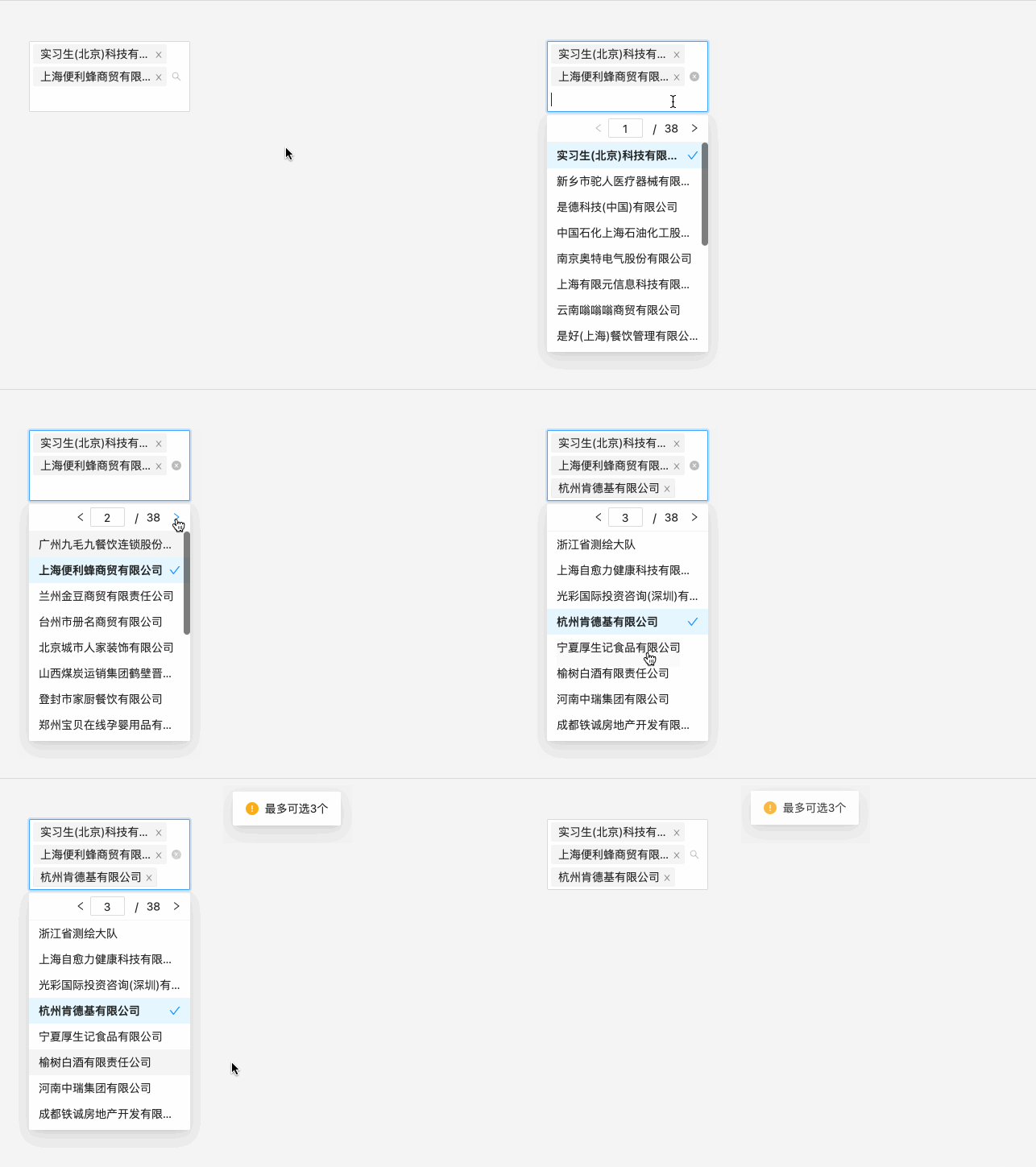
#### 多选

```jsx
<SearchSelect
  url='/user/list.json' // 接口
  mode='multiple'
  max={3} // 设置最多选择数量
/>
```

![sample](https://img-blog.csdnimg.cn/b8e191fc415f4c009734786b4a7c3bd3.gif)


#### 回显

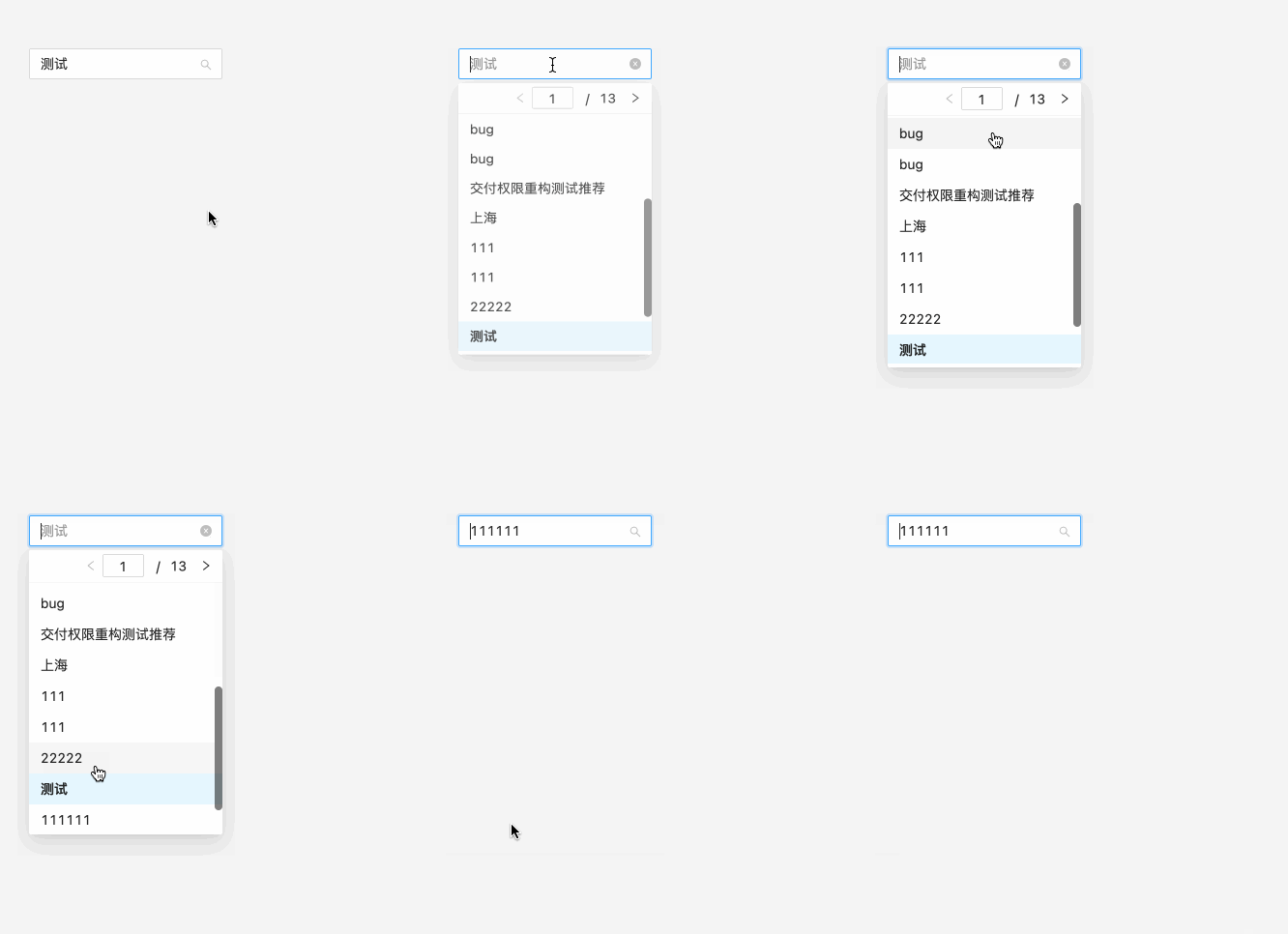
回显的策略是通过`form.setFieldsValue`或`defaultValue`设置`value`，因为组件是分页的，因此需要显式的传给组件回显数据项`selectedOptionList`。

##### 单选回显

```jsx
useEffect(() => {
  form.setFieldsValue({
    userId: 405
  })
}, [])

<Form form={form}>
  <Form.Item name='searchSelect'>
    <SearchSelect
      url='/user/list.json'
      selectedOptionList={[
        {
          stringValue: "测试",
          text: "测试",
          value: 405
        }
      ]}
      />
  </Form.Item>
</Form>
```

![sample](https://img-blog.csdnimg.cn/570511ca56d54bb8bf6d824f4e5eaee8.gif)


##### 多选回显

```jsx
useEffect(() => {
  form.setFieldsValue({
    userId: [987, 965]
  })
}, [])

<Form form={form}>
  <Form.Item name='searchSelect'>
    <SearchSelect
      url='/user/list.json'
      mode='multiple'
      max={3}
      selectedOptionList={[
        { 'text': '实习生(北京)科技有限公司', 'value': 987 },
        { 'text': '上海便利蜂商贸有限公司', 'value': 965 }
      ]}
      />
  </Form.Item>
</Form>
```

![sample](https://img-blog.csdnimg.cn/e87162bff5ba46e5bc07f5f5db96bd92.gif)


#### onChange

**返回值**

- value 为选中数据主键值；

- row 为选中的数据项

```jsx
<SearchSelect
  url='/user/list.json'
	onChange={(value, row) => {
    console.log(value, row)
  }}
/>
```


#### 额外的后缀label

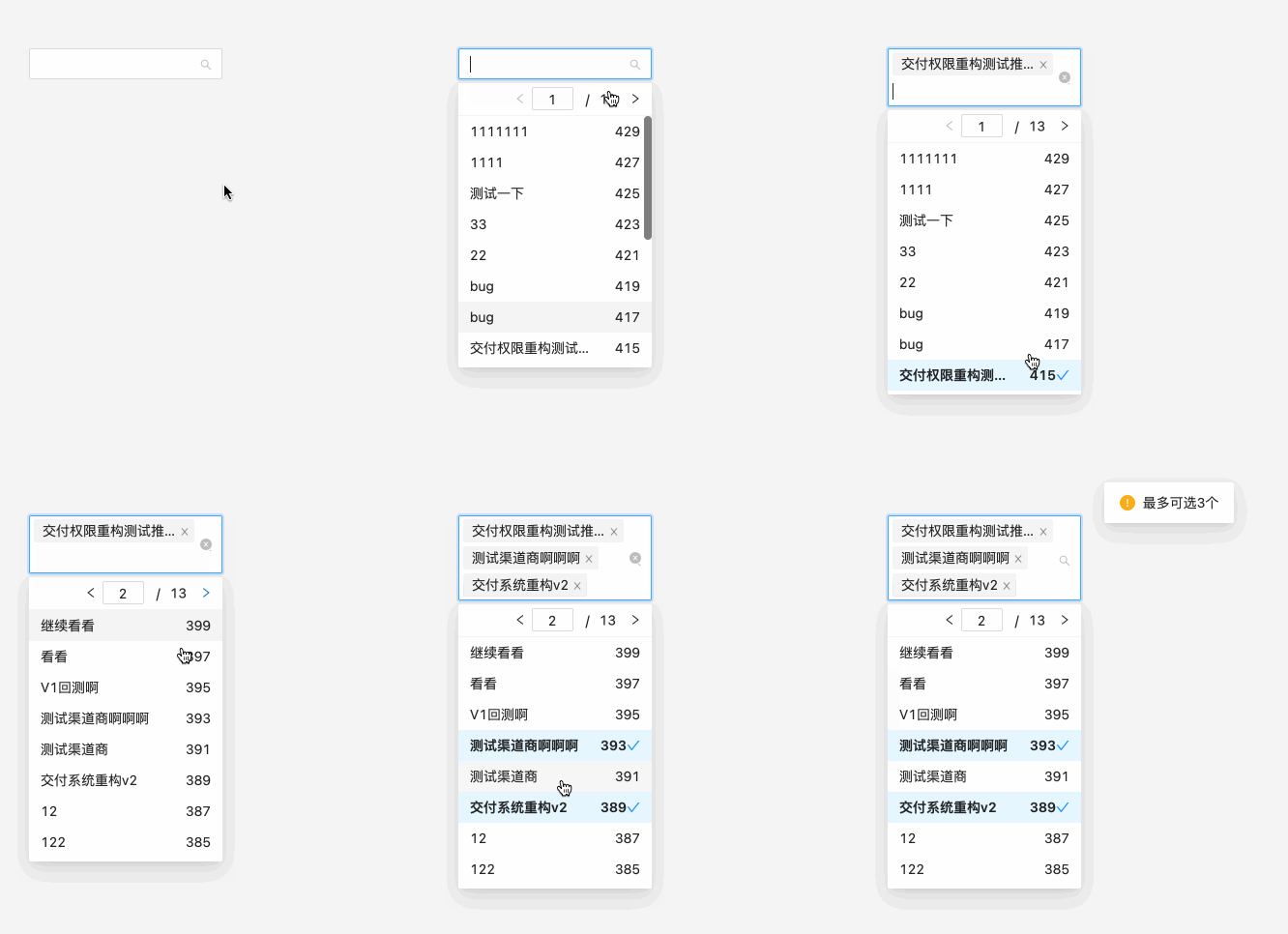
有时候我们可能会需要在option中显示一个其他字段，如：品牌名。这里提供两种方式

![sample](https://img-blog.csdnimg.cn/7f9277d4276a4be895cd056f101550b0.gif)

##### 1. 自定义option右侧字段

如不返回则不展示右侧额外字段。样式上一个`option`中`label`为`flex: 3`，`extraSuffix`为`flex: 1`

```jsx
<SearchSelect
  url='/goods/list.json'
  optionLabelProp='label' // 设置回填到选择框的 Option 的属性值
	extraSuffix={item => { // item为当前数据项
    return item.brandName // 返回要显示的字段
  }}
/>
```

##### 2. 自定义option

 ***row字段必须设置，为onChange时获取的数据项***

```jsx
<SearchSelect
  url='/goods/list.json'
	optionLabelProp='label' // 设置回填到选择框的 Option 的属性值
  renderOptions={dataList => { // dataList为下拉选数据
    return dataList.map(item => (
      <Option
        disabled={item.disabled}
        key={item.value}
        value={item.value}
        label={item.text}
        row={item} // ***此字段必须设置，为onChange时获取的数据项***
        >
        <div style={{ display: 'flex', justifyContent: 'space-between' }}>
          <span>{item.text}</span>
          <span>{item.value}</span>
        </div>
      </Option>
    ))
  }}
/>
```


#### 自定义接口返回数据字段、结构

组件默认的接口返回去数据结构和字段如下

```json
{
  data: {
    curPage: 0,
    dataList: [],
    pageSize: 15,
    totalRows: 56
  },
  flag: 1
}
```

但是你的接口返回的数据结构和字段比不是这样，组件提供两种方式解决

##### 结构相同，字段不一致

```jsx
<SearchSelect
  url='/user/list.json'
  flagKeyName='code' // 判断接口返回成功失败标识字段，对应 flag
  flagValue={200} // 判断接口返回成功失败标识键值，对应 flag: 1
  responseDataKeyName='resData' // 响应数据res.data字段，对应 data
  totalRowsKeyName='totalNumber' //  响应数据，总条数字段，对应 totalRows
  responseCurrentPageName='currentPage' // // 响应数据，当前页字段，对应 curPage
  listKeyName='tableList' // 响应数据，列表字段，对应 dataList
/>
```

##### 结构不同

比如你的接口返回数据结构如下，要转换为组件需要的数据结构和字段

```json
{
  code: 200,
  message: 'OK',
  list: [],
  totalNumber: 100,
  current: 1
}
```

通过`responseDataFormat`修改

```jsx
<SearchSelect
  url='/user/list.json'
  responseDataFormat={(resData) => { // resData为接口响应数据
    return {
      flag: resData.code === 200 ? 1 : 0,
      data: {
        totalRows: resData.totalNumber,
        curPage: resData.current,
        dataList: resData.data.list
      }
    }
  }}
/>
```


## API

### Props

| 属性                    | 说明                                               | 默认值                     | 类型                                        | 可选值                     | 版本  |
| :---------------------- | :------------------------------------------------- | -------------------------- | :------------------------------------------ | -------------------------- | ----- |
| axios                   | axios实例，使用post请求方式，必填                  |                            | Function                                    |                            |       |
| url                     | 接口，必填                                         |                            | String                                      |                            |       |
| queryParams             | 搜索参数                                           |                            | Object                                      |                            |       |
| queryKeyName            | 搜索关键字字段                                     | queryKeyword               | String                                      |                            |       |
| pageSize                | 搜索，每页条数键值                                 | 10                         | Number\|String                              |                            |       |
| pageSizeKeyName         | 搜索条件，每页条数字段                             | pageSize                   | String                                      |                            |       |
| currentPageKeyName      | 搜索条件，当前页字段                               | curPage                    | String                                      |                            |       |
| labelKeyName            | option label 字段                                  | label                      | String                                      |                            |       |
| valueKeyName            | option value 字段                                  | value                      | String                                      |                            |       |
| disabledKeyName         | option disabled 字段                               | disabled                   | String                                      |                            |       |
| flagKeyName             | 判断接口返回成功失败标识字段                       | flag                       | String                                      |                            |       |
| flagValue               | 判断接口返回成功失败标识键值                       | 1                          | String<br />Number<br />Boolean<br />Symbol |                            |       |
| responseDataKeyName     | 响应数据res.data字段                               | data                       | String                                      |                            |       |
| responseCurrentPageName | 响应数据，当前页字段                               | 默认取currentPageKeyName值 | String                                      |                            |       |
| totalRowsKeyName        | 响应数据，总条数字段                               | totalRows                  | String                                      |                            |       |
| listKeyName             | 响应数据，列表字段                                 | dataList                   | String                                      |                            |       |
| allowClear              | 支持清除                                           | true                       | Boolean                                     |                            |       |
| startSearchIndex        | 自定义接口搜索起始索引                             | 0                          | Number\|String                              |                            |       |
| qsStringify             | 是否使用qs模块序列化参数                           | false                      | Boolean                                     |                            |       |
| selectStyle             | select样式                                         |                            | Object                                      |                            |       |
| extraSuffix             | 额外的后缀label                                    |                            | Function                                    |                            |       |
| selectedOptionList      | 回显数据，需要配合form.setFieldsValue才能回显成功  | []                         | Array                                       |                            |       |
| max                     | 最多选择数量，只在 mode 为 multiple 或 tags 时有效 | 999                        | Number                                      |                            |       |
| lang                    | 选择数量超过max值时的提示语国际化类型              | zh                         | String                                      | zh<br />en<br />es<br />ja |       |
| renderOptions           | 自定义option                                       |                            | Function                                    |                            |       |
| responseDataFormat      | 修改接口返回数据                                   |                            | Function                                    |                            |       |
| requestFail             | 请求失败后的回调，参数为接口响应数据               |                            | Function                                    |                            | 1.0.2 |


### [Antd Select API](https://ant.design/components/select-cn/#API)


### Antd Select被组件占用的且无法修改的props，其他都可用

| PropTypes.node    |
| :---------------- |
| showSearch        |
| loading           |
| notFoundContent   |
| getPopupContainer |
| dropdownRender    |
| onSearch          |
| filterOption      |

---
_Source: https://npm.io/package/react-antd-search-select · Machine-readable twin of the npm.io package page. Health data is recomputed on every publish._