# react-archer-clickable-arrows
> Draw arrows between DOM elements in React
Latest version **0.3.2** (published 2019-03-15) · MIT license · 0 weekly downloads
## Install
```sh
npm install react-archer-clickable-arrows
pnpm add react-archer-clickable-arrows
yarn add react-archer-clickable-arrows
bun add react-archer-clickable-arrows
```
## Health
**Score 30/100 (F)** — status: abandoned.
Positive: esm support; no vulnerabilities.
Warnings: low downloads; no types; pre 1.0.
Negative: abandoned.
## Facts
| | |
|---|---|
| Version | 0.3.2 |
| Published | 2019-03-15 |
| First published | 2019-03-15 |
| Weekly downloads | 0 |
| License | MIT |
| TypeScript types | none |
| Module format | ESM + CommonJS |
| Dependencies | 3 |
| Unpacked size | 48.1 KB |
| Known vulnerabilities | 0 |
| Install scripts | no |
| GitHub stars | 1343 |
| Maintainers | sebastienva |
## Links
- npm: https://www.npmjs.com/package/react-archer-clickable-arrows
- Repository: https://github.com/pierpo/react-archer
- Issues: https://github.com/pierpo/react-archer/issues
- npm.io page: https://npm.io/package/react-archer-clickable-arrows
## Dependencies (3)
- [react](https://npm.io/package/react.md) 16.6.0
- [react-dom](https://npm.io/package/react-dom.md) 16.6.0
- [resize-observer-polyfill](https://npm.io/package/resize-observer-polyfill.md) 1.5.0
## Recent versions
- 0.3.2 (latest) — 2019-03-15
## README
# react-archer
[](https://circleci.com/gh/pierpo/react-archer)
🏹 Draw arrows between DOM elements in React 🖋
## Installation
`npm install react-archer --save` or `yarn add react-archer`
## Example
[Try it out!](https://pierpo.github.io/react-archer/)
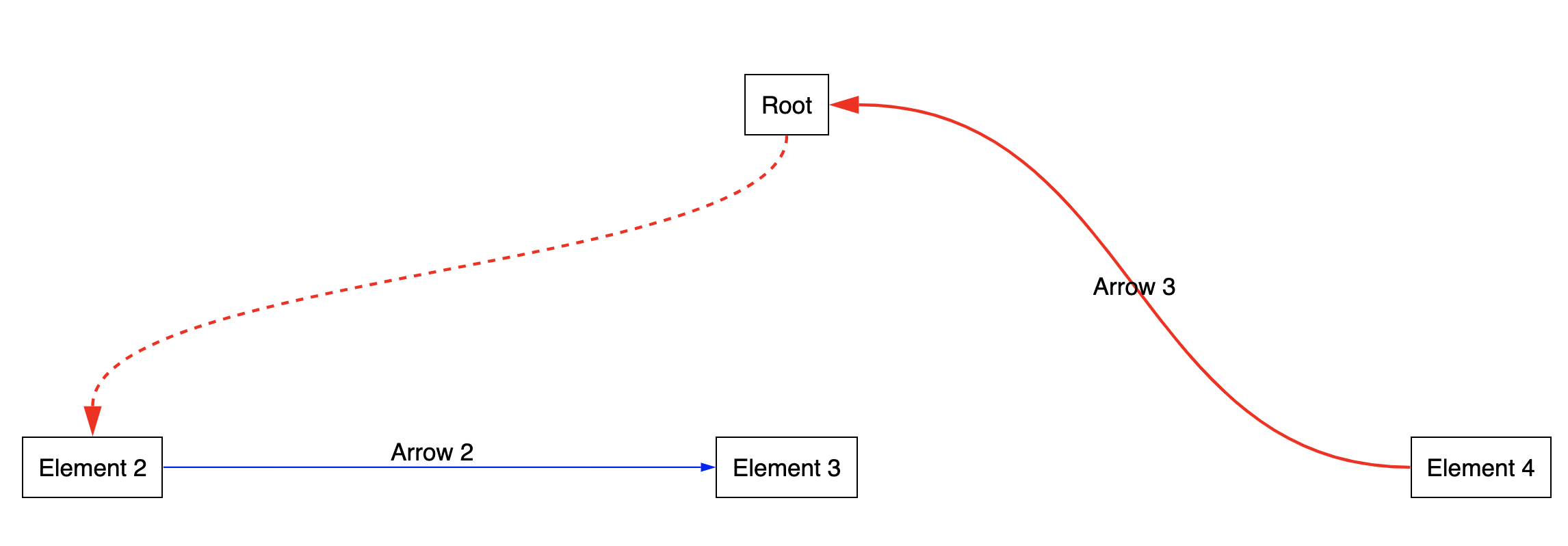
```jsx
import { ArcherContainer, ArcherElement } from 'react-archer';
const rootStyle = { display: 'flex', justifyContent: 'center' };
const rowStyle = { margin: '200px 0', display: 'flex', justifyContent: 'space-between', }
const boxStyle = { padding: '10px', border: '1px solid black', };
const App = () => {
return (
,
}]}
>
Element 2
Element 3
Element 4
);
}
export default App;
```
## API
### `ArcherContainer`
| Name | Type | Description |
| - | - | - |
| `strokeColor` | `string` | A color string `'#ff0000'`
| `strokeWidth` | `number` | A size in `px`
| `arrowLength` | `number` | A size in `px`
| `arrowThickness` | `number` | A size in `px`
| `children` | `React.Node` |
### `ArcherElement`
| Name | Type | Description |
| - | - | - |
| `id` | `string` | The id that will identify the Archer Element. Should only contain alphanumeric characters and standard characters that you can find in HTML ids.
| `strokeColor` | `string` | A color string `'#ff0000'`
| `strokeWidth` | `number` | A size in `px`
| `arrowLength` | `number` | A size in `px`
| `arrowThickness` | `number` | A size in `px`
| `children` | `React.Node` |
| `relations` | `Array` |
The `Relation` type has the following shape:
```javascript
{
from: {
anchor: 'top' | 'bottom' | 'left' | 'right'
},
to: {
anchor: 'top' | 'bottom' | 'left' | 'right'
id: string
},
label: React.Node
}
```
## TODO
- Automatic anchoring option
- Options to customize the path shape more (straight line, right angle line, smoothed right angle path)
- Add a Code Sandbox
---
_Source: https://npm.io/package/react-archer-clickable-arrows · Machine-readable twin of the npm.io package page. Health data is recomputed on every publish._