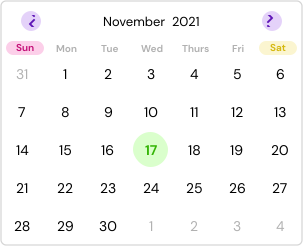
# react-beautiful-calendar

> A beautiful react calendar component library for your beautiful react apps

Latest version **1.2.1** (published 2021-11-27) · MIT license · 0 weekly downloads

## Install

```sh
npm install react-beautiful-calendar
pnpm add react-beautiful-calendar
yarn add react-beautiful-calendar
bun add react-beautiful-calendar
```

## Health

**Score 20/100 (F)** — status: abandoned.

Positive: esm support; no vulnerabilities.

Warnings: low downloads; no types.

Negative: abandoned; low maintenance score.

## Facts

| | |
|---|---|
| Version | 1.2.1 |
| Published | 2021-11-27 |
| First published | 2021-11-21 |
| Weekly downloads | 0 |
| License | MIT |
| TypeScript types | none |
| Module format | ESM + CommonJS |
| Dependencies | 1 |
| Unpacked size | 49.2 KB |
| Known vulnerabilities | 0 |
| Install scripts | no |
| GitHub stars | 3 |
| Author | Mehul Singh Teya |
| Maintainers | army-daxter |
| Keywords | calendar, date-picker, month-picker, year-picker, functional-component, react-beautiful-calendar |

## Links

- npm: https://www.npmjs.com/package/react-beautiful-calendar
- Repository: https://github.com/daxter-army/react-beautiful-calendar
- Homepage: https://daxter-army.github.io/react-beautiful-calendar
- Issues: https://github.com/daxter-army/react-beautiful-calendar/issues
- npm.io page: https://npm.io/package/react-beautiful-calendar

## Dependencies (1)

- [prop-types](https://npm.io/package/prop-types.md) ^15.7.2

## Alternatives

- [@js-joda/timezone](https://npm.io/package/@js-joda/timezone.md) — 383.4K weekly downloads
- [chartjs-adapter-moment](https://npm.io/package/chartjs-adapter-moment.md) — 210.8K weekly downloads
- [strftime](https://npm.io/package/strftime.md) — 171.2K weekly downloads
- [vue-flatpickr-component](https://npm.io/package/vue-flatpickr-component.md) — 115.8K weekly downloads
- [timepicker](https://npm.io/package/timepicker.md) — 51.0K weekly downloads

## Recent versions

- 1.2.1 (latest) — 2021-11-27
- 1.2.0 — 2021-11-27
- 1.1.16 — 2021-11-25
- 1.1.15 — 2021-11-25
- 1.1.14 — 2021-11-25
- 1.1.13 — 2021-11-24
- 1.1.12 — 2021-11-24
- 1.1.11 — 2021-11-23
- 1.1.10 — 2021-11-23
- 1.1.9 — 2021-11-23
- 1.1.8 — 2021-11-23
- 1.1.7 — 2021-11-23
- 1.1.6 — 2021-11-23
- 1.1.5 — 2021-11-23
- 1.1.4 — 2021-11-23
- … 5 more at https://npm.io/package/react-beautiful-calendar/versions

## README

[![made-with-react](https://img.shields.io/badge/made%20with-react-blue.svg)](https://www.reactjs.org/)
[![MIT-license](https://img.shields.io/badge/license-MIT-green)](https://opensource.org/licenses/MIT)

# react-beautiful-calendar

**A beautiful react calendar component library for your beautiful react apps.**

<p align="center">
    <img src="https://raw.githubusercontent.com/daxter-army/react-beautiful-calendar/main/readme-media/default-calendar-ss.svg" width="37%" alt="base-calendar-image"/>
</p>

### 🏡 Online Demo

- Visit <a href="https://www.npmjs.com/package/react-beautiful-calendar"><strong>Npm Package Homepage</strong>.</a>
- Visit <a href="https://daxter-army.github.io/react-beautiful-calendar/"><strong>Project Homepage</strong></a> to see live demo.

### ⚡ Specifications

- Pick days, months, years
- Choose size as per your convenience and mood **[COMING SOON!]**
- No third-party module needed, no moment.js

### 🚀 Getting Started

- Compatibility

  - This package uses `react: "^17.0.2"`, `react-dom: "^17.0.2"` as peer dependencies & `prop-types: ^15.7.2` as a dependency.

- Installation

  - Install it via npm, by using

  ```sh
      npm install react-beautiful-calendar
  ```

  - or via yarn, by hitting

  ```sh
      yarn add react-beautiful-calendar
  ```

- Importing

  - Import it in your project, by using

  ```sh
      import Calendar from "react-beautiful-calendar"
  ```

- Using
  - Use it by adding,
  ```js
  <Calendar onDateChange={your_handler_function} />
  ```

### 📑 User Guide

#### Calendar

- Displays a complete, interactive calendar widget.

#### Code Snippet Example

```javascript
import Calendar from "react-beautiful-calendar";

const App = () => {
  const dateChangeHandler = ([date, month, year]) => {
    // ...use the values here
  };

  // ...other code

  return <Calendar onDateChange={dateChangeHandler} />;
};
```

#### Props

|   Prop name    |                                                       Description                                                       | Default value |                 Example                  |
| :------------: | :---------------------------------------------------------------------------------------------------------------------: | :-----------: | :--------------------------------------: |
|   `variant`    |                                    It denotes the type of calendar widgets available                                    |   `default`   |           `variant="default"`            |
|     `font`     |                                             Sets font style for the widget                                              |   `DM Sans`   |             `font="DM Sans"`             |
| `onDateChange` | Handler function, triggers when a date is selected, it returns you an array containing 3 values as date, month and year |       -       | `dateChangeHandler([date, month, year])` |

### 🐞 Issues

- Issues: [Issues](https://github.com/daxter-army/react-beautiful-calendar/issues)

### 📤 Useful Links

- Icons: [Fontawesome](https://fontawesome.com)

### 📜 License

- MIT License

### 🏆 Author

<table>
  <tr>
    <td>
      <img src="https://github.com/daxter-army.png?s=100" width="100">
    </td>
    <td>
      Mehul Singh Teya<br />
      <a href="mailto:mehulsinghteya@gmail.com">mehulsinghteya@gmail.com</a><br />
      <a href="https://daxter-army.github.io">https://daxter-army.github.io</a>
    </td>
  </tr>
</table>

---
_Source: https://npm.io/package/react-beautiful-calendar · Machine-readable twin of the npm.io package page. Health data is recomputed on every publish._