# react-drag-resize-growth
> React 用于可调整大小和可拖动元素的组件并支持冲突检测与与操作回溯与键盘操作
Latest version **1.2.5** (published 2023-03-19) · ISC license · 0 weekly downloads
## Install
```sh
npm install react-drag-resize-growth
pnpm add react-drag-resize-growth
yarn add react-drag-resize-growth
bun add react-drag-resize-growth
```
## Health
**Score 15/100 (F)** — status: abandoned.
Positive: no vulnerabilities.
Warnings: low downloads; no types; no esm support.
Negative: abandoned; low maintenance score.
## Facts
| | |
|---|---|
| Version | 1.2.5 |
| Published | 2023-03-19 |
| First published | 2022-11-23 |
| Weekly downloads | 0 |
| License | ISC |
| TypeScript types | none |
| Module format | CommonJS |
| Dependencies | 5 |
| Unpacked size | 8.4 MB |
| Known vulnerabilities | 0 |
| Install scripts | no |
| GitHub stars | 9 |
| Author | linjiahong |
| Maintainers | linjiahong |
| Keywords | react, component, drag, resize, dragabble, resizable |
## Links
- npm: https://www.npmjs.com/package/react-drag-resize-growth
- Repository: https://github.com/LinJiaHongAlan/react-drag-resize-growth
- Homepage: https://github.com/LinJiaHongAlan/react-drag-resize-growth#readme
- Issues: https://github.com/LinJiaHongAlan/react-drag-resize-growth/issues
- npm.io page: https://npm.io/package/react-drag-resize-growth
## Dependencies (5)
- [classnames](https://npm.io/package/classnames.md) ^2.3.2
- [prop-types](https://npm.io/package/prop-types.md) ^15.8.1
- [deep-extend](https://npm.io/package/deep-extend.md) ^0.6.0
- [styled-components](https://npm.io/package/styled-components.md) ^5.3.6
- [clean-webpack-plugin](https://npm.io/package/clean-webpack-plugin.md) ^4.0.0
## Alternatives
- [mobx-react](https://npm.io/package/mobx-react.md) — 2.8M weekly downloads
- [rc-tree](https://npm.io/package/rc-tree.md) — 2.6M weekly downloads
- [@react-oauth/google](https://npm.io/package/@react-oauth/google.md) — 1.3M weekly downloads
- [@wagmi/connectors](https://npm.io/package/@wagmi/connectors.md) — 877.0K weekly downloads
- [vee-validate](https://npm.io/package/vee-validate.md) — 836.4K weekly downloads
## Recent versions
- 1.2.5 (latest) — 2023-03-19
- 1.2.4 — 2023-03-18
- 1.2.3 — 2023-03-18
- 1.2.2 — 2022-12-21
- 1.2.1 — 2022-12-21
- 1.1.10 — 2022-12-21
- 1.1.9 — 2022-11-27
- 1.1.8 — 2022-11-27
- 1.1.7 — 2022-11-27
- 1.1.6 — 2022-11-27
- 1.1.4 — 2022-11-27
- 1.1.5 — 2022-11-27
- 1.1.3 — 2022-11-26
- 1.1.2 — 2022-11-26
- 1.1.1 — 2022-11-26
- … 4 more at https://npm.io/package/react-drag-resize-growth/versions
## README
ReactDragResize
## 说明
> 说明:组件基于[vue-draggable-resizable](https://github.com/mauricius/vue-draggable-resizable)为参考借鉴,进行的 React 版本改造
部分功能使用,基于考虑略有修改,相对于原本设计上进行了部分优化,支持操作操作回溯以及,键盘操作功能 1.19 版本,已修复引入报错问题
1.2.4 版本修复 onResizestop 与 onResizing 不是组件最新的属性的问题
1.2.5 修复限制父级宽度的时候组件缩放会超出的问题,修复组件高宽以及位置改变时,位置不匹配问题
[](https://www.npmjs.com/package/react-drag-resize-growth)
[](https://www.npmjs.com/package/react-drag-resize-growth)
## 功能预览
[中文版演示地址](https://linjiahongalan.github.io/react-drag-resize-growth/index.html)
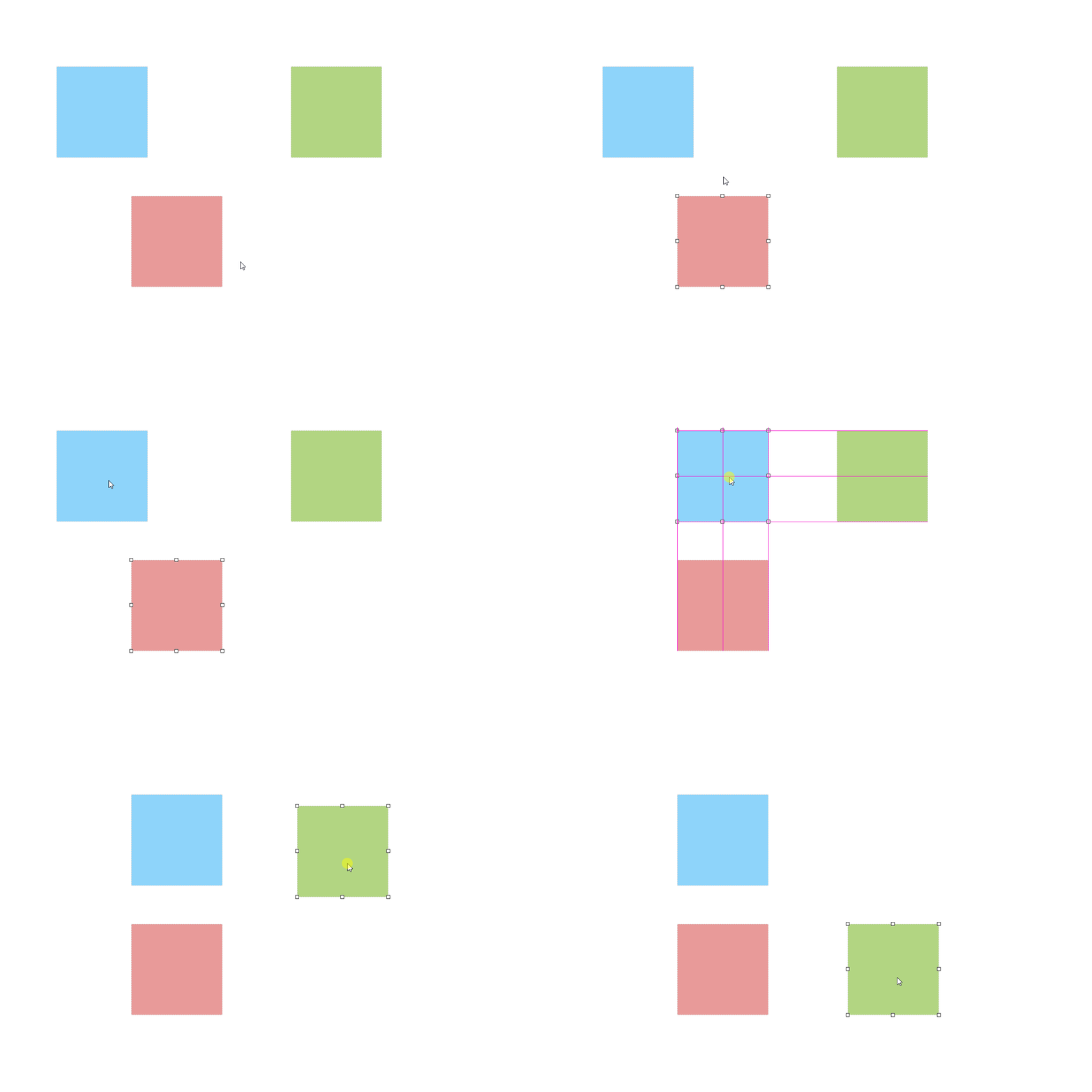
## 安装
```bash
npm install react-drag-resize-growth
yarn add react-drag-resize-growth
```
## 引入
```jsx
import ReactDragResize from 'react-drag-resize-growth'
;
```
## 基本使用
**插槽**
类型: `ReactNode`
必需: `false`
组件具有插槽,被插入的 ReactNode 可直接显示在拖拽物体里面
```jsx
我在里面
```
**comid**
类型: `String`
必需: `false`
默认: `null`
组件的标识符唯一 id,必须为唯一值,后续逻辑处理或事件监听中可知道是哪个组件触发事件监听,若只有一个组件,通常无需传值
```jsx
```
**w**
类型: `Number 'auto'`
必需: `false`
默认: `200`
**h**
类型: `Number 'auto'`
必需: `false`
默认: `200`
物体的高度与宽度,传`auto`时则表示宽度为自动撑开
```jsx
```
**x**
类型: `Number`
必需: `false`
默认: `0`
**y**
类型: `Number`
必需: `false`
默认: `0`
物体的距离父节点左边与顶部距离
```jsx
```
**minw**
类型: `Number`
必需: `false`
默认: `0`
**minh**
类型: `Number`
必需: `false`
默认: `0`
物体的最小宽度与高度
```jsx
```
**maxw**
类型: `Number`
必需: `false`
默认: `null`
**maxh**
类型: `Number`
必需: `false`
默认: `null`
物体的最大宽度与高度,若传 null 则不受限制
```jsx
```
**dragHandle**
类型: `String`
必需: `false`
默认: `null`
设置拖拽物体标识,为 css 选择器,若设置则物体物体内需要具有对应的 css 标识才可拖动
```jsx
只有点击我才可以拖拽
```
**dragCancel**
类型: `String`
必需: `false`
默认: `null`
设置拖拽物体标识,为 css 选择器,与 dragHandle 相反若设置则物体物体内具有对应的 css 标识不可拖动
```jsx
只有点击我才可以拖拽
```
**isDraggable**
类型: `Boolen`
必需: `false`
默认: `true`
物体是否允许拖动,`false` 不可拖动 `true` 可拖动
```jsx
我现在不可以拖动
```
**isResizable**
类型: `Boolen`
必需: `false`
默认: `true`
物体是否允许缩放,`false` 不可缩放 `true` 可缩放
```jsx
我现在不可以缩放
```
**aspectRatio**
类型: `Boolen`
必需: `false`
默认: `false`
物体是否等比例缩放
```jsx
我现在是等比例缩放
```
**parentScaleX**
类型: `Number`
必需: `false`
默认: `1`
**parentScaleY**
类型: `Number`
必需: `false`
默认: `1`
物体拖动以及缩放的比例因子,值为则鼠标移动与物体缩放成正比,若因子`X`小于 1 则物体速度为`1/X`,既速度为 2 倍,手柄大小也会为 2 倍
```jsx
速度为2倍
```
**stickSize**
类型: `Number`
必需: `false`
默认: `8`
手柄大小基数,受 parentScale[X/Y]影响
```jsx
放大手柄大小
```
**classNameStick**
类型: `String`
必需: `false`
默认: `空`
自定义手柄 className 名,当需要自定义样式的时候使用
```jsx
手柄颜色变了
```
```css
.diyclass {
background: red;
}
```
**stickSlot**
类型:
```txt
{
tl: ReactNode,
tm: ReactNode,
tr: ReactNode,
mr: ReactNode,
br: ReactNode,
bm: ReactNode,
bl: ReactNode,
ml: ReactNode
}
```
必需: `false`
默认: `{}`
手柄插槽,当需要往手柄 dom 里自定义物体的时候使用
```jsx
上边 }}>
手柄多了一个字
```
**sticks**
类型: `Array`
必需: `false`
默认: `['tl', 'tm', 'tr', 'mr', 'br', 'bm', 'bl', 'ml']`
需要显示的手柄,默认全展示,当手动传入的时候则只显示传入的手柄标识
```jsx
只可以拖动右下角
```
**axis**
类型: `String`
必需: `false`
可选值: `x` `y` `none` `both`
默认:`both`
传入`x`或`y`时,则物体只允许 x 轴或 y 轴移动,`both`则两边都可移动,`none`则不可移动,但不影响缩放
```jsx
只可以拖动右下角
```
## 事件
**onClicBodyDown**
类型: `Function`
必需: `false`
默认: `null`
**onDeselect**
类型: `Function`
必需: `false`
默认: `null`
点击物体内部与外部事件监听
```jsx
const clicBodyDownHandel = ({ comid, ev }) => {
console.log('我点击了里面了', comid, ev)
}
const onDeselectHandel = ({ comid, ev }) => {
console.log('我点击了外面了', comid, ev)
}
;
请点击我
```
**onDragging**
类型: `Function`
必需: `false`
默认: `null`
**onDragstop**
类型: `Function`
必需: `false`
默认: `null`
拖动物体,以及拖动物体停止的事件回调
返参
`comid` 标识唯一 id
`beforeMove`开始位置信息
`curMove`当前位置信息
```jsx
const onDraggingHandel = ({ comid, beforeMove, curMove }) => {
console.log('我在拖拽', comid, beforeMove, curMove)
}
const onDragstopHandel = ({ comid, beforeMove, curMove }) => {
console.log('拖拽结束', comid, beforeMove, curMove)
}
;
请拖动我
```
**onResizing**
类型: `Function`
必需: `false`
默认: `null`
**onResizestop**
类型: `Function`
必需: `false`
默认: `null`
缩放物体,以及缩放物体停止的事件回调
返参
`comid` 标识唯一 id
`beforeMove`开始位置信息
`curMove`当前位置信息
```jsx
const onResizingHandel = ({ comid, beforeMove, curMove }) => {
console.log('我在缩放', comid, beforeMove, curMove)
}
const onResizestopHandel = ({ comid, beforeMove, curMove }) => {
console.log('拖拽缩放', comid, beforeMove, curMove)
}
;
请点击手柄进行缩放
```
组件是否为激活状态, 默认为`null`,当为`null`的时候组件激活状态则是非受控状态,若希望激活状态为受控则需传入对于的`true 或 false`
**内部提供事件监听**
`onClicBodyDown`点击物体内部
`onDeselect`: 点击物体外部
如果希望根据自己已有的逻辑来手动控制激活转态,则可以根据事件监听来做相应的处理,以达到更灵活的程度
```jsx
我现在一直处于激活状态
```
## 父级
**parentW**
类型: `Number`
必需: `false`
默认: `null`
限制:`必须大于 0 或 null`
**parentH**
类型: `Number`
必需: `false`
默认: `null`
限制:`必须大于 0 或 null`
物体父级的宽度与高度,若不传则自动获取父级 dom 元素宽度
```jsx
```
**snapToGrid**
类型: `Boolen`
必需: `false`
默认: `false`
**gridX**
类型: `Number`
必需: `false`
默认: `50`
**gridY**
类型: `Number`
必需: `false`
默认: `50`
`snapToGrid`是否开启是否开启父级限制拖拽距离,若开启则标识物体拖动最小单位会根据` gridX``gridY `来移动
```jsx
// 我最少会移动50px
```
**parentLimitation**
类型: `Boolen`
必需: `false`
默认: `false`
将拖拽物体限制在父级盒子里面高宽里面
```jsx
// 我离不开父级范围
```
## 高级使用
**isActive**
类型: `Boolen`
必需: `false`
默认: `null`
组件是否为激活状态, 默认为`null`,当为`null`的时候组件激活状态则是非受控状态,若希望激活状态为受控则需传入对于的`true 或 false`
**内部提供事件监听**
`onClicBodyDown`点击物体里面
`onDeselect`: 点击物体外部
如果希望根据自己已有的逻辑来手动控制激活转态,则可以根据事件监听来做相应的处理,以达到更灵活的程度
```jsx
我现在一直处于激活状态
```
**isConflictCheck**
类型: `Boolen`
必需: `false`
默认: `false`
冲突检测,若开启冲突检测的目标物体,相互之间不能重叠
```jsx
我们无法重叠
我们无法重叠
```
**historyStepsLength**
类型: `Number`
必需: `false`
默认: `0`
**ref-previousOperationStep**
类型: `Function`返回上一步位置
**ref-nextOperationStep**
类型: `Function`返回下一步位置
**ref-goOperationStep**
类型: `Function`去往第步位置
**ref-historySteps**
类型: `Array`历史步数记录信息
历史记录长度,目标物体会开启一个记录,将物体移动过的地方做一个记录`historyStepsLength`越大则记录的步数越多
组件内部会提供对应方法
```jsx
import { useRef } from 'react';
const ReactDrageResizeRef = useRef();
const previousOperationStepHandel = () =>{
ReactDrageResizeRef.current.previousOperationStep()
}
const nextOperationStepHandel = () =>{
ReactDrageResizeRef.current.nextOperationStep()
}
const goOperationStepStepHandel = () =>{
ReactDrageResizeRef.current.goOperationStep(-2)
}
const getHistoryStepsHandel = () =>{
console.log(ReactDrageResizeRef.current.historySteps)
}
操作块之后可以回退
```
## 组(Group)的使用
ReactDragResize 组件可以在外层包裹一层`Group`,包裹后则可以使用组的功能,激活状态`active`则不再受自身影响,而受`Group`的控制,在`Group`激活转态只会存在一个
```jsx
我们是一个组
我们是一个组
我们是一个组
```
**defaultActive**
在组内支持,默认激活,defaultActive 与 comid 一致时候则激活
```jsx
我们是一个组,并且我是默认激活的那个
我们是一个组
```
## 键盘控制 2022.11.26 新增
**keyDirection**
类型: `String 或 Boolen`
必需: `false`
默认: `null`
**directionStep**
类型: `String 或 Boolen`
必需: `false`
默认: `null`
**shiftDirectionStep**
类型: `String 或 Boolen`
必需: `false`
默认: `null`
keyDirection 为为`null`的时候则不开启,若为 true 的时候,则激活状态会受键盘控制,若为字符串则与 comid 一致时受键盘控制
键盘控制方法为方向键 “←”,“→”,“↑”,“↓” 或者是 `shift` + “←”,“→”,“↑”,“↓”
默认移动距离为 1px,按住`shift`为 10px,可通过`directionStep` `shiftDirectionStep` 修改对应的步数
**单个组件**
keyDirection 为`null`的时候则不开启,若为 true 的时候,则激活状态会受键盘控制
```jsx
开启键盘移动,按住shift可移动10px
```
**使用组包裹**
```jsx
谁被激活,谁受控制
谁被激活,谁受控制
```
```jsx
我是被控制的那个
我不是被控制的那个
```
---
_Source: https://npm.io/package/react-drag-resize-growth · Machine-readable twin of the npm.io package page. Health data is recomputed on every publish._