# react-easy-auth
> Easily add authentication with firebase to your React application.
Latest version **1.0.2** (published 2020-07-11) · MIT license · 0 weekly downloads
## Install
```sh
npm install react-easy-auth
pnpm add react-easy-auth
yarn add react-easy-auth
bun add react-easy-auth
```
## Health
**Score 20/100 (F)** — status: abandoned.
Positive: esm support; no vulnerabilities.
Warnings: low downloads; no types.
Negative: abandoned; low maintenance score.
## Facts
| | |
|---|---|
| Version | 1.0.2 |
| Published | 2020-07-11 |
| First published | 2020-06-25 |
| Weekly downloads | 0 |
| License | MIT |
| TypeScript types | none |
| Module format | ESM + CommonJS |
| Node | >=10 |
| Dependencies | 1 |
| Unpacked size | 34.6 KB |
| Known vulnerabilities | 0 (+1 in 1 direct dependencies) |
| Install scripts | no |
| GitHub stars | 4 |
| Author | chiragsrvstv |
| Maintainers | chiragsrvstv |
| Keywords | react, firebase, react firebase, firebase auth, react auth, react firebase auth, authentication |
## Links
- npm: https://www.npmjs.com/package/react-easy-auth
- Repository: https://github.com/chiragsrvstv/react-easy-auth
- Homepage: https://github.com/chiragsrvstv/react-easy-auth#readme
- Issues: https://github.com/chiragsrvstv/react-easy-auth/issues
- npm.io page: https://npm.io/package/react-easy-auth
## Dependencies (1)
- [firebase](https://npm.io/package/firebase.md) ^7.14.6
## Alternatives
- [mobx-react](https://npm.io/package/mobx-react.md) — 2.8M weekly downloads
- [rc-tree](https://npm.io/package/rc-tree.md) — 2.6M weekly downloads
- [@react-oauth/google](https://npm.io/package/@react-oauth/google.md) — 1.3M weekly downloads
- [@wagmi/connectors](https://npm.io/package/@wagmi/connectors.md) — 877.0K weekly downloads
- [vee-validate](https://npm.io/package/vee-validate.md) — 836.4K weekly downloads
## Recent versions
- 1.0.2 (latest) — 2020-07-11
- 1.0.1 — 2020-06-25
- 1.0.0 — 2020-06-25
## README
# react-easy-auth
> A React component that easily adds social authentication with firebase to your projects.
[](https://www.npmjs.com/package/react-easy-auth) [](https://standardjs.com)
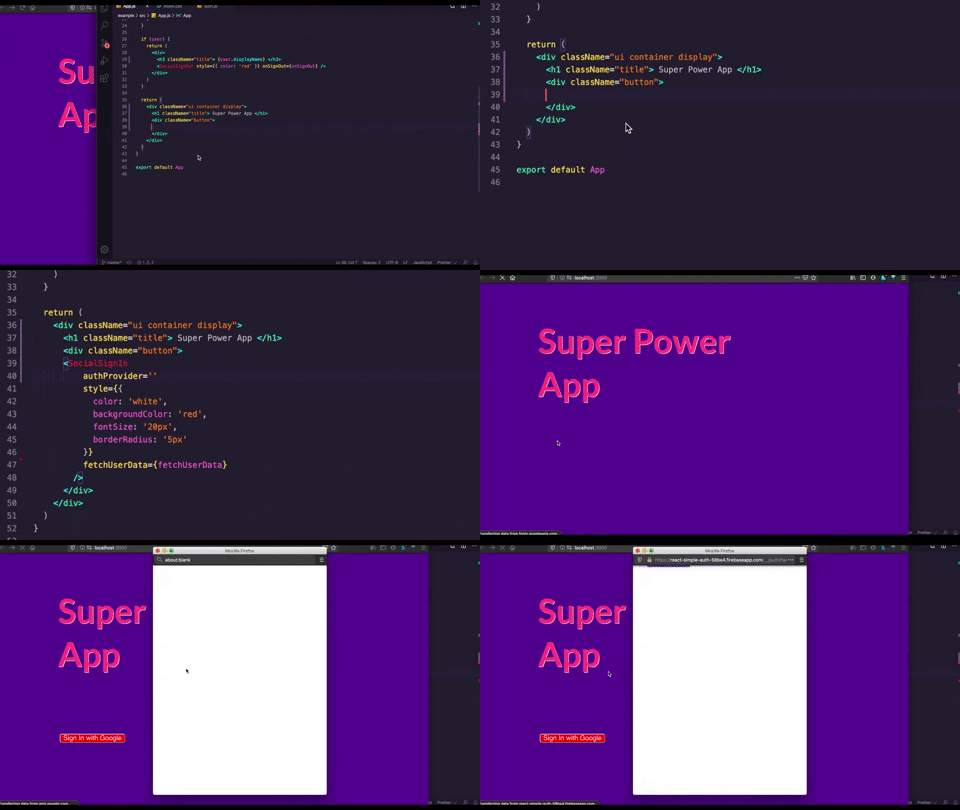
## Install
```bash
npm install --save react-easy-auth
```
## Configuration
1. Use an existing firebase project or create a new one. Then enable your preferred sign-in method from the firebase console.
For help visit: https://firebase.google.com/docs/web/setup
2. Paste your firebase configuration in a `.env` file inside your React project:
```bash
REACT_APP_APIKEY="api-key"
REACT_APP_AUTHDOMAIN="project-id.firebaseapp.com"
REACT_APP_DATABASEURL="https://project-id.firebaseio.com"
REACT_APP_PROJECTID="project-id"
REACT_APP_STORAGEBUCKET="project-id.appspot.com"
REACT_APP_MESSAGINGSENDERID="sender-id"
REACT_APP_APPID="app-id"
```
## Usage
```jsx
import React, { useState } from 'react'
import { SocialSignIn, SocialSignOut } from 'react-easy-auth'
export const App = () => {
const [user, setUser] = useState(null)
//a method to fetch user data from the SocialSignIn component
const fetchUserData = (userData, userCredentials, error) => {
if (!error) {
setUser(userData)
}
}
// a method to handle sign-out
const onSignOut = (error) => {
if (!error) {
console.log('signed out')
setUser(null)
}
}
// if the user data is present we show the SocialSignOut Compononent
if (user) {
return (
Welcome {user.displayName}
)
}
// if there is no user data we show the SocialSignIn Component
return (
)
}
```
## API
### SocialSignIn
#### `authProvider`
| Type | Required |
| :------------- | :----------: |
| string | Yes |
This prop is used to describe what authentication provider needs to be activated.
Make sure to also enable the same from firebase console.
The available providers are:
* Google
* Twitter
* Facebook
* Github
* Microsoft
#### `fetchUserData()`
| Type | Parameters | Required |
| :------------- | :------------------------------------: | :----------: |
| function | `userData`, `userCredentials`, `error` | Yes |
This function is used as a prop to fetch the data from the SignIn Component whenever
a user signs in.
* `userData` (Object): The user related data.
* `userCredentials` (Object): The user credentials like access tokens
* `error` (Object): Error generated during the authentication flow
#### `style`
| Type | Required |
| :------------- | :---------------: |
| object | Optional |
This prop is used to add styling to the SocialSignIn button using inline CSS. You can add your preffered
styling to the button to give it a custom appeal.
#### `scopes`
| Type | Required |
| :------------- | :---------------: |
| array | Optional |
This prop is used to specify additional OAuth 2.0 scopes that you want to request from the.
authentication provider.
### SocialSignOut
#### `onSignOut()`
| Type | Parameters | Required |
| :------------- | :----------: | :----------: |
| function | `error` | Yes |
This function is used as a prop to activate the sign out method. If any error
occurs during the process it is returned through the error object.
* `error` (Object): Error generated during the sign out flow
#### `style`
| Type | Required |
| :------------- | :---------------: |
| object | Optional |
This prop is used to add styling to the SocialSignOut button using inline CSS. You can add your preffered
styling to the button to give it a custom appeal.
## Contributing
See contributing guidlines [here](CONTRIBUTING.md)
## License
MIT © [chiragsrvstv](https://github.com/chiragsrvstv)
---
_Source: https://npm.io/package/react-easy-auth · Machine-readable twin of the npm.io package page. Health data is recomputed on every publish._