# react-gesture-stack

> iOS-style stacking views built for the web

Latest version **1.3.2** (published 2019-08-09) · MIT license · 0 weekly downloads

## Install

```sh
npm install react-gesture-stack
pnpm add react-gesture-stack
yarn add react-gesture-stack
bun add react-gesture-stack
```

## Health

**Score 30/100 (F)** — status: abandoned.

Positive: has types; esm support; no vulnerabilities; high quality score.

Warnings: low downloads.

Negative: abandoned; low maintenance score.

## Facts

| | |
|---|---|
| Version | 1.3.2 |
| Published | 2019-08-09 |
| First published | 2019-07-09 |
| Weekly downloads | 0 |
| License | MIT |
| TypeScript types | bundled |
| Module format | ESM + CommonJS |
| Dependencies | 6 |
| Unpacked size | 3.4 MB |
| Known vulnerabilities | 0 |
| Install scripts | no |
| GitHub stars | 58 |
| Author | Ben McMahen |
| Maintainers | bmcmahen |

## Links

- npm: https://www.npmjs.com/package/react-gesture-stack
- Repository: https://github.com/bmcmahen/react-gesture-stack
- Homepage: https://github.com/bmcmahen/react-gesture-stack#readme
- Issues: https://github.com/bmcmahen/react-gesture-stack/issues
- npm.io page: https://npm.io/package/react-gesture-stack

## Dependencies (6)

- [tslib](https://npm.io/package/tslib.md) ^1.9.3
- [@types/react](https://npm.io/package/@types/react.md) ^16.8.10
- [react-spring](https://npm.io/package/react-spring.md) ^9.0.0-beta.31
- [use-scroll-lock](https://npm.io/package/use-scroll-lock.md) ^1.0.0
- [@types/react-dom](https://npm.io/package/@types/react-dom.md) ^16.8.3
- [resize-observer-polyfill](https://npm.io/package/resize-observer-polyfill.md) ^1.5.1

## Recent versions

- 1.3.2 (latest) — 2019-08-09
- 1.3.1 — 2019-07-11
- 1.3.0 — 2019-07-09
- 1.2.0 — 2019-07-09
- 1.1.1 — 2019-07-09
- 1.1.0 — 2019-07-09
- 1.0.1 — 2019-07-09
- 1.0.0 — 2019-07-09

## README

<div align="center">
 <img 
    max-width="300px"
    alt="A demo showing views being swiped left and right."
     src="https://raw.githubusercontent.com/bmcmahen/react-gesture-stack/master/demo.gif">
</div>

# react-gesture-stack

[![npm package](https://img.shields.io/npm/v/react-gesture-stack/latest.svg)](https://www.npmjs.com/package/react-gesture-stack)

[![Follow on Twitter](https://img.shields.io/twitter/follow/benmcmahen.svg?style=social&logo=twitter)](https://twitter.com/intent/follow?screen_name=benmcmahen)

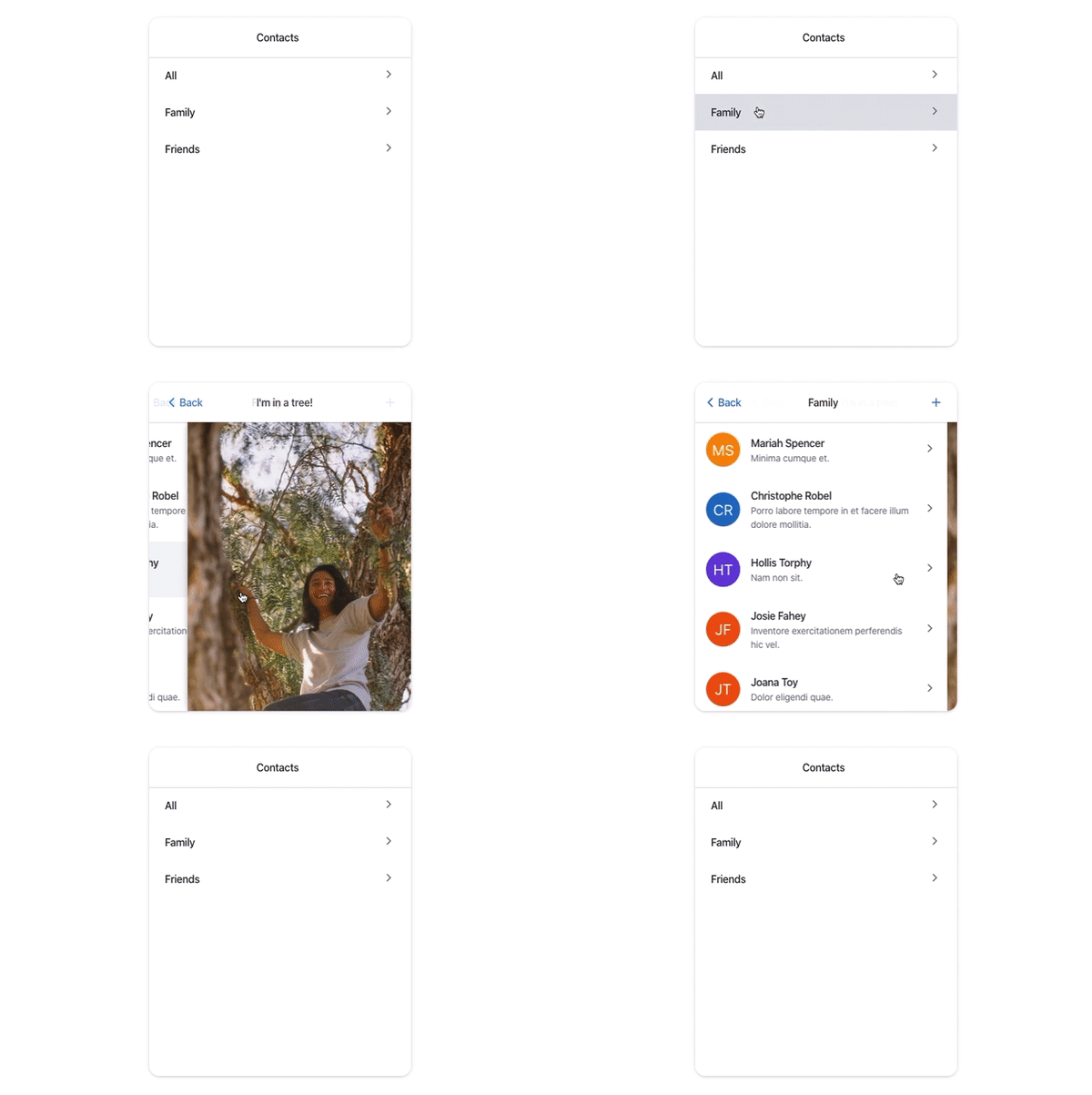
React-gesture-stack provides an iOS stack-like interface for use on the web. It supports gestures to "go back" in the stack. View the above example [on CodeSandbox](https://codesandbox.io/embed/damp-monad-ukvcu).

This was originally built for use in [Sancho-UI](https://github.com/bmcmahen/sancho).

## Install

Install `react-gesture-stack` and its peer dependency `react-gesture-responder` using yarn or npm.

```
yarn add react-gesture-stack react-gesture-responder
```

## Basic usage

```jsx
import { Stack, StackItem, StackTitle } from "react-gesture-stack";
// optional styles
import "react-gesture-stack/src/styles.css";

function Simple() {
  const [index, setIndex] = React.useState(0);

  return (
    <Stack
      onIndexChange={i => setIndex(i)}
      index={index}
      style={{ width: "400px", height: "600px" }}
      items={[
        {
          title: <StackTitle title="First title" />,
          content: (
            <StackItem>
              <button onClick={() => setIndex(index + 1)}>View 2</button>
            </StackItem>
          )
        },
        {
          title: <StackTitle title="Second title" />,
          content: (
            <StackItem>
              <button onClick={() => setIndex(index + 1)}>View 3</button>
            </StackItem>
          )
        },
        {
          title: <StackTitle title="Third title" />,
          content: (
            <StackItem>
              <div>No more!</div>
            </StackItem>
          )
        }
      ]}
    />
  );
}
```

## API

### Stack

| Name             | Type                 | Default Value | Description                                             |
| ---------------- | -------------------- | ------------- | ------------------------------------------------------- |
| index \*         | number               |               | The index of stack item to show                         |
| onIndexChange \* | (i: number) => void; |               | A callback requesting the active stack item change      |
| items \*         | StackItemList[]      |               | A list of stack items to render (see the above example) |
| disableNav       | boolean              | false          | Hide the top navigation pane                            |
| navHeight        | number               | 50            | The height of the navigation pane (in px)                      |

### StackItem

| Name     | Type       | Default Value | Description               |
| -------- | ---------- | ------------- | ------------------------- |
| style    | object     |               | Optional style attributes |
| children | React.Node |               | Content of the stack item |

### StackTitle

| Name          | Type       | Default Value | Description                                                                  |
| ------------- | ---------- | ------------- | ---------------------------------------------------------------------------- |
| title         | React.Node |               | The title of the stack item                                                  |
| backTitle     | string     | "Back"        | The title of the back button                                                 |
| contentAfter  | React.Node |               | Content that appears to the right of the title                               |
| contentBefore | React.Node |               | Content that appears to the left of the title (and replaces the back button) |
| backButton | React.Node | | Render a custom back button. You're responsible for listening to click handlers and updating the current index|

## License

MIT

---
_Source: https://npm.io/package/react-gesture-stack · Machine-readable twin of the npm.io package page. Health data is recomputed on every publish._