# react-gesture-view
> horizontal, swipeable gesture views for react
Latest version **2.1.3** (published 2019-07-09) · MIT license · 0 weekly downloads
## Install
```sh
npm install react-gesture-view
pnpm add react-gesture-view
yarn add react-gesture-view
bun add react-gesture-view
```
## Health
**Score 30/100 (F)** — status: abandoned.
Positive: has types; esm support; no vulnerabilities; high quality score.
Warnings: low downloads.
Negative: abandoned; low maintenance score.
## Facts
| | |
|---|---|
| Version | 2.1.3 |
| Published | 2019-07-09 |
| First published | 2019-05-06 |
| Weekly downloads | 0 |
| License | MIT |
| TypeScript types | bundled |
| Module format | ESM + CommonJS |
| Dependencies | 7 |
| Unpacked size | 1.3 MB |
| Known vulnerabilities | 0 |
| Install scripts | no |
| GitHub stars | 40 |
| Author | Ben McMahen |
| Maintainers | bmcmahen |
## Links
- npm: https://www.npmjs.com/package/react-gesture-view
- Repository: https://github.com/bmcmahen/react-gesture-view
- Homepage: https://github.com/bmcmahen/react-gesture-view#readme
- Issues: https://github.com/bmcmahen/react-gesture-view/issues
- npm.io page: https://npm.io/package/react-gesture-view
## Dependencies (7)
- [tslib](https://npm.io/package/tslib.md) ^1.9.3
- [@types/react](https://npm.io/package/@types/react.md) ^16.8.10
- [react-spring](https://npm.io/package/react-spring.md) ^9.0.0-beta.31
- [@types/react-dom](https://npm.io/package/@types/react-dom.md) ^16.8.3
- [@types/classnames](https://npm.io/package/@types/classnames.md) ^2.2.7
- [react-remove-scroll](https://npm.io/package/react-remove-scroll.md) ^2.0.4
- [resize-observer-polyfill](https://npm.io/package/resize-observer-polyfill.md) ^1.5.1
## Recent versions
- 2.1.3 (latest) — 2019-07-09
- 2.1.2 — 2019-06-14
- 2.1.1 — 2019-05-24
- 2.1.0 — 2019-05-17
- 2.0.0 — 2019-05-17
- 1.2.0 — 2019-05-10
- 1.1.0 — 2019-05-07
- 1.0.2 — 2019-05-07
- 1.0.1 — 2019-05-06
- 1.0.0 — 2019-05-06
## README
# react-page-controller
[](https://www.npmjs.com/package/react-page-controller)
[](https://twitter.com/intent/follow?screen_name=benmcmahen)
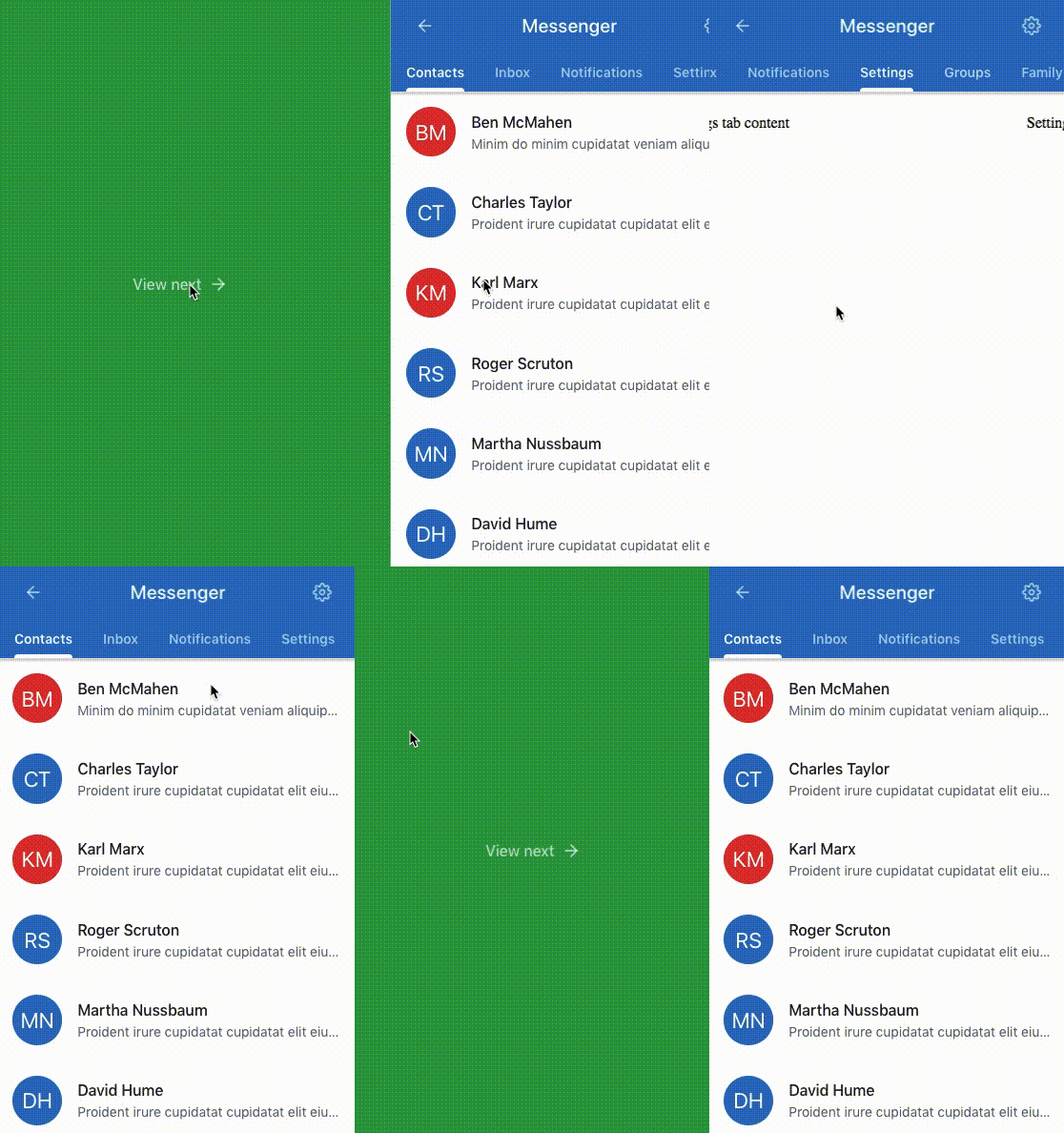
React-page-controller is a react library for providing views that can be swiped left or right. It was originally built for use in [Sancho UI](https://github.com/bmcmahen/sancho) and is inspired by the iOS library of the same name.
## Features
- **Built with [react-gesture-responder](https://github.com/bmcmahen/react-gesture-responder) to enable better control over gesture delegation.** This means that you can embed gesture based controls within this gesture view (or embed multiple gesture views within eachother) and delegate between them.
- **Configurable**. Configure the animation spring, enable mouse support, use child render callbacks, etc.
- **Optional lazy loading**.
## Install
Install `react-page-controller` and its peer dependency `react-gesture-responder` using yarn or npm.
```
yarn add react-page-controller react-gesture-responder
```
## Basic usage
The gesture view should be provided with a collection of children, each representing a panel. By default, each child will be wrapped in an element wiith the recommended props. If you'd rather render the element yourself, provide a render callback for each child instead.
```jsx
import Pager from "react-page-controller";
function TabContent() {
const [index, setIndex] = React.useState(0);
return (
setIndex(i)}>
First panel
Second panel
Third panel
{(props, active, load) => fourth panel
}
);
}
```
## API
| Name | Type | Default Value | Description |
| -------------------- | --------------------------------- | ----------------------------------------- | ------------------------------------------------------------------------------------------------------- |
| value\* | number | | The current index to show |
| onRequestChange\* | (value: number) => void; | | A callback for handling index changes |
| lazyLoad | boolean | false | Lazy load pane contents |
| enableMouse | boolean | false | By default mouse gestures are not enabled |
| enableGestures | boolean | true | By default gestures are enabled |
| animationConfig | SpringConfig | { tension: 190, friction: 20, mass: 0.4 } | A react-spring config for animations |
| onTerminationRequest | (state) => boolean; | | Optionally prevent parent views from claiming the pan-responder. Useful for embedded gesture views |
| onMoveShouldSet | (state, e, suggested) => boolean; | | Optionally override the default onMoveShouldSet behaviour. Useful for embedding multiple gesture views. |
| enableScrollLock | boolean | true | Lock all page scrolling when making swiping gestures. This is generally the desired behaviour. |
## Imperative API
You can use the imperative API to manually focus the active panel, which is something you'll likely want to do for accessibility reasons.
```jsx
function TabContent() {
const [index, setIndex] = React.useState(0);
const ref = React.useRef();
function focusCurrentIndex() {
ref.current.focus();
}
return (
setIndex(i)}>
First panel
Second panel
Third panel
);
}
```
## Embedding Views
Each Pager exposes the `react-gesture-responder` `onTerminationRequest` function which allows you to negotiate between gesture views competing for the responder. Typically, you'll want the child view to prevent the parent from claiming the responder.
```jsx
Left parent pane
false}>
child pane
another child
```
The logic can become more sophisticated. In the gif at the top of the readme, our parent claims the responder (and prevents the child from stealing it) when showing the first child pane and moving left. The code will look something like this:
```jsx
const [childIndex, setChildIndex] = React.useState(0);
const [parentIndex, setParentIndex] = React.useState(0);
function onMoveShouldSet(state, e, suggested) {
if (suggested) {
if (parentIndex === 0 || (state.delta[0] > 0 && childIndex === 0)) {
return true;
}
}
return false;
}
function onTerminationRequest(state) {
if (state.delta[0] > 0 && childIndex === 0) {
return false;
}
return true;
}
setParentIndex(i)}
>
Left parent pane
setChildIndex(i)}>
child pane
another child
;
```
---
_Source: https://npm.io/package/react-gesture-view · Machine-readable twin of the npm.io package page. Health data is recomputed on every publish._