# react-google-maps-user-location
> A react package to add user location button to react google maps. It provides de button and the functionality to pan the view to the user.
Latest version **1.1.1** (published 2023-04-19) · 0 weekly downloads
## Install
```sh
npm install react-google-maps-user-location
pnpm add react-google-maps-user-location
yarn add react-google-maps-user-location
bun add react-google-maps-user-location
```
## Health
**Score 30/100 (F)** — status: abandoned.
Positive: has types; esm support; no vulnerabilities; high quality score.
Warnings: low downloads.
Negative: abandoned; low maintenance score.
## Facts
| | |
|---|---|
| Version | 1.1.1 |
| Published | 2023-04-19 |
| First published | 2023-03-19 |
| Weekly downloads | 0 |
| TypeScript types | bundled |
| Module format | ESM + CommonJS |
| Dependencies | 10 |
| Unpacked size | 16.8 KB |
| Known vulnerabilities | 0 |
| Install scripts | no |
| GitHub stars | 0 |
| Author | santiagocasasrey |
| Maintainers | santiagocasas |
| Keywords | react, components, ui, google maps, user location |
## Links
- npm: https://www.npmjs.com/package/react-google-maps-user-location
- Repository: https://github.com/santiagocasasrey/react-google-maps-user-location
- Homepage: https://github.com/santiagocasasrey/react-google-maps-user-location#readme
- Issues: https://github.com/santiagocasasrey/react-google-maps-user-location/issues
- npm.io page: https://npm.io/package/react-google-maps-user-location
## Dependencies (10)
- [web-vitals](https://npm.io/package/web-vitals.md) ^2.1.4
- [@types/jest](https://npm.io/package/@types/jest.md) ^27.5.2
- [@types/node](https://npm.io/package/@types/node.md) ^16.18.16
- [@types/react](https://npm.io/package/@types/react.md) ^18.0.28
- [@babel/polyfill](https://npm.io/package/@babel/polyfill.md) ^7.12.1
- [@types/react-dom](https://npm.io/package/@types/react-dom.md) ^18.0.11
- [@types/google.maps](https://npm.io/package/@types/google.maps.md) ^3.52.3
- [@testing-library/react](https://npm.io/package/@testing-library/react.md) ^13.4.0
- [@testing-library/jest-dom](https://npm.io/package/@testing-library/jest-dom.md) ^5.16.5
- [@testing-library/user-event](https://npm.io/package/@testing-library/user-event.md) ^13.5.0
## Alternatives
- [@progress/kendo-ooxml](https://npm.io/package/@progress/kendo-ooxml.md) — 152.1K weekly downloads
- [@progress/kendo-react-ripple](https://npm.io/package/@progress/kendo-react-ripple.md) — 8.0K weekly downloads
- [@progress/kendo-react-orgchart](https://npm.io/package/@progress/kendo-react-orgchart.md) — 4.3K weekly downloads
- [@praxisui/dynamic-fields](https://npm.io/package/@praxisui/dynamic-fields.md) — 2.4K weekly downloads
- [@mesalvo/react-ui](https://npm.io/package/@mesalvo/react-ui.md) — 1.7K weekly downloads
## Recent versions
- 1.1.1 (latest) — 2023-04-19
- 1.1.0 — 2023-03-26
- 1.0.3 — 2023-03-20
- 1.0.2 — 2023-03-19
## README
# react-google-maps-user-location
User location button library for Google maps

 ## Description
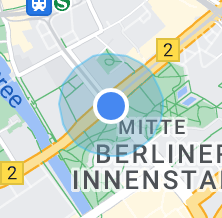
Add a user location button to google maps on React.
Click on the button and navigator will ask for location permission to the user. If the user accepts the map will pan and zoom to center the user location.
Button and user location image look like google maps ones.
## Installation
```bash
npm install --save react-google-maps-user-location
```
or:
```bash
yarn add react-google-maps-user-location
```
## Usage
Tested with google-map-react
```jsx static
import GoogleMap from 'google-map-react';
import { UserLocatorButton } from 'react-google-maps-user-location';
...
const mapRef = useRef();
...
{
mapRef.current = map;
const controlPosition = document.createElement("div");
ReactDOM.render(, controlPosition)
map.controls[maps.ControlPosition.RIGHT_TOP].push(controlPosition)
}}>
```
[WIKI](https://github.com/santiagocasasrey/react-google-maps-user-location/wiki)
## Caveats
### Required React Version
React [16.8](https://reactjs.org/blog/2019/02/06/react-v16.8.0.html) or above is required because we use [hooks](https://reactjs.org/docs/hooks-intro.html).
## License
Creative Commons
---
_Source: https://npm.io/package/react-google-maps-user-location · Machine-readable twin of the npm.io package page. Health data is recomputed on every publish._
## Description
Add a user location button to google maps on React.
Click on the button and navigator will ask for location permission to the user. If the user accepts the map will pan and zoom to center the user location.
Button and user location image look like google maps ones.
## Installation
```bash
npm install --save react-google-maps-user-location
```
or:
```bash
yarn add react-google-maps-user-location
```
## Usage
Tested with google-map-react
```jsx static
import GoogleMap from 'google-map-react';
import { UserLocatorButton } from 'react-google-maps-user-location';
...
const mapRef = useRef();
...
{
mapRef.current = map;
const controlPosition = document.createElement("div");
ReactDOM.render(, controlPosition)
map.controls[maps.ControlPosition.RIGHT_TOP].push(controlPosition)
}}>
```
[WIKI](https://github.com/santiagocasasrey/react-google-maps-user-location/wiki)
## Caveats
### Required React Version
React [16.8](https://reactjs.org/blog/2019/02/06/react-v16.8.0.html) or above is required because we use [hooks](https://reactjs.org/docs/hooks-intro.html).
## License
Creative Commons
---
_Source: https://npm.io/package/react-google-maps-user-location · Machine-readable twin of the npm.io package page. Health data is recomputed on every publish._