# react-ide-component
> IDE Component with animation for react js
Latest version **0.0.1** (published 2022-02-03) · MIT license · 0 weekly downloads
## Install
```sh
npm install react-ide-component
pnpm add react-ide-component
yarn add react-ide-component
bun add react-ide-component
```
## Health
**Score 25/100 (F)** — status: abandoned.
Positive: has types; esm support; no vulnerabilities.
Warnings: low downloads; pre 1.0.
Negative: abandoned; low maintenance score.
## Facts
| | |
|---|---|
| Version | 0.0.1 |
| Published | 2022-02-03 |
| First published | 2022-02-03 |
| Weekly downloads | 0 |
| License | MIT |
| TypeScript types | bundled |
| Module format | ESM + CommonJS |
| Dependencies | 0 |
| Unpacked size | 36.6 KB |
| Known vulnerabilities | 0 |
| Install scripts | no |
| GitHub stars | 1 |
| Author | Egi Gagah Brilliant |
| Maintainers | egigagah |
| Keywords | react, react-component, reactjs, ide, vscode, editor, media, xcode, highlight.js, typewritter, gsap |
## Links
- npm: https://www.npmjs.com/package/react-ide-component
- Repository: https://github.com/egigagah/react-ide-component
- Issues: https://github.com/egigagah/react-ide-component/issues
- npm.io page: https://npm.io/package/react-ide-component
## Alternatives
- [mobx-react](https://npm.io/package/mobx-react.md) — 2.8M weekly downloads
- [rc-tree](https://npm.io/package/rc-tree.md) — 2.6M weekly downloads
- [@react-oauth/google](https://npm.io/package/@react-oauth/google.md) — 1.3M weekly downloads
- [@wagmi/connectors](https://npm.io/package/@wagmi/connectors.md) — 877.0K weekly downloads
- [vee-validate](https://npm.io/package/vee-validate.md) — 836.4K weekly downloads
## Recent versions
- 0.0.1 (latest) — 2022-02-03
## README
# React IDE Component
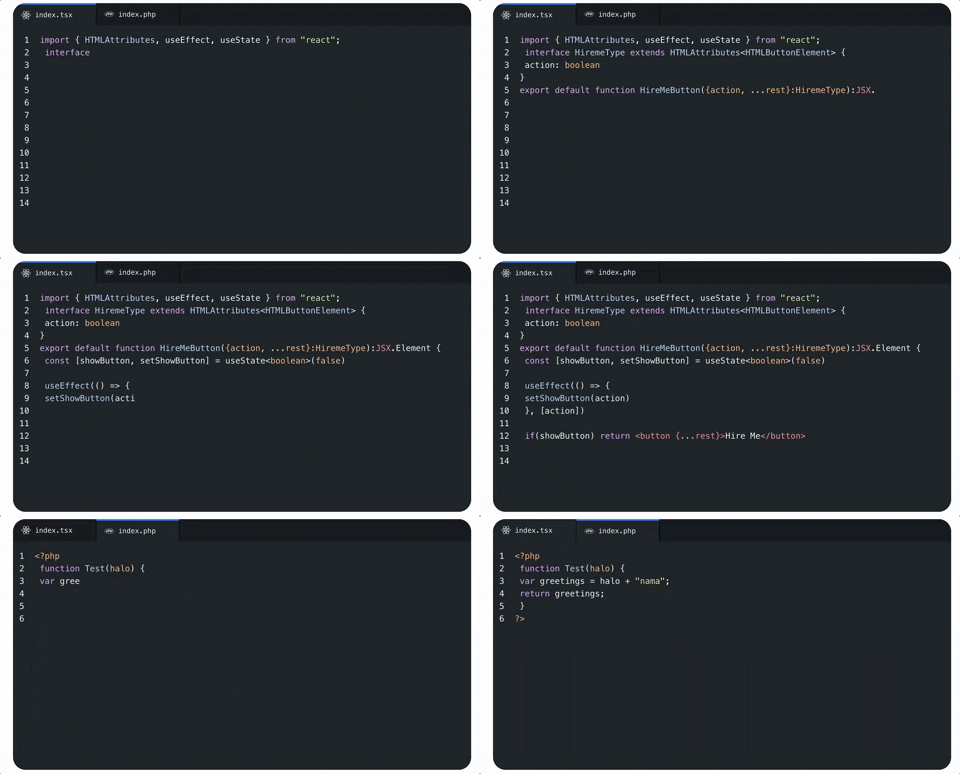
React IDE Component is lighweight IDE component for react that has been included with typewritting effect for animation.
[](https://www.npmjs.com/package/react-ide-component)
# Dependecies
This components use:
- [GSAP](https://www.npmjs.com/package/gsap) for animation that have impressive performance
- [highlight.js](https://www.npmjs.com/package/highlight.js) for rich syntax highlighter and detect the language
- [html-react-parser](https://www.npmjs.com/package/html-react-parser) for parsing HTML into React elements
# Installation
If you're using `npm`, in the command prompt run:
```sh
npm install react-ide-component --save
```
If you're using `yarn`, run:
```sh
yarn add react-ide-component
```
# Usage
Import the module
```sh
import IdeComponent from 'react-ide-component'
```
Prepare datas to send it as props, this example use [React Icons](https://www.npmjs.com/package/react-icons) as icon. you can use your own svg / image icon here
```sh
const ideData = [
{
id: 'tab1',
icon:
filename: 'index.tsx',
content: 'console.log("test")',
lang: 'typescript'
},
]
```
## Datas Type
type for datas object
| Property | Type | Required | Default | Description |
| :-------------- | :-------------------------- | :---------------- | :---------------- | :------------------------------------------------------- |
| `id` | `string` | true | `null` | tab's ids that you can use for your own needs |
| `icon` | `JSX.Element` | true | `null` | you can use your own svg, png as icon logo that representation tile extention / code language |
| `filename` | `string` | true | `null` | filename and extention file that will shown as tab's label `example: 'index.js'` |
| `content` | `string` | true | `null` | it will be use as code text, enter/break line inside string didnt not work here. if you want to break line code content use `
` instead. |
| `lang` | `string` | true | `null` | language name. example `javascript, php, java, python, etc` you can serach list language available from [highlight.js languages list](https://github.com/highlightjs/highlight.js/blob/main/SUPPORTED_LANGUAGES.md) |
Then insert component and datas like this
```sh
```
Might be your full code look like this
```sh
import React from "react";
import IdeComponent from 'react-ide-component'
import { ReactSvg, JsSvg } from '../svg/ReactSvg'
const ideData = [
{
id: 'tab1',
icon:
filename: 'index.tsx',
content: 'console.log("test")',
lang: 'typescript'
},
{
id: 'tab2',
icon:
filename: 'index.jsx',
content: 'console.log("test")',
lang: 'javascript'
},
]
function App() {
return (
)
}
```
# Props
| Property | Type | Required | Default | Description |
| :------- | :-------------- | :------- | :------ | :------------------------------------------------------------------------------ |
| `datas` | `TabDataType[]` | true | `null` | Array of object that representating tab ide, icon, filename, code, and language |
| `mode` | `dark` or `light` | false | `dark` | Mode for IDE color between `dark` and `light`, default is `dark |
---
_Source: https://npm.io/package/react-ide-component · Machine-readable twin of the npm.io package page. Health data is recomputed on every publish._