## :package: Installation
using `yarn` :
```bash
yarn add react-jinke-music-player
```
using `npm` :
```bash
npm install react-jinke-music-player --save
```
## :framed_picture: Screenshots
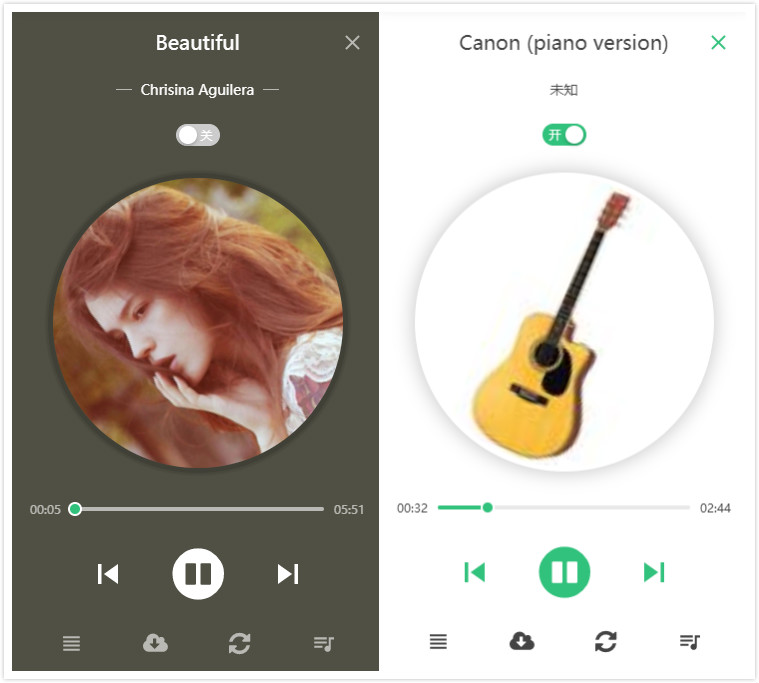
> mini mode

> Light Theme

> Dark Theme

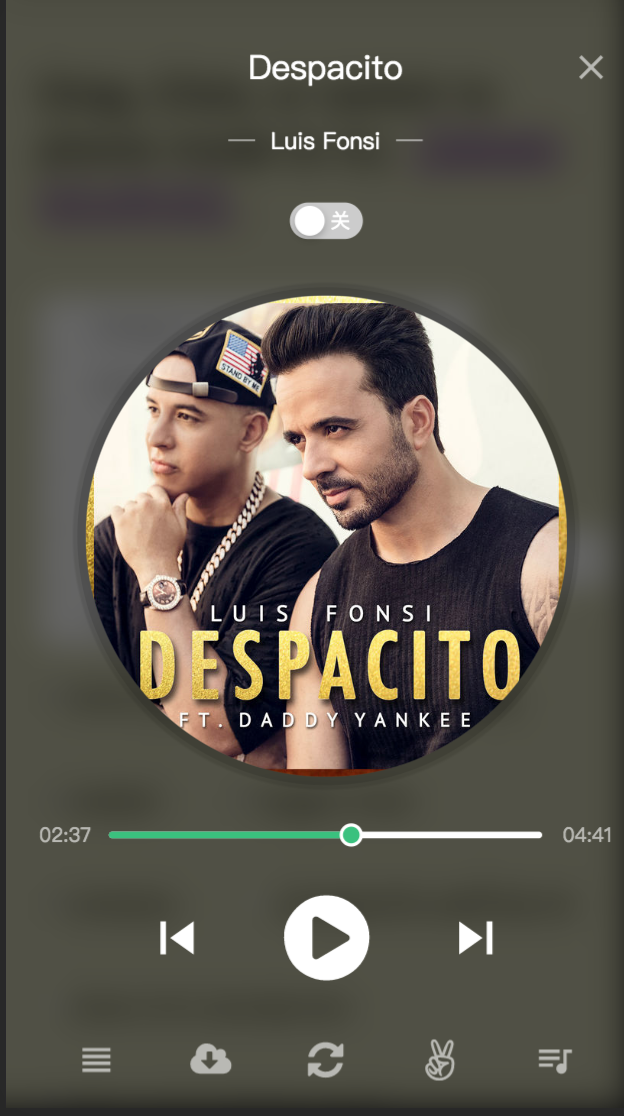
> mobile
## :sparkles: Feature list
- [x] Beautiful ui and animation
- [x] Responsive
- [x] Support theme switch
- [x] Support typescript (d.ts)
- [x] Support lyric
- [x] Support audio list sortable
- [x] Play list
- [x] Full player features
- [x] [Server-Side Rendering](#bulb-server-side-rendering)
- [x] [Import in Browser](#bulb-import-in-browser)
- [x] [Complete hook function](#clipboard-api)
- [x] [Custom operation ui](#bulb-custom-operation-ui)
- [x] [Custom downloader](#bulb-custom-downloader)
- [x] [Support destroy player](#bulb-destroy-player)
- [x] [Support glass background](#bulb-glass-bg)
- [x] [Media session](#bulb-media-session) (v4.11.0)
- [x] [Support internationalization](#bulb-internationalization) (v4.11.0)
- [x] [Customize theme](#bulb-customize-theme) (v4.11.0)
- [x] [Customize audio duration](#bulb-customize-audio-duration) (v4.13.0)
- [x] [Customize player icon](#bulb-customize-player-icon) (v4.17.0)
- [x] [Follow the theme of the system](#bulb-follow-the-theme-of-the-system) (v4.16.0)
- [x] [Audio volume fadeIn/fadeOut](#bulb-audio-volume-fade-in-and-fade-out) (v4.20.0)
## :eyes: Example
> live example :
- [https://lijinke666.github.io/react-music-player/](https://lijinke666.github.io/react-music-player/)
> local example : [http://localhost:8081/](http://localhost:8081/)
[Source Code](https://github.com/lijinke666/react-music-player/blob/master/example/example.js)
## :memo: Usage
```jsx
import React from 'react'
import ReactDOM from 'react-dom'
import ReactJkMusicPlayer from 'react-jinke-music-player'
import 'react-jinke-music-player/assets/index.css'
ReactDOM.render(
,
document.getElementById('root'),
)
```
## :clipboard: API
| Name | Type | Default | Description |
| ---- | ---- | ------- | ----------- |
| className | `string` | `-` | Additional CSS class for the root DOM node |
| audioLists | [AudioListProps[]](#bulb-audiolistprops) | `-` | [Detail](#bulb-audiolistprops) |
| theme | `light` \| `dark` \| `auto` | `dark` | color of the music player theme `dark`, `light`, `auto (follow system)` | `light` |
| locale | `zh_CN` \| `en_US` \| [CustomLocale](#bulb-internationalization) | `en_US` | [Detail](#bulb-internationalization) | `light` |
| icon | [Customize player icon](#bulb-customize-player-icon) | `-` | [Customize player icon](#bulb-customize-player-icon) | `light` |
| defaultPosition | `object` | `{top:0,left:0}` | audio controller initial position with `left,top,right,and bottom` |
| playModeShowTime | `number` | `600` | play mode toggle show time (ms) |
| bounds | `object`,`number` | `body` | specifies movement boundaries. Accepted values: `parent` restricts movement within the node's offsetParent (nearest node with position relative or absolute), or a selector, restricts movement within the targeted node An object with `left, top, right, and bottom` properties. These indicate how far in each direction the draggable can be moved. |
| preload | `boolean`,`string` | `false` | Whether to load audio immediately after the page loads. can be set to `auto | metadata | none` `true | false`if`preload=true` preload="auto" |
| remember | `boolean` | `false` | The next time you access the player, do you keep the last state |
| glassBg | `boolean` | `false` | Whether the player's background displays frosted glass effect |
| remove | `boolean` | `true` | The Audio Can be deleted |
| defaultPlayIndex | `number` | `0` | Default play index of the audio player |
| playIndex | `number` | `0` | play index of the audio player |
| defaultPlayMode | `string` | `order` | default play mode of the audio player options can be set to `order`,`orderLoop`,`singleLoop`,`shufflePlay` or omitted |
| mode | `string` | `mini` | audio theme switch checkedText can be set to `mini`,`full` or omitted |
| once | `boolean` | `false` | The default audioPlay handle function will be played again after each pause, If you only want to trigger it once, you can set 'true' |
| autoPlay | `boolean` | `true` | Whether the audio is played after loading is completed. mobile devices are invalid [autoplay-policy-changes](https://developers.google.com/web/updates/2017/09/autoplay-policy-changes) |
| toggleMode | `boolean` | `true` | Whether you can switch between two modes, full => mini or mini => full |
| drag | `boolean` | `true` | audio controller is can be drag of the "mini" mode |
| seeked | `boolean` | `true` | Whether you can drag or click the progress bar to play in the new progress. |
| showMiniModeCover | `boolean` | `true` | audio cover is show of the "mini" mode |
| showMiniProcessBar | `boolean` | `false` | audio progress circle bar is show of the "mini" mode |
| showProgressLoadBar | `boolean` | `true` | Displays the audio load progress bar. |
| showPlay | `boolean` | `true` | play button display of the audio player panel |
| showReload | `boolean` | `true` | reload button display of the audio player panel |
| showDownload | `boolean` | `true` | download button display of the audio player panel |
| showPlayMode | `boolean` | `true` | play mode toggle button display of the audio player panel |
| showThemeSwitch | `boolean` | `true` | theme toggle switch display of the audio player panel |
| showLyric | `boolean` | `false` | audio lyric button display of the audio player panel |
| showMediaSession | `boolean` | `false` | [https://web.dev/media-session/](https://web.dev/media-session/) |
| lyricClassName | `string` | `-` | audio lyric class name |
| extendsContent | `ReactNode \| boolean \| string` | `-` | Extensible custom content like `<> ` |
| defaultVolume | `number` | `1` | default volume of the audio player , range `0`-`1` |
| loadAudioErrorPlayNext | `boolean` | `true` | Whether to try playing the next audio when the current audio playback fails |
| responsive | `boolean` | `true` | Whether to turn on the response mode, if set false, audio controller always show desktop ui |
| onAudioDownload | `function(audioInfo)` | `-` | audio is downloaded handle |
| onAudioPlay | `function(audioInfo)` | `-` | audio play handle |
| onAudioPause | `function(audioInfo)` | `-` | audio pause handle |
| onAudioSeeked | `function(audioInfo)` | `-` | When the user has moved/jumped to a new location in audio handle |
| onAudioVolumeChange | `function(volume)` | `-` | When the volume has changed handle min = 0.0 max = 1.0 |
| onAudioEnded | `function(currentPlayId,audioLists,audioInfo)` | `-` | The single song is ended handle |
| onAudioAbort | `function(currentPlayId, audioLists, audioInfo)` | `-` | audio load abort The target event like {...,audioName:xx,audioSrc:xx,playMode:xx} |
| onAudioProgress | `function(audioInfo)` | `-` | audio play progress handle |
| onAudioError | `function(errMsg,currentPlayId, audioLists, audioInfo)` | `-` | audio load failed error handle |
| onAudioReload | `function(audioInfo)` | `-` | audio reload handle |
| onAudioListsChange | `function(currentPlayId,audioLists,audioInfo)` | `-` | audio lists change handle |
| onAudioPlayTrackChange | `function(currentPlayId,audioLists,audioInfo)` | `-` | audio current play track change handle |
| onAudioPlayModeChange | `function(playMode)` | `-` | play mode change handle |
| onAudioListsPanelChange | `function(panelVisible)` | `-` | audio lists panel change handle |
| onThemeChange | `function(theme)` | `-` | theme change handle |
| onModeChange | `function(mode)` | `-` | mode change handle |
| onAudioListsSortEnd | `function(oldIndex,newIndex)` | `-` | audio lists sort end handle, use [SortableJS](https://github.com/SortableJS/Sortable) |
| onAudioLyricChange | `function(lineNum, currentLyric)` | `-` | audio lyric change handle |
| getContainer | `() => HTMLElement` \| `Selectors` | `document.body` | Return the mount node for Music player |
| getAudioInstance | `(instance: HTMLAudioElement) => void` | `-` | get origin audio element instance , you can use it do everything |
| autoHiddenCover | `boolean` | `false` | Auto hide the cover photo if no cover photo is available |
| onBeforeAudioDownload | `(audioInfo: ReactJkMusicPlayerAudioInfo) => Promise` | `-` | transform download audio info before |
| clearPriorAudioLists | `boolean` | `false` | Replace a new playlist with the first loaded playlist and reset playIndex to 0 |
| autoPlayInitLoadPlayList | `boolean` | `false` | Play your new play list right after your new play list is loaded turn false. |
| spaceBar | `boolean` | `false` | Play and pause audio through space bar (Desktop effective). |
| showDestroy | `boolean` | `false` | Destroy player button display |
| onBeforeDestroy | `function(currentPlayId,audioLists,audioInfo)` | `-` | custom destroy handler before |
| onDestroyed | `function(currentPlayId,audioLists,audioInfo)` | `-` | player destroyed handle |
| customDownloader | `function(downloadInfo: TransformedDownloadAudioInfo)` | `-` | custom download handle |
| onCoverClick | `function(mode,audioLists,audioInfo)` | `-` | audio cover clicked handle |
| onPlayIndexChange | `function(playIndex)` | `-` | audio play index change handle |
| quietUpdate | `boolean` | `false` | [Detail](#bulb-quiet-update) |
| renderAudioTitle | `(audioInfo, isMobile) => ReactNode` | `-` | use `locale.audioTitle` to set `audio` tag title, the api can render custom jsx element for display |
| mobileMediaQuery | `string` | `(max-width: 768px) and (orientation : portrait)` | custom mobile media query string, eg use the mobile version UI on iPad. |
| volumeFade | `{ fadeIn: number(ms), fadeOut: number(ms) }` | `-` | audio fade in and out. [Detail](#bulb-audio-volume-fade-in-and-fade-out) |
| sortableOptions | `object` | `{swap: true, animation: 100, swapClass: 'audio-lists-panel-sortable-highlight-bg'}` | [SortableJs Options](https://github.com/SortableJS/Sortable#options) |
| restartCurrentOnPrev | `boolean` | `false` | Restarts the current track when trying to play previous song, if the current time of the song is more than 1 second |
## :bulb: Custom operation ui
Support feature:
- `play`
- `pause`
- `reload`
- `change play time`
- `change playback rate`
- `change volume`
- `destroy audio player`
- `toggle play`
- `clear audio list`
- `toggle play`
- `play next audio`
- `play prev audio`
- `play audio by custom play index`
- `update play index`
- [SortableJS methods](https://github.com/SortableJS/Sortable#methods)
```jsx
class App extends React.Component {
constructor() {
this.audioInstance = null
}
render() {
return (
<>
{
this.audioInstance = instance
}}
/>
)
}
}
```
## :bulb: Glass bg
```jsx
```
## :bulb: Custom downloader
Default use [downloadjs](https://github.com/rndme/download), you can use any download library
eg. , or use `download` attribute
```jsx
const customDownloader = (downloadInfo) => {
const link = document.createElement('a')
link.href = downloadInfo.src // a.mp3
link.download = downloadInfo.filename || 'test'
document.body.appendChild(link)
link.click()
}
;
// use onBeforeAudioDownload
const onBeforeAudioDownload = () => {
return Promise.resolve({
src: '1.mp3',
})
}
const customDownloader = (downloadInfo) => {
console.log(downloadInfo.src) // 1.mp3
}
;
```
## :bulb: Destroy player
```jsx
const onBeforeDestroy = (currentPlayId, audioLists, audioInfo) => {
return new Promise((resolve, reject) => {
// your custom validate
if (window.confirm('Are you confirm destroy the player?')) {
// if resolve, player destroyed
resolve()
} else {
// if reject, skip.
reject()
}
})
}
const onDestroyed = (currentPlayId, audioLists, audioInfo) => {
console.log('onDestroyed:', currentPlayId, audioLists, audioInfo)
}
;
```
## :bulb: Media session
>
```jsx
// so cool, so easy !!!
```
## :bulb: Internationalization
> Version: 4.11.0
[Source](https://github.com/lijinke666/react-music-player/blob/master/src/locale/index.js)
```jsx
import Locale from 'react-jinke-music-player/lib/config/locale'
// Two languages are provided by default
// one of zh_CN | en_US
//
// Custom override
const customLocale = {
playModeText: {
order: '',
orderLoop: '',
singleLoop: '',
shufflePlay: ''
},
openText: '',
closeText: '',
emptyText: '',
clickToPlayText: '',
clickToPauseText: '',
nextTrackText: '',
previousTrackText: '',
reloadText: '',
volumeText: '',
playListsText: '',
toggleLyricText: '',
toggleMiniModeText: '',
destroyText: '',
downloadText: '',
lightThemeText: '',
darkThemeText: '',
switchThemeText: '',
removeAudioListsText: '',
controllerTitle: '',
emptyLyricText: '',
clickToDeleteText: (name) => ``,
audioTitle: ''
// audioTitle: (audioInfo) => ``
}
// Support partial override, auto merge
```
## :bulb: Customize Theme
```jsx
import ReactJkMusicPlayer from 'react-jinke-music-player'
import 'react-jinke-music-player/lib/styles/index.less'
```
```less
@primary-color: #31c27c;
@default-color: #d9d9d9;
@bg-color: #f7f8fa;
@border-color: #d9d9d9;
@panel-bg-light: #fff;
@controller-bg-light: #fff;
@music-player-panel-height: 80px;
@lists-panel-width: 480px;
@lists-panel-height: 410px;
@lists-panel-item-bg: #40444b;
@lists-panel-item-bg-light: #fff;
@panel-header-height: 50px;
@panel-bg: rgba(0, 0, 0, 0.7);
@font-color: #444;
@player-width: 80px;
@player-height: @player-width;
@base-color: rgba(255, 255, 255, 0.6);
@common-animate-type: cubic-bezier(0.43, -0.1, 0.16, 1.1);
@common-animate-time: 350ms @common-animate-type;
@progress-load-bar-bg-color: rgba(0, 0, 0, 0.11);
@progress-load-bar-bg-color-light: rgba(0, 0, 0, 0.06);
@progress-bar-bg-color-light: rgba(0, 0, 0, 0.09);
@progress-bar-bg-color-dark: #fff;
@player-lyric-color: @primary-color;
@player-lyric-font-size: 36px;
@player-lyric-font-size-mobile: 16px;
@player-lyric-z-index: 999;
```
> Customize in webpack
```diff
// webpack.config.js
module.exports = {
rules: [{
test: /\.less$/,
use: [
...
{
loader: 'less-loader',
+ options: {
+ modifyVars: {
+ 'primary-color': '#444',
+ // or
+ 'hack': `true; @import "your-less-file-path.less";`, // Override with less file
+ },
+ javascriptEnabled: true,
+ },
}],
}],
}
```
> Customize in less file
```less
@import 'react-jinke-music-player/lib/styles/index.less';
@import 'your-theme-file.less';
```
## :bulb: Customize audio duration
> Default: by this.audio.duration, if cannot get current play audio's duration, you can customize to set.
```jsx
```
## :bulb: Customize player icon
```ts
export interface ReactJkMusicPlayerIcon {
pause?: React.ReactNode | string
play?: React.ReactNode | string
destroy?: React.ReactNode | string
close?: React.ReactNode | string
delete?: React.ReactNode | string
download?: React.ReactNode | string
toggle?: React.ReactNode | string
lyric?: React.ReactNode | string
volume?: React.ReactNode | string
mute?: React.ReactNode | string
next?: React.ReactNode | string
prev?: React.ReactNode | string
playLists?: React.ReactNode | string
reload?: React.ReactNode | string
loop?: React.ReactNode | string
order?: React.ReactNode | string
orderLoop?: React.ReactNode | string
shuffle?: React.ReactNode | string
loading?: React.ReactNode | string
}
```
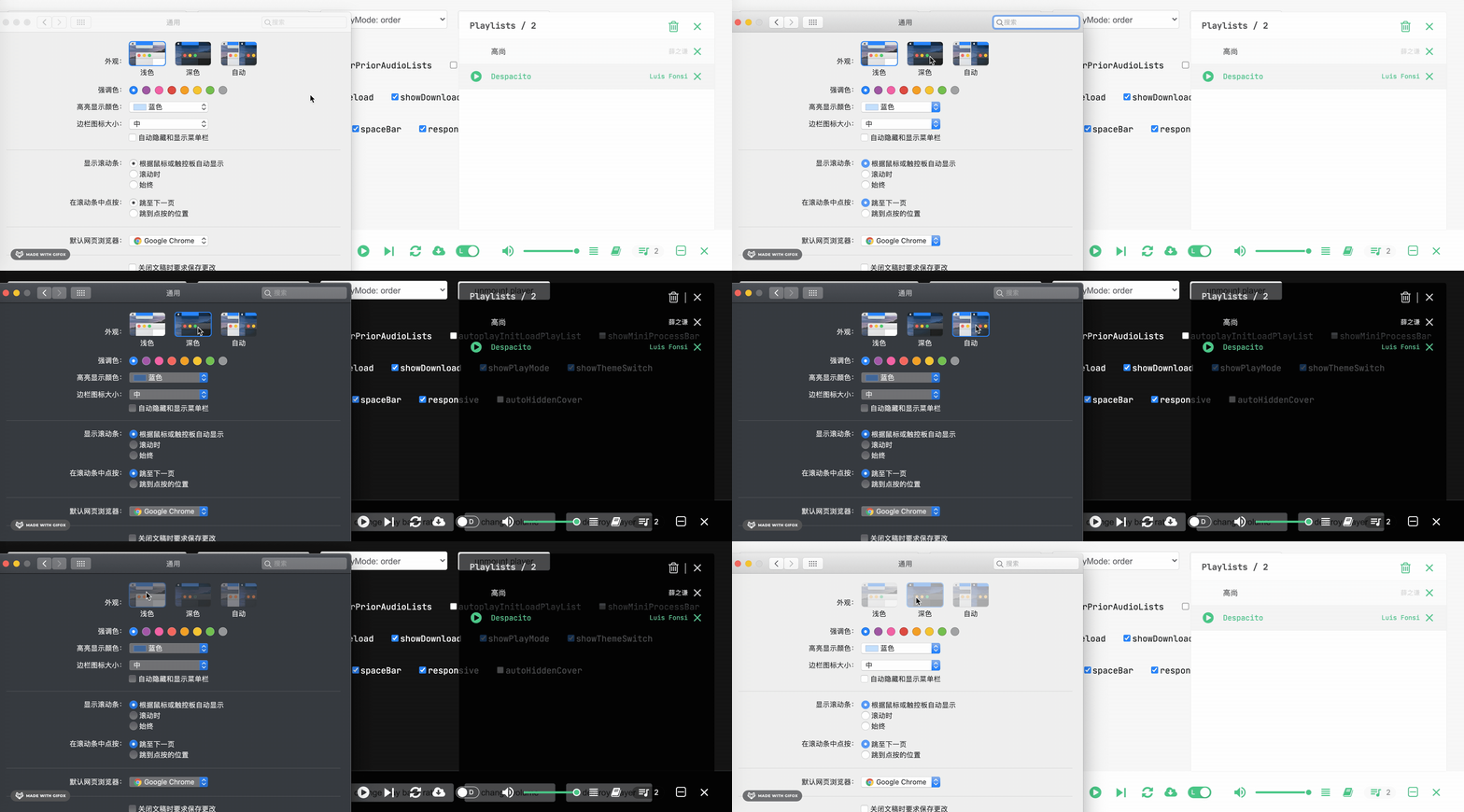
## :bulb: Follow the theme of the system
```jsx
```
## :bulb: Quiet update
```jsx
/**
* Don't interrupt current playing state when audio list updated
* eg. (A) is current playing...
* [A,B] => [A,C,B]
* [A,B] => [A,B,C]
*
* if (A) not in updated audio lists
* [A,B] => [C]
* (C) is playing
*/
function App() {
const [audioLists, setAudioLists] = useState([
{ musicSrc: 'A' },
{ musicSrc: 'B' },
])
useEffect(() => {
setTimeout(() => {
setAudioLists([{ musicSrc: 'A' }, { musicSrc: 'C' }, { musicSrc: 'B' }])
}, 1000)
}, [setAudioLists])
return (
)
}
```
## :bulb: Import in browser
```html
```
## :bulb: Server-Side Rendering
```jsx
// components/Player.js
import React from 'react'
import ReactJkMusicPlayer from 'react-jinke-music-player'
import styles from 'react-jinke-music-player/assets/index.module.css'
export const Player = () =>
// pages/_app.js
import dynamic from 'next/dynamic'
const PlayerWithNoSSR = dynamic(() => import('../components/Player'), {
ssr: false,
})
```
## :bulb: Customize mobile media query
> eg. Use mobile UI on a iPad device
```jsx
// Default '(max-width: 768px) and (orientation : portrait)'
```
## :bulb: Audio volume fade in and fade out
```jsx
```
## :pencil: Development
```bash
git clone https://github.com/lijinke666/react-music-player.git
yarn # npm install
yarn start # npm start
open `http://localhost:8084/`
```
## :hourglass: Test case
```bash
npm run test
```
## :bulb: AudioListProps
> Like This
```ts
interface ReactJkMusicPlayerAudioListProps {
name: string | React.ReactNode,
musicSrc: string | () => Promise,
cover: string,
singer?: string | React.ReactNode,
duration?: number,
lyric?: string,
[key: string]: any
}>
```
## :bulb: AudioInfo
> Like This
```ts
interface ReactJkMusicPlayerAudioInfo {
cover: string
currentTime: number
duration: number
ended: boolean
musicSrc: string
muted: boolean
name: string
networkState: number
paused: boolean
played: any
readyState: number
startDate: any
volume: number
lyric: string
[key: string]: any
}
```
## :two_men_holding_hands: Contributors
> Special thanks: @JeffreyCA

## :page_facing_up: License
[MIT](https://github.com/lijinke666/react-music-player/blob/master/LICENCE)
---
_Source: https://npm.io/package/react-jinke-music-player · Machine-readable twin of the npm.io package page. Health data is recomputed on every publish._










 ## :bulb: Internationalization
> Version: 4.11.0
[Source](https://github.com/lijinke666/react-music-player/blob/master/src/locale/index.js)
```jsx
import Locale from 'react-jinke-music-player/lib/config/locale'
// Two languages are provided by default
// one of zh_CN | en_US
## :bulb: Internationalization
> Version: 4.11.0
[Source](https://github.com/lijinke666/react-music-player/blob/master/src/locale/index.js)
```jsx
import Locale from 'react-jinke-music-player/lib/config/locale'
// Two languages are provided by default
// one of zh_CN | en_US