# react-native-another-toast
> React Native Toast
Latest version **0.0.6** (published 2017-07-12) · MIT license · 0 weekly downloads
## Install
```sh
npm install react-native-another-toast
pnpm add react-native-another-toast
yarn add react-native-another-toast
bun add react-native-another-toast
```
## Health
**Score 15/100 (F)** — status: abandoned.
Positive: no vulnerabilities.
Warnings: low downloads; no types; no esm support; pre 1.0.
Negative: abandoned; low maintenance score.
## Facts
| | |
|---|---|
| Version | 0.0.6 |
| Published | 2017-07-12 |
| First published | 2017-06-29 |
| Weekly downloads | 0 |
| License | MIT |
| TypeScript types | none |
| Module format | CommonJS |
| Dependencies | 0 |
| Known vulnerabilities | 0 |
| Install scripts | no |
| GitHub stars | 2527 |
| Author | ywein |
| Maintainers | ywein |
| Keywords | react, react-native, react-component, toast, toast-notifications, toast-message, ios, android |
## Links
- npm: https://www.npmjs.com/package/react-native-another-toast
- Repository: https://github.com/rt2zz/react-native-drawer
- Issues: https://github.com/rt2zz/react-native-drawer/issues
- npm.io page: https://npm.io/package/react-native-another-toast
## Alternatives
- [update-check](https://npm.io/package/update-check.md) — 4.0M weekly downloads
- [react-native-onesignal](https://npm.io/package/react-native-onesignal.md) — 134.5K weekly downloads
- [react-redux-toastr](https://npm.io/package/react-redux-toastr.md) — 33.7K weekly downloads
- [@nocobase/plugin-notification-manager](https://npm.io/package/@nocobase/plugin-notification-manager.md) — 2.0K weekly downloads
- [react-simple-toasts](https://npm.io/package/react-simple-toasts.md) — 1.9K weekly downloads
## Recent versions
- 0.0.6 (latest) — 2017-07-12
- 0.0.5 — 2017-07-06
- 0.0.3 — 2017-06-30
- 0.0.2 — 2017-06-30
- 0.0.1 — 2017-06-29
## README
# react-native-another-toast
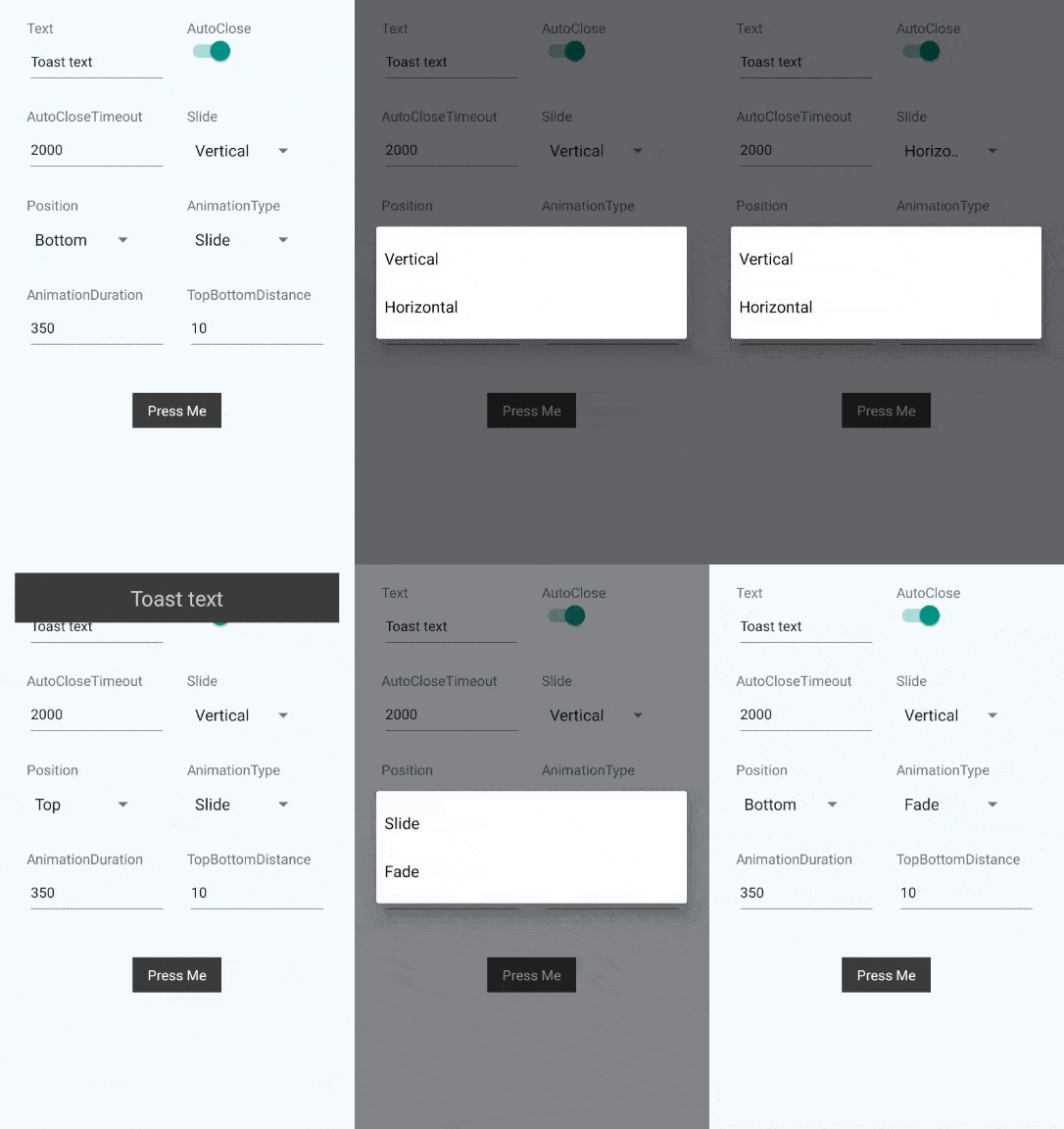 React Native Toast done in JS for better compatibility and customizability.
[](https://badge.fury.io/js/react-native-another-toast)
### Installation
`npm install --save react-native-another-toast`
### Usage
```javascript
import Toast from 'react-native-another-toast'
class Example extends Component {
render () {
return (
)
}
}
```
### Examples
```js
//Simple toast that fades at the top via the state change
class Example extends Component {
constructor(props) {
super(props)
this.onClose = this.onClose.bind(this)
this.showToast = this.showToast.bind(this)
}
state = {
showToast: false,
}
onClose() {
this.setState({
showToast: false,
})
}
showToast() {
this.setState({
showToast: true,
})
}
render() {
return (
Press Me
)
}
}
```
React Native Toast done in JS for better compatibility and customizability.
[](https://badge.fury.io/js/react-native-another-toast)
### Installation
`npm install --save react-native-another-toast`
### Usage
```javascript
import Toast from 'react-native-another-toast'
class Example extends Component {
render () {
return (
)
}
}
```
### Examples
```js
//Simple toast that fades at the top via the state change
class Example extends Component {
constructor(props) {
super(props)
this.onClose = this.onClose.bind(this)
this.showToast = this.showToast.bind(this)
}
state = {
showToast: false,
}
onClose() {
this.setState({
showToast: false,
})
}
showToast() {
this.setState({
showToast: true,
})
}
render() {
return (
Press Me
)
}
}
```
 ```js
//Toast with image that slides from the side via refs
class Example extends Component {
constructor(props) {
super(props)
this.showToast = this.showToast.bind(this)
}
showToast() {
this.toast.showToast()
}
render() {
return (
Press Me
Complex toast
}
slide='horizontal'
ref={(c) => { this.toast = c }}
/>
)
}
}
```
### Props
- `content` - (React.Component) `null` - Component inside the toast. Replaces the `text`.
- `text` - (String) `Toast` - text that will be shown in the toast, if `content` is null.
- `textStyle` - (Object) - Styles for the text element.
- `toastStyle` - (Object) - Styles for the toast element.
- `underlayColor` - (String) `#515151` - Color of the underlay for TouchableHighlight element of the toast. Recommended to be slightly lighter or darker than main background.
- `onToastTap` - (Function) `null` - Will be called on the tap on the toast element. By default (if null) will call internal function that will close the toast. If provided - internal function will not be called.
- `autoClose` - (Boolean) `true` - Decides if we should close the toast automatically after timeout.
- `autoCloseTimeout` - (Number) `2000` - Timeout for autoClose.
- `onClose` - (Function) - Will be called after the toast close animation.
- `showToast` - (Boolean) `false` - If true - toast will be shown. Please note, that you should revert this to false if you want to show the toast again(You probably want to use onClose event for this).
- `slide` - (String: [vertical, horizontal]) `vertical` - Decides how animation will occur for `slide` animation type.
- `position` - (String: [top, bottom]) `bottom` - Position of the toast on screen.
- `topBottomDistance` - (Number) `10` - Gap between the edge of the screen and the toast(either from the bottom, or from the top, depend on the `position`).
- `animationType` - (String: [slide, fade]) `slide` - Decides on the animation type.
- `animationDuration` - (Number) `350` - Animation duration.
### Methods
- `showToast` - Will show the toast.
```js
this.toast.showToast()
```
- `closeToast` - Will close the toast.
```js
this.toast.closeToast()
```
### Demo
* `git clone https://github.com/ywein/react-native-another-toast.git`
* `cd react-native-another-toast/examples/toast && npm install`
* **iOS**
* Open `./examples/toast/ios/toast.xcodeproject` in xcode
* `command+r` (in xcode)
* **Android**
* Run android simulator / plug in your android device
* Run `react-native run-android` in terminal
### TODO
The following is left to be done:
- [ ] Different Touchable components per platform.
- [ ] Customizable animation function.
---
_Source: https://npm.io/package/react-native-another-toast · Machine-readable twin of the npm.io package page. Health data is recomputed on every publish._
```js
//Toast with image that slides from the side via refs
class Example extends Component {
constructor(props) {
super(props)
this.showToast = this.showToast.bind(this)
}
showToast() {
this.toast.showToast()
}
render() {
return (
Press Me
Complex toast
}
slide='horizontal'
ref={(c) => { this.toast = c }}
/>
)
}
}
```
### Props
- `content` - (React.Component) `null` - Component inside the toast. Replaces the `text`.
- `text` - (String) `Toast` - text that will be shown in the toast, if `content` is null.
- `textStyle` - (Object) - Styles for the text element.
- `toastStyle` - (Object) - Styles for the toast element.
- `underlayColor` - (String) `#515151` - Color of the underlay for TouchableHighlight element of the toast. Recommended to be slightly lighter or darker than main background.
- `onToastTap` - (Function) `null` - Will be called on the tap on the toast element. By default (if null) will call internal function that will close the toast. If provided - internal function will not be called.
- `autoClose` - (Boolean) `true` - Decides if we should close the toast automatically after timeout.
- `autoCloseTimeout` - (Number) `2000` - Timeout for autoClose.
- `onClose` - (Function) - Will be called after the toast close animation.
- `showToast` - (Boolean) `false` - If true - toast will be shown. Please note, that you should revert this to false if you want to show the toast again(You probably want to use onClose event for this).
- `slide` - (String: [vertical, horizontal]) `vertical` - Decides how animation will occur for `slide` animation type.
- `position` - (String: [top, bottom]) `bottom` - Position of the toast on screen.
- `topBottomDistance` - (Number) `10` - Gap between the edge of the screen and the toast(either from the bottom, or from the top, depend on the `position`).
- `animationType` - (String: [slide, fade]) `slide` - Decides on the animation type.
- `animationDuration` - (Number) `350` - Animation duration.
### Methods
- `showToast` - Will show the toast.
```js
this.toast.showToast()
```
- `closeToast` - Will close the toast.
```js
this.toast.closeToast()
```
### Demo
* `git clone https://github.com/ywein/react-native-another-toast.git`
* `cd react-native-another-toast/examples/toast && npm install`
* **iOS**
* Open `./examples/toast/ios/toast.xcodeproject` in xcode
* `command+r` (in xcode)
* **Android**
* Run android simulator / plug in your android device
* Run `react-native run-android` in terminal
### TODO
The following is left to be done:
- [ ] Different Touchable components per platform.
- [ ] Customizable animation function.
---
_Source: https://npm.io/package/react-native-another-toast · Machine-readable twin of the npm.io package page. Health data is recomputed on every publish._