# react-native-button-component
> A Beautiful, Customizable React Native Button component for iOS & Android
Latest version **0.2.28** (published 2018-03-18) · MIT license · 0 weekly downloads
## Install
```sh
npm install react-native-button-component
pnpm add react-native-button-component
yarn add react-native-button-component
bun add react-native-button-component
```
## Health
**Score 15/100 (F)** — status: abandoned.
Positive: no vulnerabilities.
Warnings: low downloads; no types; no esm support; pre 1.0.
Negative: abandoned; low maintenance score.
## Facts
| | |
|---|---|
| Version | 0.2.28 |
| Published | 2018-03-18 |
| First published | 2016-08-27 |
| Weekly downloads | 0 |
| License | MIT |
| TypeScript types | none |
| Module format | CommonJS |
| Dependencies | 5 |
| Unpacked size | 1.6 MB |
| Known vulnerabilities | 0 |
| Install scripts | no |
| GitHub stars | 531 |
| Author | jacklam |
| Maintainers | jacklam |
| Keywords | react button, react-native, react-native-button-component, react-native-button, react native button, button, component, react-component, react-native-component, ios, android |
## Links
- npm: https://www.npmjs.com/package/react-native-button-component
- Repository: https://github.com/jacklam718/react-native-button-component
- Homepage: https://github.com/jacklam718/react-native-button-component/blob/master/README.md
- Issues: https://github.com/jacklam718/react-native-button-component/issues
- npm.io page: https://npm.io/package/react-native-button-component
## Dependencies (5)
- [lodash](https://npm.io/package/lodash.md) ^4.17.2
- [react-native-spinkit](https://npm.io/package/react-native-spinkit.md) ^1.0.2
- [react-native-linear-gradient](https://npm.io/package/react-native-linear-gradient.md) ^2.4.0
- [react-native-circular-progress](https://npm.io/package/react-native-circular-progress.md) https://github.com/jacklam718/react-native-circular-progress/archive/v0.0.10.tar.gz
- [babel-preset-react-native-stage-0](https://npm.io/package/babel-preset-react-native-stage-0.md) ^1.0.1
## Alternatives
- [@sindresorhus/slugify](https://npm.io/package/@sindresorhus/slugify.md) — 3.7M weekly downloads
- [solid-js](https://npm.io/package/solid-js.md) — 2.7M weekly downloads
- [expo-glass-effect](https://npm.io/package/expo-glass-effect.md) — 2.5M weekly downloads
- [nanoassert](https://npm.io/package/nanoassert.md) — 780.8K weekly downloads
- [@ffmpeg/ffmpeg](https://npm.io/package/@ffmpeg/ffmpeg.md) — 529.5K weekly downloads
## Recent versions
- 0.2.28 (latest) — 2018-03-18
- 0.2.27 — 2018-03-18
- 0.1.26 — 2018-03-18
- 0.1.25 — 2017-08-26
- 0.1.24 — 2017-08-26
- 0.1.23 — 2017-08-26
- 0.1.22 — 2017-08-22
- 0.1.21 — 2017-08-12
- 0.1.20 — 2017-08-11
- 0.1.19 — 2017-08-11
- 0.1.18 — 2017-06-29
- 0.1.17 — 2017-05-19
- 0.1.16 — 2017-03-17
- 0.1.15 — 2017-03-07
- 0.1.14 — 2017-02-26
- … 13 more at https://npm.io/package/react-native-button-component/versions
## README
[](https://travis-ci.org/jacklam718/react-native-button-component)
[]()
[]()
## React Native Button component
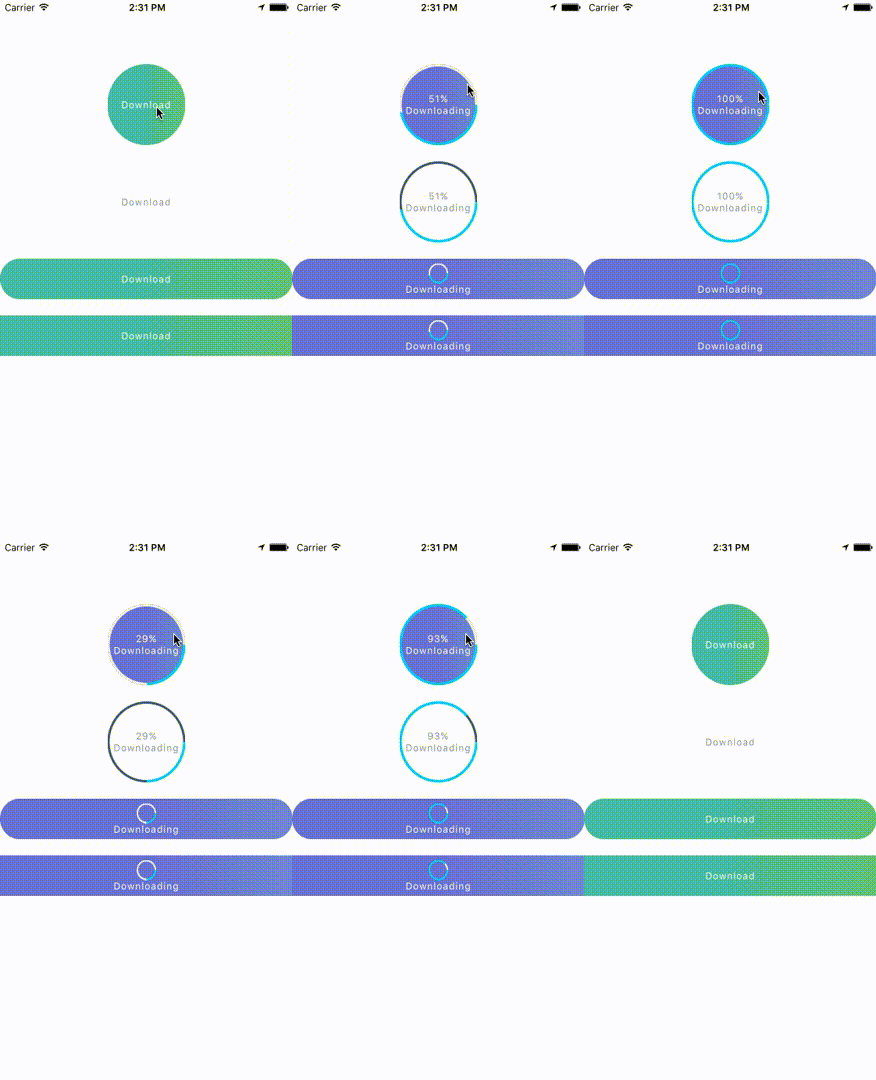
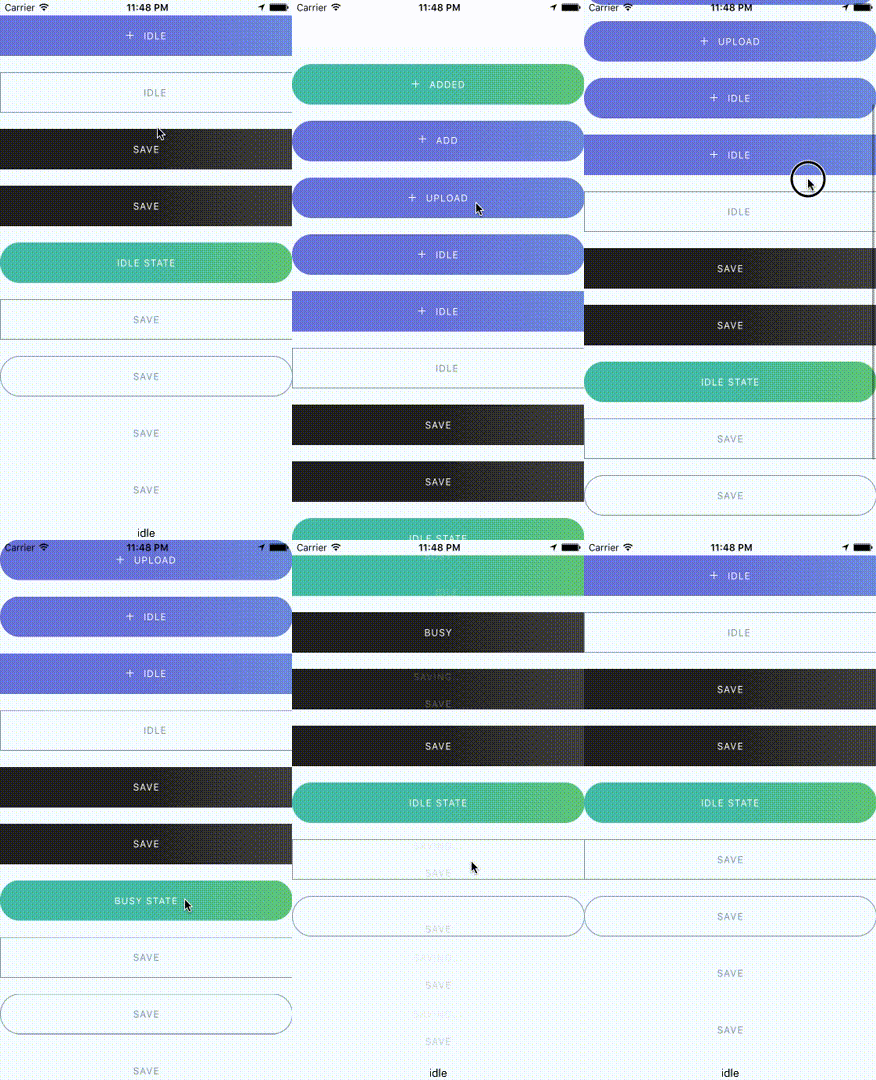
React Native Button component for iOS & Android.
## Provided Components
This library provided the following button components:
```
ButtonComponent
CircleButton
RoundButton
RectangleButton
```
#### Note:
CircleButton, RoundButton, RectangleButton is on top of ButtonComponent.
So I recommend you should use CircleButton, RoundButton, RectangleButton, rather than directly use ButtonComponent because those button components may have preset some options.
## Installation
1. `npm install --save react-native-button-component`
2. `react-native link`
##### Note
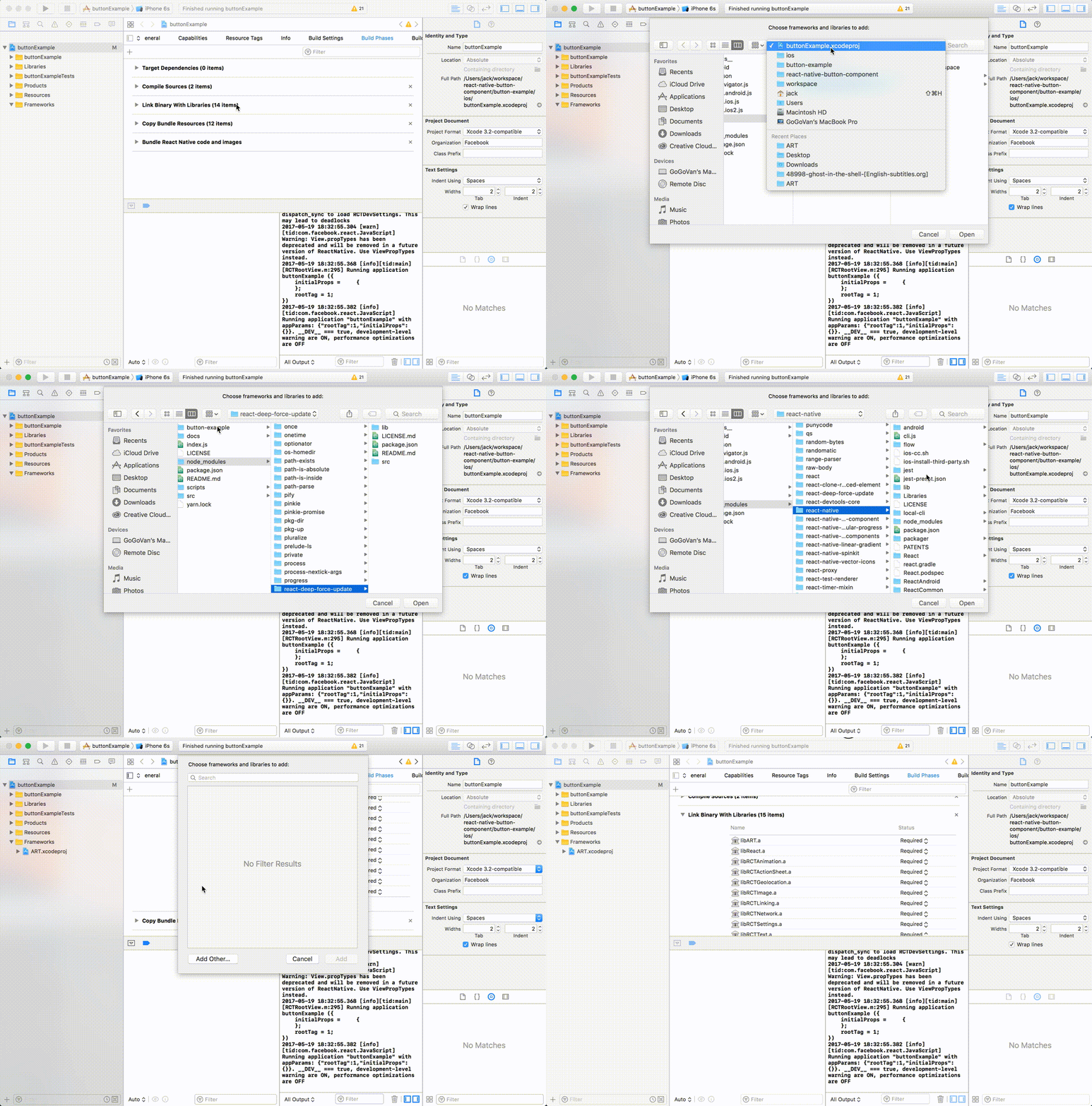
If you didn't see this item `libART.a` under the `Link Binary With Libraries` or you get this error `No component found for view with name "ARTSurfaceView"`
Please open Xcode project and add `libART.a` under `Build Phases -> Link Binary With Libraries`
###### The detailed steps:
1. Open Xcode project
2. Build Phases -> Link Binary With Libraries
3. Click the `+` button and Click `Add Other...`
4. Open with `node_modules/react-native/Libraries/ART/ART.xcodeproj`
5. Click the `+` and select the `libART.a` and click `Add`
 ## Some Simple Examples
One State Button
## Some Simple Examples
One State Button
Multiple States Button
Spinner Button
Progress Button
Circle Button
## Documents
Props & Button Options
Options for Progress Button
Options for Spinner Button
Options for Circle Button
## Usage - Basic
#### Button with one state
```javascript
import ButtonComponent, { CircleButton, RoundButton, RectangleButton } from 'react-native-button-component';
// You can use CircleButton, RoundButton, RectangleButton to instead ButtonComponent
{}}
image={require('button-image.png')}
text="Button"
>
```
#### Button with multiple states
```javascript
import ButtonComponent, { CircleButton, RoundButton, RectangleButton } from 'react-native-button-component';
// You can use CircleButton, RoundButton, RectangleButton to instead ButtonComponent
{
this.imageUploader.upload();
this.state.setState({ buttonState: 'uploading' });
},
image: require('upload-image.png'),
text: 'Upload Image',
},
uploading: {
onPress: () => {
this.imageUploader.cancelUpload();
this.state.setState({ buttonState: 'upload' });
},
spinner: true,
text: 'Uploding Image...',
},
}}
>
```
## Usage - With Your Configurations
#### Button with one state
```javascript
{}}
image={require('button-image.png')}
>
```
#### Button with multiple states - different config for different states
```javascript
import ButtonComponent, { CircleButton, RoundButton, RectangleButton } from 'react-native-button-component';
// You can use CircleButton, RoundButton, RectangleButton to instead ButtonComponent
{
this.imageUploader.upload();
this.state.setState({ buttonState: 'uploading' });
},
},
uploading: {
text: 'Uploding Image...',
gradientStart: { x: 0.8, y: 1 },
gradientEnd: { x: 1, y: 1 },
backgroundColors: ['#ff4949', '#fe6060'],
spinner: true,
onPress: () => {
this.imageUploader.cancelUpload();
this.state.setState({ buttonState: 'upload' });
},
},
}}
>
```
#### Button with multiple states - one config for different states
```javascript
{
this.imageUploader.upload();
this.state.setState({ buttonState: 'uploading' });
},
},
uploading: {
text: 'Uploding Image...',
spinner: true,
onPress: () => {
this.imageUploader.cancelUpload();
this.state.setState({ buttonState: 'upload' });
},
},
}}
>
```
## License
MIT
---
_Source: https://npm.io/package/react-native-button-component · Machine-readable twin of the npm.io package page. Health data is recomputed on every publish._