A searchable, themeable country picker for React Native — iOS, Android and Web.
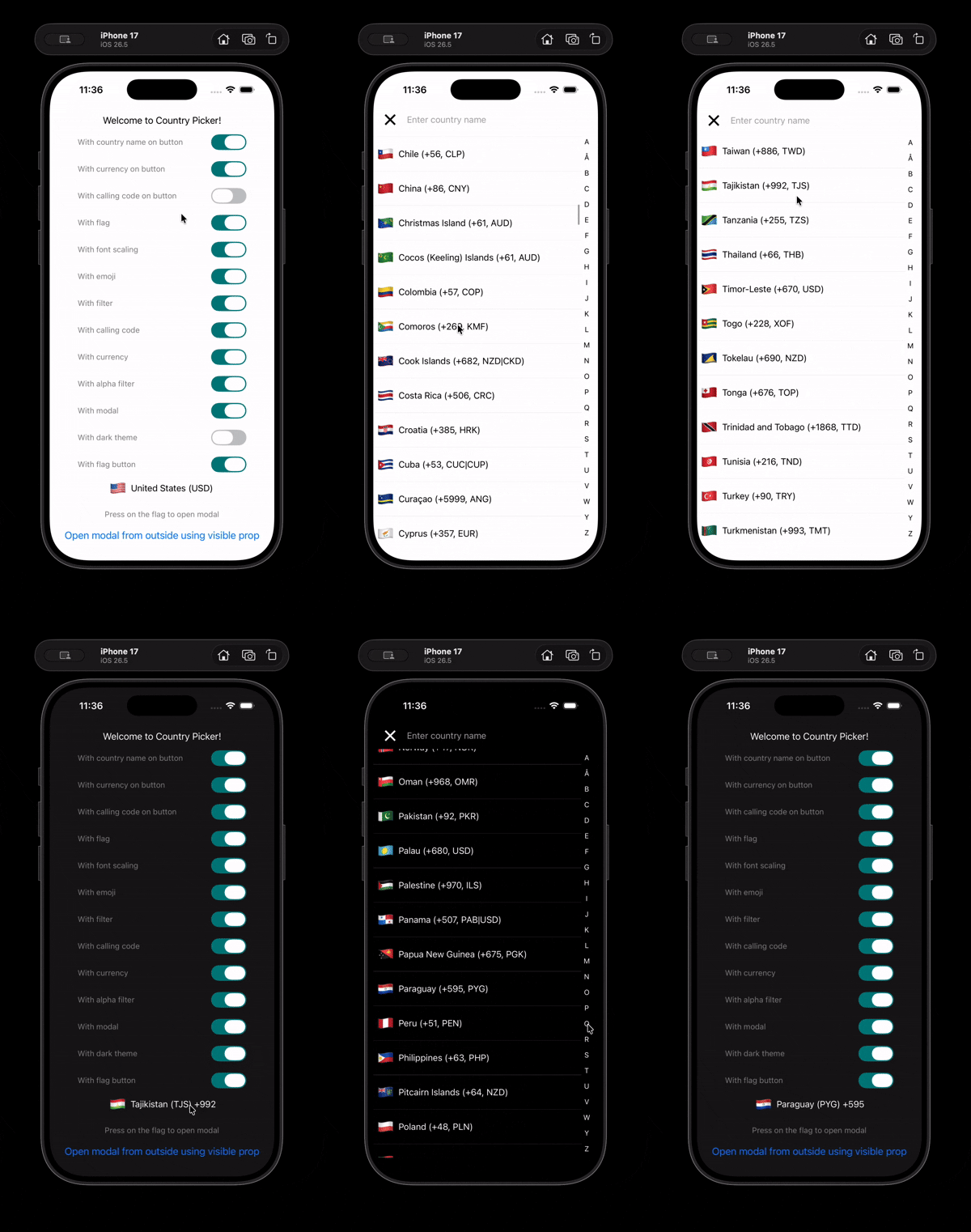
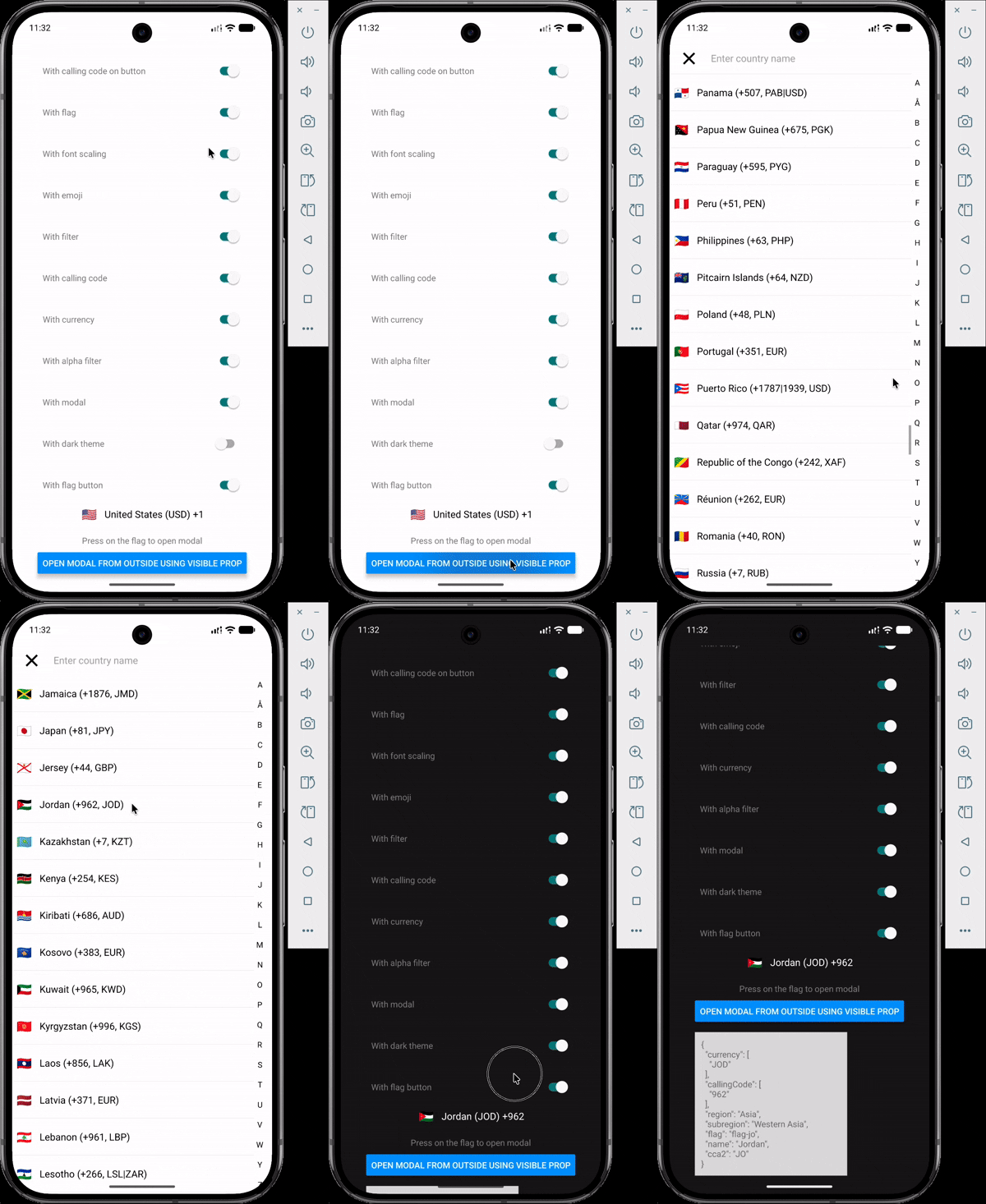
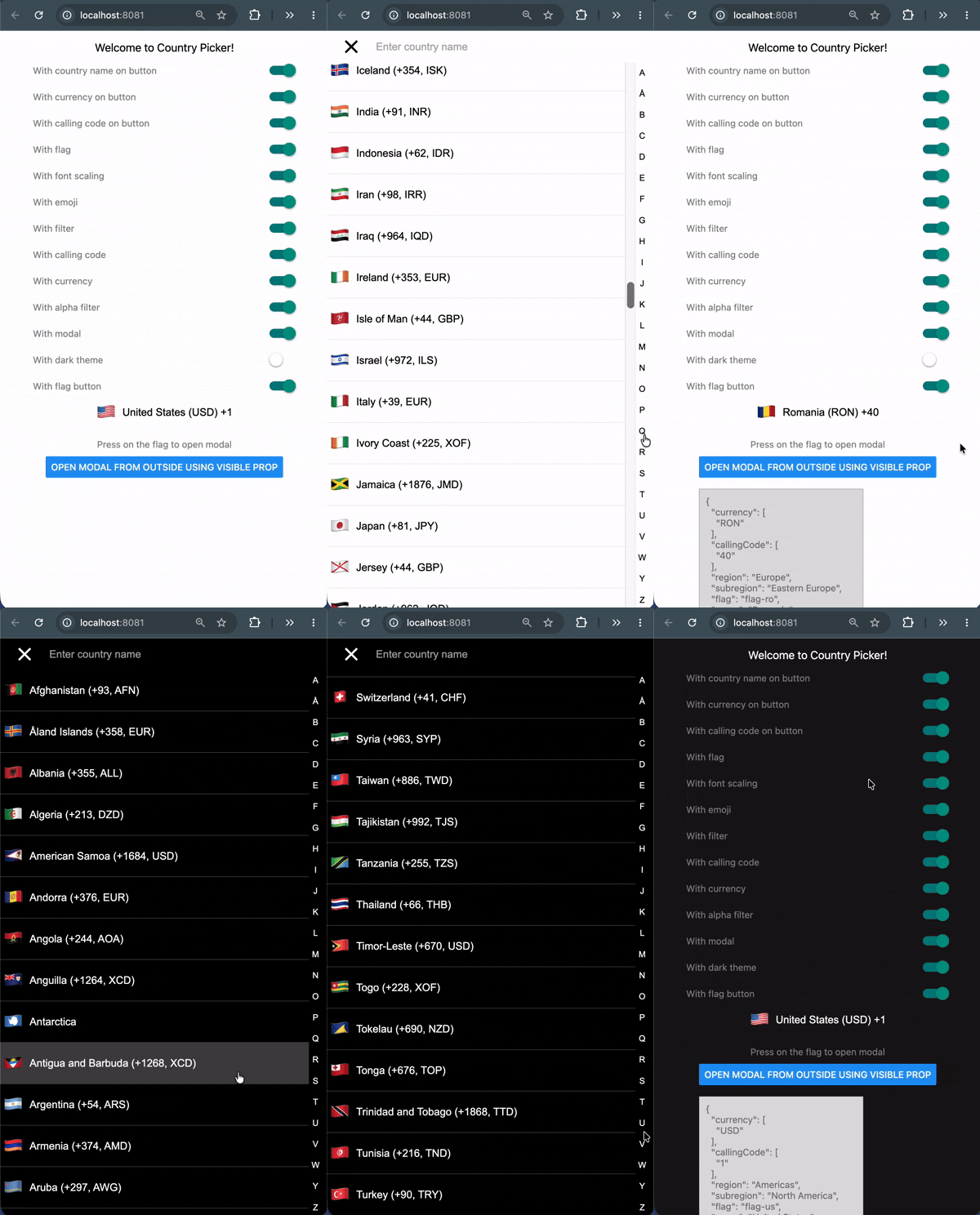
| iOS | Android | Web |
| ------------------------------------------------------------------------------------------------------------------------------------------------------ | -------------------------------------------------------------------------------------------------------------------------------------------------------------- | ------------------------------------------------------------------------------------------------------------------------------------------------------ |
| | | |
## Features
- 250 countries with names, flags, calling codes, currencies, regions and subregions.
- Emoji flags with **no runtime dependency** — derived from the country code, nothing to download.
- Fuzzy search across name, country code and calling code, plus an A–Z jump index.
- 18 name translations bundled, with automatic fallback to English.
- Fully themeable, with a built-in dark theme.
- Written in TypeScript; country codes, regions and translations are literal union types.
- Works on iOS, Android and Web.
## Requirements
| Package | Version |
| -------------- | --------- |
| `react` | `>= 19.0` |
| `react-native` | `>= 0.78` |
> **Using React 18 or React Native 0.72?** Stay on `v2`. See [Migrating from v2](#migrating-from-v2).
## Installation
```bash
npm install react-native-country-picker-modal
yarn add react-native-country-picker-modal
pnpm add react-native-country-picker-modal
bun add react-native-country-picker-modal
```
There is no native code and no linking step, so it works in Expo Go as well as bare React Native.
## Quick start
```tsx
import { useState } from 'react'
import { SafeAreaView, Text } from 'react-native'
import CountryPicker, {
type Country,
type CountryCode,
} from 'react-native-country-picker-modal'
export default function App() {
const [countryCode, setCountryCode] = useState('US')
const [country, setCountry] = useState()
return (
{
setCountryCode(selected.cca2)
setCountry(selected)
}}
/>
{country ? You picked {country.name as string} : null}
)
}
```
Tapping the flag opens the modal. To drive it yourself, pass `visible` and handle `onOpen` / `onClose`.
A runnable version exercising every option lives in [`example/App.tsx`](https://github.com/xcarpentier/react-native-country-picker-modal/blob/1c6a19e/example/App.tsx).
## Props
### Selection
| Prop | Type | Default | Description |
| -------------------- | ---------------------------- | ---------- | ----------------------------------------------------------- |
| `countryCode` | `CountryCode` | — | The currently selected country, e.g. `'US'`. |
| `onSelect` | `(country: Country) => void` | no-op | Called with the full country object when one is chosen. |
| `countryCodes` | `CountryCode[]` | — | Restrict the list to these countries. |
| `excludeCountries` | `CountryCode[]` | — | Remove these countries from the list. |
| `preferredCountries` | `CountryCode[]` | — | Show these first. Ignored when `withAlphaFilter` is `true`. |
| `region` | `Region` | — | Restrict to a region, e.g. `'Europe'`. |
| `subregion` | `Subregion` | — | Restrict to a subregion, e.g. `'Western Europe'`. |
| `translation` | `TranslationLanguageCode` | `'common'` | Language for names. Falls back to English per country. |
### What the list shows
| Prop | Type | Default | Description |
| ----------------- | --------- | ------- | ------------------------------------------------------------------------------------ |
| `withFlag` | `boolean` | `true` | Show a flag on each row. |
| `withEmoji` | `boolean` | `true` | Use emoji flags. When `false`, images are fetched — see [Image flags](#image-flags). |
| `withCallingCode` | `boolean` | `false` | Append the calling code to each row. |
| `withCurrency` | `boolean` | `false` | Append the currency to each row. |
| `withFilter` | `boolean` | `false` | Show the search field. |
| `withAlphaFilter` | `boolean` | `false` | Show the A–Z jump index. |
### What the button shows
| Prop | Type | Default | Description |
| ----------------------- | ---------------------- | ------------------ | ------------------------------------ |
| `withFlagButton` | `boolean` | `true` | Show the flag on the button. |
| `withCountryNameButton` | `boolean` | `false` | Show the country name on the button. |
| `withCallingCodeButton` | `boolean` | `false` | Show the calling code on the button. |
| `withCurrencyButton` | `boolean` | `false` | Show the currency on the button. |
| `placeholder` | `string` | `'Select Country'` | Shown when no `countryCode` is set. |
| `containerButtonStyle` | `StyleProp` | — | Style for the button container. |
| `allowFontScaling` | `boolean` | `true` | Respect the OS font-size setting. |
### Modal
| Prop | Type | Default | Description |
| -------------------- | ----------------------------------- | ------- | ------------------------------------------------------------------------------------------------------------- |
| `withModal` | `boolean` | `true` | When `false`, the list renders inline and no button is shown. |
| `visible` | `boolean` | `false` | Open the modal from outside. |
| `onOpen` / `onClose` | `() => void` | — | Called when the modal opens or closes. |
| `withCloseButton` | `boolean` | `true` | Show the close button in the header. |
| `modalInsets` | `{ top?: number; bottom?: number }` | — | Override the Android status/navigation bar insets. See [Android and edge-to-edge](#android-and-edge-to-edge). |
### Escape hatches
| Prop | Type | Description |
| --------------------------------------------------------------- | ----------------------------------------------------------------------- | ------------------------------------------------------- |
| `theme` | `Theme` | Merged over the default theme. See [Theming](#theming). |
| `modalProps` | [`ModalProps`](https://reactnative.dev/docs/modal#props) | Forwarded to the underlying `Modal`. |
| `filterProps` | [`TextInputProps`](https://reactnative.dev/docs/textinput#props) | Forwarded to the search field. |
| `flatListProps` | [`FlatListProps`](https://reactnative.dev/docs/flatlist#props) | Forwarded to the list. |
| `renderFlagButton` | `(props: FlagButtonProps) => ReactNode` | Replace the button entirely. |
| `renderCountryFilter` | `(props: CountryFilterProps) => ReactNode` | Replace the search field entirely. |
| `closeButtonImage`, `closeButtonStyle`, `closeButtonImageStyle` | — | Customise the close button. |
## Theming
`theme` is merged over the defaults, so you specify only what you want to change.
```tsx
import CountryPicker, { DARK_THEME } from 'react-native-country-picker-modal'
// Built-in dark theme
// Or override individual values
```
| Key | Default (light) |
| ---------------------------- | ---------------------------------------------- |
| `primaryColor` | `'#ccc'` |
| `primaryColorVariant` | `'#eee'` |
| `backgroundColor` | `'#ffffff'` |
| `onBackgroundTextColor` | `'#000000'` |
| `fontSize` | `16` |
| `fontFamily` | `'System'` / `'Roboto'` / `'Arial'` |
| `filterPlaceholderTextColor` | `'#aaa'` |
| `keyboardAppearance` | `'light'` (`'dark'` in `DARK_THEME`, iOS only) |
| `activeOpacity` | `0.5` |
| `itemHeight` | 7% of screen height |
| `desktopBreakpoint` | `768` (web only) |
| `dialogMaxWidth` | `480` (web only) |
| `dialogMaxHeight` | `640` (web only) |
| `dialogBorderRadius` | `12` (web only) |
| `backdropColor` | `'rgba(0, 0, 0, 0.45)'` (web only) |
| `flagSize` | `20` on Android, `30` elsewhere |
| `flagSizeButton` | `20` on Android, `30` elsewhere |
`useTheme()` returns the fully resolved theme if you are building your own row or button.
### Android and edge-to-edge
Android 15 and newer always lay the app window out edge-to-edge. Two things in
react-native do not follow, and the picker compensates for both:
- `SafeAreaView` is `Platform.select({ ios: ..., default: View })`, so it applies
**no insets at all** on Android. The modal pads itself by
`StatusBar.currentHeight` instead.
- The native modal sets `fitsSystemWindows` on its content and disables
edge-to-edge on the dialog window whenever `statusBarTranslucent` is false.
That offset the content by the status bar height while it stayed full-screen
tall, pushing the search bar down and the bottom of the list off screen. The
picker passes `statusBarTranslucent` so the dialog matches the app window.
`navigationBarTranslucent` is deliberately left off, which lets the system inset
the dialog above the navigation bar — the one inset core react-native cannot
measure. If your app already uses `react-native-safe-area-context` and you want
exact values, pass them in:
```tsx
import { useSafeAreaInsets } from 'react-native-safe-area-context'
const insets = useSafeAreaInsets()
```
`modalInsets` accepts `{ top?: number; bottom?: number }` and overrides the
measured values. It is ignored on iOS, where `SafeAreaView` reports real insets.
### Web
On web the picker is responsive. Below `desktopBreakpoint` it stays the full-screen
sheet you get on a phone; at or above it the sheet becomes a centred dialog capped to
`dialogMaxWidth` / `dialogMaxHeight` over a dimmed backdrop, because a country list
stretched across a monitor is hard to read. Clicking the backdrop or pressing
Esc closes the dialog, and rows highlight on hover using
`primaryColorVariant`. Native is unaffected.
## Helper functions
Everything the picker uses internally is exported, so you can query the country data without rendering anything.
```tsx
import {
getEmojiFlag,
getCountryName,
getCallingCode,
getCurrency,
getCountryInfo,
getAllCountries,
FlagType,
} from 'react-native-country-picker-modal'
getEmojiFlag('JP') // '🇯🇵' — synchronous, no I/O
await getCountryName('JP', 'fra') // 'Japon'
await getCallingCode('JP') // '81'
await getCurrency('JP') // 'JPY'
await getCountryInfo({ countryCode: 'JP' })
// { countryName: 'Japan', currency: 'JPY', callingCode: '81' }
await getAllCountries(FlagType.EMOJI, 'common')
```
## Recipes
### Opening the modal from your own button
```tsx
const [visible, setVisible] = useState(false)



 |
|  |
|  |
## Features
- 250 countries with names, flags, calling codes, currencies, regions and subregions.
- Emoji flags with **no runtime dependency** — derived from the country code, nothing to download.
- Fuzzy search across name, country code and calling code, plus an A–Z jump index.
- 18 name translations bundled, with automatic fallback to English.
- Fully themeable, with a built-in dark theme.
- Written in TypeScript; country codes, regions and translations are literal union types.
- Works on iOS, Android and Web.
## Requirements
| Package | Version |
| -------------- | --------- |
| `react` | `>= 19.0` |
| `react-native` | `>= 0.78` |
> **Using React 18 or React Native 0.72?** Stay on `v2`. See [Migrating from v2](#migrating-from-v2).
## Installation
```bash
npm install react-native-country-picker-modal
yarn add react-native-country-picker-modal
pnpm add react-native-country-picker-modal
bun add react-native-country-picker-modal
```
There is no native code and no linking step, so it works in Expo Go as well as bare React Native.
## Quick start
```tsx
import { useState } from 'react'
import { SafeAreaView, Text } from 'react-native'
import CountryPicker, {
type Country,
type CountryCode,
} from 'react-native-country-picker-modal'
export default function App() {
const [countryCode, setCountryCode] = useState
|
## Features
- 250 countries with names, flags, calling codes, currencies, regions and subregions.
- Emoji flags with **no runtime dependency** — derived from the country code, nothing to download.
- Fuzzy search across name, country code and calling code, plus an A–Z jump index.
- 18 name translations bundled, with automatic fallback to English.
- Fully themeable, with a built-in dark theme.
- Written in TypeScript; country codes, regions and translations are literal union types.
- Works on iOS, Android and Web.
## Requirements
| Package | Version |
| -------------- | --------- |
| `react` | `>= 19.0` |
| `react-native` | `>= 0.78` |
> **Using React 18 or React Native 0.72?** Stay on `v2`. See [Migrating from v2](#migrating-from-v2).
## Installation
```bash
npm install react-native-country-picker-modal
yarn add react-native-country-picker-modal
pnpm add react-native-country-picker-modal
bun add react-native-country-picker-modal
```
There is no native code and no linking step, so it works in Expo Go as well as bare React Native.
## Quick start
```tsx
import { useState } from 'react'
import { SafeAreaView, Text } from 'react-native'
import CountryPicker, {
type Country,
type CountryCode,
} from 'react-native-country-picker-modal'
export default function App() {
const [countryCode, setCountryCode] = useState