# react-native-detect-caller-id
> Module for detecting caller id by provided callers list
Latest version **1.5.1** (published 2022-06-22) · MIT license · 0 weekly downloads
## Install
```sh
npm install react-native-detect-caller-id
pnpm add react-native-detect-caller-id
yarn add react-native-detect-caller-id
bun add react-native-detect-caller-id
```
## Health
**Score 15/100 (F)** — status: abandoned.
Positive: no vulnerabilities.
Warnings: low downloads; no types; no esm support.
Negative: abandoned; low maintenance score.
## Facts
| | |
|---|---|
| Version | 1.5.1 |
| Published | 2022-06-22 |
| First published | 2022-01-07 |
| Weekly downloads | 0 |
| License | MIT |
| TypeScript types | none |
| Module format | CommonJS |
| Dependencies | 0 |
| Unpacked size | 7.3 MB |
| Known vulnerabilities | 0 |
| Install scripts | no |
| Author | yesskyscrapers |
| Maintainers | yesskyscrapers |
| Keywords | react-native |
## Links
- npm: https://www.npmjs.com/package/react-native-detect-caller-id
- Repository: https://github.com/YesSkyscrapers/react-native-detect-caller-id
- Homepage: https://github.com/YesSkyscrapers/react-native-detect-caller-id.git
- Issues: https://github.com/YesSkyscrapers/react-native-detect-caller-id/issues
- npm.io page: https://npm.io/package/react-native-detect-caller-id
## Recent versions
- 1.5.1 (latest) — 2022-06-22
- 1.5.0 — 2022-06-22
- 1.4.3 — 2022-06-01
- 1.4.2 — 2022-05-31
- 1.4.1 — 2022-04-25
- 1.4.0 — 2022-04-19
- 1.3.0 — 2022-03-25
- 1.2.0 — 2022-03-03
- 1.1.1 — 2022-01-17
- 1.1.0 — 2022-01-17
- 1.0.1 — 2022-01-07
- 1.0.0 — 2022-01-07
## README
React Native Detect CallerID implements [Broadcast Receiver](https://developer.android.com/guide/components/broadcasts) (Android) and [CallKit: Call Directory Extension](https://developer.apple.com/documentation/callkit/cxcalldirectoryextensioncontext) (iOS).
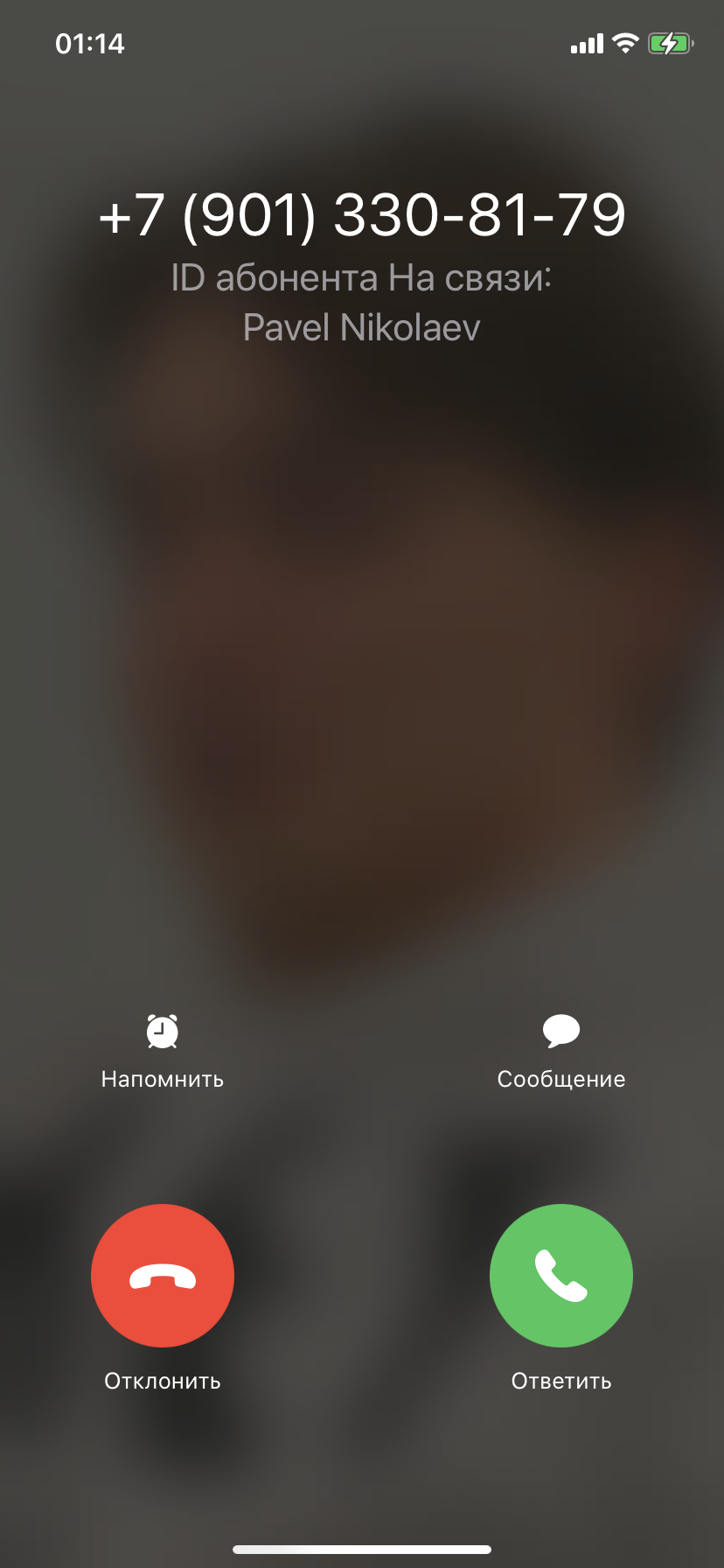
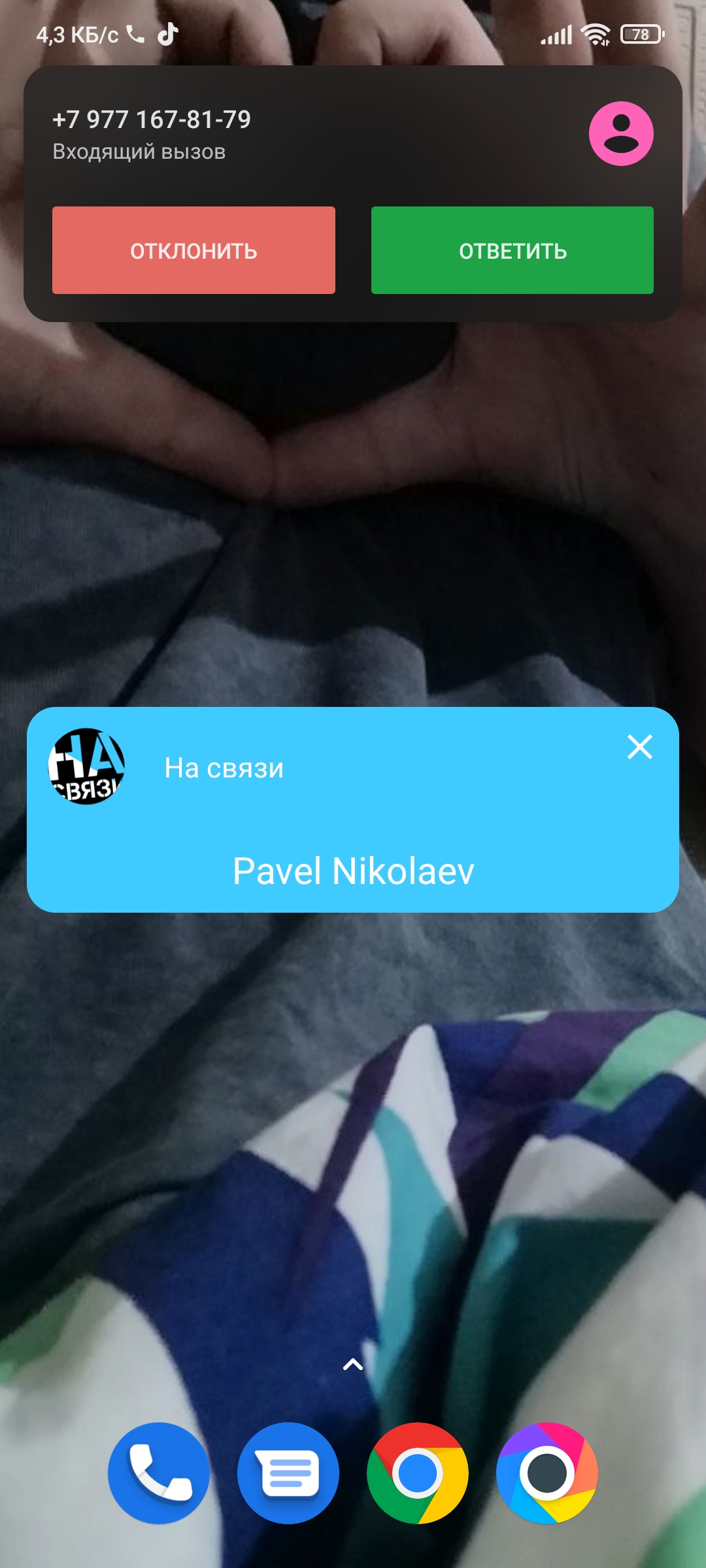
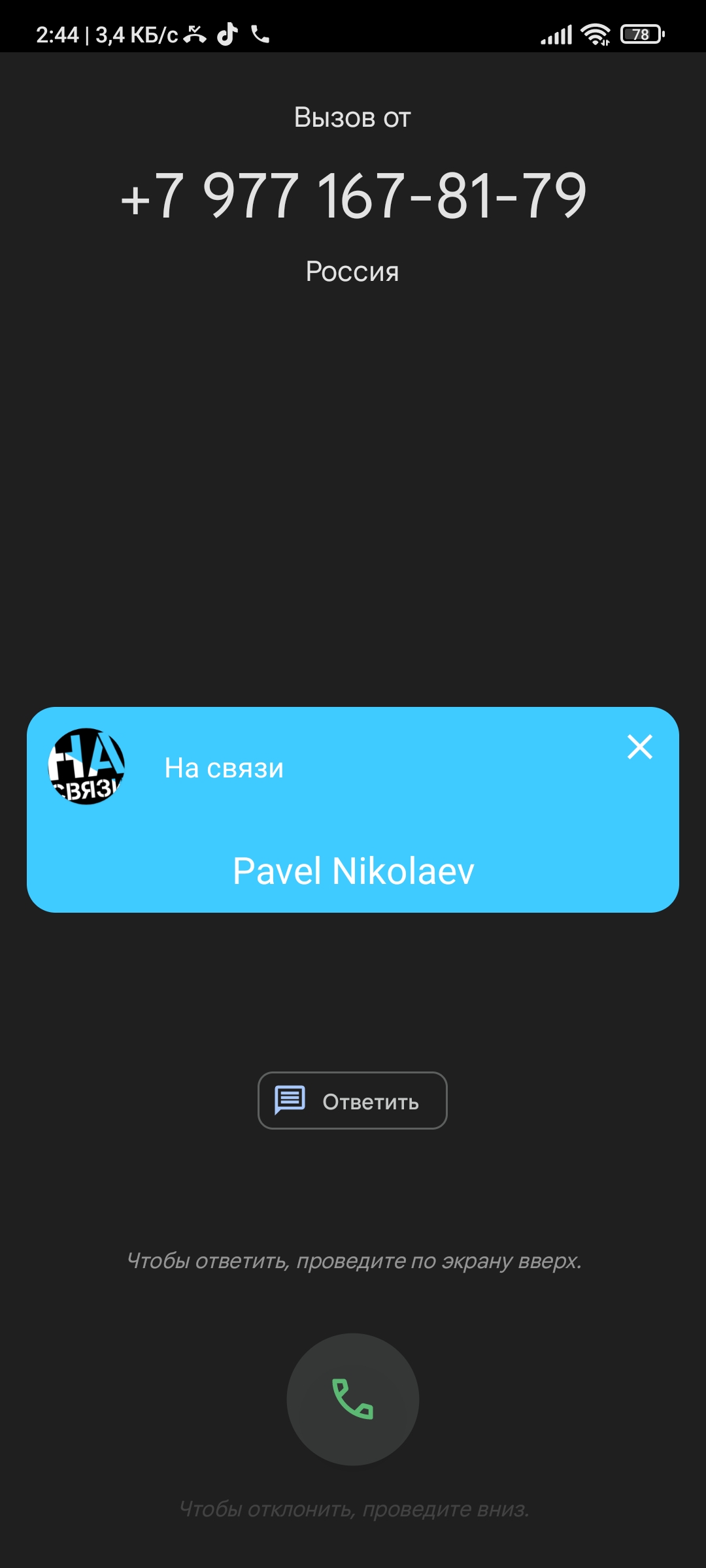
With this library you can simple add CallerID for your React-Native Apps. For iOS library provides additional information on calling screen. For android library render additional layout with your information about incoming phone number.
## Table of Contents
- [Installation](#installation)
- [Basic Usage](#basic-usage)
- [API](#api)
## Installation
Using Yarn
```sh
yarn add react-native-detect-caller-id
```
Using npm
```sh
npm install react-native-detect-caller-id --save
```
### iOS
Firsty, you should add `Call Directory Extension`.
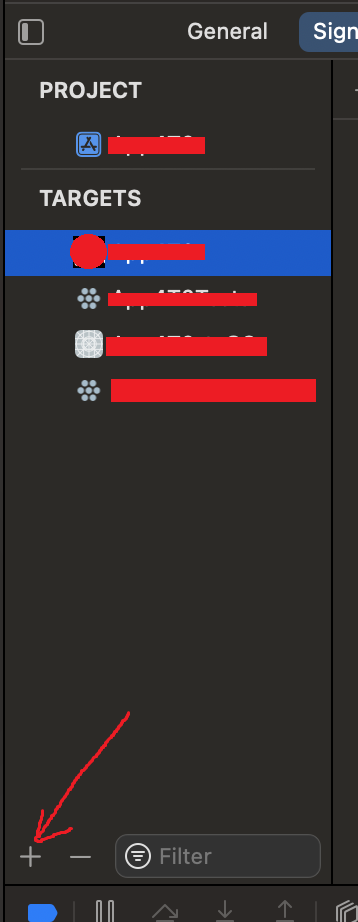
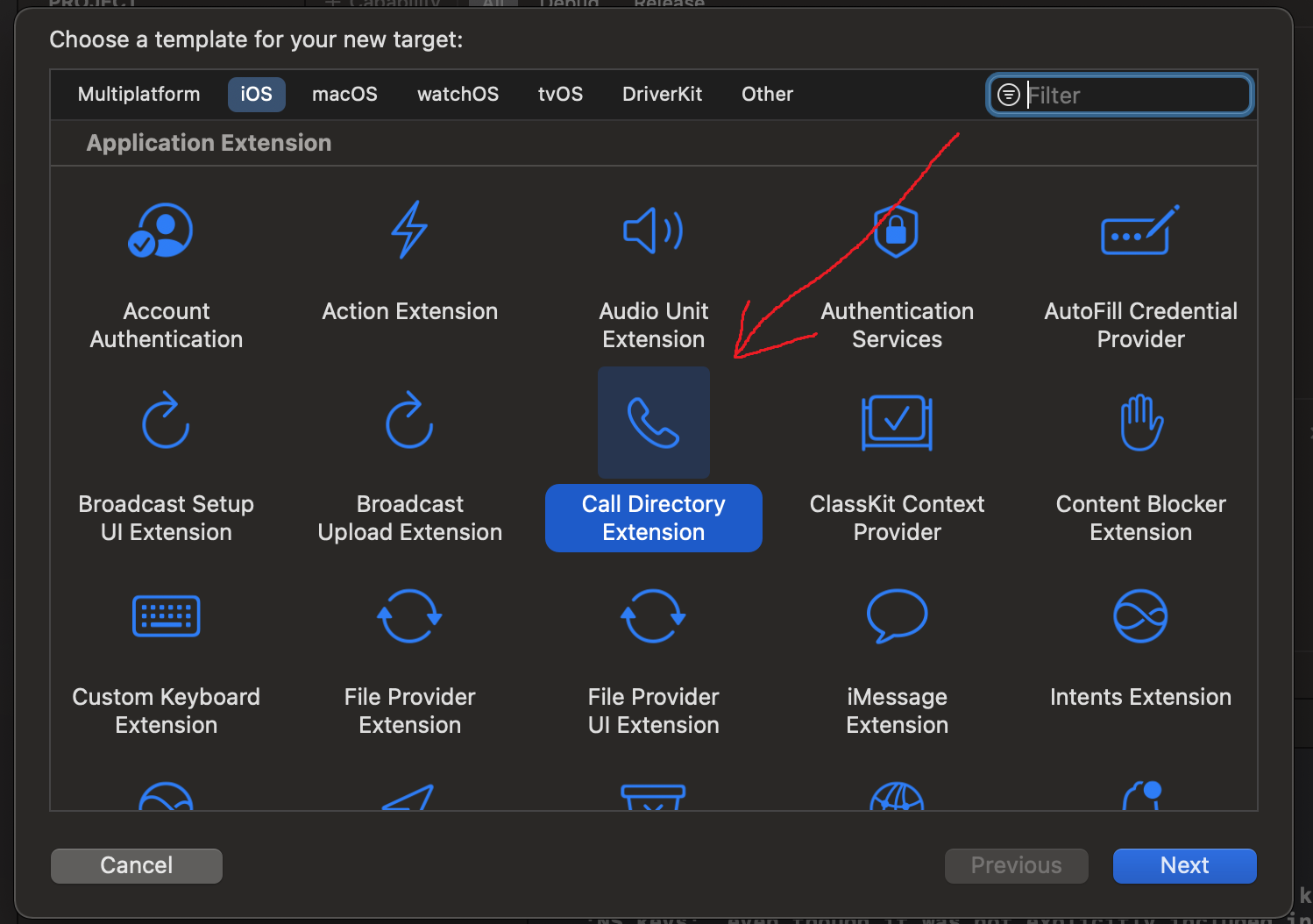
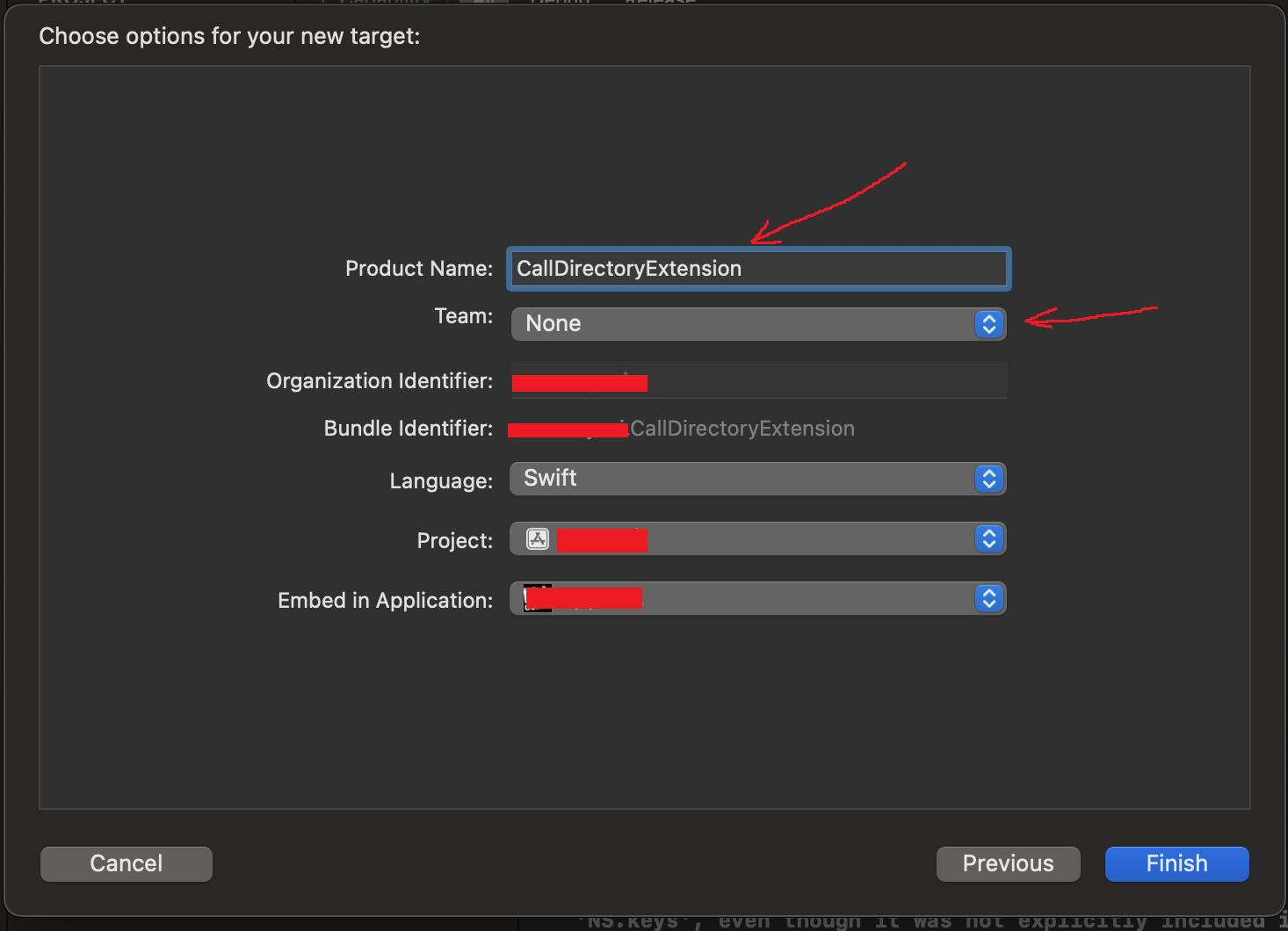
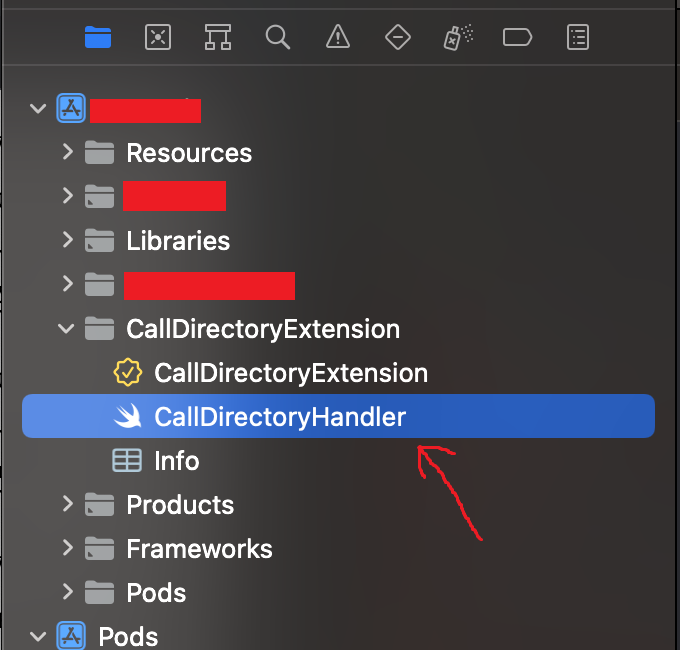
It creates new folder in your main app. Open `CallDirectoryHandler.swift` and delete all content. Then add content from `node_modules/react-native-detect-caller-id/ios/CallDirectoryExtension/CallDirectoryHandler.swift`. Its replace default handler implementation to library implementation.
Secondly, you should use provisioning profile for your app with enabled AppGroup Capability, so add this Capability.
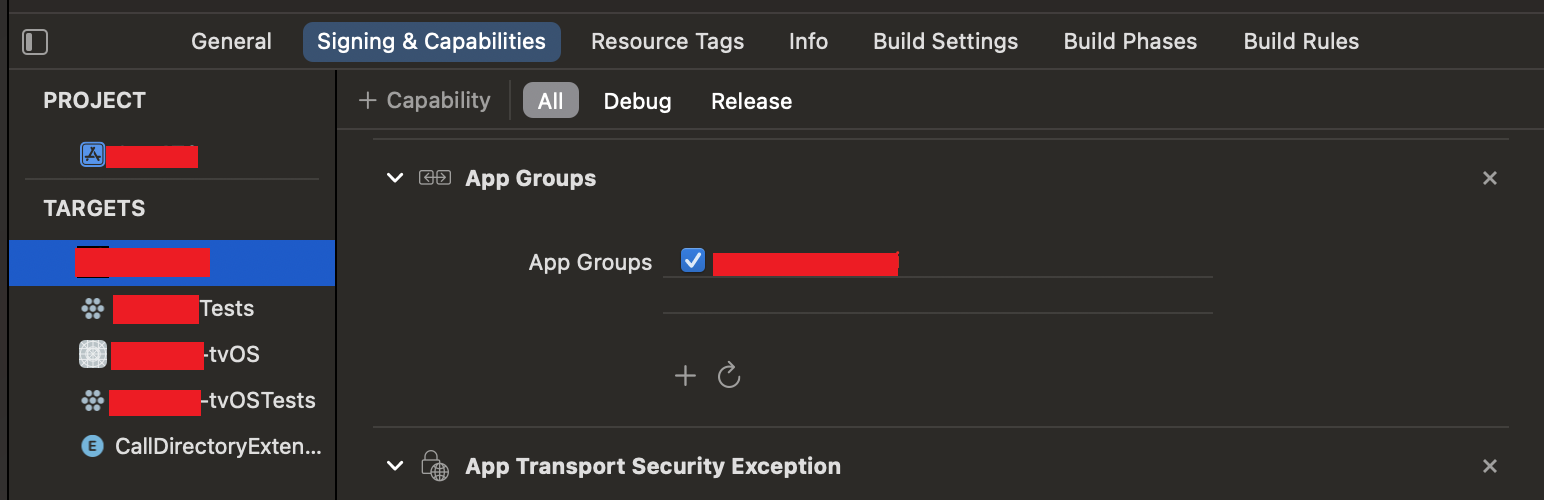
Thirdly, select your CallDirectoryExtension target and set provisioning profile for extension and add similar AppGroup (see previous point).
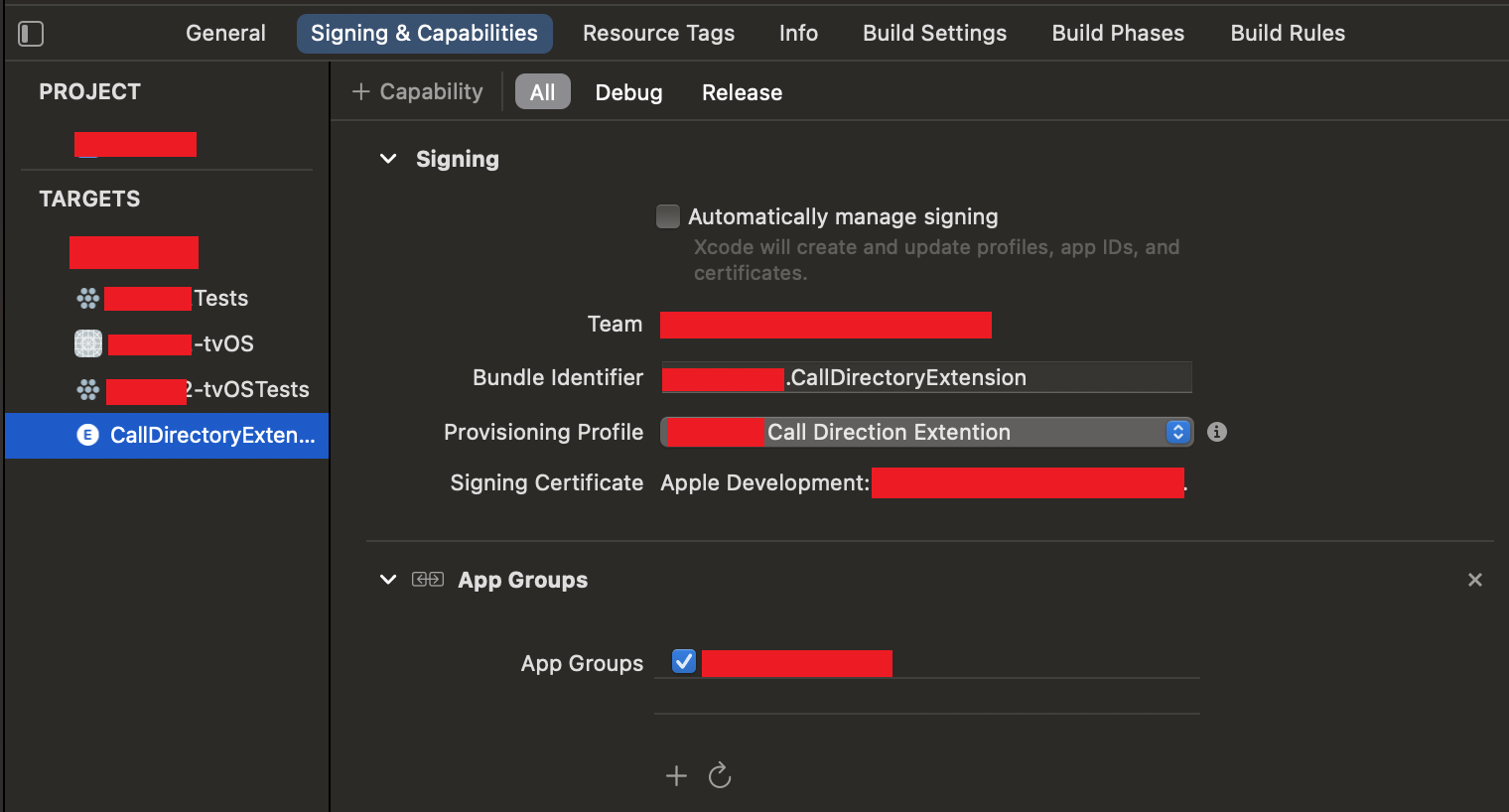
Lastly, IMPORTANT! check your `CallDirectoryHandler.swift`. It should define similar DATA_GROUP constant with your AppGroup.
### Android
Any actions not required.
For customization caller information layout you can add `caller_info_dialog.xml` inside `YOUR_APP/android/app/src/main/res/layout/` folder. For example, you can copy layout implementation from `node_modules/react-native-detect-caller-id/android/src/main/res/layout/caller_info_dialog.xml`.
Button with id `close_btn` will get click action to closing layout.
LinearLayout with id `callerLabel` will get click action to closing layout.
TextView with id `appName` will get text with your AppName.
TextView with id `callerName` will get text with CallerName provided with library for incoming number.
ImageView with id `appIcon` will get drawable with your app default icon.
## Basic Usage
```javascript
import CallerDetector from 'react-native-detect-caller-id';
// Check required permissions for your platform
checkPermissions = async () => {
if (Platform.OS == 'android') {
const checkInfo = await CallerDetector.checkPermissions()
console.log('checkPermissions', checkInfo)
} else {
const checkInfo = await CallerDetector.getExtensionEnabledStatus()
console.log('getExtensionEnabledStatus', checkInfo)
}
}
// Open android overlay settings screen
onAskOverlayPermission = async () => {
const permission = await CallerDetector.requestOverlayPermission()
console.log('onAskOverlayPermission', permission)
}
// Ask required permissions for android
onAskPermissions = async () => {
const permission = await CallerDetector.requestPhonePermission()
console.log('onAskPermissions', permission)
}
// Settings default detecting app
onAskServicePermissions = async () => {
const permission = await CallerDetector.requestServicePermission()
console.log('onAskServicePermissions', permission)
}
// Set iOS params for your Extension and AppGroup
onOpenSettings = async () => {
CallerDetector.setiOSParams({
EXTENSION_ID: 'packagename.CallDirectoryExtension',
DATA_GROUP: 'group.packagename',
DATA_KEY: 'callerListKey'
})
}
// Open iOS settings for settings Detect Caller App
onOpenSettings = async () => {
const permission = await CallerDetector.openExtensionSettings()
console.log('onOpenSettings', permission)
}
// Setting Callers for detecting
setCallerList = async () => {
let callers = []
callers.push({
name: `Pavel Nikolaev`,
appointment: `Developer`,
city: `Riga`,
iosRow: `Pavel Nikolaev, Developer, Riga`,
number: 79771678179,
isDeleted: false
})
callers.push({
name: `Pavel Nikolaev`,
appointment: `Developer`,
city: `Riga`,
iosRow: `Pavel Nikolaev, Developer, Riga`,
number: 79013308179,
isDeleted: true
})
let result = await CallerDetector.setCallerList(callers)
console.log(result);
}
```
## API
* `checkPermissions`: Promise - (*ONLY Android*) returns all permissions for android
* `requestOverlayPermission`: Promise - (*ONLY Android*) returns result of overlay request
* `requestPhonePermission`: Promise - (*ONLY Android*) returns result of permissions request
* `requestServicePermission`: Promise - (*ONLY Android*) returns result of service request
* `getExtensionEnabledStatus`: Promise - (*ONLY iOS*) returns extension status
* `setiOSParams`: Void - (*ONLY iOS*) return nothing. Just set params for your extension and appgroup
* `openExtensionSettings`: Promise - (*ONLY iOS*) return nothing. Just opening extension settings page (iOS 13.4+)
* `setCallerList`: Promise - return nothing. Waiting end of process.
## Check Permissions (Android)
Checking all android permissions for correctly working. Service permissions required with Android 10. For lower version its return always true
```js
const checkInfo = await CallerDetector.checkPermissions()
console.log('checkPermissions', checkInfo)
//checkPermissions {"overlayPermissionGranted": true, "phonePermissionGranted": true, "servicePermissionGranted": true}
```
## Request Overlay Permission (Android)
Asking user to allow overlay permission. You should ask this, if checkPermissions method returned "overlayPermissionGranted": false
```js
const permission = await CallerDetector.requestOverlayPermission()
console.log('requestOverlayPermission', permission)
//requestOverlayPermission granted/denied
```
## Request Phone Permissions (Android)
Asking user to allow phone permissions. You should ask this, if checkPermissions method returned "phonePermissionGranted": false.
Library using READ_PHONE_STATE and READ_CALL_LOG permissions.
```js
const permission = await CallerDetector.requestPhonePermission()
console.log('requestPhonePermission', permission)
//requestPhonePermission ["granted/denied", "granted/denied"]
```
## Request Service Permission (Android)
Asking user to set default call detect app. You should ask this, if checkPermissions method returned "servicePermissionGranted": false.
Default call detect app starts with Android 10, so this method will always return "granted" for lower OS versions.
```js
const permission = await CallerDetector.requestServicePermission()
console.log('requestServicePermission', permission)
//requestServicePermission granted/denied
```
## Set iOS Params (iOS)
Before use iOS methods you should to set your extension and appgroup params by this method. Params should be similar with CallDirectoryHandler.swift
```js
CallerDetector.setiOSParams({
EXTENSION_ID: 'packagename.CallDirectoryExtension', // Similar with your Extension name
DATA_GROUP: 'group.packagename', // Similar with your AppGroup
DATA_KEY: 'callerListKey' // Similar with DATA_KEY from your CallDirectoryHandler.swift file
})
```
## Check Extension Status (iOS)
Checking one required permission for working library on iOS. User required to set active for call detect extension. Method returns its status.
```js
const status = await CallerDetector.getExtensionEnabledStatus()
console.log('getExtensionEnabledStatus', status)
//getExtensionEnabledStatus granted/denied
```
## Open Extension Settings (iOS)
Library provides opening settings method to set active call detect extension. Available for iOS 13.4+
```js
CallerDetector.openExtensionSettings()
```
## Set Caller List
Setting callerlist for detecting. For 10k nubmers its takes average 1 min for ios.
```js
let callers = []
callers.push({
name: `Pavel Nikolaev`,
appointment: `Developer`,
city: `Riga`,
iosRow: `Pavel Nikolaev, Developer, Riga`,
number: 79771678179,
isDeleted: false
})
callers.push({
name: `Pavel Nikolaev`,
appointment: `Developer`,
city: `Riga`,
iosRow: `Pavel Nikolaev, Developer, Riga`,
number: 79013308179,
isDeleted: true
})
let result = await CallerDetector.setCallerList(callers)
console.log(result);
```
---
_Source: https://npm.io/package/react-native-detect-caller-id · Machine-readable twin of the npm.io package page. Health data is recomputed on every publish._