# react-native-drawer
> React Native Drawer
Latest version **2.5.1** (published 2018-10-02) · MIT license · 0 weekly downloads
## Install
```sh
npm install react-native-drawer
pnpm add react-native-drawer
yarn add react-native-drawer
bun add react-native-drawer
```
## Health
**Score 18/100 (F)** — status: abandoned.
Positive: has types package; no vulnerabilities.
Warnings: low downloads; no esm support.
Negative: abandoned; low maintenance score.
## Facts
| | |
|---|---|
| Version | 2.5.1 |
| Published | 2018-10-02 |
| First published | 2015-06-10 |
| Weekly downloads | 0 |
| License | MIT |
| TypeScript types | separate (@types/react-native-drawer) |
| Module format | CommonJS |
| Dependencies | 2 |
| Unpacked size | 32.3 KB |
| Known vulnerabilities | 0 |
| Install scripts | no |
| GitHub stars | 2527 |
| Author | rt2zz |
| Maintainers | rt2zz |
| Keywords | react, react-native, react-component, drawer, side-menu, menu, ios, android, material design |
## Links
- npm: https://www.npmjs.com/package/react-native-drawer
- Repository: https://github.com/rt2zz/react-native-drawer
- Issues: https://github.com/rt2zz/react-native-drawer/issues
- npm.io page: https://npm.io/package/react-native-drawer
## Dependencies (2)
- [prop-types](https://npm.io/package/prop-types.md) ^15.5.8
- [tween-functions](https://npm.io/package/tween-functions.md) ^1.0.1
## Alternatives
- [mobx-react](https://npm.io/package/mobx-react.md) — 2.8M weekly downloads
- [rc-tree](https://npm.io/package/rc-tree.md) — 2.6M weekly downloads
- [@react-oauth/google](https://npm.io/package/@react-oauth/google.md) — 1.3M weekly downloads
- [@wagmi/connectors](https://npm.io/package/@wagmi/connectors.md) — 877.0K weekly downloads
- [vee-validate](https://npm.io/package/vee-validate.md) — 836.4K weekly downloads
## Recent versions
- 2.5.1 (latest) — 2018-10-02
- 2.1.0 (next) — 2016-04-23
- 2.5.0 — 2017-08-25
- 2.4.0 — 2017-08-18
- 2.3.0 — 2016-08-26
- 2.2.6 — 2016-07-05
- 2.2.5 — 2016-07-05
- 2.2.4 — 2016-06-22
- 2.2.3 — 2016-05-24
- 2.2.2 — 2016-05-10
- 2.2.1 — 2016-05-09
- 2.2.0 — 2016-05-05
- 2.0.0 — 2016-03-31
- 2.0.0-wip1 — 2016-03-20
- 2.0.0-beta5 — 2016-03-20
- … 56 more at https://npm.io/package/react-native-drawer/versions
## README
### USAGE WARNING
This module is not as performant as it should be. For production applications we generally recommend using either [React Native Side Menu](https://github.com/react-native-community/react-native-side-menu) or [React Navigation](https://github.com/react-navigation/react-navigation) as applicable. React Native Drawer will continue to be available and potentially useful for its high customizability but again it is **not** recommended for production appliciations. If you are interested in revamping react native drawer to be more performant (i.e. use Animated) please get in touch!
## React Native Drawer
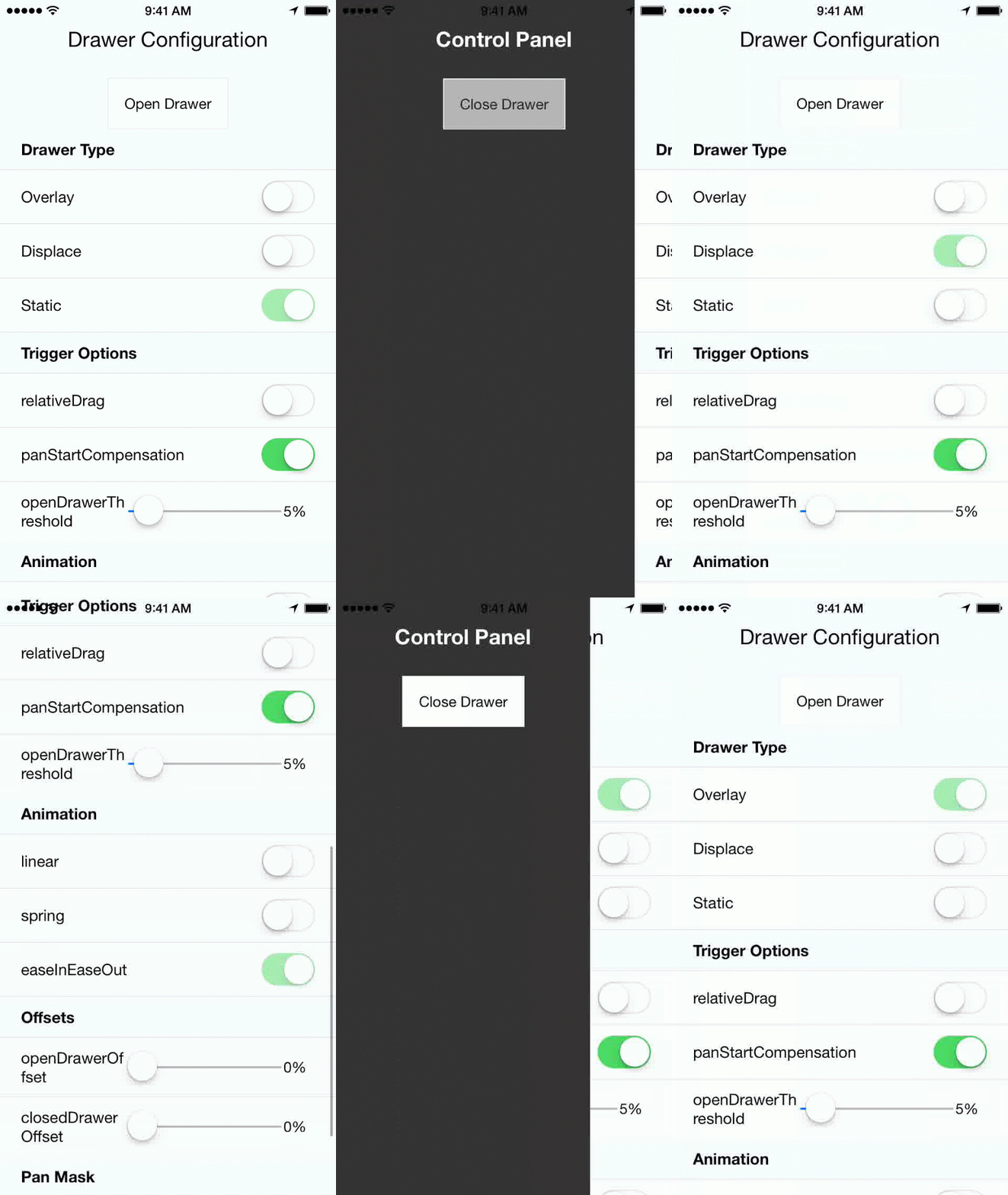 React native drawer, configurable to achieve material design style, slack style, parallax, and more. Works in both iOS and Android.
[](https://www.npmjs.com/package/react-native-drawer)
[](https://www.npmjs.com/package/react-native-drawer)
- [Installation](#installation)
- [Usage](#usage)
- [Examples](#examples)
- [Props](#props)
- [Demo](#demo)
- [Credits](#credits)
### Installation
`npm install --save react-native-drawer`
### Usage
```javascript
import Drawer from 'react-native-drawer'
class Application extends Component {
closeControlPanel = () => {
this._drawer.close()
};
openControlPanel = () => {
this._drawer.open()
};
render () {
return (
this._drawer = ref}
content={}
>
)
}
})
```
### Examples
```js
//Parallax Effect (slack style)
}
openDrawerOffset={100}
styles={drawerStyles}
tweenHandler={Drawer.tweenPresets.parallax}
>
//Material Design Style Drawer
}
tapToClose={true}
openDrawerOffset={0.2} // 20% gap on the right side of drawer
panCloseMask={0.2}
closedDrawerOffset={-3}
styles={drawerStyles}
tweenHandler={(ratio) => ({
main: { opacity:(2-ratio)/2 }
})}
>
const drawerStyles = {
drawer: { shadowColor: '#000000', shadowOpacity: 0.8, shadowRadius: 3},
main: {paddingLeft: 3},
}
```
### Props
This module supports a wide range of drawer styles, and hence has *a lot* of props.
##### Important
- `content` (React.Component) `null` - Menu component
- `type` (String: displace:overlay:static) `displace`- Type of drawer.
- `open` (Boolean) `null` - If true will trigger drawer open, if false will trigger close.
- `openDrawerOffset` (Number|Function) `0` - Can either be a integer (pixel value) or decimal (ratio of screen width). Defines the right hand margin when the drawer is open. Or, can be function which returns offset: `(viewport) => viewport.width - 200`
- `closedDrawerOffset` (Number|Function) `0` - Same as openDrawerOffset, except defines left hand margin when drawer is closed.
- `disabled` (Boolean) `false` - If true the drawer can not be opened and will not respond to pans.
- `styles` (Object) `null` - Styles for the drawer, main, drawerOverlay and mainOverlay container Views.
##### Animation / Tween
**Note**: In the future animations with use Animated, and the api will change.
- `tweenHandler` (Function) `null` - Takes in the pan ratio (decimal 0 to 1) that represents the tween percent. Returns an object of native props to be set on the constituent views { drawer: {/*native props*/}, main: {/*native props*/}, mainOverlay: {/*native props*/} }
- `tweenDuration` (Integer) `250` - The duration of the open/close animation.
- `tweenEasing` (String) `linear` - A easing type supported by [tween-functions](https://www.npmjs.com/package/tween-functions)
##### Event Handlers
- `onOpen` (Function) - Will be called immediately after the drawer has entered the open state.
- `onOpenStart` (Function) callback fired at the start of an open animation.
- `onClose` (Function) - Will be called immediately after the drawer has entered the closed state.
- `onCloseStart` (Function) callback fired at the start of a close animation.
##### Gestures
- `captureGestures` (oneOf(true, false, 'open', 'closed')) `open` - If true, will capture all gestures inside of the pan mask. If 'open' will only capture when drawer is open.
- `acceptDoubleTap` (Boolean) `false` - Toggle drawer when double tap occurs within pan mask?
- `acceptTap` (Boolean) `false` - Toggle drawer when any tap occurs within pan mask?
- `acceptPan` (Boolean) `true` - Allow for drawer pan (on touch drag). Set to false to effectively disable the drawer while still allowing programmatic control.
- `tapToClose` (Boolean) `false` - Same as acceptTap, except only for close.
- `negotiatePan` (Boolean) `false` - If true, attempts to handle only horizontal swipes, making it play well with a child `ScrollView`.
##### Additional Configurations
- `panThreshold` (Number) `.25` - Ratio of screen width that must be travelled to trigger a drawer open/close.
- `panOpenMask` (Number) `null` - Ratio of screen width that is valid for the start of a pan open action. If null -> defaults to `max(.05, closedDrawerOffset)`.
- `panCloseMask` (Number) `null` - Ratio of screen width that is valid for the start of a pan close action. If null -> defaults to `max(.05, openDrawerOffset)`.
- `initializeOpen` (Boolean) `false` - Initialize with drawer open?
- `side` (String left|right|top|bottom) `left` - which side the drawer should be on.
- `useInteractionManager` (Boolean) `false` - if true will run InteractionManager for open/close animations.
- `elevation` (Number) `0` - (Android-only) Sets the elevation of the drawer using Android's underlying [elevation API](https://developer.android.com/training/material/shadows-clipping.html#Elevation)
### Tween Handler
You can achieve pretty much any animation you want using the tween handler with the transformMatrix property. E.G.
```js
tweenHandler={(ratio) => {
var r0 = -ratio/6
var r1 = 1-ratio/6
var t = [
r1, r0, 0, 0,
-r0, r1, 0, 0,
0, 0, 1, 0,
0, 0, 0, 1,
]
return {
main: {
style: {
transformMatrix: t,
opacity: 1 - ratio/2,
},
}
}
}}
```
Will result in a skewed fade out animation.
### Opening & Closing the Drawer Programmatically
Three options:
1. Use the open prop (controlled mode):
```js
this._drawer = ref
onPress={() => {this._drawer.open()}}
```
3. Using Context
```js
contextTypes = {drawer: React.PropTypes.object}
// later...
this.context.drawer.open()
```
### Demo
* `git clone https://github.com/rt2zz/react-native-drawer.git`
* `cd react-native-drawer/examples/RNDrawerDemo && npm install`
* **iOS**
* Open `./examples/RNDrawerDemo/RNDrawerDemo.xcodeproject` in xcode
* `command+r` (in xcode)
* **Android**
* Run android simulator / plug in your android device
* Run `react-native run-android` in terminal
### Credits
Component was adapted from and inspired by
[@khanghoang](https://github.com/khanghoang)'s [RNSideMenu](https://github.com/khanghoang/RNSideMenu)
*AND*
[@kureevalexey](https://twitter.com/kureevalexey)'s [react-native-side-menu](https://github.com/Kureev/react-native-side-menu)
---
_Source: https://npm.io/package/react-native-drawer · Machine-readable twin of the npm.io package page. Health data is recomputed on every publish._
React native drawer, configurable to achieve material design style, slack style, parallax, and more. Works in both iOS and Android.
[](https://www.npmjs.com/package/react-native-drawer)
[](https://www.npmjs.com/package/react-native-drawer)
- [Installation](#installation)
- [Usage](#usage)
- [Examples](#examples)
- [Props](#props)
- [Demo](#demo)
- [Credits](#credits)
### Installation
`npm install --save react-native-drawer`
### Usage
```javascript
import Drawer from 'react-native-drawer'
class Application extends Component {
closeControlPanel = () => {
this._drawer.close()
};
openControlPanel = () => {
this._drawer.open()
};
render () {
return (
this._drawer = ref}
content={}
>
)
}
})
```
### Examples
```js
//Parallax Effect (slack style)
}
openDrawerOffset={100}
styles={drawerStyles}
tweenHandler={Drawer.tweenPresets.parallax}
>
//Material Design Style Drawer
}
tapToClose={true}
openDrawerOffset={0.2} // 20% gap on the right side of drawer
panCloseMask={0.2}
closedDrawerOffset={-3}
styles={drawerStyles}
tweenHandler={(ratio) => ({
main: { opacity:(2-ratio)/2 }
})}
>
const drawerStyles = {
drawer: { shadowColor: '#000000', shadowOpacity: 0.8, shadowRadius: 3},
main: {paddingLeft: 3},
}
```
### Props
This module supports a wide range of drawer styles, and hence has *a lot* of props.
##### Important
- `content` (React.Component) `null` - Menu component
- `type` (String: displace:overlay:static) `displace`- Type of drawer.
- `open` (Boolean) `null` - If true will trigger drawer open, if false will trigger close.
- `openDrawerOffset` (Number|Function) `0` - Can either be a integer (pixel value) or decimal (ratio of screen width). Defines the right hand margin when the drawer is open. Or, can be function which returns offset: `(viewport) => viewport.width - 200`
- `closedDrawerOffset` (Number|Function) `0` - Same as openDrawerOffset, except defines left hand margin when drawer is closed.
- `disabled` (Boolean) `false` - If true the drawer can not be opened and will not respond to pans.
- `styles` (Object) `null` - Styles for the drawer, main, drawerOverlay and mainOverlay container Views.
##### Animation / Tween
**Note**: In the future animations with use Animated, and the api will change.
- `tweenHandler` (Function) `null` - Takes in the pan ratio (decimal 0 to 1) that represents the tween percent. Returns an object of native props to be set on the constituent views { drawer: {/*native props*/}, main: {/*native props*/}, mainOverlay: {/*native props*/} }
- `tweenDuration` (Integer) `250` - The duration of the open/close animation.
- `tweenEasing` (String) `linear` - A easing type supported by [tween-functions](https://www.npmjs.com/package/tween-functions)
##### Event Handlers
- `onOpen` (Function) - Will be called immediately after the drawer has entered the open state.
- `onOpenStart` (Function) callback fired at the start of an open animation.
- `onClose` (Function) - Will be called immediately after the drawer has entered the closed state.
- `onCloseStart` (Function) callback fired at the start of a close animation.
##### Gestures
- `captureGestures` (oneOf(true, false, 'open', 'closed')) `open` - If true, will capture all gestures inside of the pan mask. If 'open' will only capture when drawer is open.
- `acceptDoubleTap` (Boolean) `false` - Toggle drawer when double tap occurs within pan mask?
- `acceptTap` (Boolean) `false` - Toggle drawer when any tap occurs within pan mask?
- `acceptPan` (Boolean) `true` - Allow for drawer pan (on touch drag). Set to false to effectively disable the drawer while still allowing programmatic control.
- `tapToClose` (Boolean) `false` - Same as acceptTap, except only for close.
- `negotiatePan` (Boolean) `false` - If true, attempts to handle only horizontal swipes, making it play well with a child `ScrollView`.
##### Additional Configurations
- `panThreshold` (Number) `.25` - Ratio of screen width that must be travelled to trigger a drawer open/close.
- `panOpenMask` (Number) `null` - Ratio of screen width that is valid for the start of a pan open action. If null -> defaults to `max(.05, closedDrawerOffset)`.
- `panCloseMask` (Number) `null` - Ratio of screen width that is valid for the start of a pan close action. If null -> defaults to `max(.05, openDrawerOffset)`.
- `initializeOpen` (Boolean) `false` - Initialize with drawer open?
- `side` (String left|right|top|bottom) `left` - which side the drawer should be on.
- `useInteractionManager` (Boolean) `false` - if true will run InteractionManager for open/close animations.
- `elevation` (Number) `0` - (Android-only) Sets the elevation of the drawer using Android's underlying [elevation API](https://developer.android.com/training/material/shadows-clipping.html#Elevation)
### Tween Handler
You can achieve pretty much any animation you want using the tween handler with the transformMatrix property. E.G.
```js
tweenHandler={(ratio) => {
var r0 = -ratio/6
var r1 = 1-ratio/6
var t = [
r1, r0, 0, 0,
-r0, r1, 0, 0,
0, 0, 1, 0,
0, 0, 0, 1,
]
return {
main: {
style: {
transformMatrix: t,
opacity: 1 - ratio/2,
},
}
}
}}
```
Will result in a skewed fade out animation.
### Opening & Closing the Drawer Programmatically
Three options:
1. Use the open prop (controlled mode):
```js
this._drawer = ref
onPress={() => {this._drawer.open()}}
```
3. Using Context
```js
contextTypes = {drawer: React.PropTypes.object}
// later...
this.context.drawer.open()
```
### Demo
* `git clone https://github.com/rt2zz/react-native-drawer.git`
* `cd react-native-drawer/examples/RNDrawerDemo && npm install`
* **iOS**
* Open `./examples/RNDrawerDemo/RNDrawerDemo.xcodeproject` in xcode
* `command+r` (in xcode)
* **Android**
* Run android simulator / plug in your android device
* Run `react-native run-android` in terminal
### Credits
Component was adapted from and inspired by
[@khanghoang](https://github.com/khanghoang)'s [RNSideMenu](https://github.com/khanghoang/RNSideMenu)
*AND*
[@kureevalexey](https://twitter.com/kureevalexey)'s [react-native-side-menu](https://github.com/Kureev/react-native-side-menu)
---
_Source: https://npm.io/package/react-native-drawer · Machine-readable twin of the npm.io package page. Health data is recomputed on every publish._