# react-native-flip-timer
> A Flip timer implementation in React Native
Latest version **0.0.5** (published 2020-09-04) · MIT license · 0 weekly downloads
## Install
```sh
npm install react-native-flip-timer
pnpm add react-native-flip-timer
yarn add react-native-flip-timer
bun add react-native-flip-timer
```
## Health
**Score 20/100 (F)** — status: abandoned.
Positive: esm support; no vulnerabilities.
Warnings: low downloads; no types; pre 1.0.
Negative: abandoned; low maintenance score.
## Facts
| | |
|---|---|
| Version | 0.0.5 |
| Published | 2020-09-04 |
| First published | 2019-02-27 |
| Weekly downloads | 0 |
| License | MIT |
| TypeScript types | none |
| Module format | ESM + CommonJS |
| Dependencies | 0 |
| Unpacked size | 193.2 KB |
| Known vulnerabilities | 0 |
| Install scripts | no |
| Author | Pritish Vaidya |
| Maintainers | pritishvaidya |
| Keywords | react-native, flip, flip-timer, react-native-flip, react-native-flip-timer |
## Links
- npm: https://www.npmjs.com/package/react-native-flip-timer
- Repository: https://github.com/pritishvaidya/react-native-flip-timer
- Homepage: https://github.com/pritishvaidya/react-native-flip-timer#readme
- Issues: https://github.com/pritishvaidya/react-native-flip-timer/issues
- npm.io page: https://npm.io/package/react-native-flip-timer
## Recent versions
- 0.0.5 (latest) — 2020-09-04
- 0.0.4 — 2019-05-22
- 0.0.3 — 2019-02-28
- 0.0.2 — 2019-02-28
- 0.0.1 — 2019-02-27
## README
# react-native-flip-timer [](https://travis-ci.com/pritishvaidya/react-native-flip-timer) [](https://www.codefactor.io/repository/github/pritishvaidya/react-native-flip-timer) [](https://codeclimate.com/github/pritishvaidya/react-native-flip-timer/maintainability) [](https://codeclimate.com/github/pritishvaidya/react-native-flip-timer/test_coverage) [](https://badge.fury.io/js/react-native-flip-timer) [](https://npm-stat.com/charts.html?package=react-native-flip-timer&from=2018-02-17&to=2018-12-28)  > A Flip timer implementation in React Native
For Countdown Timer application you can checkout [react-native-flip-countdown-timer](https://github.com/pritishvaidya/react-native-flip-countdown-timer) repository.
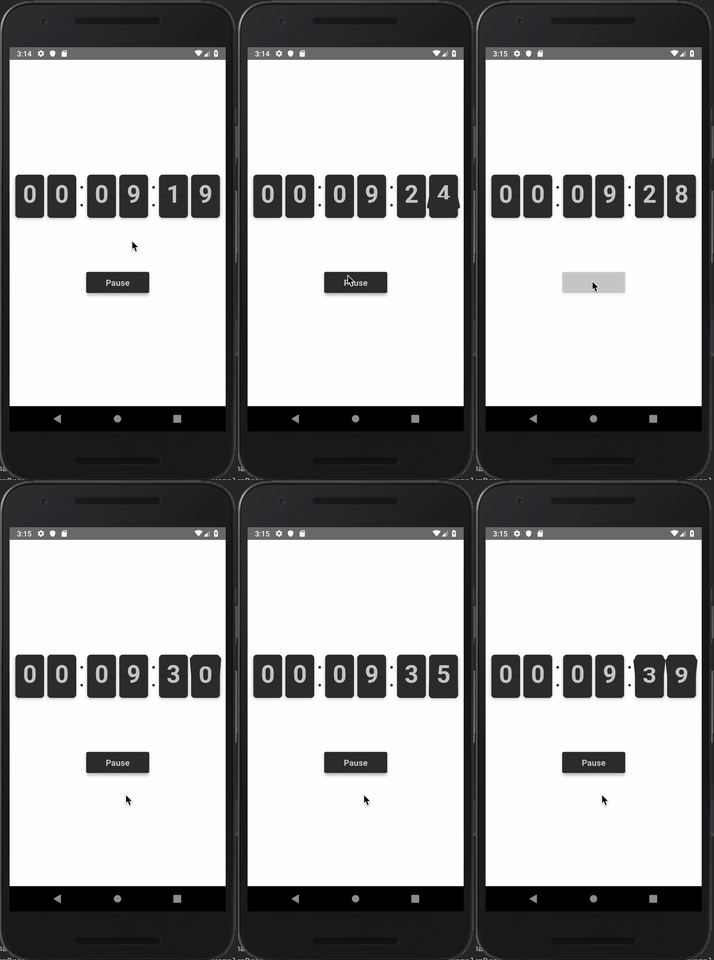
## Show Cases
IOS | Android
:-------------------------:|:-------------------------:
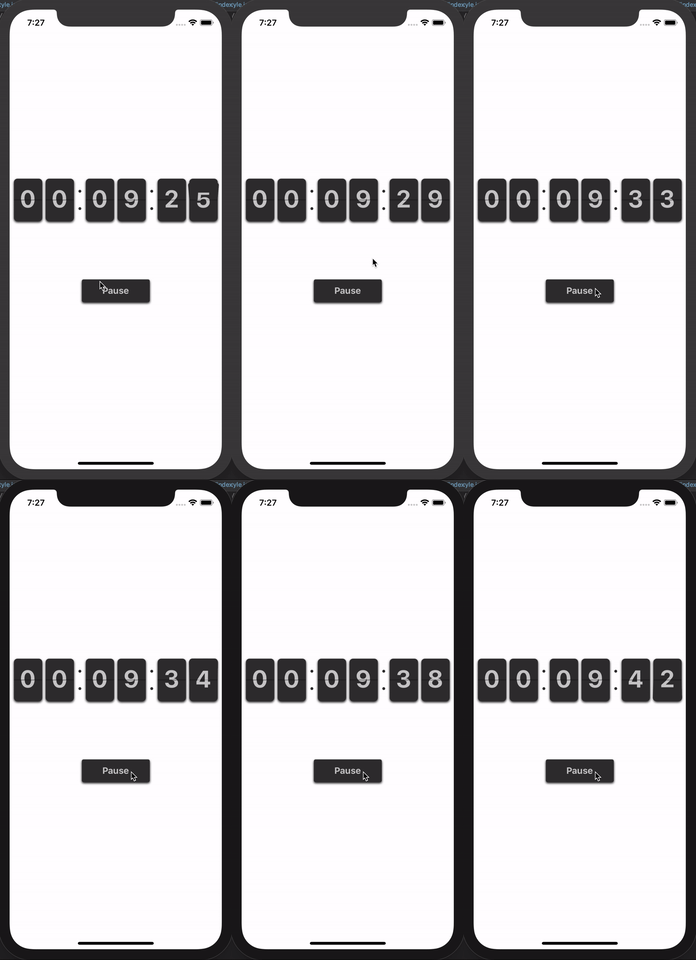 | 
## Getting Started
- [Installation](#installation)
- [Basic Usage](#basic-usage)
- [Properties](#properties)
- [Defaults](#defaults)
- [Contribution](#contribution)
- [Questions](#questions)
### Installation
```bash
$ npm i react-native-flip-timer --save
```
### Basic Usage
```
import React, { Component } from 'react';
import {
StyleSheet, View, TouchableOpacity, Text,
} from 'react-native';
import { Timer, FlipNumber } from 'react-native-flip-timer';
export default class App extends Component {
state = {
play: true,
}
play = () => {
this.setState(({ play }) => ({ play: !play }));
}
render() {
const { play } = this.state;
return (
{play ? 'Pause' : 'Play'}
);
}
}
const styles = StyleSheet.create({
container: {
flex: 1,
backgroundColor: 'white',
alignItems: 'center',
justifyContent: 'center',
},
button: {
height: 40,
backgroundColor: '#333333',
width: 120,
alignItems: 'center',
justifyContent: 'center',
},
text: {
fontSize: 16,
fontWeight: 'bold',
color: '#cccccc',
},
});
```
### Properties
#### Timer Props
| Prop | Default | Type | Description |
| :------------ |---------------:| :---------------| :-----|
| time | required | `string / number` | Time (in seconds) |
| play | true | bool | Play the timer |
| wrapperStyle | `{}` | object | Wrapper for the Timer |
| flipNumberProps | [`{...}`](#flip-number-props) | `defaults` | Flip Number Props |
#### Flip Number Props
| Prop | Default | Type | Description |
| :------------ |---------------:| :---------------| :-----|
| number | required | `string / number` | Number Input |
| unit | `seconds` | `hours / minutes / seconds` | Number Input Unit |
| size | `number` | `deviceWidth / 6` | Size of the card |
| perspective | `250` | number | Perspective |
| numberWrapperStyle | `{}` | object | Wrapper Style |
| cardStyle | `{}` | object | Card Style |
| flipCardStyle | `{}` | object | Flip Card Style |
| numberStyle | `{}` | object | Number Style |
## Todos
- Full Coverage Tests for the Components
- Support for Labels
## Contribution
- [@pritishvaidya](mailto:pritishvaidya94@gmail.com) The main author.
## Questions
Feel free to [contact me](mailto:pritishvaidya94@gmail.com) or [create an issue](https://github.com/pritishvaidya/react-native-flip-timer/issues/new)
---
_Source: https://npm.io/package/react-native-flip-timer · Machine-readable twin of the npm.io package page. Health data is recomputed on every publish._
> A Flip timer implementation in React Native
For Countdown Timer application you can checkout [react-native-flip-countdown-timer](https://github.com/pritishvaidya/react-native-flip-countdown-timer) repository.
## Show Cases
IOS | Android
:-------------------------:|:-------------------------:
 | 
## Getting Started
- [Installation](#installation)
- [Basic Usage](#basic-usage)
- [Properties](#properties)
- [Defaults](#defaults)
- [Contribution](#contribution)
- [Questions](#questions)
### Installation
```bash
$ npm i react-native-flip-timer --save
```
### Basic Usage
```
import React, { Component } from 'react';
import {
StyleSheet, View, TouchableOpacity, Text,
} from 'react-native';
import { Timer, FlipNumber } from 'react-native-flip-timer';
export default class App extends Component {
state = {
play: true,
}
play = () => {
this.setState(({ play }) => ({ play: !play }));
}
render() {
const { play } = this.state;
return (
{play ? 'Pause' : 'Play'}
);
}
}
const styles = StyleSheet.create({
container: {
flex: 1,
backgroundColor: 'white',
alignItems: 'center',
justifyContent: 'center',
},
button: {
height: 40,
backgroundColor: '#333333',
width: 120,
alignItems: 'center',
justifyContent: 'center',
},
text: {
fontSize: 16,
fontWeight: 'bold',
color: '#cccccc',
},
});
```
### Properties
#### Timer Props
| Prop | Default | Type | Description |
| :------------ |---------------:| :---------------| :-----|
| time | required | `string / number` | Time (in seconds) |
| play | true | bool | Play the timer |
| wrapperStyle | `{}` | object | Wrapper for the Timer |
| flipNumberProps | [`{...}`](#flip-number-props) | `defaults` | Flip Number Props |
#### Flip Number Props
| Prop | Default | Type | Description |
| :------------ |---------------:| :---------------| :-----|
| number | required | `string / number` | Number Input |
| unit | `seconds` | `hours / minutes / seconds` | Number Input Unit |
| size | `number` | `deviceWidth / 6` | Size of the card |
| perspective | `250` | number | Perspective |
| numberWrapperStyle | `{}` | object | Wrapper Style |
| cardStyle | `{}` | object | Card Style |
| flipCardStyle | `{}` | object | Flip Card Style |
| numberStyle | `{}` | object | Number Style |
## Todos
- Full Coverage Tests for the Components
- Support for Labels
## Contribution
- [@pritishvaidya](mailto:pritishvaidya94@gmail.com) The main author.
## Questions
Feel free to [contact me](mailto:pritishvaidya94@gmail.com) or [create an issue](https://github.com/pritishvaidya/react-native-flip-timer/issues/new)
---
_Source: https://npm.io/package/react-native-flip-timer · Machine-readable twin of the npm.io package page. Health data is recomputed on every publish._