# react-native-layout-tester
> Run your app in an iPad simulator and emulate different iPhone screen sizes to test your layouts
Latest version **1.0.6** (published 2016-07-08) · MIT license · 0 weekly downloads
## Install
```sh
npm install react-native-layout-tester
pnpm add react-native-layout-tester
yarn add react-native-layout-tester
bun add react-native-layout-tester
```
## Health
**Score 15/100 (F)** — status: abandoned.
Positive: no vulnerabilities.
Warnings: low downloads; no types; no esm support.
Negative: abandoned; low maintenance score.
## Facts
| | |
|---|---|
| Version | 1.0.6 |
| Published | 2016-07-08 |
| First published | 2016-06-03 |
| Weekly downloads | 0 |
| License | MIT |
| TypeScript types | none |
| Module format | CommonJS |
| Dependencies | 2 |
| Known vulnerabilities | 0 |
| Install scripts | no |
| Author | Gustavo Machado |
| Maintainers | machadogj |
## Links
- npm: https://www.npmjs.com/package/react-native-layout-tester
- npm.io page: https://npm.io/package/react-native-layout-tester
## Dependencies (2)
- [shallowequal](https://npm.io/package/shallowequal.md) ^0.2.2
- [react-native-layout-provider](https://npm.io/package/react-native-layout-provider.md) ^1.0.0
## Recent versions
- 1.0.6 (latest) — 2016-07-08
- 1.0.5 — 2016-07-07
- 1.0.4 — 2016-06-14
- 1.0.3 — 2016-06-10
- 1.0.2 — 2016-06-03
- 1.0.1 — 2016-06-03
- 1.0.0 — 2016-06-03
## README
#react-native-layout-tester
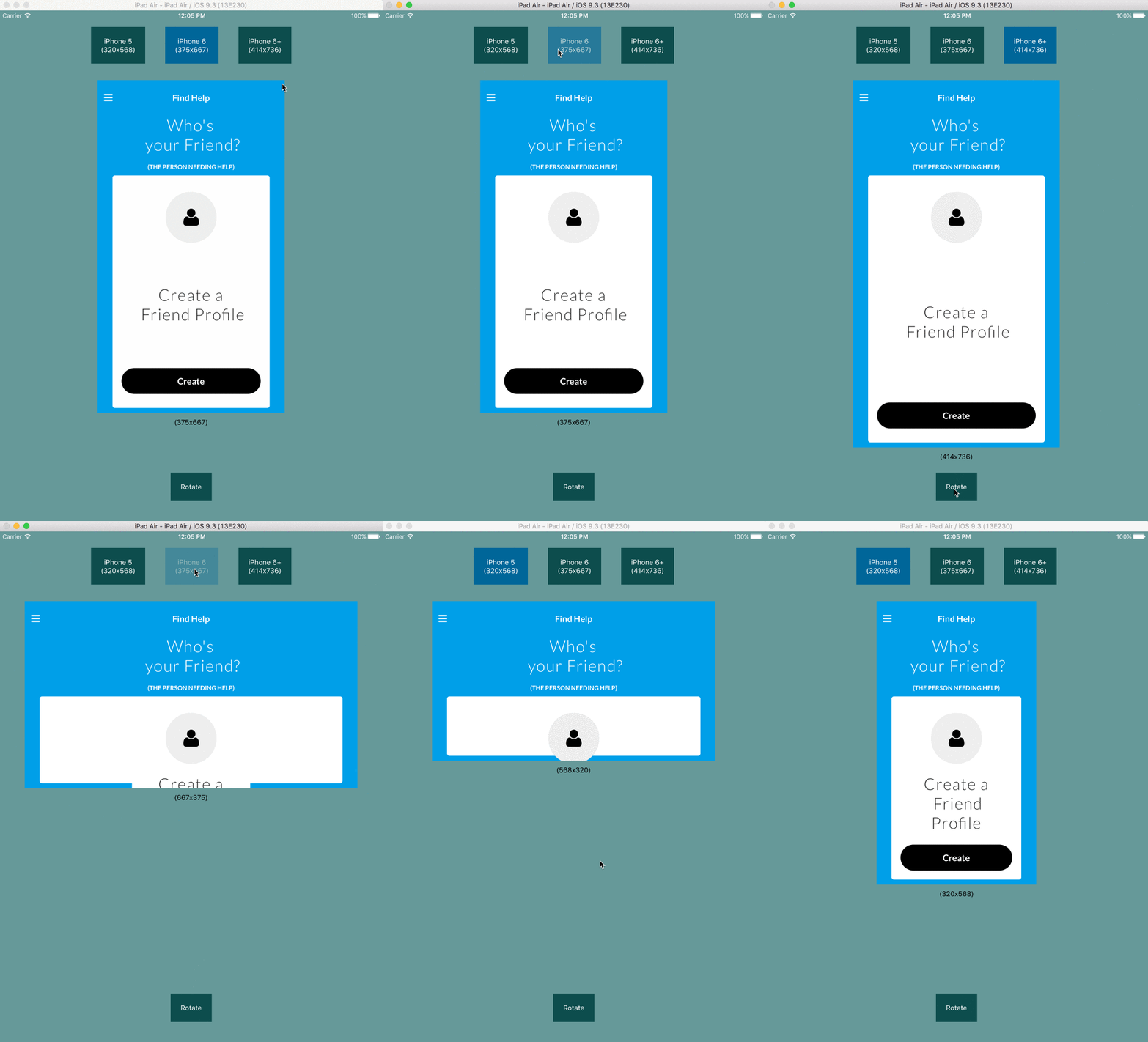
Use an iPad to test your component's layout in different iPhone sizes.
## Installation
```
npm install --save react-native-layout-tester
```
## Usage
In order to test your entire app, first wrap your app in the LayoutTester
(works with redux and Navigator as well).
```
import LayoutTester from "react-native-layout-tester";
//...
render() {
return (
);
}
```
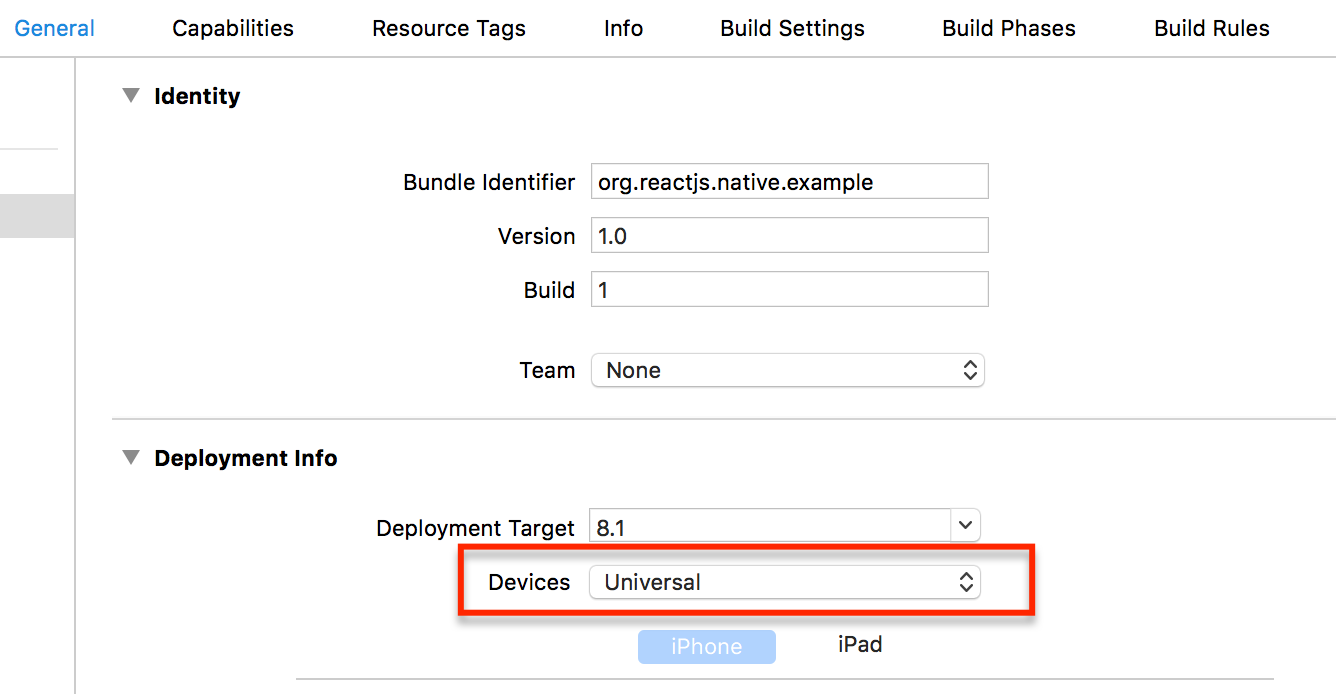
Then run you application in the iPad Air simulator (it has enough width to
accomodate an iPhone 6+ logical resolution in landscape mode). In order to
accomplish this, you will have to set up your xcode solution to "Universal".
NOTICE: You won't need this package in your production bundle, so you can
exclude this package by simply not importing it in any file.
## Reacting to changes in viewport
This module makes use of the [react-native-layout-provider](https://github.com/jhen0409/react-native-layout-provider)
to react to changes in viewports. You can make your styles re-calculate on
viewport changes. In order to do this, you can use a decorator shipped in
`react-native-layout-provider`. The decorator will take changes in viewport and
pass it through props to your wrapped components.
In your component's code, import the getLayout function.
```
import { getLayout } from 'react-native-layout-provider';
```
Then calculate the styles based on the newly added props:
```
render() {
const { mode, viewport, portrait } = this.props;
let style = ...
```
Finally export your wrapped component.
```
export default getLayout(layout => layout)(Container);
```
Here is a sample container component that adjusts the padding based on the
width of the viewport.
```
import React, { Component } from 'react';
import {
StyleSheet,
View
} from 'react-native';
import { getLayout } from 'react-native-layout-tester';
class Container extends Component {
render() {
let { viewport: { width } } = this.props;
let padding = width * 0.05; //5% of width
let style = StyleSheet.create({
container: {
padding: padding,
flex: 1,
justifyContent: 'center',
alignItems: 'center',
}
});
return (
{ this.props.children }
);
}
}
export default getLayout(layout => layout)(Container);
```
You can see more of `react-native-layout-provider` [here](https://github.com/jhen0409/react-native-layout-provider).
## Receiving dimensions props in production code
If you wrap your components to receive dimensions by props, then you will need
these props when running your app on production as well. For doing this, you
can pass the `noTestWrapConfig` prop to LayoutTester and it will not render the
testing interface.
For example:
```
render() {
return (
Welcome to React Native!
To get started, edit index.ios.js
Yeah!
);
}
```
`noTestWrapConfig` can either be a bool, or an object with the properties you
want to pass to your wrapped components.
## Properties
| Prop | Default | Type | Description |
| :------------ |:---------------:| :---------------:| :-----|
| viewportChanged | `undefined` |`func` | Callback triggered when the viewport changes, either by changing device or rotating. |
| config | `undefined` |`object` | Device screens configuration. |
| noTestWrapConfig | `undefined` | `object` or `bool` | Device screens configuration to send to wrapped components. If `true` then config is taken from `Dimensions` (physical device dimensions) |
### config (prop)
You can pass whatever device screen sizes you need (useful for android sizes).
```
// these are not real measure!!!!
render() {
return (
);
}
```
### noTestWrapConfig (prop)
Here is a slightly more complex example of how to use this prop to pass props
to all the wrapped components.
```
import React, { Component, PropTypes } from "react";
import { Platform, Dimensions } from "react-native";
import LayoutTester from 'react-native-layout-tester';
import Orientation from 'react-native-orientation';
import ExtraDimensions from "react-native-extra-dimensions-android";
let statusBarHeight = 0;
if (Platform.OS === "android") {
try {
statusBarHeight = ExtraDimensions.get("STATUS_BAR_HEIGHT");
} catch(e) {}
}
class App extends Component {
state = {
orientation: Orientation.getInitialOrientation()
};
_orientationDidChange = orientation => {
this.setState({ orientation });
};
componentDidMount() {
Orientation.addOrientationListener(this._orientationDidChange);
}
componentWillUnmount() {
Orientation.removeOrientationListener(this._orientationDidChange);
}
render() {
const { width, height } = Dimensions.get('window');
return (
...
);
}
}
```
## Known Issues
- Doesn't play well with styles generated based on `Dimensions` (physical device dimensions).
- Doesn't play well when styles depend on PixelRatio.
- Doesn't play well with styles that depend on keyboard status (yet?).
## TODO
- Haven't yet tested it in Android
---
_Source: https://npm.io/package/react-native-layout-tester · Machine-readable twin of the npm.io package page. Health data is recomputed on every publish._