# react-native-pinning-ssl
> A react-native library for pinning SSL using SHA-1 public key
Latest version **1.0.3** (published 2018-08-28) · 0 weekly downloads
## Install
```sh
npm install react-native-pinning-ssl
pnpm add react-native-pinning-ssl
yarn add react-native-pinning-ssl
bun add react-native-pinning-ssl
```
## Health
**Score 15/100 (F)** — status: abandoned.
Positive: no vulnerabilities.
Warnings: low downloads; no types; no esm support; large bundle.
Negative: abandoned; low maintenance score.
## Facts
| | |
|---|---|
| Version | 1.0.3 |
| Published | 2018-08-28 |
| First published | 2018-08-15 |
| Weekly downloads | 0 |
| TypeScript types | none |
| Module format | CommonJS |
| Dependencies | 0 |
| Unpacked size | 23.7 MB |
| Known vulnerabilities | 0 |
| Install scripts | no |
| GitHub stars | 16 |
| Author | leLabrador |
| Maintainers | nlt2390 |
| Keywords | react, native, pinning, ssl, react-native-pinning-ssl |
## Links
- npm: https://www.npmjs.com/package/react-native-pinning-ssl
- Repository: https://github.com/nlt2390/react-native-pinning-ssl
- Issues: https://github.com/nlt2390/react-native-pinning-ssl/issues
- npm.io page: https://npm.io/package/react-native-pinning-ssl
## Alternatives
- [mobx-react](https://npm.io/package/mobx-react.md) — 2.8M weekly downloads
- [rc-tree](https://npm.io/package/rc-tree.md) — 2.6M weekly downloads
- [@react-oauth/google](https://npm.io/package/@react-oauth/google.md) — 1.3M weekly downloads
- [@wagmi/connectors](https://npm.io/package/@wagmi/connectors.md) — 877.0K weekly downloads
- [vee-validate](https://npm.io/package/vee-validate.md) — 836.4K weekly downloads
## Recent versions
- 1.0.3 (latest) — 2018-08-28
- 1.0.2 — 2018-08-15
- 1.0.1 — 2018-08-15
- 1.0.0 — 2018-08-15
## README
# react-native-pinning-ssl
A react-native library for pinning SSL using SHA-1 public key.
## Getting started
`$ npm install react-native-pinning-ssl --save`
### Mostly automatic installation
`$ react-native link react-native-pinning-ssl`
### Manual installation
#### iOS
1. In XCode, in the project navigator, right click `Libraries` ➜ `Add Files to [your project's name]`
2. Go to `node_modules` ➜ `react-native-pinning-ssl` and add `RNPinningSsl.xcodeproj`
3. In XCode, in the project navigator, select your project. Add `libRNPinningSsl.a` to your project's `Build Phases` ➜ `Link Binary With Libraries`
4. Run your project (`Cmd+R`)<
#### Android
1. Open up `android/app/src/main/java/[...]/MainActivity.java`
- Add `import com.reactlibrary.RNPinningSslPackage;` to the imports at the top of the file
- Add `new RNPinningSslPackage()` to the list returned by the `getPackages()` method
2. Append the following lines to `android/settings.gradle`:
```
include ':react-native-pinning-ssl'
project(':react-native-pinning-ssl').projectDir = new File(rootProject.projectDir, '../node_modules/react-native-pinning-ssl/android')
```
3. Insert the following lines inside the dependencies block in `android/app/build.gradle`:
```
compile project(':react-native-pinning-ssl')
```
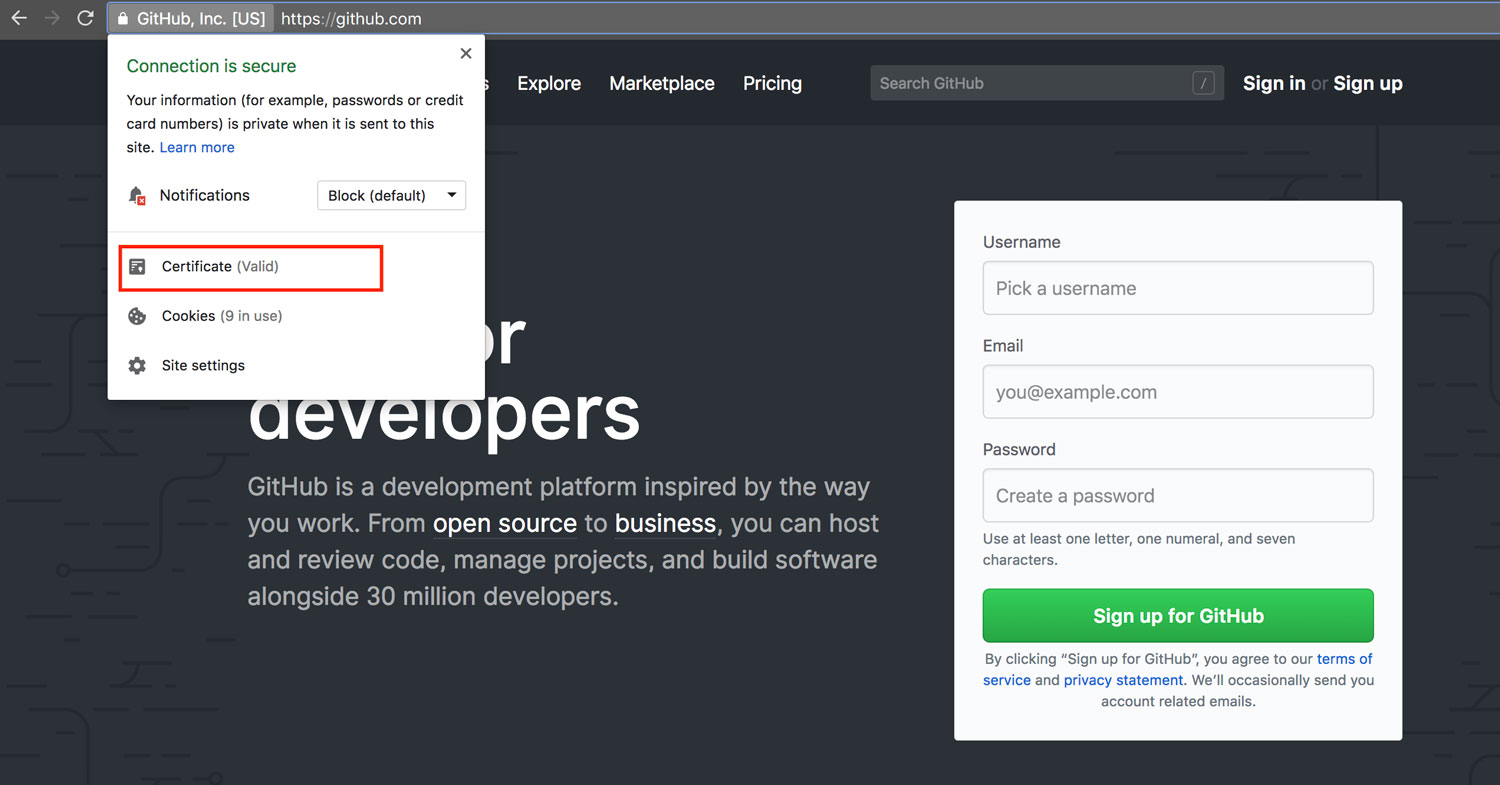
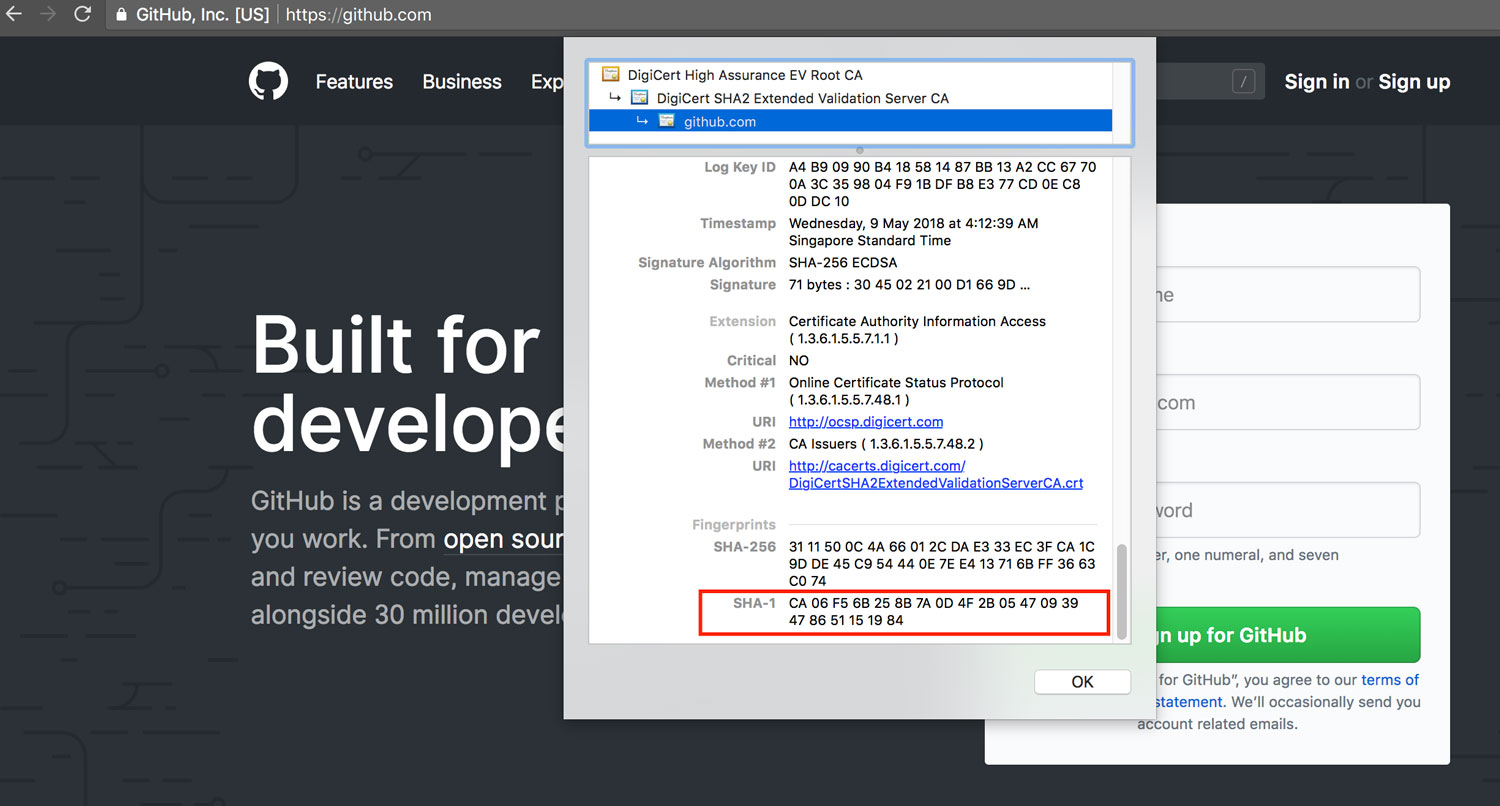
## Get SHA-1 key
 ## Usage
```javascript
import { isSSLValid } from 'react-native-pinning-ssl';
async function runSSLPinning(){
try{
const result = await isSSLValid({
url: 'https://github.com/',
hashes: ['CA 06 F5 6B 25 8B 7A 0D 4F 2B 05 47 09 39 47 86 51 15 19 84'],
domainNames: ['github.com'],
});
return result;
} catch (e) {
console.log(e);
}
}
runSSLPinning();
```
## References
NSURLAuthenticationChallenge+Fingerprint credited to [https://stackoverflow.com/a/26963381](https://stackoverflow.com/a/26963381)
#### Donation
## Usage
```javascript
import { isSSLValid } from 'react-native-pinning-ssl';
async function runSSLPinning(){
try{
const result = await isSSLValid({
url: 'https://github.com/',
hashes: ['CA 06 F5 6B 25 8B 7A 0D 4F 2B 05 47 09 39 47 86 51 15 19 84'],
domainNames: ['github.com'],
});
return result;
} catch (e) {
console.log(e);
}
}
runSSLPinning();
```
## References
NSURLAuthenticationChallenge+Fingerprint credited to [https://stackoverflow.com/a/26963381](https://stackoverflow.com/a/26963381)
#### Donation
 Help to make cryptocurrency world bigger :))
My ADA wallet:
DdzFFzCqrht7vQmuSYrjn6PKDxW3on4cFznU4Jjjycp1bqVTvXngM8wN7sop1Haq7msc5NanULU8TyAG9UuLLZMynfroiHKr2aiiTaMM
---
_Source: https://npm.io/package/react-native-pinning-ssl · Machine-readable twin of the npm.io package page. Health data is recomputed on every publish._
Help to make cryptocurrency world bigger :))
My ADA wallet:
DdzFFzCqrht7vQmuSYrjn6PKDxW3on4cFznU4Jjjycp1bqVTvXngM8wN7sop1Haq7msc5NanULU8TyAG9UuLLZMynfroiHKr2aiiTaMM
---
_Source: https://npm.io/package/react-native-pinning-ssl · Machine-readable twin of the npm.io package page. Health data is recomputed on every publish._