# react-native-qrcode-styled
> A fully customizable QR Code generator for React Native based on react-native-svg and javascript-qrcode.
Latest version **0.4.0** (published 2025-08-27) · MIT license · 0 weekly downloads
## Install
```sh
npm install react-native-qrcode-styled
pnpm add react-native-qrcode-styled
yarn add react-native-qrcode-styled
bun add react-native-qrcode-styled
```
## Health
**Score 50/100 (C)** — status: stable.
Positive: has types; esm support; no vulnerabilities; high quality score.
Warnings: low downloads; pre 1.0.
Negative: stale.
## Facts
| | |
|---|---|
| Version | 0.4.0 |
| Published | 2025-08-27 |
| First published | 2023-02-06 |
| Weekly downloads | 0 |
| License | MIT |
| TypeScript types | bundled |
| Module format | ESM + CommonJS |
| Node | >= 16.0.0 |
| Dependencies | 3 |
| Unpacked size | 253.5 KB |
| Known vulnerabilities | 0 |
| Install scripts | no |
| GitHub stars | 234 |
| Author | Daniel Tokkozhin |
| Maintainers | tokkozhin |
| Keywords | react-native, qrcode, svg, react-native-qrcode-svg, react-native-qrcode, qrcode-styled, qr-generator, rn-qr-generator |
## Links
- npm: https://www.npmjs.com/package/react-native-qrcode-styled
- Repository: https://github.com/tokkozhin/react-native-qrcode-styled
- Homepage: https://github.com/tokkozhin/react-native-qrcode-styled#readme
- Issues: https://github.com/tokkozhin/react-native-qrcode-styled/issues
- npm.io page: https://npm.io/package/react-native-qrcode-styled
## Dependencies (3)
- [qrcode](https://npm.io/package/qrcode.md) 1.5.4
- [fast-text-encoding](https://npm.io/package/fast-text-encoding.md) ^1.0.6
- [react-fast-compare](https://npm.io/package/react-fast-compare.md) ^3.2.2
## Alternatives
- [jsforce](https://npm.io/package/jsforce.md) — 851.2K weekly downloads
- [react-native-qrcode-svg](https://npm.io/package/react-native-qrcode-svg.md) — 693.5K weekly downloads
- [@salesforce/plugin-data](https://npm.io/package/@salesforce/plugin-data.md) — 394.9K weekly downloads
- [@backstage/plugin-search-common](https://npm.io/package/@backstage/plugin-search-common.md) — 308.5K weekly downloads
- [@chain-registry/types](https://npm.io/package/@chain-registry/types.md) — 38.4K weekly downloads
## Recent versions
- 0.4.0 (latest) — 2025-08-27
- 0.3.3 — 2024-12-01
- 0.3.2 — 2024-06-27
- 0.3.1 — 2024-03-16
- 0.3.0 — 2023-12-11
- 0.2.2 — 2023-12-11
- 0.2.1 — 2023-02-16
- 0.2.0 — 2023-02-12
- 0.1.2 — 2023-02-09
- 0.1.1 — 2023-02-06
## README





# react-native-qrcode-styled
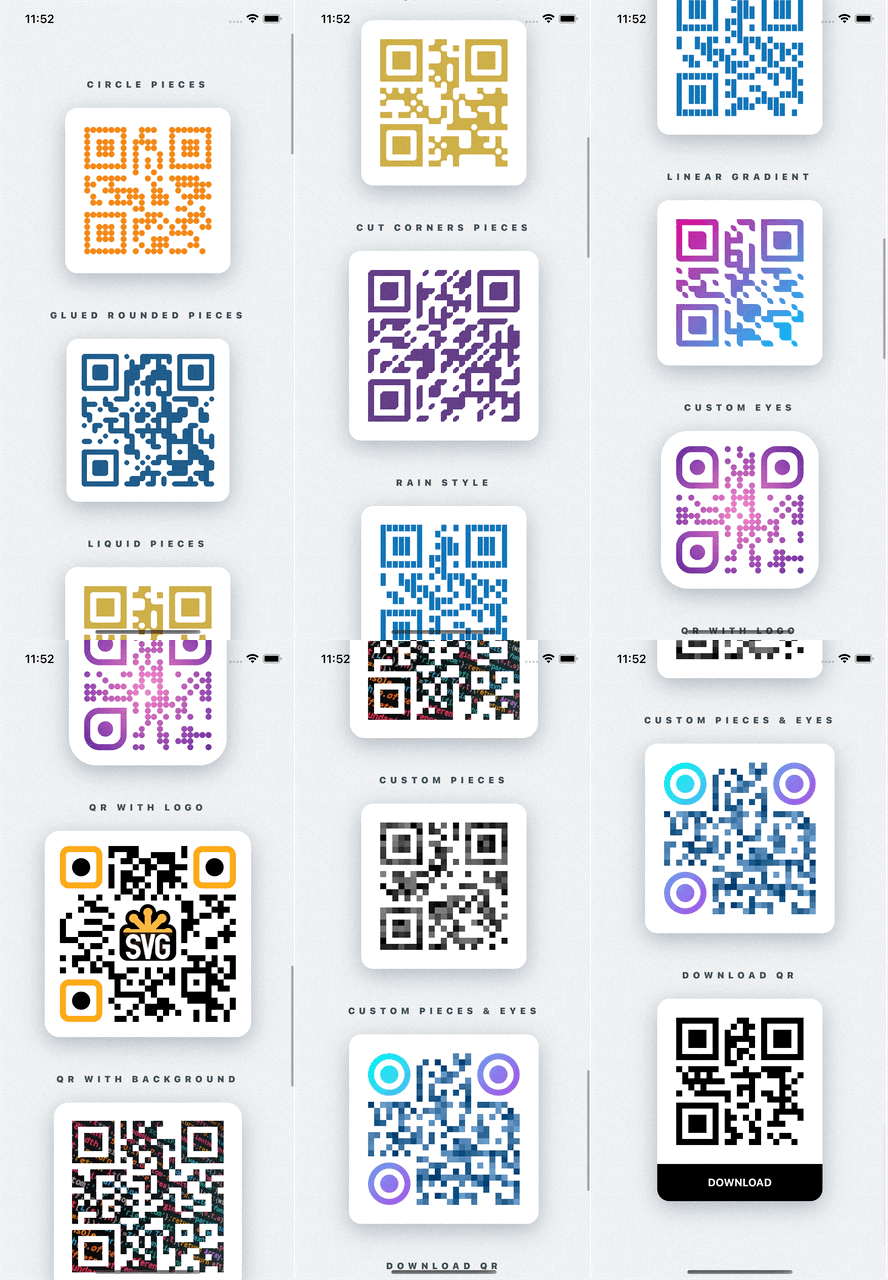
Fully customizable QR Codes generator for React Native using react-native-svg
## Installation
```sh
npm i react-native-svg react-native-qrcode-styled
```
or with yarn
```sh
yarn add react-native-svg react-native-qrcode-styled
```
If you use typescript, run:
```sh
yarn add -D @types/qrcode
```
## Usage
Simple usage is:
```jsx
import QRCodeStyled from 'react-native-qrcode-styled';
```
For more examples [check out the Example app](https://github.com/tokkozhin/react-native-qrcode-styled/tree/main/example)
## Props
Name | Default | Type | Description
---------------------------|----------------|------------------------|-----
data | "I'm QR Code!" | string | Message for encoding. Can also be an array. More info [HERE](https://github.com/soldair/node-qrcode#manual-mode).
size | 160 | number | Size of each piece of the QR code
pieceScale | 1.03(to avoid gaps)| SvgProps['scale'] | Scale of each piece of the QR code
pieceRotation | undefined | SvgProps['rotation'] | Angle of rotation of each piece of the QR code (in degrees)
pieceCornerType | 'rounded' | 'rounded' \| 'cut' | Type of piece corner
pieceBorderRadius | 0 | number \| number[] | Border radius of all corners of each piece. Can also be an array to define different border radius for each corner (start from top-left corner)
pieceStroke | undefined | [ColorValue](https://reactnative.dev/docs/colors) | Border color of each piece
pieceStrokeWidth | undefined | number | Border with of each piece
pieceLiquidRadius | undefined | number | Level of liquid effect between pieces. If you have `pieceBorderRadius` set `isPiecesGlued` to *true*
isPiecesGlued | false | boolean | If *true* between pieces will be glue effect. You will see this if you have `pieceBorderRadius` > 0
outerEyesOptions | undefined | [EyeOptions](#EyeOptions) \| [AllEyesOptions](#AllEyesOptions) | Configurations for outer eyes of QR code. If they defined, previous piece configurations won't be work
innerEyesOptions | undefined | [EyeOptions](#EyeOptions) \| [AllEyesOptions](#AllEyesOptions) | The same as `outerEyesOptions` prop but for inner eyes
color | 'black' | [ColorValue](https://reactnative.dev/docs/colors) | Color of QR code
gradient | undefined | [GradientProps](#GradientProps) | Gradient of QR code. Can be two types: 'linear' \| 'radial'. By default 'linear'
padding | undefined | number | Padding inside `` component from QR code
logo | undefined | [LogoOptions](#LogoOptions) | Configurations for logo. Support svg's `` props
backgroundImage | undefined | svg's `` props type | Background image for QR code
version | undefined | number |[Description](https://github.com/soldair/node-qrcode#version)
maskPattern | undefined | number |[Description](https://github.com/soldair/node-qrcode#maskpattern)
toSJISFunc | undefined | function |[Description](https://github.com/soldair/node-qrcode#tosjisfunc)
errorCorrectionLevel | 'M' | 'L' \| 'M' \| 'Q' \| 'H' |[Description](https://github.com/soldair/node-qrcode#errorCorrectionLevel)
renderCustomPieceItem | undefined | [RenderCustomPieceItem](#RenderCustomPieceItem) | Render custom piece of QR code. It must return svg component. If it defined, previous piece and eyes configurations won't be work
renderBackground | undefined | (pieceSize: number, bitMatrix: number[][]) => SvgProps['children'] | Ability to add any additional svg components behind qr code
children | undefined | (pieceSize: number, bitMatrix: number[][]) => SvgProps['children'] | Ability to add any additional svg components as children
...rest `` props |
## Types
### GradientProps
```typescript
type GradientType = 'linear' | 'radial';
type LinearGradientProps = {
colors?: ColorValue[];
start?: [number, number]; // start point [x, y] (0 -> 0%, 1 -> 100%)
end?: [number, number]; // end point [x, y] (0 -> 0%, 1 -> 100%)
locations?: number[]; // list of colors positions (0 -> 0%, 1 -> 100%)
};
type RadialGradientProps = {
colors?: ColorValue[];
center?: [number, number]; // center point [x, y] (0 -> 0%, 1 -> 100%)
radius?: [number, number]; // radiusXY [x, y] (0 -> 0%, 1 -> 100%)
locations?: number[]; // list of colors positions (0 -> 0%, 1 -> 100%)
};
type GradientProps = {
type?: GradientType;
options?: LinearGradientProps | RadialGradientProps;
};
```
### EyeOptions
```typescript
type EyeOptions = {
scale?: PathProps['scale']; // scaleXY | [scaleX, scaleY]
rotation?: string | number;
borderRadius?: number | number[];
color?: ColorValue;
gradient?: GradientProps;
stroke?: ColorValue;
strokeWidth?: number;
}
```
### AllEyesOptions
```typescript
type EyePosition = 'topLeft' | 'topRight' | 'bottomLeft';
type AllEyesOptions = { [K in EyePosition]?: EyeOptions }
```
### RenderCustomPieceItem
```typescript
type RenderCustomPieceItem = ({x, y, pieceSize, qrSize, bitMatrix}: {
x: number;
y: number;
pieceSize: number;
qrSize: number;
bitMatrix: number[][];
}) => React.ReactElement | null;
```
### LogoOptions
```typescript
export type LogoArea = {
x: number;
y: number;
width: number;
height: number;
};
export type LogoOptions = {
hidePieces?: boolean;
padding?: number;
scale?: number;
onChange?: (logoArea?: LogoArea) => void;
} & SVGImageProps;
```
## Troubleshooting
### Gaps between pieces
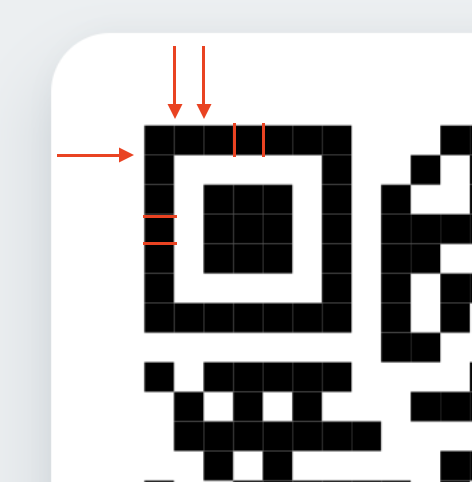
If you'll see that gaps between pieces on Android, just scale pieces up a little bit:
```jsx
```
## Contributing
See the [contributing guide](CONTRIBUTING.md) to learn how to contribute to the repository and the development workflow.
## License
MIT
---
Made with [create-react-native-library](https://github.com/callstack/react-native-builder-bob)
---
_Source: https://npm.io/package/react-native-qrcode-styled · Machine-readable twin of the npm.io package page. Health data is recomputed on every publish._
 




# react-native-qrcode-styled
Fully customizable QR Codes generator for React Native using react-native-svg

## Installation
```sh
npm i react-native-svg react-native-qrcode-styled
```
or with yarn
```sh
yarn add react-native-svg react-native-qrcode-styled
```
If you use typescript, run:
```sh
yarn add -D @types/qrcode
```
## Usage
Simple usage is:
```jsx
import QRCodeStyled from 'react-native-qrcode-styled';





# react-native-qrcode-styled
Fully customizable QR Codes generator for React Native using react-native-svg

## Installation
```sh
npm i react-native-svg react-native-qrcode-styled
```
or with yarn
```sh
yarn add react-native-svg react-native-qrcode-styled
```
If you use typescript, run:
```sh
yarn add -D @types/qrcode
```
## Usage
Simple usage is:
```jsx
import QRCodeStyled from 'react-native-qrcode-styled';
 If you'll see that gaps between pieces on Android, just scale pieces up a little bit:
```jsx
If you'll see that gaps between pieces on Android, just scale pieces up a little bit:
```jsx