# react-native-raw-bottom-sheet
> Add Your Own Component To Bottom Sheet Whatever You Want (Android & iOS)
Latest version **3.0.0** (published 2024-03-21) · MIT license · 0 weekly downloads
## Install
```sh
npm install react-native-raw-bottom-sheet
pnpm add react-native-raw-bottom-sheet
yarn add react-native-raw-bottom-sheet
bun add react-native-raw-bottom-sheet
```
## Health
**Score 25/100 (F)** — status: abandoned.
Positive: has types; no vulnerabilities; high quality score.
Warnings: low downloads; no esm support.
Negative: abandoned; low maintenance score.
## Facts
| | |
|---|---|
| Version | 3.0.0 |
| Published | 2024-03-21 |
| First published | 2019-01-20 |
| Weekly downloads | 0 |
| License | MIT |
| TypeScript types | bundled |
| Module format | CommonJS |
| Dependencies | 0 |
| Unpacked size | 20 KB |
| Known vulnerabilities | 0 |
| Install scripts | no |
| GitHub stars | 1203 |
| Author | NY Samnang |
| Maintainers | nysamnang |
| Keywords | bottom-sheet, action-sheet, raw-bottom-sheet, bottom-drawer, bottom-animated, drawer, picker, swipper, modal, dialog |
## Links
- npm: https://www.npmjs.com/package/react-native-raw-bottom-sheet
- Repository: https://github.com/nysamnang/react-native-raw-bottom-sheet
- Homepage: https://github.com/nysamnang/react-native-raw-bottom-sheet#readme
- Issues: https://github.com/nysamnang/react-native-raw-bottom-sheet/issues
- npm.io page: https://npm.io/package/react-native-raw-bottom-sheet
## Alternatives
- [react-native-root-siblings](https://npm.io/package/react-native-root-siblings.md) — 102.9K weekly downloads
- [@praxisui/dialog](https://npm.io/package/@praxisui/dialog.md) — 2.0K weekly downloads
- [easy-toggle-state](https://npm.io/package/easy-toggle-state.md) — 350 weekly downloads
- [ngx-lightbox-evp](https://npm.io/package/ngx-lightbox-evp.md) — 19 weekly downloads
- [react-native-modal-translucent-axton](https://npm.io/package/react-native-modal-translucent-axton.md) — 4 weekly downloads
## Recent versions
- 3.0.0 (latest) — 2024-03-21
- 3.0.0-rc.1 (rc) — 2024-03-21
- 2.2.1 — 2024-03-07
- 2.2.0 — 2020-05-06
- 2.1.0 — 2020-03-19
- 2.0.6 — 2019-11-09
- 2.0.5 — 2019-10-05
- 2.0.4 — 2019-10-04
- 2.0.3 — 2019-10-04
- 2.0.2 — 2019-05-28
- 2.0.1 — 2019-05-28
- 2.0.0 — 2019-05-28
- 1.1.4 — 2019-04-03
- 1.1.3 — 2019-02-27
- 1.1.2 — 2019-02-26
- … 3 more at https://npm.io/package/react-native-raw-bottom-sheet/versions
## README
# react-native-raw-bottom-sheet
## Hooray! The new version 3 has been released.
Please pay close attention if you are upgrading the RBSheet from version 2 to version 3.
- Functional Components: Starting from v3.0.0, RBSheet has been completely rewritten using Functional Components. This improves performance and aligns with modern React practices.
- Prop Removal & Renaming: Several props have been removed and renamed for improved clarity and maintainability. Please refer to the updated documentation for a complete list of available props and their intended behavior.
[](//npmjs.com/package/react-native-raw-bottom-sheet)
[
](//npmjs.com/package/react-native-raw-bottom-sheet)
[](https://github.com/nysamnang/react-native-raw-bottom-sheet/actions/workflows/ci.yml)
[](https://codecov.io/gh/nysamnang/react-native-raw-bottom-sheet)
- Super Lightweight Component
- Add Your Own Component To Bottom Sheet
- Customize Whatever You Like
- Support Drag Down Gesture
- Support All Orientations
- Support Both Android And iOS
- Smooth Animation
- Zero Configuration
- Zero dependency
- Millions of Downloads
| Showcase iOS | Showcase Android |
| :--------------------------------------------------------------------------------------------------------------------: | :--------------------------------------------------------------------------------------------------------------------: |
| 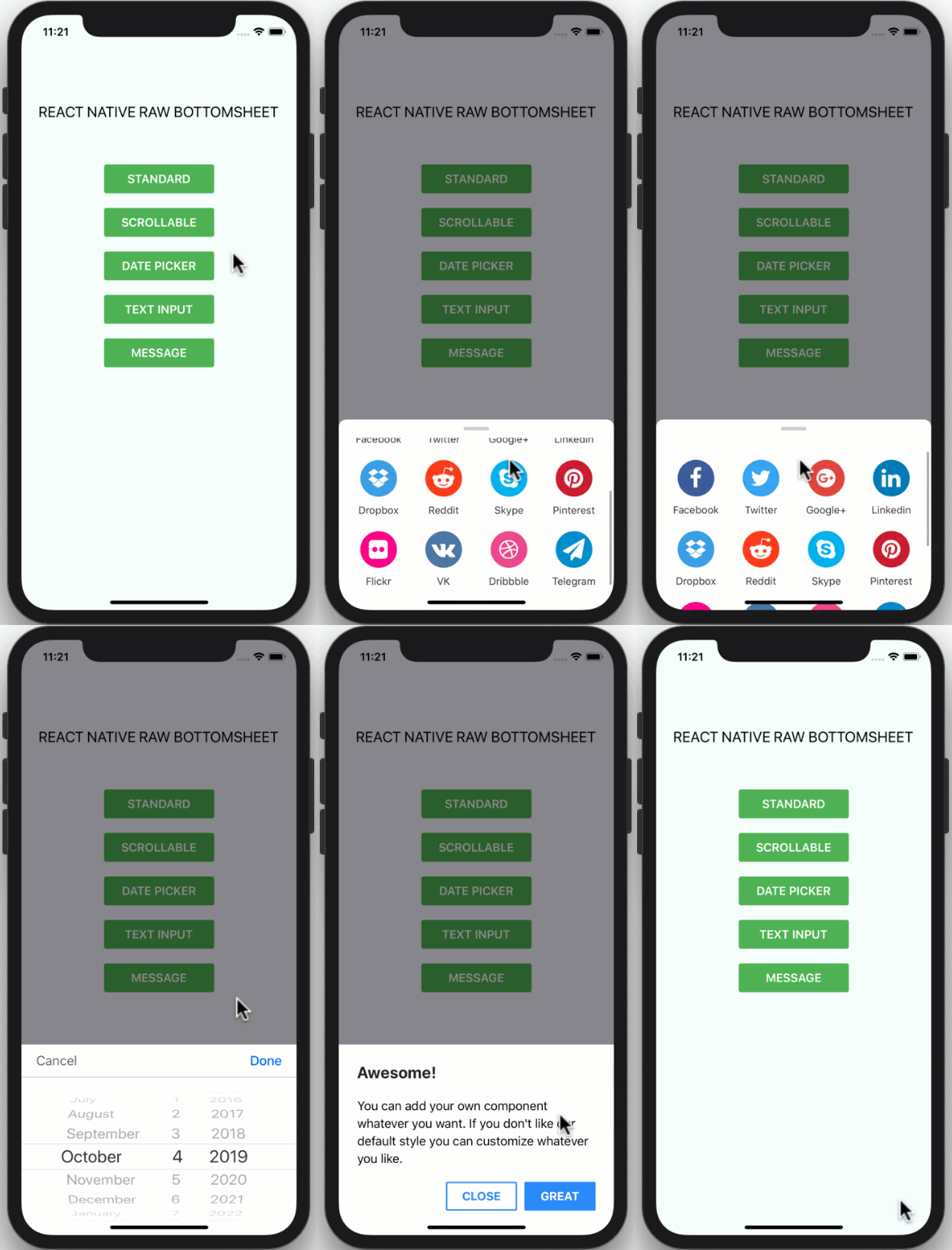 | 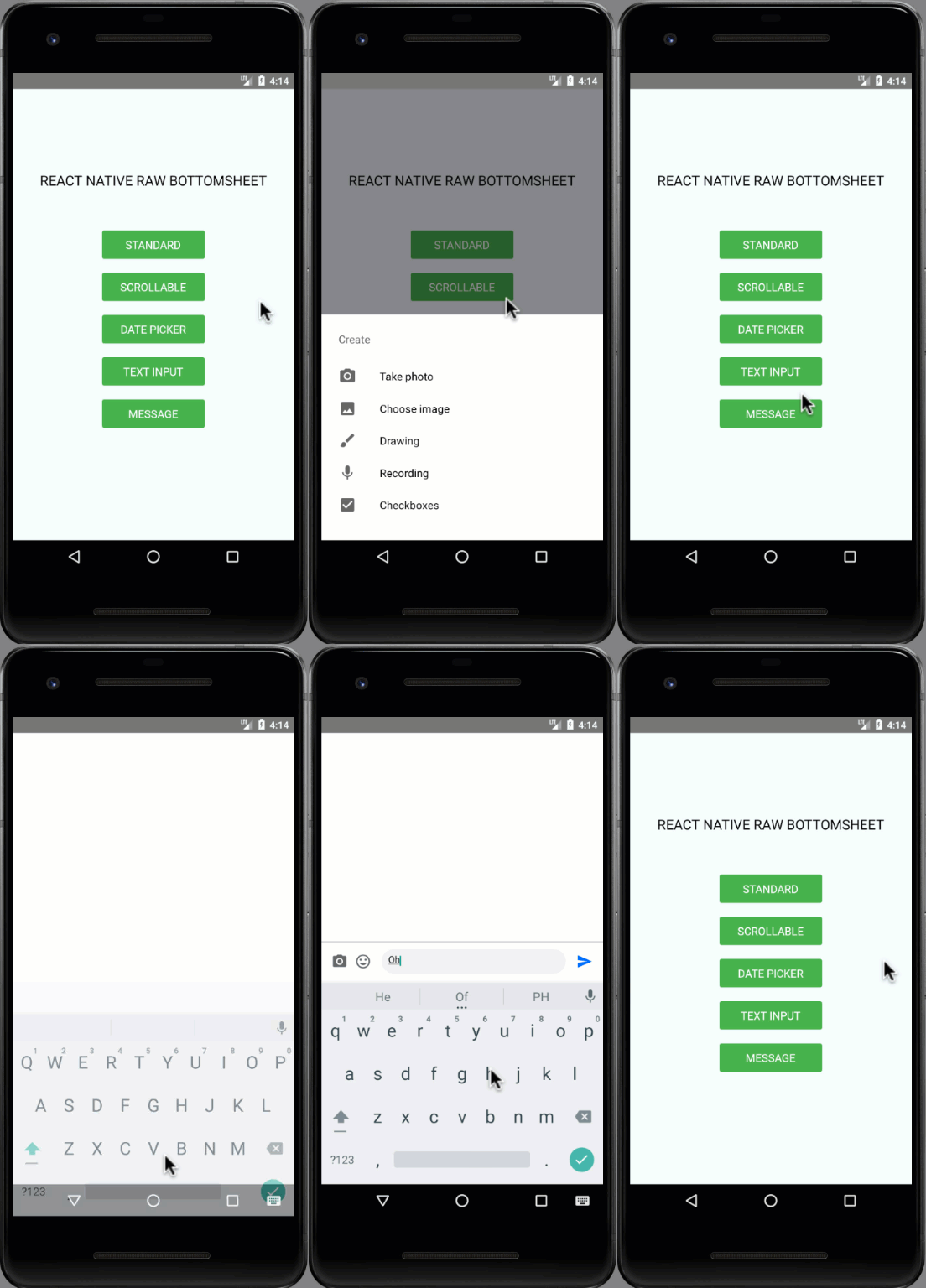 |
## Installation
```
npm i react-native-raw-bottom-sheet --save
```
### or
```
yarn add react-native-raw-bottom-sheet
```
## Example
Please check the [example](https://github.com/nysamnang/react-native-raw-bottom-sheet/tree/master/example) folder to explore more example codes.
#### Single Bottom Sheet
```jsx
import React, {useRef} from 'react';
import {View, Button} from 'react-native';
import RBSheet from 'react-native-raw-bottom-sheet';
export default function Example() {
const refRBSheet = useRef();
return (
);
}
```
#### Multiple Bottom Sheet
```jsx
const refRBSheet = useRef([]);
const renderItem = ({item, index}) => {
return (
refRBSheet.current[index].open()}>
ITEM {item + 1} (refRBSheet.current[index] = ref)}>
I AM ITEM {item + 1}
);
};
```
## Props
| Props | Type | Description | Default |
| ----------------------- | -------- | ------------------------------------------------------------------------------------------------------------------------------------------------------ | -------- |
| height | number | The height of bottom sheet. | 260 |
| openDuration | number | Duration of the animation when opening bottom sheet. | 300 (ms) |
| closeDuration | number | Duration of the animation when closing bottom sheet. | 200 (ms) |
| closeOnPressMask | boolean | Press the outside area (mask) to close bottom sheet. | true |
| closeOnPressBack | boolean | Press hardware back android to close bottom sheet (Android only). | false |
| draggable | boolean | Enable the drag-down gesture to close the bottom sheet. | false |
| dragOnContent | boolean | The draggable is only worked on the draggable icon. Set this to `true` if you want to drag on the content as well (doesn't work with ScrollView). | false |
| useNativeDriver | boolean | Use the native driver to run smoother animation. | false |
| customStyles | object | Add [custom styles](#available-custom-style) to bottom sheet. | {} |
| customModalProps | object | Add [custom props](https://reactnative.dev/docs/modal#props) to modal. | {} |
| customAvoidingViewProps | object | Add [custom props](https://reactnative.dev/docs/keyboardavoidingview#props) to KeyboardAvoidingView. | {} |
| onOpen | function | Callback function that will be called after the bottom sheet has been opened. | null |
| onClose | function | Callback function that will be called after the bottom sheet has been closed. | null |
### Available Custom Style
```js
customStyles: {
wrapper: {...}, // The Root of component (Change the mask's background color here).
container: {...}, // The Container of bottom sheet (The animated view that contains your component).
draggableIcon: {...} // The style of Draggable Icon (If you set `draggable` to `true`).
}
```
## Methods
| Method Name | Description | Usage |
| ----------- | --------------------------------- | ---------------------------- |
| open | The method to open bottom sheet. | `refRBSheet.current.open()` |
| close | The method to close bottom sheet. | `refRBSheet.current.close()` |
## CONTRIBUTING
I'm really glad you're reading this, because we need volunteer developers to help bring this project to life.
#### How to contribute:
1. Clone this repository
2. Open project, then run `yarn` to install devDependencies
3. Add your magic code for contribution
4. Test your code
- Navigate to `example` folder
- Run `yarn` & `yarn start` to run the example project
- Test your code in `example/App.js`
5. Update `README.md` to update documentation (Optional)
6. Write unit testing in `__tests__` folder (Optional)
7. Update `index.d.ts` to update typing (Optional)
8. Make a pull request, Genius!
## License
This project is licensed under the MIT License - see the [LICENSE.md](https://github.com/nysamnang/react-native-raw-bottom-sheet/blob/master/LICENSE) file for details.
## Author
Made with ❤️ by [NY Samnang](https://github.com/nysamnang).
---
_Source: https://npm.io/package/react-native-raw-bottom-sheet · Machine-readable twin of the npm.io package page. Health data is recomputed on every publish._