# react-native-swipeable
> A powerful React Native swipe component
Latest version **0.6.0** (published 2017-07-10) · MIT license · 0 weekly downloads
## Install
```sh
npm install react-native-swipeable
pnpm add react-native-swipeable
yarn add react-native-swipeable
bun add react-native-swipeable
```
## Health
**Score 15/100 (F)** — status: abandoned.
Positive: no vulnerabilities.
Warnings: low downloads; no types; no esm support; pre 1.0.
Negative: abandoned; low maintenance score.
## Facts
| | |
|---|---|
| Version | 0.6.0 |
| Published | 2017-07-10 |
| First published | 2017-01-05 |
| Weekly downloads | 0 |
| License | MIT |
| TypeScript types | none |
| Module format | CommonJS |
| Dependencies | 1 |
| Known vulnerabilities | 0 |
| Install scripts | no |
| Author | Jeff Hanson |
| Maintainers | jshanson7 |
| Keywords | react, native, swipe, ListView, TableView |
## Links
- npm: https://www.npmjs.com/package/react-native-swipeable
- Repository: https://github.com/jshanson7/react-native-swipeable
- Homepage: https://github.com/jshanson7/react-native-swipeable#readme
- Issues: https://github.com/jshanson7/react-native-swipeable/issues
- npm.io page: https://npm.io/package/react-native-swipeable
## Dependencies (1)
- [prop-types](https://npm.io/package/prop-types.md) ^15.5.10
## Recent versions
- 0.6.0 (latest) — 2017-07-10
- 0.5.0 — 2017-07-08
- 0.4.0 — 2017-02-27
- 0.3.3 — 2017-02-19
- 0.3.2 — 2017-01-15
- 0.3.1 — 2017-01-15
- 0.3.0 — 2017-01-15
- 0.2.6 — 2017-01-14
- 0.2.5 — 2017-01-14
- 0.2.4 — 2017-01-13
- 0.2.3 — 2017-01-10
- 0.2.2 — 2017-01-10
- 0.2.1 — 2017-01-10
- 0.2.0 — 2017-01-10
- 0.1.2 — 2017-01-05
- … 6 more at https://npm.io/package/react-native-swipeable/versions
## README
# React Native Swipeable [![NPM version][npm-image]][npm-url]
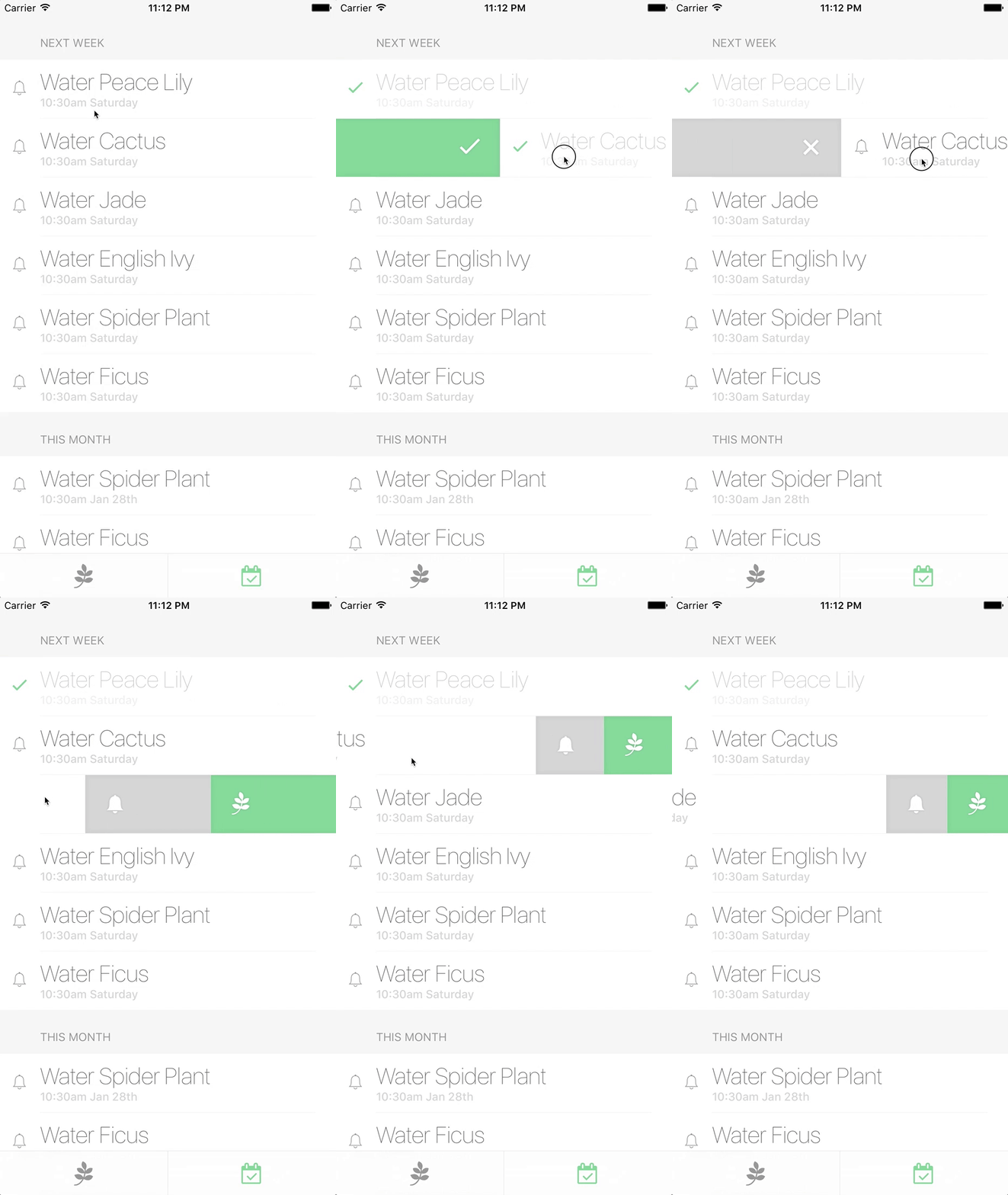
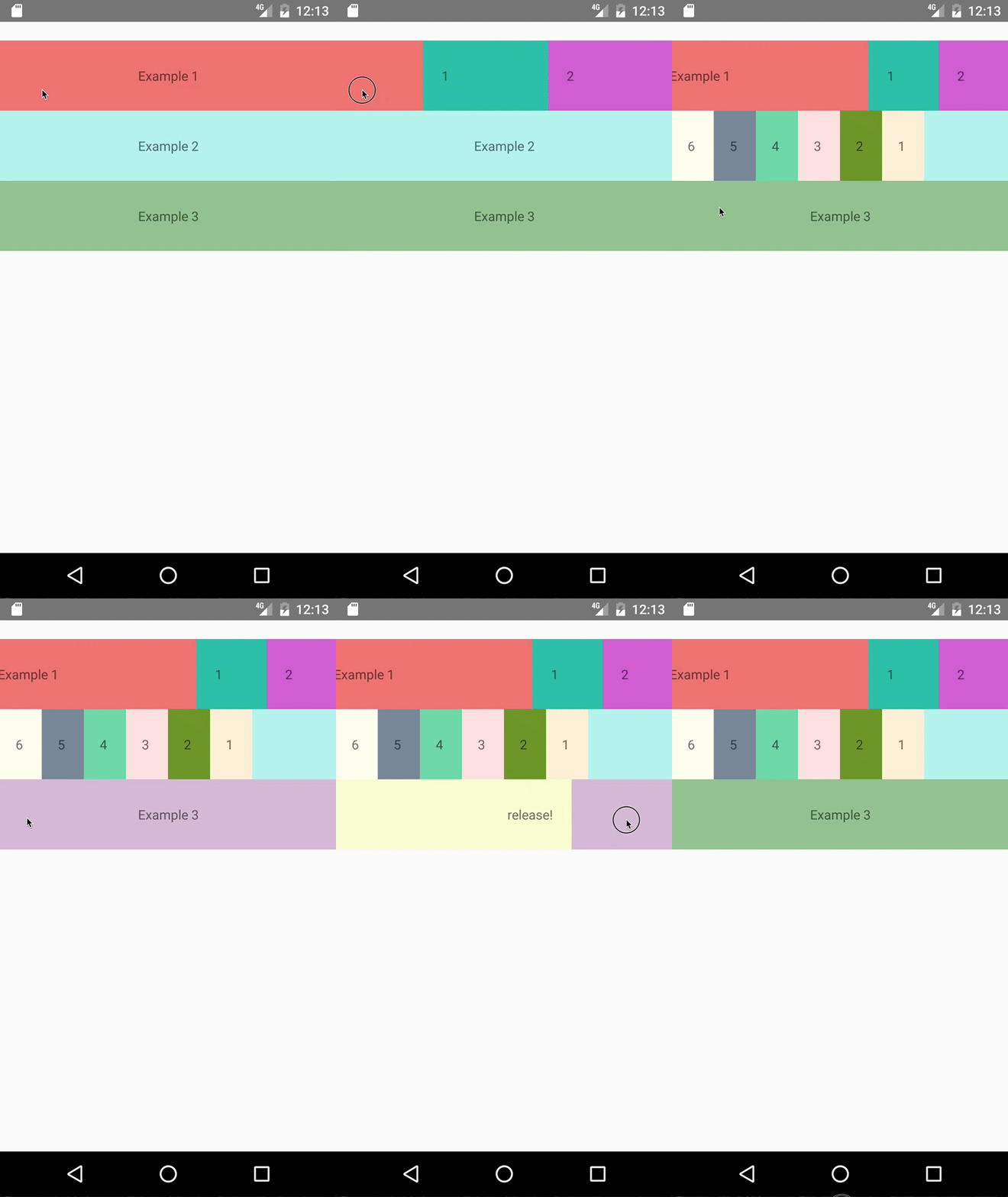
A powerful React Native swipe component. Supports both iOS and Android.
 ## Installation
```sh
npm i --save react-native-swipeable
```
## Usage
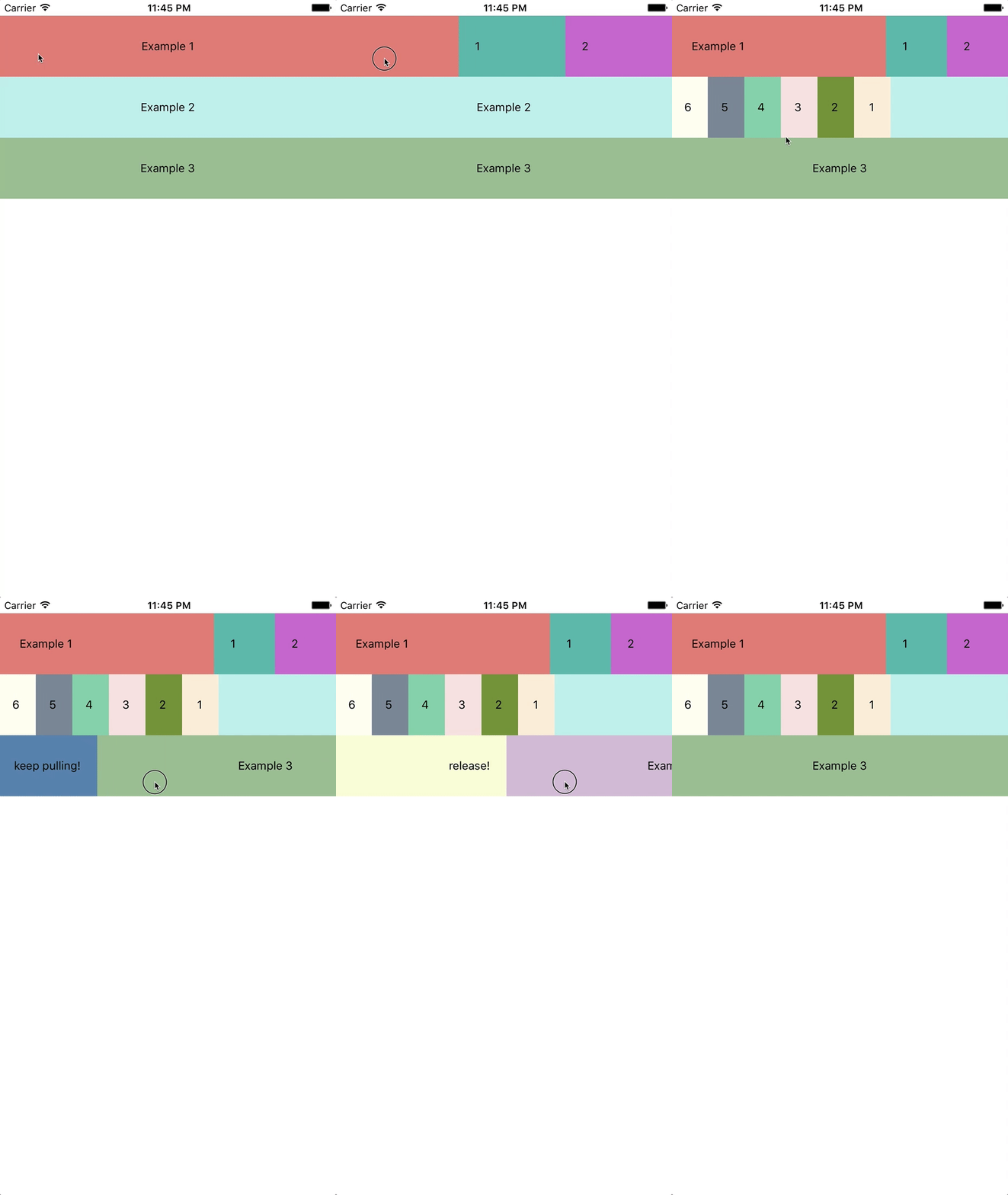
Wrap your ListView/TableView items with the `Swipeable` component:
```javascript
import Swipeable from 'react-native-swipeable';
const leftContent = Pull to activate;
const rightButtons = [
Button 1,
Button 2
];
function MyListItem() {
return (
My swipeable content
);
}
```
### Props
| prop | type | default | description |
|---------------------------------|--------------|---------|-------------------------------------------------------------------------------------------|
| `children` | renderable | `null` | swipeable content |
| `leftContent` | renderable | `null` | (optional) left content visible during pull action |
| `rightContent` | renderable | `null` | (optional) right content visible during pull action |
| `leftButtons` | renderable[] | `null` | (optional) array of buttons, first being the innermost; ignored if `leftContent` present |
| `rightButtons` | renderable[] | `null` | (optional) array of buttons, first being the innermost; ignored if `rightContent` present |
| `leftActionActivationDistance` | integer | 125 | (optional) minimum swipe distance to activate left action |
| `onLeftActionRelease` | function | `null` | (optional) user has swiped beyond `leftActionActivationDistance` and released |
| `rightActionActivationDistance` | integer | 125 | (optional) minimum swipe distance to activate right action |
| `onRightActionRelease` | function | `null` | (optional) user has swiped beyond `rightActionActivationDistance` and released |
| `leftButtonWidth` | integer | 75 | (optional) resting visible peek of each left button after buttons are swiped open |
| `rightButtonWidth` | integer | 75 | (optional) resting visible peek of each right button after buttons are swiped open |
| `onRef` | function | `null` | (optional) receive swipeable component instance reference |
| `onPanAnimatedValueRef` | function | `null` | (optional) receive swipeable pan `Animated.ValueXY` reference for upstream animations |
### Advanced Props
[Check out the `Swipeable` component's `propTypes`](https://github.com/jshanson7/react-native-swipeable/blob/master/src/index.js#L14) for a huge list of options including animation lifecycle hooks and low-level overrides.
### Instance Methods
#### recenter()
Imperatively reset swipeable component back to initial position. This is useful if buttons are exposed and the user has begun scrolling the parent view.
```javascript
class MyListItem extends Component {
swipeable = null;
handleUserBeganScrollingParentView() {
this.swipeable.recenter();
}
render() {
return (
this.swipeable = ref} rightButtons={rightButtons}>
My swipeable content
);
}
}
```
## Example
To run [the example](https://github.com/jshanson7/react-native-swipeable/blob/master/example/swipeable-example.js):
```sh
npm run build
cd example
npm install
react-native run-ios # or run-android
```
## Installation
```sh
npm i --save react-native-swipeable
```
## Usage
Wrap your ListView/TableView items with the `Swipeable` component:
```javascript
import Swipeable from 'react-native-swipeable';
const leftContent = Pull to activate;
const rightButtons = [
Button 1,
Button 2
];
function MyListItem() {
return (
My swipeable content
);
}
```
### Props
| prop | type | default | description |
|---------------------------------|--------------|---------|-------------------------------------------------------------------------------------------|
| `children` | renderable | `null` | swipeable content |
| `leftContent` | renderable | `null` | (optional) left content visible during pull action |
| `rightContent` | renderable | `null` | (optional) right content visible during pull action |
| `leftButtons` | renderable[] | `null` | (optional) array of buttons, first being the innermost; ignored if `leftContent` present |
| `rightButtons` | renderable[] | `null` | (optional) array of buttons, first being the innermost; ignored if `rightContent` present |
| `leftActionActivationDistance` | integer | 125 | (optional) minimum swipe distance to activate left action |
| `onLeftActionRelease` | function | `null` | (optional) user has swiped beyond `leftActionActivationDistance` and released |
| `rightActionActivationDistance` | integer | 125 | (optional) minimum swipe distance to activate right action |
| `onRightActionRelease` | function | `null` | (optional) user has swiped beyond `rightActionActivationDistance` and released |
| `leftButtonWidth` | integer | 75 | (optional) resting visible peek of each left button after buttons are swiped open |
| `rightButtonWidth` | integer | 75 | (optional) resting visible peek of each right button after buttons are swiped open |
| `onRef` | function | `null` | (optional) receive swipeable component instance reference |
| `onPanAnimatedValueRef` | function | `null` | (optional) receive swipeable pan `Animated.ValueXY` reference for upstream animations |
### Advanced Props
[Check out the `Swipeable` component's `propTypes`](https://github.com/jshanson7/react-native-swipeable/blob/master/src/index.js#L14) for a huge list of options including animation lifecycle hooks and low-level overrides.
### Instance Methods
#### recenter()
Imperatively reset swipeable component back to initial position. This is useful if buttons are exposed and the user has begun scrolling the parent view.
```javascript
class MyListItem extends Component {
swipeable = null;
handleUserBeganScrollingParentView() {
this.swipeable.recenter();
}
render() {
return (
this.swipeable = ref} rightButtons={rightButtons}>
My swipeable content
);
}
}
```
## Example
To run [the example](https://github.com/jshanson7/react-native-swipeable/blob/master/example/swipeable-example.js):
```sh
npm run build
cd example
npm install
react-native run-ios # or run-android
```
 ## Common Issues
> Action being triggered more than once ([#3](https://github.com/jshanson7/react-native-swipeable/issues/3))
This seems to occur occasionally (but not always) with certain `ScrollView` and `ListView` configurations. The fix is simple though, just ensure that `scrollEnabled` is set to `false` while the user is swiping a row.
```js
this.setState({isSwiping: true})}
onSwipeRelease={() => this.setState({isSwiping: false})}
```
or:
```js
(
this.setState({isSwiping: true})}
onSwipeRelease={() => this.setState({isSwiping: false})}
)}
/>
```
## License
MIT
[npm-image]: https://badge.fury.io/js/react-native-swipeable.svg
[npm-url]: https://npmjs.org/package/react-native-swipeable
---
_Source: https://npm.io/package/react-native-swipeable · Machine-readable twin of the npm.io package page. Health data is recomputed on every publish._
## Common Issues
> Action being triggered more than once ([#3](https://github.com/jshanson7/react-native-swipeable/issues/3))
This seems to occur occasionally (but not always) with certain `ScrollView` and `ListView` configurations. The fix is simple though, just ensure that `scrollEnabled` is set to `false` while the user is swiping a row.
```js
this.setState({isSwiping: true})}
onSwipeRelease={() => this.setState({isSwiping: false})}
```
or:
```js
(
this.setState({isSwiping: true})}
onSwipeRelease={() => this.setState({isSwiping: false})}
)}
/>
```
## License
MIT
[npm-image]: https://badge.fury.io/js/react-native-swipeable.svg
[npm-url]: https://npmjs.org/package/react-native-swipeable
---
_Source: https://npm.io/package/react-native-swipeable · Machine-readable twin of the npm.io package page. Health data is recomputed on every publish._