# react-native-uploader
> A React Native module to upload files and camera roll assets. Supports progress notification.
Latest version **0.0.10** (published 2016-11-25) · 0 weekly downloads
## Install
```sh
npm install react-native-uploader
pnpm add react-native-uploader
yarn add react-native-uploader
bun add react-native-uploader
```
## Health
**Score 20/100 (F)** — status: abandoned.
Positive: no vulnerabilities.
Warnings: low downloads; no types; no esm support; low quality score; pre 1.0.
Negative: abandoned.
## Facts
| | |
|---|---|
| Version | 0.0.10 |
| Published | 2016-11-25 |
| First published | 2015-12-20 |
| Weekly downloads | 0 |
| TypeScript types | none |
| Module format | CommonJS |
| Dependencies | 0 |
| Known vulnerabilities | 0 |
| Install scripts | no |
| GitHub stars | 510 |
| Author | Adam Roth |
| Maintainers | aroth |
| Keywords | react-native, react-native-upload, react-component, react, native, image, upload, transfer, file |
## Links
- npm: https://www.npmjs.com/package/react-native-uploader
- Repository: https://github.com/aroth/react-native-uploader
- Homepage: https://github.com/aroth/react-native-uploader#readme
- Issues: https://github.com/aroth/react-native-uploader/issues
- npm.io page: https://npm.io/package/react-native-uploader
## Alternatives
- [mobx-react](https://npm.io/package/mobx-react.md) — 2.8M weekly downloads
- [rc-tree](https://npm.io/package/rc-tree.md) — 2.6M weekly downloads
- [@react-oauth/google](https://npm.io/package/@react-oauth/google.md) — 1.3M weekly downloads
- [@wagmi/connectors](https://npm.io/package/@wagmi/connectors.md) — 877.0K weekly downloads
- [vee-validate](https://npm.io/package/vee-validate.md) — 836.4K weekly downloads
## Recent versions
- 0.0.10 (latest) — 2016-11-25
- 0.0.9 — 2016-03-05
- 0.0.8 — 2015-12-30
- 0.0.6 — 2015-12-22
- 0.0.5 — 2015-12-22
- 0.0.4 — 2015-12-22
- 0.0.3 — 2015-12-21
- 0.0.2 — 2015-12-20
- 0.0.1 — 2015-12-20
## README
# react-native-uploader
A React Native module for uploading files and camera roll assets. Supports progress notification.
## Install
### iOS
1. `npm install react-native-uploader --save`
2. Link the native modules:
If you're using React-Native >= 0.29:
* Link the library with the command `react-native link`
If you're using React-Native < 0.29:
* Install rnpm using the command `npm install -g rnpm`
* Link the library with the command `rnpm link`
If you have any issues, you can install the library manually:
* In XCode, in the project navigator, right click `Libraries` ➜ `Add Files to [your project's name]`
* Go to `node_modules` ➜ `react-native-uploader` ➜ `RNUploader` and add `RNUploader.xcodeproj`
* In XCode, in the project navigator, select your project. Add `libRNUploader.a` to your project's `Build Phases` ➜ `Link Binary With Libraries`
3. Run your project (`Cmd+R`)
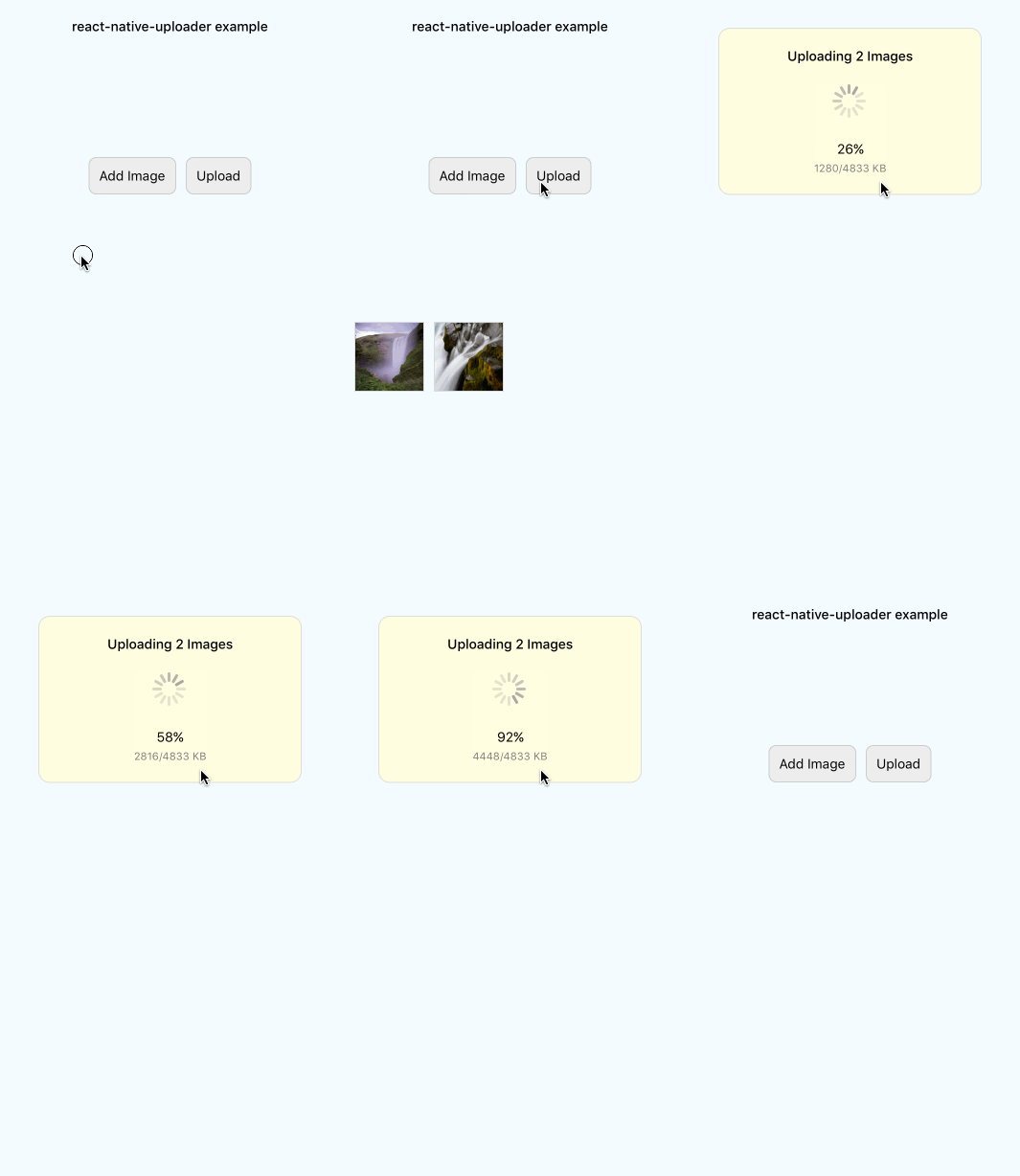
## Example
See ./examples/UploadFromCameraRoll
## Usage
```javascript
var RNUploader = require('NativeModules').RNUploader;
var {
StyleSheet,
Component,
View,
DeviceEventEmitter,
} = React;
```
```javascript
componentDidMount(){
// upload progress
DeviceEventEmitter.addListener('RNUploaderProgress', (data)=>{
let bytesWritten = data.totalBytesWritten;
let bytesTotal = data.totalBytesExpectedToWrite;
let progress = data.progress;
console.log( "upload progress: " + progress + "%");
});
}
```
```javascript
doUpload(){
let files = [
{
name: 'file[]',
filename: 'image1.png',
filepath: 'assets-library://....', // image from camera roll/assets library
filetype: 'image/png',
},
{
name: 'file[]',
filename: 'image2.gif',
filepath: "data:image/gif;base64,R0lGODlhEAAQAMQAAORHHOVSKudfOulrSOp3WOyDZu6QdvCchPGolfO0o/XBs/fNwfjZ0frl3/zy7////wAAAAAAAAAAAAAAAAAAAAAAAAAAAAAAAAAAAAAAAAAAAAAAAAAAAAAAAAAAAAAAACH5BAkAABAALAAAAAAQABAAAAVVICSOZGlCQAosJ6mu7fiyZeKqNKToQGDsM8hBADgUXoGAiqhSvp5QAnQKGIgUhwFUYLCVDFCrKUE1lBavAViFIDlTImbKC5Gm2hB0SlBCBMQiB0UjIQA7",
filetype: 'image/gif',
},
];
let opts = {
url: 'http://my.server/api/upload',
files: files,
method: 'POST', // optional: POST or PUT
headers: { 'Accept': 'application/json' }, // optional
params: { 'user_id': 1 }, // optional
};
RNUploader.upload( opts, (err, response) => {
if( err ){
console.log(err);
return;
}
let status = response.status;
let responseString = response.data;
let json = JSON.parse( responseString );
console.log('upload complete with status ' + status);
});
}
```
## API
#### RNUploader.upload( options, callback )
`options` is an object with values:
||type|required|description|example|
|---|---|---|---|---|
|`url`|string|required|URL to upload to|`http://my.server/api/upload`|
|`method`|string|optional|HTTP method, values: [PUT,POST], default: POST|`POST`|
|`headers`|object|optional|HTTP headers|`{ 'Accept': 'application/json' }`|
|`params`|object|optional|Query parameters|`{ 'user_id': 1 }`|
|`files`|array|required|Array of file objects to upload. See below.| `[{ name: 'file', filename: 'image1.png', filepath: 'assets-library://...', filetype: 'image/png' } ]` |
`callback` is a method with two parameters:
||type|description|example|
|---|---|---|---|
|error|string|String detailing the error|`A server with the specified hostname could not be found.`|
|response|object{status:Number, data:String}|Object returned with a status code and data.|`{ status: 200, data: '{ success: true }' }`|
#### `files`
`files` is an array of objects with values:
||type|required|description|example|
|---|---|---|---|---|
|name|string|optional|Form parameter key for the specified file. If missing, will use `filename`.|`file[]`|
|filename|string|required|filename|`image1.png`|
|filepath|string|required|File URI
Supports `assets-library:`, `data:` and `file:` URIs and file paths.|`assets-library://...`
`data:image/gif;base64,R0lGODlhEAAQAMQAAORHHOV...`
`file:/tmp/image1.png`
`/tmp/image1.png`|
|filetype|string|optional|MIME type of file. If missing, will infer based on the extension in `filepath`.|`image/png`|
### Progress
To monitor upload progress simply subscribe to the `RNUploaderProgress` event using DeviceEventEmitter.
```
DeviceEventEmitter.addListener('RNUploaderProgress', (data)=>{
let bytesWritten = data.totalBytesWritten;
let bytesTotal = data.totalBytesExpectedToWrite;
let progress = data.progress;
console.log( "upload progress: " + progress + "%");
});
```
### Cancel
To cancel an upload in progress:
```
RNUploader.cancel()
```
### Notes
Inspired by similiar projects:
* https://github.com/booxood/react-native-file-upload
* https://github.com/kamilkp/react-native-file-transfer
...with noteable enhancements:
* uploads are performed asynchronously on the native side
* progress reporting
* packaged as a static library
* support for multiple files at a time
* support for files from the assets library, base64 `data:` or `file:` paths
* no external dependencies (ie: AFNetworking)
## License
MIT
---
_Source: https://npm.io/package/react-native-uploader · Machine-readable twin of the npm.io package page. Health data is recomputed on every publish._