# react-simple-multi-select
> "simple multi select and easy to use, built on styled components
Latest version **1.1.0** (published 2020-06-10) · MIT license · 0 weekly downloads
## Install
```sh
npm install react-simple-multi-select
pnpm add react-simple-multi-select
yarn add react-simple-multi-select
bun add react-simple-multi-select
```
## Health
**Score 15/100 (F)** — status: abandoned.
Positive: no vulnerabilities.
Warnings: low downloads; no types; no esm support.
Negative: abandoned; low maintenance score.
## Facts
| | |
|---|---|
| Version | 1.1.0 |
| Published | 2020-06-10 |
| First published | 2019-11-01 |
| Weekly downloads | 0 |
| License | MIT |
| TypeScript types | none |
| Module format | CommonJS |
| Dependencies | 2 |
| Unpacked size | 18.5 KB |
| Known vulnerabilities | 0 |
| Install scripts | no |
| Author | Ravi P |
| Maintainers | ravip2900 |
| Keywords | select, drop down, multi select, multi select drop down |
## Links
- npm: https://www.npmjs.com/package/react-simple-multi-select
- Repository: https://github.com/ravip2900/react-simple-multi-select
- Homepage: https://github.com/ravip2900/react-simple-multi-select#readme
- Issues: https://github.com/ravip2900/react-simple-multi-select/issues
- npm.io page: https://npm.io/package/react-simple-multi-select
## Dependencies (2)
- [react](https://npm.io/package/react.md) ^16.2.0
- [styled-components](https://npm.io/package/styled-components.md) ^4.4.1
## Recent versions
- 1.1.0 (latest) — 2020-06-10
- 1.0.9 — 2020-06-09
- 1.0.8 — 2020-06-09
- 1.0.7 — 2020-03-17
- 1.0.6 — 2019-11-03
- 1.0.5 — 2019-11-03
- 1.0.4 — 2019-11-03
- 1.0.3 — 2019-11-03
- 1.0.2 — 2019-11-01
- 1.0.1 — 2019-11-01
- 1.0.0 — 2019-11-01
## README
# React Simple Multi Select
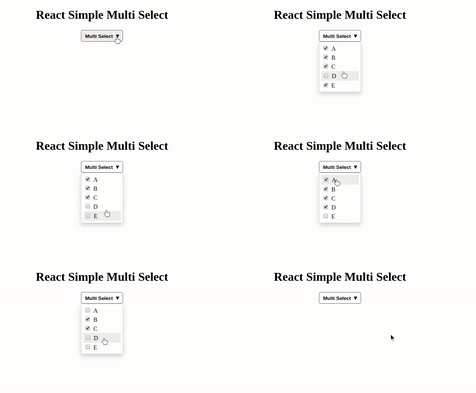
**React Simple Multi Select** is easy to use and configure.
#### Installation
```sh
$ npm install --save react-simple-multi-select
```
#### Running example in local
```sh
$ git clone https://github.com/ravip2900/react-simple-multi-select.git
$ npm start
```
It'll open localhost:2900 port, where you can see live demo.
#### 1). Array of values Example
```js
import React from 'react';
import ReactDOM from 'react-dom'
import MultiSelect from 'react-simple-multi-select';
class Example extends React.Component{
constructor(props){
super(props);
this.state={
itemList: [
"React Js",
"Node Js",
"Express Js",
"Next Js",
"Vue Js",
"Mongo Db"
],
selectedItemList: [
"React Js",
"Next Js",
"Mongo Db"
]
};
this.changeList = this.changeList.bind(this);
}
changeList(selectedItemList){
this.setState({selectedItemList});
}
render(){
return(
React Simple Multi Select
)
}
}
```
#### 2). Array of Objects Example
```js
import React from 'react';
import ReactDOM from 'react-dom'
import MultiSelect from 'react-simple-multi-select';
class Example extends React.Component{
constructor(props){
super(props);
this.state={
itemList: [
{key:"React Js", value:"react"},
{key:"Node Js", value:"node"},
{key:"Express Js", value:"express"},
{key:"Next Js", value:"next"},
{key:"Vue Js", value:"vue"},
{key:"Mongo Db", value:"mongo"}
],
selectedItemList: [
{key:"React Js", value:"react"},
{key:"Next Js", value:"next"},
{key:"Mongo Db", value:"mongo"}
]
};
this.changeList = this.changeList.bind(this);
}
changeList(selectedItemList){
this.setState({selectedItemList});
}
render(){
return(
React Simple Multi Select
)
}
}
```
#### Configurable Props
Props | Type | Required | Default Value | Description
--- | --- | --- | --- | ---
`title` | `String` | `true` | Multi Select | title of the multi select
`itemList` | `Array` | `true` | [] | list of items
`selectedItemList` | `Array` | `true` | [] | selected list of items
`changeList` | `Func` | `true` | null | `function` to modify the list
`borderRadius` | `Number` | false | 4 | border radius
`borderColor` | `String` | false | default | border color
`borderTopColor` | `String` | false | default | border top color
`borderRightColor` | `String` | false | default | border right color
`borderLeftColor` | `String` | false | default | border left color
`borderBottomColor` | `String` | false | default | border bottom color
`textColor` | `String` | false | default | multi select text color
`iconColor` | `String` | false | default | icon color
`isObjectArray` | `Boolean` | false | false | required if passing array of objects
`listItemColor` | `String` | false | black | list item color
`listBackgroundColor` | `String` | false | white | list background color
License
----
MIT (**Free Package**)
---
_Source: https://npm.io/package/react-simple-multi-select · Machine-readable twin of the npm.io package page. Health data is recomputed on every publish._