# react-use-pagination-hook

> Lightweight headless UI pagination hook

Latest version **2.1.1** (published 2023-11-27) · MIT license · 0 weekly downloads

## Install

```sh
npm install react-use-pagination-hook
pnpm add react-use-pagination-hook
yarn add react-use-pagination-hook
bun add react-use-pagination-hook
```

## Health

**Score 35/100 (D)** — status: abandoned.

Positive: has types; esm support; no vulnerabilities.

Warnings: low downloads.

Negative: abandoned.

## Facts

| | |
|---|---|
| Version | 2.1.1 |
| Published | 2023-11-27 |
| First published | 2022-10-13 |
| Weekly downloads | 0 |
| License | MIT |
| TypeScript types | bundled |
| Module format | ESM + CommonJS |
| Dependencies | 2 |
| Unpacked size | 25.4 KB |
| Known vulnerabilities | 0 |
| Install scripts | no |
| GitHub stars | 9 |
| Author | jeongyun |
| Maintainers | jeongyunniim |
| Keywords | pagination, use-pagination, paging, pagination-hook, table |

## Links

- npm: https://www.npmjs.com/package/react-use-pagination-hook
- Repository: https://github.com/je0ngyun/react-use-pagination-hook
- Homepage: https://je0ngyun.github.io/react-use-pagination-hook
- Issues: https://github.com/je0ngyun/react-use-pagination-hook/issues
- npm.io page: https://npm.io/package/react-use-pagination-hook

## Dependencies (2)

- [react](https://npm.io/package/react.md) ^18.2.0
- [react-dom](https://npm.io/package/react-dom.md) ^18.2.0

## Alternatives

- [@lexical/table](https://npm.io/package/@lexical/table.md) — 3.0M weekly downloads
- [mantine-datatable](https://npm.io/package/mantine-datatable.md) — 98.2K weekly downloads
- [react-native-collapsible-tab-view](https://npm.io/package/react-native-collapsible-tab-view.md) — 70.6K weekly downloads
- [@handsontable/vue3](https://npm.io/package/@handsontable/vue3.md) — 16.1K weekly downloads
- [vuewordcloud](https://npm.io/package/vuewordcloud.md) — 7.2K weekly downloads

## Recent versions

- 2.1.1 (latest) — 2023-11-27
- 2.1.0 — 2023-11-06
- 2.0.0 — 2023-03-02
- 1.1.2 — 2022-12-25
- 1.0.2 — 2022-10-17
- 1.0.1 — 2022-10-15
- 1.0.0 — 2022-10-13

## README

<div align="center">
  <img src='https://raw.githubusercontent.com/je0ngyun/react-use-pagination-hook/master/media/logo.png' width="60%" alt='react-use-pagination-hook' />
</div>

<div align="center">
  <em>
    Lightweight headless UI pagination hook
  </em>
</div>

<br/>

<p align="center">
  <a href="https://github.com/je0ngyun/react-use-pagination-hook/blob/master/LICENSE">
    <img src="https://img.shields.io/badge/license-MIT-ff69b4.svg" alt="MIT License">
  </a>
  <a href="https://www.npmjs.com/package/react-use-pagination-hook">
    <img src="https://img.shields.io/npm/v/react-use-pagination-hook.svg">
  </a>
  <img src="https://img.shields.io/badge/coverage-100%25-brightgreen.svg" alt="100% coverage">
  <img src="https://img.shields.io/badge/PRs-welcome-blueviolet.svg" alt="PR welcome">
</p>

# Install

```
$ npm install --save react-use-pagination-hook

or

$ yarn add react-use-pagination-hook
```

# Features

- ⚙️ Completely unstyled, You only need to provide UI controls.
- ✅ Only State hooks & callbacks, compatible with other libraries.
- ✨ Provides several different methods for page navigation, such as section-by-section navigation.

# Demo

[https://je0ngyun.github.io/react-use-pagination-hook](https://je0ngyun.github.io/react-use-pagination-hook)

# Usage

```ts
const App = () => {
  const {
    pageList,
    goNextSection,
    goBeforeSection,
    goFirstSection,
    goLastSection,
    goNext,
    goBefore,
    setTotalPage,
    setPage,
    currentPage,
  } = usePagination({ numOfPage: 5, totalPage: 15 })

  return (
    <div className="App">
      <main className="container">
        <button onClick={() => goFirstSection()}>{'First'}</button>
        <button onClick={() => goBeforeSection()}>{'<<'}</button>
        <button onClick={() => goBefore()}>{'<'}</button>
        <ul className="pages">
          {pageList.map((page) => (
            <li
              onClick={() => setPage(page)}
              className={currentPage === page ? 'selected' : ''}
              key={page}
            >
              {page}
            </li>
          ))}
        </ul>
        <button onClick={() => goNext()}>{'>'}</button>
        <button onClick={() => goNextSection()}>{'>>'}</button>
        <button onClick={() => goLastSection()}>{'Last'}</button>
      </main>
    </div>
  )
}

export default App
```

# API

## Props

| Option       | Type                               | Description                                                                                                                                                                                                                             |
| ------------ | ---------------------------------- | --------------------------------------------------------------------------------------------------------------------------------------------------------------------------------------------------------------------------------------- |
| numOfPage    | number                             | The number of pages to be displayed on the pagination bar. If the number of pages to display at once in the pagination bar is greater than the total number of pages, the page list will be initialized with the total number of pages. |
| totalPage    | number?(optional, default:0)       | The initial value of the total number of pages.                                                                                                                                                                                         |
| initialPage  | number?(optional, default:1)       | The initial value of the current page.                                                                                                                                                                                                  |
| onPageChange | (page: number) => void? (optional) | Callback that is triggered every time a page is changed.                                                                                                                                                                                |

## Hook return value

| Name             | Type                        | Description                                                                                                                                        |
| ---------------- | --------------------------- | -------------------------------------------------------------------------------------------------------------------------------------------------- |
| pageList         | number[]                    | The array that represents the current page bar, If the total number of pages is 0, [initialPage] is returned.                                      |
| currentPage      | number                      | This is the currently selected page, with the initial value of the initial page props. If the total number of pages is 0, initialPage is returned. |
| setTotalPage     | (tatalPage: number) => void | Set the total number of pages to be used when initializing the page count in response to the server side.                                          |
| setPage          | (page: number) => void      | Update the currently selected page number in the pageList, If you try to set a value that is not in the page list array, an error is thrown.       |
| goBefore         | () => void                  | Go to the previous page (currentPage decreases by -1).                                                                                             |
| goNext           | () => void                  | Go to the next page. (currentPage increases by +1)                                                                                                 |
| goBeforeSection  | () => void                  | Go to the previous section, and the page list will change.                                                                                         |
| goNextSection    | () => void                  | Go to the next section, and the page list will change.                                                                                             |
| goFirstSection   | () => void                  | Go to the first section, and the page list will change.                                                                                            |
| goLastSection    | () => void                  | Go to the last section, and the page list will change.                                                                                             |
| hasNextSection   | boolean                     | Returns whether the next section exists                                                                                                            |
| hasBeforeSection | boolean                     | Returns whether the before section exists                                                                                                          |

# With React-Query

```ts
const numOfPage = 5
const limit = 10

interface FetchPages {
  (page: number): Promise<{ results: { name: string }[]; count: number }>
}

const fetchPages: FetchPages = async (page: number) => {
  try {
    const res = await fetch(`https://swapi.dev/api/people/?page=${page}`)
    if (!res.ok) throw new Error('Error')
    return res.json()
  } catch (err) {
    console.log(err)
  }
}

const LandingPage = () => {
  const {
    pageList,
    goNextSection,
    goBeforeSection,
    goFirstSection,
    goLastSection,
    goNext,
    goBefore,
    setTotalPage,
    setPage,
    currentPage,
  } = usePagination({ numOfPage })

  const { data } = useQuery(
    ['pagination', currentPage],
    () => fetchPages(currentPage),
    {
      onSuccess: (data) => {
        // Reinitialize the total page state using the server-side response result
        // The API used in the example was calculated because it returns the total number of items.
        setTotalPage(
          data.count % limit ? data.count / limit + 1 : data.count / limit
        )
        // setTotalPage(data.totalPage)
      },
    }
  )

  return (
    <>

      <ul className="items">
        {!data && <li>loading...</li>}
        {data?.results.map(({ name }, idx) => (
          <li key={idx}>{name}</li>
        ))}
      </ul>
      <main className="container">
        <button onClick={() => goFirstSection()}>{'First'}</button>
        <button onClick={() => goBeforeSection()}>{'<<'}</button>
        <button onClick={() => goBefore()}>{'<'}</button>
        <ul className="pages" aria-labelledby="pages">
          {pageList.map((page) => (
            <li
              onClick={() => setPage(page)}
              className={currentPage === page ? 'selected' : ''}
              key={page}
            >
              {page}
            </li>
          ))}
        </ul>
        <button onClick={() => goNext()}>{'>'}</button>
        <button onClick={() => goNextSection()}>{'>>'}</button>
        <button onClick={() => goLastSection()}>{'Last'}</button>
      </main>
    </>
  )
}

export default LandingPage
```

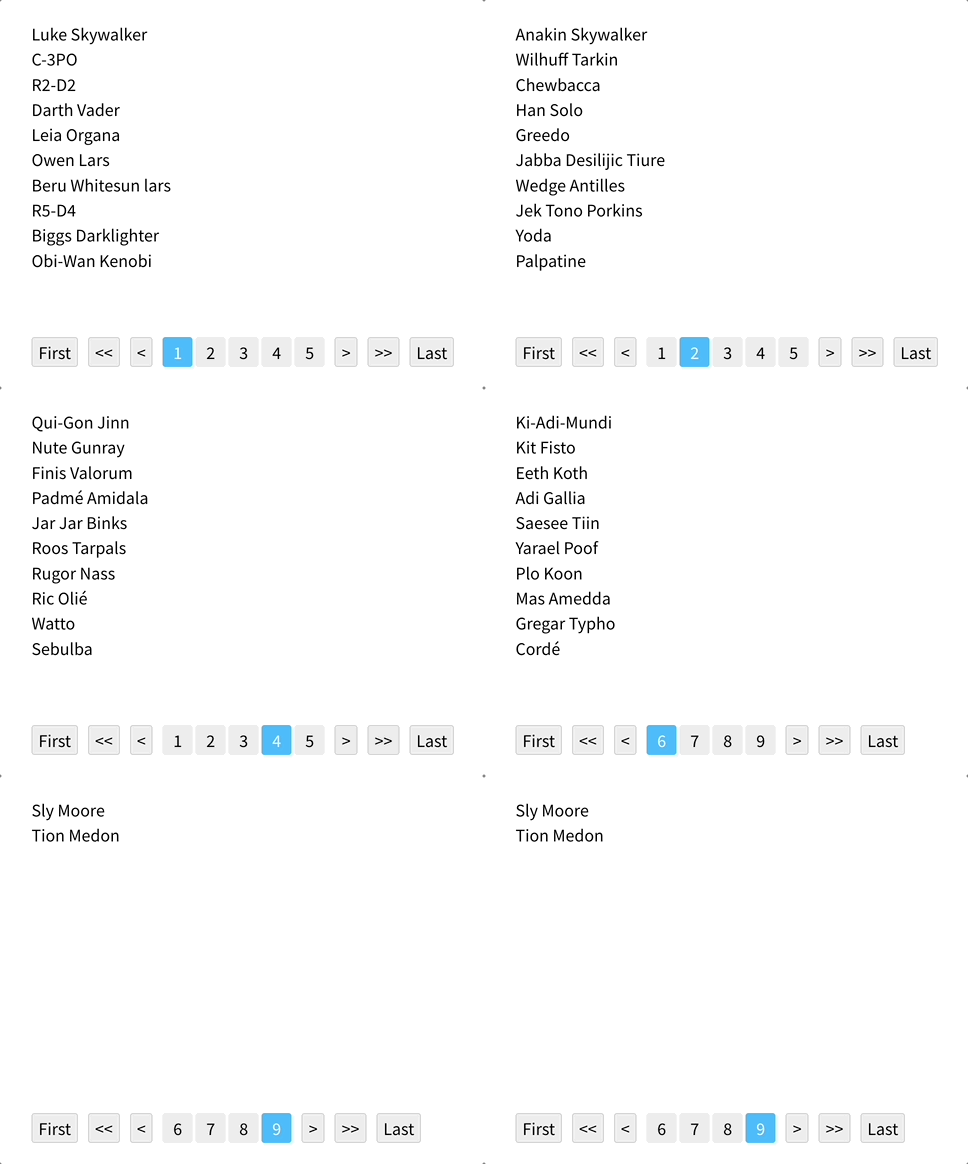
### Result

<div>
  <img src='https://raw.githubusercontent.com/je0ngyun/react-use-pagination-hook/master/media/using-react-query.gif' width="60%" alt='react-use-pagination-hook' />
</div>

# With SearchParams

With the addition of the "initialPage" and "onPageChange" features in version 2.1.0, it is now possible to seamlessly integrate them with search parameters.

```ts
// Example of using the useSearchParams hook from react-router-dom

const usePageParam = () => {
  const [params, setParams] = useSearchParams()

  const pageParam = params.get('page') || 1

  const setPageParam = (page) => {
    params.set('page', page)
    setParams(params)
  }

  return [pageParam, setPageParam]
}

const App = () => {
  const [pageParam, setPageParam] = usePageParam()

  const {
    pageList,
    goNextSection,
    goBeforeSection,
    goFirstSection,
    goLastSection,
    goNext,
    goBefore,
    setTotalPage,
    setPage,
    currentPage,
  } = usePagination({
    numOfPage: 5,
    totalPage: 15,
    initialPage: pageParam,
    onPageChange: (page) => setPageParam(page),
  })

  return (
    <div className="App">
      <main className="container">
        <button onClick={() => goFirstSection()}>{'First'}</button>
        <button onClick={() => goBeforeSection()}>{'<<'}</button>
        <button onClick={() => goBefore()}>{'<'}</button>
        <ul className="pages">
          {pageList.map((page) => (
            <li
              onClick={() => setPage(page)}
              className={currentPage === page ? 'selected' : ''}
              key={page}
            >
              {page}
            </li>
          ))}
        </ul>
        <button onClick={() => goNext()}>{'>'}</button>
        <button onClick={() => goNextSection()}>{'>>'}</button>
        <button onClick={() => goLastSection()}>{'Last'}</button>
      </main>
    </div>
  )
}

export default App
```

# License

Copyright © 2022 [jeongyun <jeongyunniim@gmail.com>](https://github.com/je0ngyun).
This project is [MIT](https://github.com/je0ngyun/react-use-pagination-hook/blob/master/LICENSE) licensed.

# Bug reporting

Please use [issue](https://github.com/je0ngyun/react-use-pagination-hook/issues) to report bugs

---
_Source: https://npm.io/package/react-use-pagination-hook · Machine-readable twin of the npm.io package page. Health data is recomputed on every publish._