





























# remark-github-blockquote-alert

> Alerts are a Markdown extension based on the blockquote syntax that you can use to emphasize critical information.

Latest version **2.1.0** (published 2026-03-14) · MIT license · 0 weekly downloads

## Install

```sh
npm install remark-github-blockquote-alert
pnpm add remark-github-blockquote-alert
yarn add remark-github-blockquote-alert
bun add remark-github-blockquote-alert
```

## Health

**Score 65/100 (B)** — status: stable.

Positive: has types; esm support; no vulnerabilities; has provenance; high quality score.

Warnings: low downloads.

## Facts

| | |
|---|---|
| Version | 2.1.0 |
| Published | 2026-03-14 |
| First published | 2024-03-15 |
| Weekly downloads | 0 |
| License | MIT |
| TypeScript types | bundled |
| Module format | ESM |
| Node | >=16 |
| Dependencies | 1 |
| Unpacked size | 37.8 KB |
| Known vulnerabilities | 0 |
| Install scripts | no |
| Provenance | attested (GitHub Actions) |
| Author | Kenny Wong |
| Maintainers | wcjiang |
| Keywords | remark, remark-plugin, remark-github-blockquote-alert, alert, element, markdown, javascript, html, ast, unified |

## Links

- npm: https://www.npmjs.com/package/remark-github-blockquote-alert
- Repository: https://github.com/jaywcjlove/remark-github-blockquote-alert
- Homepage: https://jaywcjlove.github.io/remark-github-blockquote-alert
- Issues: https://github.com/jaywcjlove/remark-github-blockquote-alert/issues
- Funding: https://jaywcjlove.github.io/#/sponsor
- npm.io page: https://npm.io/package/remark-github-blockquote-alert

## Dependencies (1)

- [unist-util-visit](https://npm.io/package/unist-util-visit.md) ^5.0.0

## Alternatives

- [update-check](https://npm.io/package/update-check.md) — 4.0M weekly downloads
- [react-native-onesignal](https://npm.io/package/react-native-onesignal.md) — 134.5K weekly downloads
- [react-redux-toastr](https://npm.io/package/react-redux-toastr.md) — 33.7K weekly downloads
- [@nocobase/plugin-notification-manager](https://npm.io/package/@nocobase/plugin-notification-manager.md) — 2.0K weekly downloads
- [react-simple-toasts](https://npm.io/package/react-simple-toasts.md) — 1.9K weekly downloads

## Recent versions

- 2.1.0 (latest) — 2026-03-14
- 2.0.1 — 2025-12-12
- 2.0.0 — 2025-07-25
- 1.3.1 — 2025-05-11
- 1.3.0 — 2024-11-01
- 1.2.1 — 2024-05-09
- 1.2.0 — 2024-03-22
- 1.1.1 — 2024-03-16
- 1.1.0 — 2024-03-16
- 1.0.2 — 2024-03-16
- 1.0.1 — 2024-03-15
- 1.0.0 — 2024-03-15

## README

<div markdown="1">
  <sup>Using <a href="https://wangchujiang.com/#/app" target="_blank">my app</a> is also a way to <a href="https://wangchujiang.com/#/sponsor" target="_blank">support</a> me:</sup>
  <br>
  <a target="_blank" href="https://apps.apple.com/app/Deskmark/6755948110" title="Deskmark for macOS"><img alt="Deskmark" height="52" width="52" src="https://wangchujiang.com/appicon/deskmark.png"></a>
  <a target="_blank" href="https://apps.apple.com/app/Keyzer/6500434773" title="Keyzer for macOS"><img alt="Keyzer" height="52" width="52" src="https://wangchujiang.com/appicon/keyzer.png"></a>
  <a target="_blank" href="https://github.com/jaywcjlove/vidwall-hub" title="Vidwall Hub for macOS"><img alt="Vidwall Hub" height="52" width="52" src="https://wangchujiang.com/appicon/vidwall-hub.png"></a>
  <a target="_blank" href="https://apps.apple.com/app/VidCrop/6752624705" title="VidCrop for macOS"><img alt="VidCrop" height="52" width="52" src="https://wangchujiang.com/appicon/vidcrop.png"></a>
  <a target="_blank" href="https://apps.apple.com/app/Vidwall/6747587746" title="Vidwall for macOS"><img alt="Vidwall" height="52" width="52" src="https://wangchujiang.com/appicon/vidwall.png"></a>
  <a target="_blank" href="https://wangchujiang.com/mousio-hint/" title="Mousio Hint for macOS"><img alt="Mousio Hint" height="52" width="52" src="https://wangchujiang.com/appicon/mousio-hint.png"></a>
  <a target="_blank" href="https://apps.apple.com/app/6746747327" title="Mousio for macOS"><img alt="Mousio" height="52" width="52" src="https://wangchujiang.com/appicon/mousio.png"></a>
  <a target="_blank" href="https://apps.apple.com/app/6745227444" title="Musicer for macOS"><img alt="Musicer" height="52" width="52" src="https://wangchujiang.com/appicon/musicer.png"></a>
  <a target="_blank" href="https://apps.apple.com/app/6743841447" title="Audioer for macOS"><img alt="Audioer" height="52" width="52" src="https://wangchujiang.com/appicon/audioer.png"></a>
  <a target="_blank" href="https://apps.apple.com/app/6744690194" title="FileSentinel for macOS"><img alt="FileSentinel" height="52" width="52" src="https://wangchujiang.com/appicon/file-sentinel.png"></a>
  <a target="_blank" href="https://apps.apple.com/app/6743495172" title="FocusCursor for macOS"><img alt="FocusCursor" height="52" width="52" src="https://wangchujiang.com/appicon/focus-cursor.png"></a>
  <a target="_blank" href="https://apps.apple.com/app/6742680573" title="Videoer for macOS"><img alt="Videoer" height="52" width="52" src="https://wangchujiang.com/appicon/videoer.png"></a>
  <a target="_blank" href="https://apps.apple.com/app/6740425504" title="KeyClicker for macOS"><img alt="KeyClicker" height="52" width="52" src="https://wangchujiang.com/appicon/key-clicker.png"></a>
  <a target="_blank" href="https://apps.apple.com/app/6739052447" title="DayBar for macOS"><img alt="DayBar" height="52" width="52" src="https://wangchujiang.com/appicon/daybar.png"></a>
  <a target="_blank" href="https://apps.apple.com/app/6739444407" title="Iconed for macOS"><img alt="Iconed" height="52" width="52" src="https://wangchujiang.com/appicon/iconed.png"></a>
  <a target="_blank" href="https://apps.apple.com/app/6737160756" title="Mousio for macOS"><img alt="Mousio" height="52" width="52" src="https://wangchujiang.com/appicon/rightmenu-master.png"></a>
  <a target="_blank" href="https://apps.apple.com/app/6723903021" title="Paste Quick for macOS"><img alt="Quick RSS" height="52" width="52" src="https://wangchujiang.com/appicon/paste-quick.png"></a>
  <a target="_blank" href="https://apps.apple.com/app/6670696072" title="Quick RSS for macOS/iOS"><img alt="Quick RSS" height="52" width="52" src="https://wangchujiang.com/appicon/quick-rss.png"></a>
  <a target="_blank" href="https://apps.apple.com/app/6670167443" title="Web Serve for macOS"><img alt="Web Serve" height="52" width="52" src="https://wangchujiang.com/appicon/web-serve.png"></a>
  <a target="_blank" href="https://apps.apple.com/app/6503953628" title="Copybook Generator for macOS/iOS"><img alt="Copybook Generator" height="52" width="52" src="https://wangchujiang.com/appicon/copybook-generator.png"></a>
  <a target="_blank" href="https://apps.apple.com/app/6471227008" title="DevTutor for macOS/iOS"><img alt="DevTutor for SwiftUI" height="52" width="52" src="https://wangchujiang.com/appicon/devtutor.png"></a>
  <a target="_blank" href="https://apps.apple.com/app/6479819388" title="RegexMate for macOS/iOS"><img alt="RegexMate" height="52" width="52" src="https://wangchujiang.com/appicon/regex-mate.png"></a>
  <a target="_blank" href="https://apps.apple.com/app/6479194014" title="Time Passage for macOS/iOS"><img alt="Time Passage" height="52" width="52" src="https://wangchujiang.com/appicon/time-passage.png"></a>
  <a target="_blank" href="https://apps.apple.com/app/6478772538" title="IconizeFolder for macOS"><img alt="Iconize Folder" height="52" width="52" src="https://wangchujiang.com/appicon/iconize-folder.png"></a>
  <a target="_blank" href="https://apps.apple.com/app/6478511402" title="Textsound Saver for macOS/iOS"><img alt="Textsound Saver" height="52" width="52" src="https://wangchujiang.com/appicon/textsound-saver.png"></a>
  <a target="_blank" href="https://apps.apple.com/app/6476924627" title="Create Custom Symbols for macOS"><img alt="Create Custom Symbols" height="52" width="52" src="https://wangchujiang.com/appicon/create-custom-symbols.png"></a>
  <a target="_blank" href="https://apps.apple.com/app/6476452351" title="DevHub for macOS"><img alt="DevHub" height="52" width="52" src="https://wangchujiang.com/appicon/devhub.png"></a>
  <a target="_blank" href="https://apps.apple.com/app/6476400184" title="Resume Revise for macOS"><img alt="Resume Revise" height="52" width="52" src="https://wangchujiang.com/appicon/resume-revise.png"></a>
  <a target="_blank" href="https://apps.apple.com/app/6472593276" title="Palette Genius for macOS"><img alt="Palette Genius" height="52" width="52" src="https://wangchujiang.com/appicon/palette-genius.png"></a>
  <a target="_blank" href="https://apps.apple.com/app/6470879005" title="Symbol Scribe for macOS"><img alt="Symbol Scribe" height="52" width="52" src="https://wangchujiang.com/appicon/symbol-scribe.png"></a>
</div>
<hr>

remark-github-blockquote-alert
===
<!--rehype:style=display: flex; height: 230px; align-items: center; justify-content: center; font-size: 38px;-->

[![Buy me a coffee](https://img.shields.io/badge/Buy%20me%20a%20coffee-048754?logo=buymeacoffee)](https://jaywcjlove.github.io/#/sponsor) 
[![Downloads](https://img.shields.io/npm/dm/remark-github-blockquote-alert.svg?style=flat)](https://www.npmjs.com/package/remark-github-blockquote-alert)
[![NPM version](https://img.shields.io/npm/v/remark-github-blockquote-alert.svg?style=flat)](https://npmjs.org/package/remark-github-blockquote-alert)
[![CI](https://github.com/jaywcjlove/remark-github-blockquote-alert/actions/workflows/ci.yml/badge.svg)](https://github.com/jaywcjlove/remark-github-blockquote-alert/actions/workflows/ci.yml)
[![Coverage Status](https://jaywcjlove.github.io/remark-github-blockquote-alert/badges.svg)](https://jaywcjlove.github.io/remark-github-blockquote-alert/lcov-report/)
[![Repo Dependents](https://badgen.net/github/dependents-repo/jaywcjlove/remark-github-blockquote-alert)](https://github.com/jaywcjlove/remark-github-blockquote-alert/network/dependents)

Remark plugin to add support for [GitHub Alert](https://docs.github.com/en/get-started/writing-on-github/getting-started-with-writing-and-formatting-on-github/basic-writing-and-formatting-syntax#alerts)

![](https://docs.github.com/assets/cb-50447/mw-1440/images/help/writing/alerts-rendered.webp)

Alerts are a Markdown extension based on the blockquote syntax that you can use to emphasize critical information.

## Installation

This package is [ESM only](https://gist.github.com/sindresorhus/a39789f98801d908bbc7ff3ecc99d99c): Node 12+ is needed to use it and it must be `import` instead of `require`.

```bash
npm install remark-github-blockquote-alert
```

## Usage

```js
import { remarkAlert } from 'remark-github-blockquote-alert'

let markdown = `# Alert \n> [!NOTE] \n> test`;
const htmlStr = remark()
    .use(remarkParse)
    .use(remarkAlert)
    .use(remarkRehype)
    .use(rehypeStringify)
    .processSync(markdown).toString()
```

The output HTML will be:

```html
<h1>Alert</h1>
<div class="markdown-alert markdown-alert-note" dir="auto">
<p class="markdown-alert-title" dir="auto"><svg class="octicon" viewBox="0 0 16 16" width="16" height="16" aria-hidden="true"><path d="M0 8a8 8 0 1 1 16 0A8 8 0 0 1 0 8Zm8-6.5a6.5 6.5 0 1 0 0 13 6.5 6.5 0 0 0 0-13ZM6.5 7.75A.75.75 0 0 1 7.25 7h1a.75.75 0 0 1 .75.75v2.75h.25a.75.75 0 0 1 0 1.5h-2a.75.75 0 0 1 0-1.5h.25v-2h-.25a.75.75 0 0 1-.75-.75ZM8 6a1 1 0 1 1 0-2 1 1 0 0 1 0 2Z"></path></svg>NOTE</p>
<p>Useful information that users should know, even when skimming content.</p>
</div>
```

## Modify the title

Change the expression `[!NOTE]` to `[!NOTE/笔记]`

```js
let markdown = `# Alert \n> [!NOTE/笔记] \n> test`;

const htmlStr = remark()
    .use(remarkParse)
    .use(remarkAlert, { legacyTitle: true })
    .use(remarkRehype)
    .use(rehypeStringify)
    .processSync(markdown).toString()
```

The output HTML will be:

```html
<h1>笔记</h1>
<div class="markdown-alert markdown-alert-note" dir="auto">
<p class="markdown-alert-title" dir="auto"><svg class="octicon" viewBox="0 0 16 16" width="16" height="16" aria-hidden="true"><path d="M0 8a8 8 0 1 1 16 0A8 8 0 0 1 0 8Zm8-6.5a6.5 6.5 0 1 0 0 13 6.5 6.5 0 0 0 0-13ZM6.5 7.75A.75.75 0 0 1 7.25 7h1a.75.75 0 0 1 .75.75v2.75h.25a.75.75 0 0 1 0 1.5h-2a.75.75 0 0 1 0-1.5h.25v-2h-.25a.75.75 0 0 1-.75-.75ZM8 6a1 1 0 1 1 0-2 1 1 0 0 1 0 2Z"></path></svg>NOTE</p>
<p>Useful information that users should know, even when skimming content.</p>
</div>
```

## Wrap tag name with container

```js
let markdown = `> [!CAUTION] \n> Hello World`;
const htmlStr = remark()
  .use(remarkParse)
  .use(remarkAlert, { tagName: "blockquote" })
  .use(remarkRehype)
  .use(rehypeStringify)
  .processSync(markdown).toString()
```

The output HTML will be:

```html
<blockquote class="markdown-alert markdown-alert-caution" dir="auto">
<p class="markdown-alert-title" dir="auto"><svg class="octicon" viewBox="0 0 16 16" width="16" height="16" aria-hidden="true"><path d="M4.47.22A.749.749 0 0 1 5 0h6c.199 0 .389.079.53.22l4.25 4.25c.141.14.22.331.22.53v6a.749.749 0 0 1-.22.53l-4.25 4.25A.749.749 0 0 1 11 16H5a.749.749 0 0 1-.53-.22L.22 11.53A.749.749 0 0 1 0 11V5c0-.199.079-.389.22-.53Zm.84 1.28L1.5 5.31v5.38l3.81 3.81h5.38l3.81-3.81V5.31L10.69 1.5ZM8 4a.75.75 0 0 1 .75.75v3.5a.75.75 0 0 1-1.5 0v-3.5A.75.75 0 0 1 8 4Zm0 8a1 1 0 1 1 0-2 1 1 0 0 1 0 2Z"></path></svg>CAUTION</p>
<p>Hello World</p>
</blockquote>
```

## Styling

You can mimic GitHub's alert style by adding the styles provided in the npm package to your CSS.

```js
import 'remark-github-blockquote-alert/alert.css'
```

Or, add the following styles to your CSS to mimic GitHub's alert style:

```css
@media (prefers-color-scheme: dark) {
  .markdown-alert {
    --color-border-default: #30363d;
    --color-accent-fg: #58a6ff;
    --color-accent-emphasis: #1f6feb;
    --color-danger-fg: #f85149;
    --color-danger-emphasis: #da3633;
    --color-attention-fg: #d29922;
    --color-attention-emphasis: #9e6a03;
    --color-done-fg: #a371f7;
    --color-done-emphasis: #8957e5;
    --color-success-fg: #3fb950;
    --color-success-emphasis: #238636;
  }
}

@media (prefers-color-scheme: light) {
  .markdown-alert {
    --color-border-default: #d0d7de;
    --color-accent-fg: #0969da;
    --color-accent-emphasis: #0969da;
    --color-danger-fg: #d1242f;
    --color-danger-emphasis: #cf222e;
    --color-attention-fg: #9a6700;
    --color-attention-emphasis: #9a6700;
    --color-done-fg: #8250df;
    --color-done-emphasis: #8250df;
    --color-success-fg: #1a7f37;
    --color-success-emphasis: #1f883d;
  }
}

.markdown-alert {
  border-left: .25em solid var(--borderColor-default, var(--color-border-default));
  color: inherit;
  margin-bottom: 16px;
  padding: .5rem 1em
}
.markdown-alert>:last-child {
  margin-bottom: 0!important
}
.markdown-alert .markdown-alert-title {
  align-items: center;
  display: flex;
  font-size: 14px;
  font-weight: 500;
  line-height: 1
}
.markdown-alert .markdown-alert-title svg.octicon {
  margin-right: 8px!important;
  margin-right: var(--base-size-8,8px) !important;
  fill: currentColor;
}
.markdown-alert.markdown-alert-note {
  border-left-color: var(--borderColor-accent-emphasis,var(--color-accent-emphasis))
}
.markdown-alert.markdown-alert-note .markdown-alert-title {
  color: var(--color-accent-fg);
  color: var(--fgColor-accent,var(--color-accent-fg))
}
.markdown-alert.markdown-alert-tip {
  border-left-color: var(--borderColor-success-emphasis,var(--color-success-emphasis))
}
.markdown-alert.markdown-alert-tip .markdown-alert-title {
  color: var(--color-success-fg);
  color: var(--fgColor-success,var(--color-success-fg))
}
.markdown-alert.markdown-alert-important {
  border-left-color: var(--borderColor-done-emphasis,var(--color-done-emphasis))
}
.markdown-alert.markdown-alert-important .markdown-alert-title {
  color: var(--color-done-fg);
  color: var(--fgColor-done,var(--color-done-fg))
}
.markdown-alert.markdown-alert-warning {
  border-left-color: var(--borderColor-attention-emphasis,var(--color-attention-emphasis))
}
.markdown-alert.markdown-alert-warning .markdown-alert-title {
  color: var(--color-attention-fg);
  color: var(--fgColor-attention,var(--color-attention-fg))
}
.markdown-alert.markdown-alert-caution {
  border-left-color: var(--borderColor-danger-emphasis,var(--color-danger-emphasis))
}
.markdown-alert.markdown-alert-caution .markdown-alert-title {
  color: var(--color-danger-fg);
  color: var(--fgColor-danger,var(--color-danger-fg))
}
```

## Currently 5 types of alerts are supported:

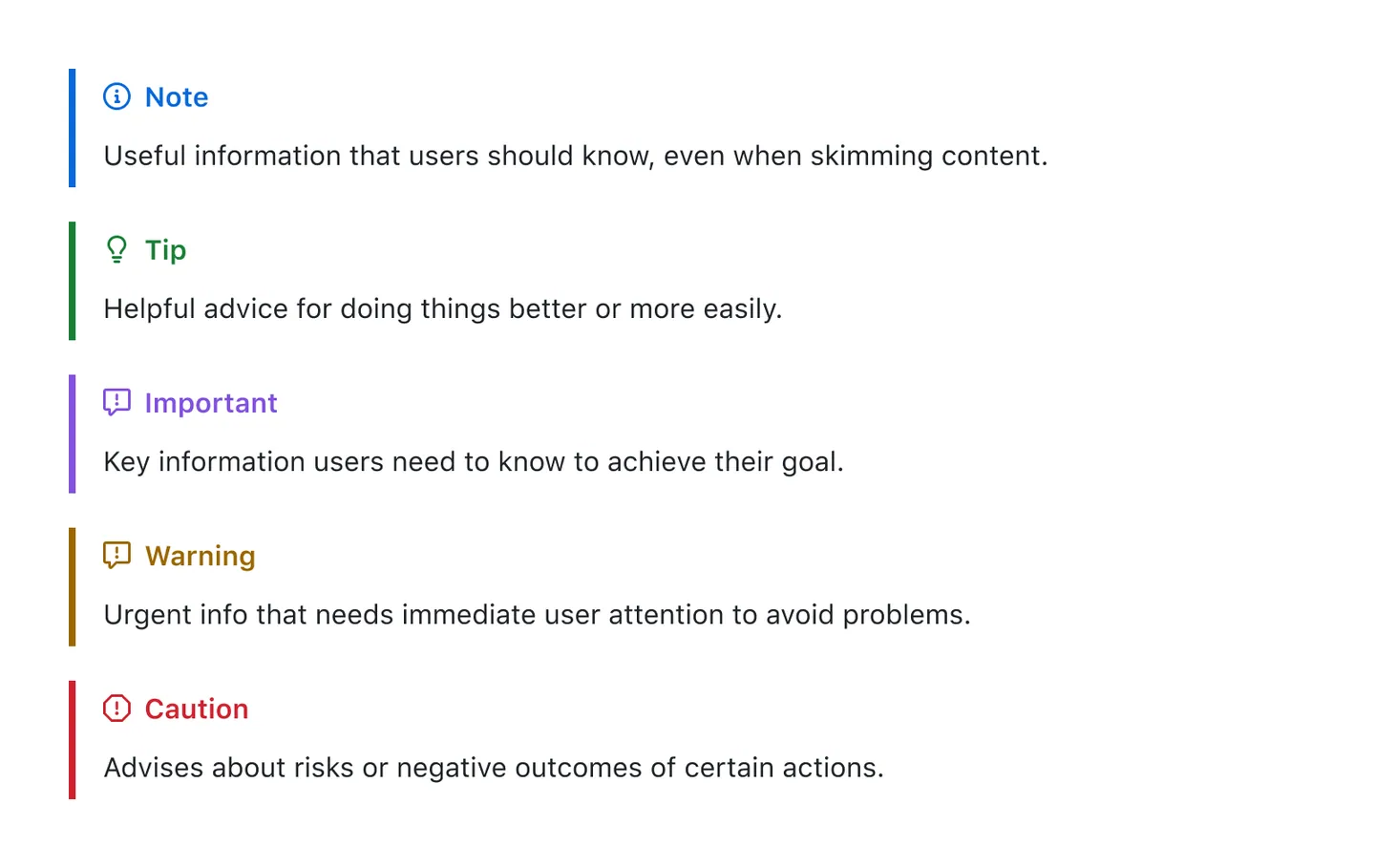
To add an alert, use a special blockquote line specifying the alert type, followed by the alert information in a standard blockquote. Five types of alerts are available:

```markdown
> [!NOTE]
> Useful information that users should know, even when skimming content.

> [!TIP]
> Helpful advice for doing things better or more easily.

> [!IMPORTANT]
> Key information users need to know to achieve their goal.

> [!WARNING]
> Urgent info that needs immediate user attention to avoid problems.

> [!CAUTION]
> Advises about risks or negative outcomes of certain actions.
```

Here are the rendered alerts:
![](https://docs.github.com/assets/cb-50447/mw-1440/images/help/writing/alerts-rendered.webp)

> [!NOTE]  
> Useful information that users should know, even when skimming content.

> [!TIP]  
> Helpful advice for doing things better or more easily.

> [!IMPORTANT]  
> Key information users need to know to achieve their goal.

> [!WARNING]  
> Urgent info that needs immediate user attention to avoid problems.

> [!CAUTION]  
> Advises about risks or negative outcomes of certain actions.

## Related

- [`rehype-rewrite`](https://github.com/jaywcjlove/rehype-rewrite) Rewrite element with rehype.
- [`rehype-video`](https://github.com/jaywcjlove/rehype-video) Add improved video syntax: links to `.mp4` and `.mov` turn into videos.
- [`rehype-attr`](https://github.com/jaywcjlove/rehype-attr) New syntax to add attributes to Markdown.
- [`rehype-ignore`](https://github.com/jaywcjlove/rehype-ignore) Ignore content display via HTML comments, Shown in GitHub readme, excluded in HTML.

## Contributors

As always, thanks to our amazing contributors!

<a href="https://github.com/jaywcjlove/remark-github-blockquote-alert/graphs/contributors">
  <img src="https://jaywcjlove.github.io/remark-github-blockquote-alert/CONTRIBUTORS.svg" />
</a>

Made with [contributors](https://github.com/jaywcjlove/github-action-contributors).

## License

MIT © [Kenny Wong](https://github.com/jaywcjlove)

---
_Source: https://npm.io/package/remark-github-blockquote-alert · Machine-readable twin of the npm.io package page. Health data is recomputed on every publish._
