# remediator-cli

> Node command line application to sort images and video based off of their filesystem metadata or exif/media metadata formatted from a predefined or custom template.

Latest version **0.1.1** (published 2018-12-29) · MIT license · 0 weekly downloads

## Install

```sh
npm install remediator-cli
pnpm add remediator-cli
yarn add remediator-cli
bun add remediator-cli
```

Provides the command `remediator`.

## Health

**Score 15/100 (F)** — status: abandoned.

Positive: no vulnerabilities.

Warnings: low downloads; no types; no esm support; pre 1.0.

Negative: abandoned; low maintenance score.

## Facts

| | |
|---|---|
| Version | 0.1.1 |
| Published | 2018-12-29 |
| First published | 2018-12-29 |
| Weekly downloads | 0 |
| License | MIT |
| TypeScript types | none |
| Module format | CommonJS |
| Node | >=8.5.0 |
| Dependencies | 3 |
| Unpacked size | 608.8 KB |
| Known vulnerabilities | 0 (+2 in 1 direct dependencies) |
| Install scripts | no |
| GitHub stars | 0 |
| Author | Jason Zajdel |
| Maintainers | shabubu |
| Keywords | remediator, exif, metadata, photo, video, image, media, sort, rename, exiftool, remediator-cli, cli |

## Links

- npm: https://www.npmjs.com/package/remediator-cli
- Repository: https://github.com/shabubu/remediator-cli
- Homepage: https://github.com/shabubu/remediator-cli#readme
- Issues: https://github.com/shabubu/remediator-cli/issues
- npm.io page: https://npm.io/package/remediator-cli

## Dependencies (3)

- [commander](https://npm.io/package/commander.md) ^2.19.0
- [remediator](https://npm.io/package/remediator.md) ^0.6.1
- [exiftool-vendored](https://npm.io/package/exiftool-vendored.md) ^7.3.0

## Alternatives

- [@salesforce/cli](https://npm.io/package/@salesforce/cli.md) — 389.7K weekly downloads
- [@mintlify/cli](https://npm.io/package/@mintlify/cli.md) — 208.9K weekly downloads
- [@grafana/e2e-selectors](https://npm.io/package/@grafana/e2e-selectors.md) — 128.7K weekly downloads
- [mintlify](https://npm.io/package/mintlify.md) — 112.0K weekly downloads
- [@intlayer/cli](https://npm.io/package/@intlayer/cli.md) — 22.8K weekly downloads

## Recent versions

- 0.1.1 (latest) — 2018-12-29
- 0.1.0 — 2018-12-29

## README

# Remediator-CLI
Command-line Application to sort images and video based off of their filesystem metadata or exif/media metadata formatted from a predefined or custom template.

[![Travis Tests](https://travis-ci.org/shabubu/remediator-cli.svg?branch=master)](https://travis-ci.org/shabubu/remediator-cli)
[![Appveyor Tests](https://ci.appveyor.com/api/projects/status/github/shabubu/remediator-cli?branch=master&svg=true)](https://ci.appveyor.com/project/shabubu/remediator-cli)
[![Coverage Status](https://coveralls.io/repos/github/shabubu/remediator-cli/badge.svg?branch=master)](https://coveralls.io/github/shabubu/remediator-cli?branch=master)
[![Dependency Status](https://img.shields.io/david/shabubu/remediator-cli.svg?style=flat-square)](https://david-dm.org/shabubu/remediator-cli)
[![Known Vulnerabilities](https://snyk.io/test/github/shabubu/remediator-cli/badge.svg?targetFile=package.json)](https://snyk.io/test/github/shabubu/remediator-cli?targetFile=package.json)
[![License: MIT](https://img.shields.io/badge/License-MIT-yellow.svg)](https://opensource.org/licenses/MIT)

## Installation
Installation assumes you have already installed v8.5.0 or greater of [Node.js](https://nodejs.org/). If you have not done this, or do not know how to, please follow the directions at [https://nodejs.org/](https://nodejs.org/).

#### Get Remediator-CLI
Open your CLI of choice with Node v8.5.0 or greater installed and run the following to install Remediator-CLI.
```bash
$ npm install remediator-cli -g
```

## Usage
Remediator-CLI is a simple to use command-line application that accepts a range of options to sort your media.<br />
Note: First run of Remediator-CLI may take slightly longer as [Exiftool](https://www.sno.phy.queensu.ca/~phil/exiftool/) will be automatically downloaded to your computer.

### Remediator-CLI Options
<table>
    <thead>
        <th>Option</th>
        <th>Default</th>
        <th>Description</th>
        <th>Example</th>
    </thead>
    <tbody>
        <tr>
            <td>-b, --batch-size</td>
            <td>20</td>
            <td>(Advanced) amount of files to process asynchronously at a time.</td>
            <td>remediator --batch-size 5</td>
        </tr>
        <tr>
            <td>-f, --format</td>
            <td>:YYYY:\\:MM0:. :Month:\\:DD0: :Day:\\:YYYY:.:MM0:.:DD0: :HH0:.:MN0:.:Ext:</td>
            <td>(Advanced) Template markup to use when building new file names.</td>
            <td>remediator --format :YYYY:/:DD0:.:Ext:</td>
        </tr>
        <tr>
            <td>-h, --help</td>
            <td>--</td>
            <td>Lists all Remediator-CLI options.</td>
            <td>remediator --help</td>
        </tr>
        <tr>
            <td>-m, --mode</td>
            <td>dry</td>
            <td>May run in one of three different modes: dry, copy, or move.</td>
            <td>remediator --mode copy</td>
        </tr>
        <tr>
            <td>-o, --output</td>
            <td>Directory Remediator-CLI is ran from.</td>
            <td>Base output directory for transformed files.</td>
            <td>remediator --output /output_directory</td>
        </tr>
        <tr>
            <td>-r, --recursive</td>
            <td>disabled</td>
            <td>Enable recursively fetch all files from subdirectories of source directories.</td>
            <td>remediator --recursive</td>
        </tr>
        <tr>
            <td>-e, --skip-errors</td>
            <td>disabled</td>
            <td>Enable skipping errors will continue processing all files even if errors are encountered.</td>
            <td>remediator --skip-errors</td>
        </tr>
        <tr>
            <td>-s, --source</td>
            <td>Directory Remediator-CLI is ran from.</td>
            <td>Directory(s) to get files to transform from.</td>
            <td>remediator --source /source_directory</td>
        </tr>
        <tr>
            <td>-v, --verbose</td>
            <td>all</td>
            <td>May run in one of three different verbosity levels: all, error, or none.</td>
            <td>remediator --verbose none</td>
        </tr>
        <tr>
            <td>-V, --version</td>
            <td>--</td>
            <td>Output the version number.</td>
            <td>remediator --version</td>
        </tr>
    </tbody>
</table>

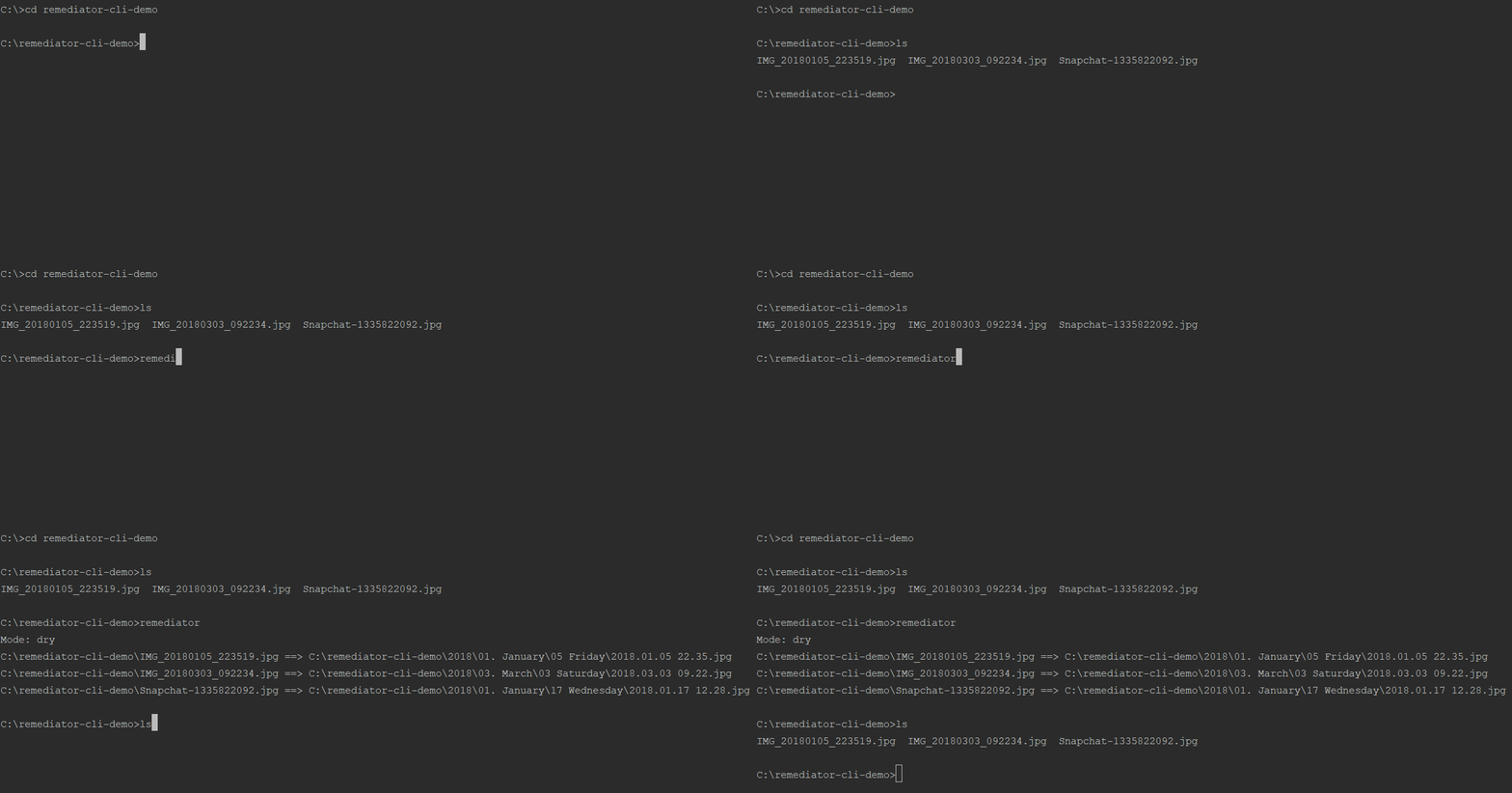
### Basic Demo - No options
<img src="https://raw.githubusercontent.com/shabubu/remediator-cli/HEAD/readmeAssets/noOptionsExample.gif" />

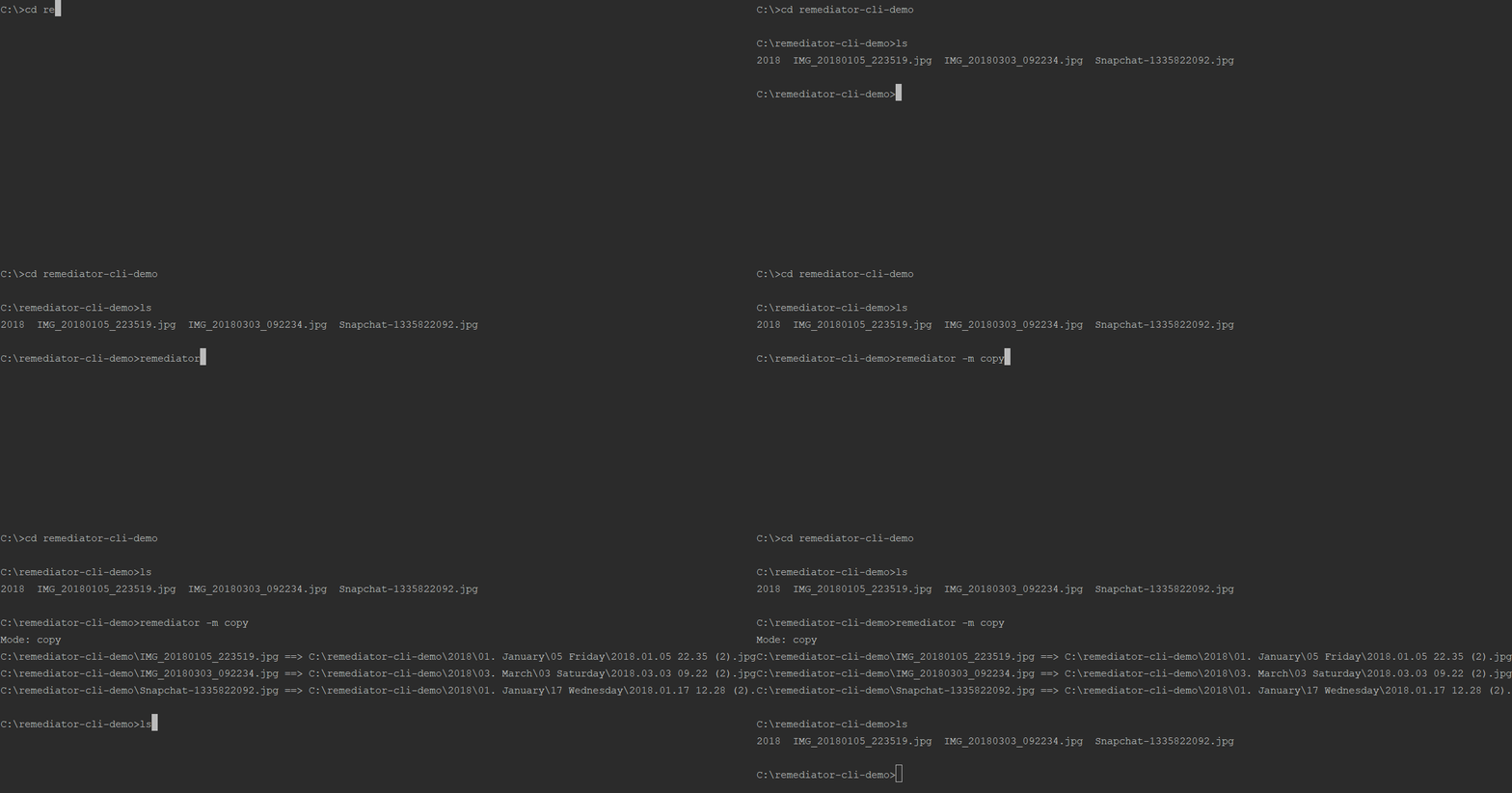
### Basic Demo - Copy
<img src="https://raw.githubusercontent.com/shabubu/remediator-cli/HEAD/readmeAssets/basicCopyExample.gif" />

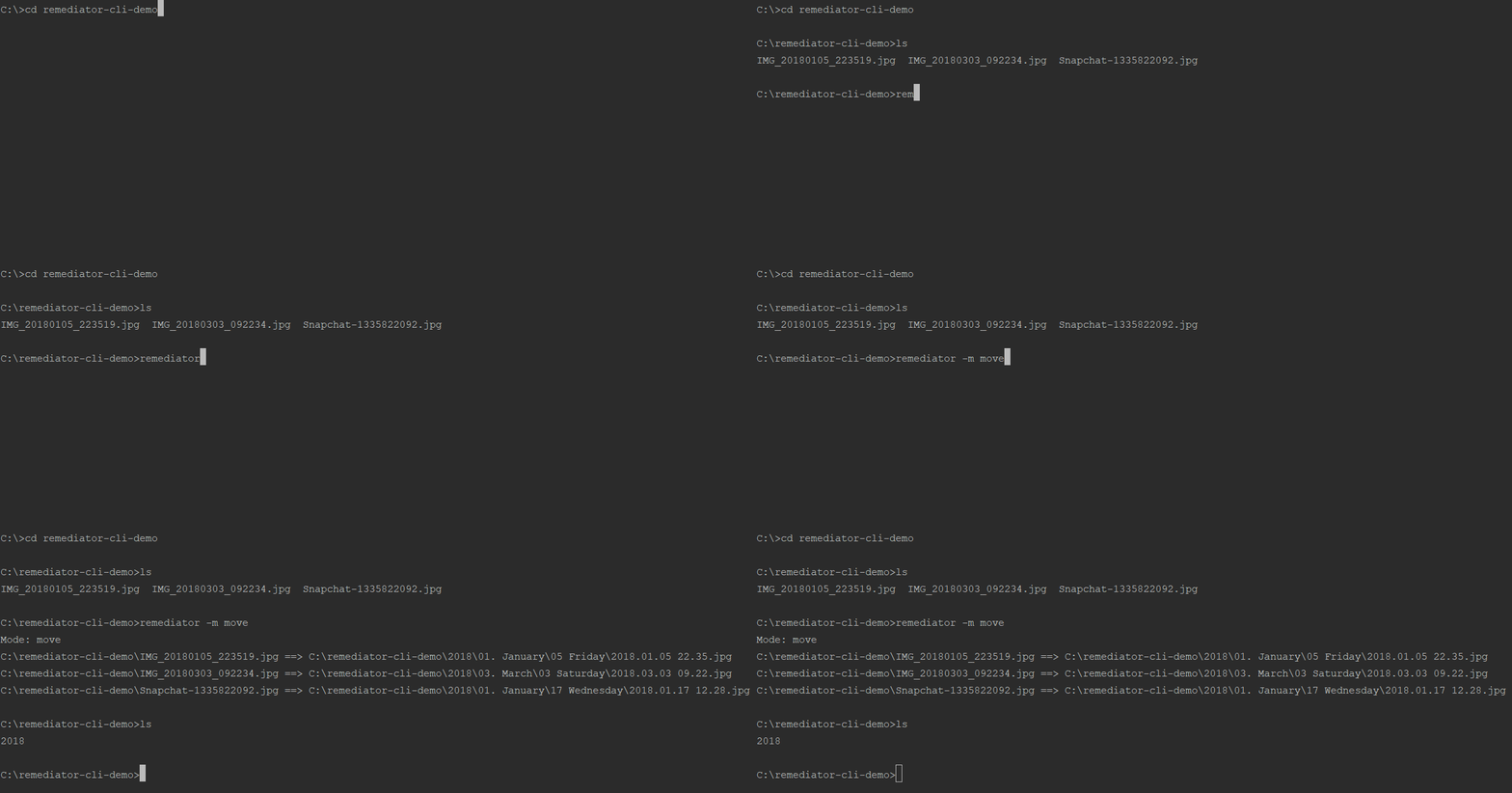
### Basic Demo - Move
<img src="https://raw.githubusercontent.com/shabubu/remediator-cli/HEAD/readmeAssets/basicMoveExample.gif" />


## Building Format Templates
Format templates are used to define file output structure.  `:`'s are used to denote the start and end of a transformer section.  Remediator will replace the first "transformer" it encounters in a section.  If the first transformer found is empty everything between the `:`'s will not be added to the filename.

For example, if you have a format of `:YYYY::-Make-:.:Ext:` and a image named `image.jpg` that was taken in the year 2000 but does NOT have any metadata for the device make the output would be: `2000.jpg`.  However, if `image.jpg` did have a device make of "Sony" the output would be: `2000-Sony-.jpg`.

The following tables list all currently supported "transformers" by Remediator-CLI.

### Transformers
#### Date based
<table>
    <thead>
        <tr>
            <th>Name</th>
            <th>Transformer Markup</th>
            <th>Description</th>
            <th>Example(s) Output</th>
        </tr>
    </thead>
    <tbody>
        <tr>
            <td>Year</td>
            <td>YYYY</td>
            <td>Date based numeric year.</td>
            <td>2018</td>
        </tr>
        <tr>
            <td rowspan="7">Month</td>
            <td>DD</td>
            <td>Date based numeric day of the month.</td>
            <td>1, 10, 20, 30</td>
        </tr>
        <tr>
            <td>DD0</td>
            <td>Date based numeric day of the month with leading zero.</td>
            <td>01, 10, 20, 30</td>
        </tr>
        <tr>
            <td>MM</td>
            <td>Date based month numeric month of the year.</td>
            <td>1, 4, 5, 12</td>
        </tr>
        <tr>
            <td>MM0</td>
            <td>Date based month numeric month of the year with leading zero.</td>
            <td>01, 04, 05, 12</td>
        </tr>
        <tr>
            <td>Month</td>
            <td>Date based name of month.</td>
            <td>January</td>
        </tr>
        <tr>
            <td>lcMonth</td>
            <td>Date based lowercase name of month.</td>
            <td>january</td>
        </tr>
        <tr>
            <td>ucMonth</td>
            <td>Date based uppercase name of month.</td>
            <td>JANUARY</td>
        </tr>
        <tr>
            <td rowspan="3">Week</td>
            <td>Day</td>
            <td>Date based day of the week.</td>
            <td>Sunday</td>
        </tr>
        <tr>
            <td>lcDay</td>
            <td>Date based lowercase day of the week.</td>
            <td>sunday</td>
        </tr>
        <tr>
            <td>ucDay</td>
            <td>Date based uppercase day of the week.</td>
            <td>SUNDAY</td>
        </tr>
    </tbody>
</table>

#### Time based
<table>
    <thead>
        <tr>
            <th>Name</th>
            <th>Transformer Markup</th>
            <th>Description</th>
            <th>Example(s) Output</th>
        </tr>
    </thead>
    <tbody>
        <tr>
            <td rowspan="2">Hour</td>
            <td>HH</td>
            <td>Time based numeric hour media was captured.</td>
            <td>0, 9, 12, 23</td>
        </tr>
        <tr>
            <td>HH0</td>
            <td>Time based numeric hour media was captured with leading zero.</td>
            <td>00, 09, 12, 23</td>
        </tr>
        <tr>
            <td rowspan="2">Minute</td>
            <td>MN</td>
            <td>Time based numeric minute media was captured.</td>
            <td>0, 7, 31, 44, 59</td>
        </tr>
        <tr>
            <td>MN0</td>
            <td>Time based numeric minute media was captured with leading zero.</td>
            <td>00, 07, 31, 44, 59</td>
        </tr>
    </tbody>
</table>

#### Device Based
<table>
    <thead>
        <tr>
            <th>Name</th>
            <th>Transformer Markup</th>
            <th>Description</th>
            <th>Example(s) Output</th>
        </tr>
    </thead>
    <tbody>
        <tr>
            <td rowspan="3">Device Make</td>
            <td>Make</td>
            <td>Make of camera used from media metadata.</td>
            <td>Sony</td>
        </tr>
        <tr>
            <td>lcMake</td>
            <td>Lowercase make of camera used from media metadata.</td>
            <td>sony</td>
        </tr>
        <tr>
            <td>ucMake</td>
            <td>Uppercase make of camera used from media metadata.</td>
            <td>SONY</td>
        </tr>
        <tr>
            <td rowspan="3">Device Model</td>
            <td>Model</td>
            <td>Model of camera used from media metadata.</td>
            <td>Nexus 5x</td>
        </tr>
        <tr>
            <td>lcModel</td>
            <td>Lowercase model of camera used from media metadata.</td>
            <td>nexus 5x</td>
        </tr>
        <tr>
            <td>ucModel</td>
            <td>Uppercase model of camera used from media metadata.</td>
            <td>NEXUS 5X</td>
        </tr>
    </tbody>
</table>

#### File Metadata Based
<table>
    <thead>
        <tr>
            <th>Name</th>
            <th>Transformer Markup</th>
            <th>Description</th>
            <th>Example(s) Output</th>
        </tr>
    </thead>
    <tbody>
        <tr>
            <td rowspan="3">Extension</td>
            <td>Ext</td>
            <td>Original file extension of source file.</td>
            <td>Jpeg</td>
        </tr>
        <tr>
            <td>lcExt</td>
            <td>Lowercase File Extension of source file.</td>
            <td>jpeg</td>
        </tr>
        <tr>
            <td>ucExt</td>
            <td>Uppercase File Extension of source file.</td>
            <td>JPEG</td>
        </tr>
        <tr>
            <td>Height</td>
            <td>Height</td>
            <td>Pixel height of media.</td>
            <td>1080</td>
        </tr>
        <tr>
            <td rowspan="3">Orientation</td>
            <td>Orientation</td>
            <td>Orientation of camera when photo was taken.</td>
            <td>Horizontal (normal)</td>
        </tr>
        <tr>
            <td>lcOrientation</td>
            <td>Lowercase orientation of camera when photo was taken.</td>
            <td>horizontal (normal)</td>
        </tr>
        <tr>
            <td>ucOrientation</td>
            <td>Uppercase orientation of camera when photo was taken.</td>
            <td>HORIZONTAL (NORMAL)</td>
        </tr>
        <tr>
            <td>Width</td>
            <td>Width</td>
            <td>Pixel width of media.</td>
            <td>1920</td>
        </tr>
    </tbody>
</table>

## Acknowledgements
Remediator-CLI would not be possible without [Exiftool by Phil Harvey](https://www.sno.phy.queensu.ca/~phil/exiftool/).  Please consider donating! 

Additionally, big thanks to [Adobe Systems](https://www.adobe.com/) for allowing work on the original prototype of Remediator during a Hackathon.

---
_Source: https://npm.io/package/remediator-cli · Machine-readable twin of the npm.io package page. Health data is recomputed on every publish._