# repocreate
> An over-engineered but ultra-fast tool to create Github repositories from command-line
Latest version **1.0.1** (published 2018-04-28) · MIT license · 0 weekly downloads
## Install
```sh
npm install repocreate
pnpm add repocreate
yarn add repocreate
bun add repocreate
```
Provides the command `repocreate`.
## Health
**Score 15/100 (F)** — status: abandoned.
Positive: no vulnerabilities.
Warnings: low downloads; no types; no esm support.
Negative: abandoned; low maintenance score.
## Facts
| | |
|---|---|
| Version | 1.0.1 |
| Published | 2018-04-28 |
| First published | 2018-04-28 |
| Weekly downloads | 0 |
| License | MIT |
| TypeScript types | none |
| Module format | CommonJS |
| Node | >=4 |
| Dependencies | 6 |
| Unpacked size | 423.5 KB |
| Known vulnerabilities | 0 |
| Install scripts | no |
| Author | Rishi Giri |
| Maintainers | rishi |
| Keywords | cli, cli-app, create, github, repository, repositories, command-line, fast, quick, github-api |
## Links
- npm: https://www.npmjs.com/package/repocreate
- Repository: https://github.com/CodeDotJS/repocreate
- Homepage: https://github.com/CodeDotJS/repocreate#readme
- Issues: https://github.com/CodeDotJS/repocreate/issues
- npm.io page: https://npm.io/package/repocreate
## Dependencies (6)
- [ora](https://npm.io/package/ora.md) ^2.0.0
- [execa](https://npm.io/package/execa.md) ^0.10.0
- [fs-extra](https://npm.io/package/fs-extra.md) ^5.0.0
- [jsonfile](https://npm.io/package/jsonfile.md) ^4.0.0
- [log-update](https://npm.io/package/log-update.md) ^2.3.0
- [update-notifier](https://npm.io/package/update-notifier.md) ^2.5.0
## Alternatives
- [@salesforce/cli](https://npm.io/package/@salesforce/cli.md) — 389.7K weekly downloads
- [@mintlify/cli](https://npm.io/package/@mintlify/cli.md) — 208.9K weekly downloads
- [@grafana/e2e-selectors](https://npm.io/package/@grafana/e2e-selectors.md) — 128.7K weekly downloads
- [mintlify](https://npm.io/package/mintlify.md) — 112.0K weekly downloads
- [@intlayer/cli](https://npm.io/package/@intlayer/cli.md) — 22.8K weekly downloads
## Recent versions
- 1.0.1 (latest) — 2018-04-28
- 1.0.0 — 2018-04-28
## README




An over-engineered but ultra-fast tool to create Github repositories from command-line!
### Install
```
$ npm install --global repocreate
```
__`OR`__
```
$ sudo npm install --global repocreate
````
### Preview
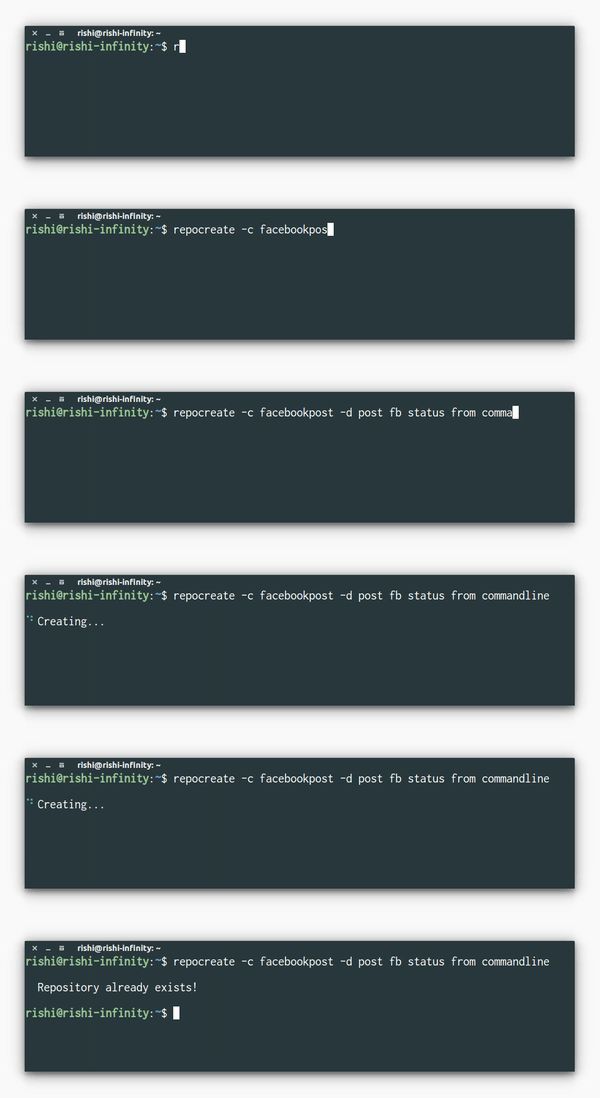
### Usage
```
Usage: repocreate [option]
Commands:
-c, --create name of the repository
-d, --description description of the repository
NOTE : --description is optional
Example:
$ repocreate -c foobar
$ repocreate -c "foo bar" -d Just another foobarism
Help:
-h, --help Display help
```
__`NOTE`__
- If the name of your repository is of more than one word, pass the argument as a single string inside single or double quotes.
- You don't have to put the descriptions inside quotes. Things will work fine even if you do that!
### Setup
- Generate your `access token` from [`here`](https://github.com/settings/tokens) and copy it.
- Run command `$ repocreate -c testrepo`
- A `token.json` file will open in Sublime with -
```json
{
"username": "enter your github username",
"token":"paste the access token"
}
```
- Enter your `username`, paste the `token` and save the file. You are ready to go!
__`NOTE`__
__`In case, you are not using sublime, follow the given steps -`__
- Manually open the `token.json` file saved under `.repocreate` folder under `home directory`
__`or`__
- Open the file using : `$ atom/code/vi ~/.repocreate/token.json`
- Copy-paste the genereated `access token`
- Save the file and that's it.
#### __`Why?`__
- I don't know, it's silly, but I use it. I don't know.
### License
MIT © [Rishi Giri](https://rishigiri.ml)
---
_Source: https://npm.io/package/repocreate · Machine-readable twin of the npm.io package page. Health data is recomputed on every publish._