# s3lite
> A wrapper library for SQLite that keeps database file on Amazon S3 storage and adds support for promises and async/await.
Latest version **0.0.6** (published 2020-02-08) · MIT license · 0 weekly downloads
## Install
```sh
npm install s3lite
pnpm add s3lite
yarn add s3lite
bun add s3lite
```
## Health
**Score 15/100 (F)** — status: abandoned.
Positive: no vulnerabilities.
Warnings: low downloads; no types; no esm support; pre 1.0.
Negative: abandoned; low maintenance score.
## Facts
| | |
|---|---|
| Version | 0.0.6 |
| Published | 2020-02-08 |
| First published | 2020-01-27 |
| Weekly downloads | 0 |
| License | MIT |
| TypeScript types | none |
| Module format | CommonJS |
| Node | >=8.0.0 |
| Dependencies | 4 |
| Unpacked size | 37.1 KB |
| Known vulnerabilities | 0 (+1 in 1 direct dependencies) |
| Install scripts | no |
| GitHub stars | 26 |
| Author | Artur FanFataL Grzybowski |
| Maintainers | fanfatal, neoncubeadmin |
| Keywords | async, aws, aws-sdk, bucket, database, db, es6, promise, s3, sqlite, sql |
## Links
- npm: https://www.npmjs.com/package/s3lite
- Repository: https://github.com/s3lite/s3lite
- Homepage: https://github.com/s3lite/s3lite#readme
- Issues: https://github.com/s3lite/s3lite/issues
- npm.io page: https://npm.io/package/s3lite
## Dependencies (4)
- [md5](https://npm.io/package/md5.md) ^2.2.1
- [mkdirp](https://npm.io/package/mkdirp.md) ^0.5.1
- [aws-sdk](https://npm.io/package/aws-sdk.md) ^2.596.0
- [sqlite3](https://npm.io/package/sqlite3.md) ^4.1.1
## Alternatives
- [angular-pipes](https://npm.io/package/angular-pipes.md) — 5.6K weekly downloads
- [@ng-web-apis/midi](https://npm.io/package/@ng-web-apis/midi.md) — 2.6K weekly downloads
- [happn-3](https://npm.io/package/happn-3.md) — 1.6K weekly downloads
- [@opensip-cli/lang-go](https://npm.io/package/@opensip-cli/lang-go.md) — 1.2K weekly downloads
- [mongoose-typescript](https://npm.io/package/mongoose-typescript.md) — 85 weekly downloads
## Recent versions
- 0.0.6 (latest) — 2020-02-08
- 0.0.5 — 2020-02-03
- 0.0.4 — 2020-02-01
- 0.0.3 — 2020-02-01
- 0.0.2 — 2020-01-27
- 0.0.1 — 2020-01-27
## README
# [](https://github.com/s3lite/s3lite) S3Lite → SQLite + S3
[](https://travis-ci.com/s3lite/s3lite)
[](https://coveralls.io/github/s3lite/s3lite)
[](https://www.npmjs.com/package/s3lite)
[](https://www.npmjs.com/package/s3lite)
[](https://standardjs.com)
[](https://github.com/s3lite/s3lite/blob/master/LICENSE)
A wrapper library for SQLite that keeps database file on Amazon S3 storage and adds support for promises and async/await.
## Usage
```
npm i --save s3lite
```
```javascript
const S3Lite = require('s3lite')
const db = S3Lite.database(
'https://bucket-name.s3.eu-central-1.amazonaws.com/database.sqlite',
{
s3Options: {
accessKeyId: 'AWS_ACCESS_KEY_ID',
secretAccessKey: 'AWS_SECRET_ACCESS_KEY'
}
}
)
const data = await db.all('SELECT * FROM table WHERE column = ?', 'value')
```
## Table of contents
- [How It Works](#how-it-works)
- [API Documentation](#api-documentation)
- [S3Lite](#s3lite)
- [S3Lite.database(s3FileName, [options])](#s3litedatabase)
- [Database](#database)
- [Database.all(sql, [param, ...])](#databaseall)
- [Database.get(sql, [param, ...])](#databaseget)
- [Database.exec(sql)](#databaseexec)
- [Database.run(sql, [param, ...])](#databaserun)
- [Database.prepare(sql, [param, ...])](#databaseprepare)
- [Database.open()](#databaseopen)
- [Database.close()](#databaseclose)
- [Statement](#statement)
- [Statement.all([param, ...])](#statementall)
- [Statement.get([param, ...])](#statementget)
- [Statement.run([param, ...])](#statementrun)
- [Statement.reset()](#statementreset)
- [Statement.finalize()](#statementfinalize)
## How It Works
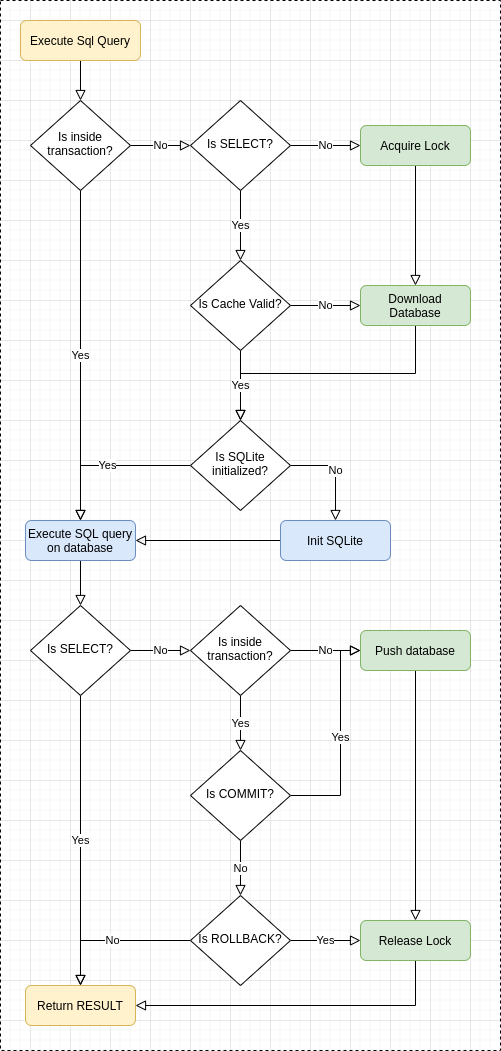
- To execute select-like sql query S3Lite pull the database file from s3 bucket if database file has changed. Then initialize the Sqlite object if needed, execute query and return result on success.For details look on the architecture diagram:
[](https://github.com/s3lite/s3lite)
}`
Runs the sql query with the specified parameters and returns `Promise` of `Array` if the query has been executed successfully.}`: If the query has been executed successfully method returns `Promise` of `Array` of objects.
```javascript
// async/await
const data = await db.all('SELECT id, name FROM table LIMIT ?', 10)
// promise
db.all('SELECT id, name FROM table LIMIT $a', { $a: 10 }).then(data => {
console.log(data)
})
/*
[
{ id: 1, name: 'test1' },
{ id: 2, name: 'test2' }
]
*/
```
---
#### [Database.get](#databaseget)
`async` `get (sql, [params...])` `→` `{Promise}`
Runs the sql query with the specified parameters and returns `Promise` of `Object` if the query has been executed successfully.}`: If the query has been executed successfully method returns `Promise` of `Object` or `undefined` if nothing found.
```javascript
// async/await
const data = await db.get('SELECT id, name FROM table')
// promise
db.get('SELECT id, name FROM table').then(data => {
console.log(data)
})
/*
{ id: 1, name: 'test1' }
*/
```
---
#### [Database.exec](#databaseexec)
`async` `exec (sql)` `→` `{Promise}`
Run all the sql queries. No results have been returned here.
**Parameters:**
- `{string} sql`: Sql queries to run.
**Returns:**
- `{Promise}`: If the query has been executed successfully method returns `Promise` of `Database` object.
```javascript
// async/await
await db.exec(`
CREATE TABLE test(id INTEGER PRIMARY KEY, name TEXT, control INTEGER);
INSERT INTO test VALUES(1, 'foo1', 1);
INSERT INTO test VALUES(2, 'foo2', 2);
`)
// promise
db.exec(
'CREATE TABLE test(id INTEGER PRIMARY KEY, name TEXT, control INTEGER)'
).then(() => {
// success
})
```
---
#### [Database.run](#databaserun)
`async` `run (sql, [params...])` `→` `{Promise<{lastID: number, changes: number, sql: string}>}`
Runs the sql query with the specified parameters and returns `Promise` of `Object` containing `{lastID: number, changes: number, sql: string}` if the query has been executed successfully.
**Parameters:**
- `{string} sql`: The sql query to run. It can contains placeholder to be bound by the given parameters.
- `{...*|Object|Array} [params]` _(optional)_: Parameters to bind. There are three ways to pass parameters: as an arguments, as an array or as na object.
**Returns:**
- `{Promise<{lastID: number, changes: number, sql: string}>}`: If the query has been executed successfully method returns `Promise` of `Object`:
- `lastId`: id of the last inserted row
- `changes`: number of changes done by the sql query
- `sql`: executed sql query
```javascript
// async/await
const result = await db.run("INSERT INTO test VALUES(NULL, 'foo1', 1)")
// promise
db.run("INSERT INTO test VALUES(NULL, 'foo1', 1)").then(result => {
console.log(result)
})
/*
{ lastID: 1, changes: 1, sql: "INSERT INTO test VALUES(NULL, 'foo1', 1)" }
*/
```
---
#### [Database.prepare](#databaseprepare)
`async` `prepare (sql, [params...])` `→` `{Promise}`
Prepare a statement
**Parameters:**
- `{string} sql`: The sql query to run. It can contains placeholder to be bound by the given parameters.
- `{...*|Object|Array} [params]` _(optional)_: Parameters to bind. There are three ways to pass parameters: as an arguments, as an array or as na object.
**Returns:**
- `{Promise}`: Statement object (self)
```javascript
// async/await
const stmt = await db.prepare('INSERT INTO test VALUES(NULL, ?, ?)')
// promise
db.prepare('INSERT INTO test VALUES(NULL, ?, ?)').then(stmt => {
// stmt {Statement}
})
```
---
#### [Database.open](#databaseopen)
`async` `open ()` `→` `{Promise}`
Open the database, fetch database file from s3 bucket and open the SQLite connection.
**Returns:**
- `{Promise}`: Database object
```javascript
// async/await
await db.open()
// promise
db.open().then(() => {
// database opened
})
```
---
#### [Database.close](#databaseclose)
`async` `close ()` `→` `{Promise}`
Close the SQLite connection
**Returns:**
- `{Promise}`: Database object
```javascript
// async/await
await db.close()
// promise
db.close().then(() => {
// database closed
})
```
---
### Statement
Statement object created by `db.prepare()` method.}`
Execute the statement with the specified parameters and returns `Promise` of `Array` if the query has been executed successfully.}`: If the query has been executed successfully method returns `Promise` of `Array` of objects.
```javascript
// async/await
const stmt = await db.prepare('SELECT * FROM test WHERE column = ? LIMIT ?')
const data = await stmt.all(1, 5)
// promise
db.prepare('SELECT * FROM test WHERE column = ?').then(stmt => {
stmt.all().then(data => {
console.log(data)
})
})
/*
[
{ id: 1, name: 'test1' },
{ id: 2, name: 'test2' }
]
*/
```
---
#### [Statement.get](#statementget)
`async` `get ([params...])` `→` `{Promise}`
Execute the statement with the specified parameters and returns `Promise` of `Object` if the query has been executed successfully.}`: If the query has been executed successfully method returns `Promise` of `Object` or `undefined` if nothing found.
```javascript
// async/await
const stmt = await db.prepare('SELECT * FROM test WHERE column = ? LIMIT 1')
const data = await stmt.get(3)
// promise
db.prepare('SELECT * FROM test WHERE column = ?').then(stmt => {
stmt.get(3).then(data => {
console.log(data)
})
})
/*
{ id: 1, name: 'test1' }
*/
```
---
#### [Statement.run](#statementrun)
`async` `run ([params...])` `→` `{Promise}`
Execute the statement with the specified parameters and returns `Promise` of `Object` containing `{lastID: number, changes: number, sql: string}` if the query has been executed successfully.
**Parameters:**
- `{...*|Object|Array} [params]` _(optional)_: Parameters to bind. There are three ways to pass parameters: as an arguments, as an array or as na object.
**Returns:**
- `{Promise}`: Statement object (self)
```javascript
// async/await
const stmt = await db.prepare('INSERT INTO test VALUES (NULL, ?)')
await stmt.run('foo')
// promise
db.prepare('INSERT INTO test VALUES (NULL, ?)').then(stmt => {
stmt.run('foo').then(stmt => {
console.log(stmt)
})
})
/*
// stmt {Statement}
*/
```
---
#### [Statement.reset](#statementreset)
`async` `reset ()` `→` `{Promise}`
Reset the cursor of the statement. It's require for re-execute the query with the same params.
**Returns:**
- `{Promise}`: Statement object (self)
```javascript
// async/await
const result = await stmt.reset()
// promise
stmt.reset().then(stmt => {
console.log(stmt)
})
/*
// stmt {Statement}
*/
```
---
#### [Statement.finalize](#statementfinalize)
`async` `finalize ()` `→` `{Promise}`
Finalize the statement
**Returns:**
- `{Promise}`: Statement object (self)
```javascript
// async/await
const result = await stmt.finalize()
// promise
stmt.finalize().then(stmt => {
console.log(stmt)
})
/*
// stmt {Statement}
*/
```
---
---
_Source: https://npm.io/package/s3lite · Machine-readable twin of the npm.io package page. Health data is recomputed on every publish._