# satti-table
> 🙏🙏🙏
Latest version **1.0.1** (published 2020-08-19) · 0 weekly downloads
## Install
```sh
npm install satti-table
pnpm add satti-table
yarn add satti-table
bun add satti-table
```
## Health
**Score 25/100 (F)** — status: abandoned.
Positive: has types; esm support; no vulnerabilities.
Warnings: low downloads.
Negative: abandoned; low maintenance score.
## Facts
| | |
|---|---|
| Version | 1.0.1 |
| Published | 2020-08-19 |
| First published | 2020-07-04 |
| Weekly downloads | 0 |
| TypeScript types | bundled |
| Module format | ESM + CommonJS |
| Dependencies | 1 |
| Unpacked size | 267.9 KB |
| Known vulnerabilities | 0 |
| Install scripts | no |
| GitHub stars | 0 |
| Maintainers | karthisgk |
| Keywords | angular, ngx, satti-table, data-table, satti, sattingo |
## Links
- npm: https://www.npmjs.com/package/satti-table
- Repository: https://github.com/karthisgk/satti-table
- Homepage: https://github.com/karthisgk/satti-table#readme
- Issues: https://github.com/karthisgk/satti-table/issues
- npm.io page: https://npm.io/package/satti-table
## Dependencies (1)
- [tslib](https://npm.io/package/tslib.md) ^1.10.0
## Alternatives
- [@lexical/table](https://npm.io/package/@lexical/table.md) — 3.0M weekly downloads
- [mantine-datatable](https://npm.io/package/mantine-datatable.md) — 98.2K weekly downloads
- [react-native-collapsible-tab-view](https://npm.io/package/react-native-collapsible-tab-view.md) — 70.6K weekly downloads
- [@handsontable/vue3](https://npm.io/package/@handsontable/vue3.md) — 16.1K weekly downloads
- [vuewordcloud](https://npm.io/package/vuewordcloud.md) — 7.2K weekly downloads
## Recent versions
- 1.0.1 (latest) — 2020-08-19
- 1.0.0 — 2020-07-30
- 0.0.6 — 2020-07-30
- 0.0.5 — 2020-07-11
- 0.0.4 — 2020-07-05
- 0.0.3 — 2020-07-04
- 0.0.2 — 2020-07-04
- 0.0.1 — 2020-07-04
## README
# SattiTable 🤦♂️🤦♂️🤦♂️🤦♂️🤦♂️🤦♂️
🙏🙏🙏
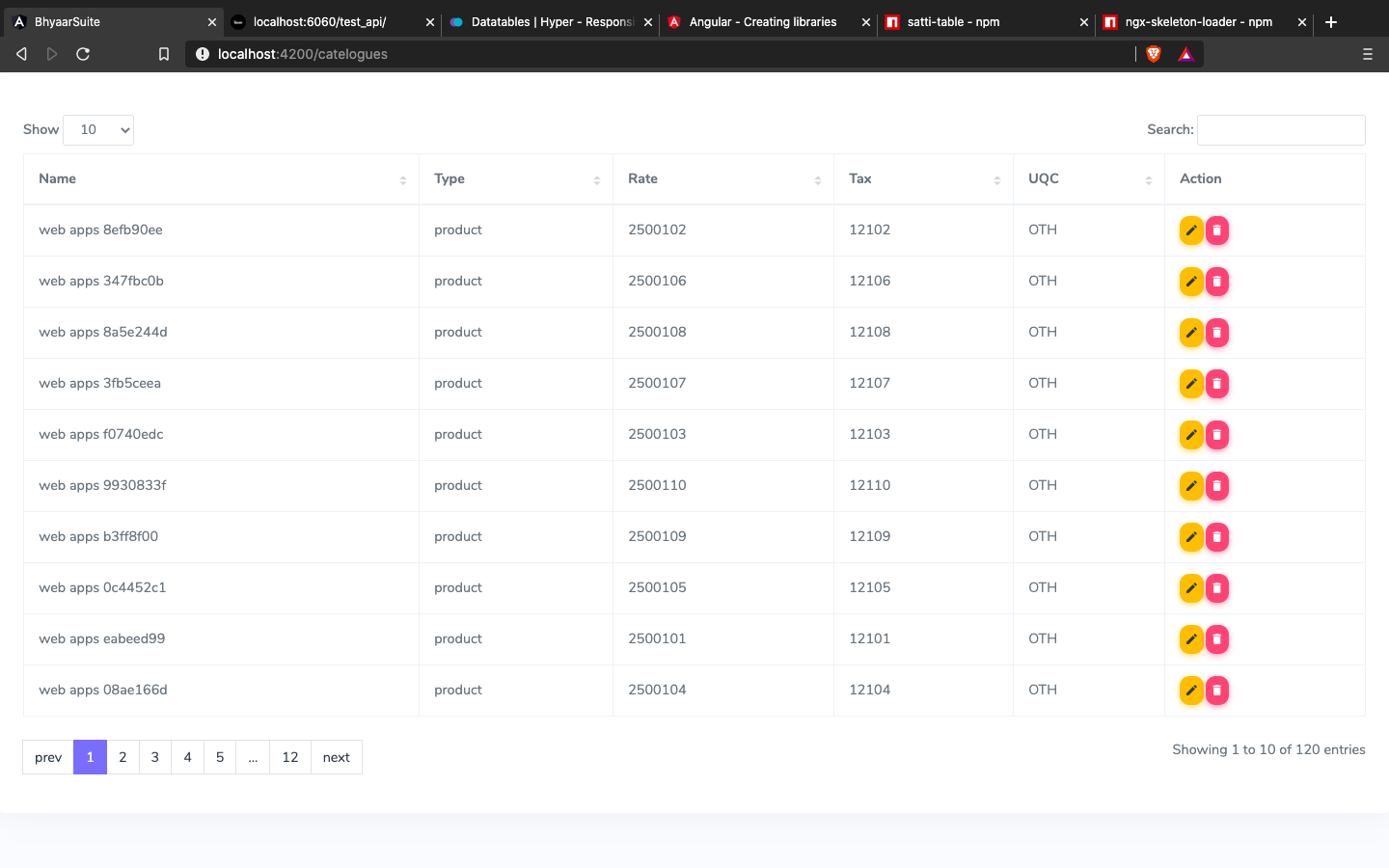
The idea of this component is cloning jquery data table in Angular way, this component is only made for data table with http calls. 🔥🔥🔥
## Install
You can get it on NPM installing `satti-table` module as a project dependency.
```shell
npm install satti-table --save
```
## Setup
You'll need to add `SattiTableModule` to your application module. So that, the `` components will be accessible in your application. ✍✍✍
```typescript
...
import { SattiTableModule } from 'satti-table';
...
@NgModule({
declarations: [
YourAppComponent
],
imports: [
...
SattiTableModule,
...
],
providers: [],
bootstrap: [YourAppComponent]
})
export class YourAppModule {}
```
After that, you can use the `satti-table` components in your templates, passing the configuration data into the component itself.
- `satti-table`: Handle the data table with http of your app;
```html
```
In Yout Component,
```typescript
export class YourAppComponent {
option: any = {
columns: ['name','position', 'office','age']
}
getDataFromApi(callBack: () => void){
let data = {
offset: this.option.start,
limit: this.option.length,
search: this.option.searchText,
sort: {
field: this.option.sort.columnId,
dir: this.option.sort.value == 1 ? 'asc' : 'desc'
}
}
this.httpClient.post('http://api.sample.com/', data).subscribe((resp: any) => {
this.option.data = resp.data.map(d => {
d.hideAction = 'view-btn, edit-btn';
return d;
});
this.option.total = 4;
callBack();
}, err => alert(err.statusText ? err.statusText : err.message))
}
}
```
### Note
** To Hide Action Button **
```typescript
data: [
{
...,
...,
hideAction: 'edit,delete'
}
]
```
## Options
- `columns`: pass the column id with label;
- `data`: raw data;
- `showEntry`: 'n' records to show;
- `start`: data from the start index;
- `length` - record from filtred data;
- `total`: total records;
- `searchText`: search value of input field;
- `sort`: sorting the columns as Accending and decending;
- `idKey`: pass the column id which is unique to identify;
- `reload`: this is method to re-initialize the component;
### option[columns]
```typescript
export class AppComponent {
....
option: any = {
columns: [
{
_id: 'name',
label: 'Name',
sort: true
},
{
_id: 'pos',
label: 'Position',
sort: true
},
{
_id: 'branch',
label: 'Brach',
sort: false
},
{
_id: 'age',
label: 'Age',
sort: true
},
{
_id: 'action',
label: 'Action',
action: [
{
type: 'view-more',
className: 'btn btn-warning',
returnKey: 'id',
iconClassName: 'mdi mdi-eye',
btnText: 'View',
}
]
}
]
}
....
acactionCallBack(e: any) {
//e.type, e.data
alert(e.type + ' button is clicked'); //view-more button is clicked
}
}
```
### option[sort]
```javascript
sort: {
columnId: "name",//string
value: 1,//number (1 = asc,-1 = desc)
}
```
---
_Source: https://npm.io/package/satti-table · Machine-readable twin of the npm.io package page. Health data is recomputed on every publish._