If you've found an issue or you have feature request - open an issue or look if it was already created.
[](https://www.npmjs.com/package/sb-mig)
[](https://www.npmjs.com/package/sb-mig)
[](https://github.com/sb-mig/sb-mig/issues?q=is%3Aopen+is%3Aissue)

# Documentation
- [Docs site](https://sb-mig.vercel.app) is the canonical documentation for current sb-mig workflows.
- [Quickstart](https://sb-mig.vercel.app/docs/quickstart) covers installation, credentials, and first safe commands.
- [CLI reference](https://sb-mig.vercel.app/docs/reference/cli) covers command families and safety conventions.
- [LLM docs index](https://sb-mig.vercel.app/llms.txt) and [full Markdown corpus](https://sb-mig.vercel.app/llms-full.txt) are available for coding agents and other LLM tools.
# Requirements:
| | |
| ---- | ------------ |
| Node | 22.x.x or >=24.x.x |
# Current release notes: 6.x.x
## Important Updates
- New migration publication model for stories. `sb-mig migrate content` now supports `--publicationMode preserve-layers`, `--publicationMode collapse-draft`, and `--publicationMode save-only`.
- Default migration behavior is now built around preserving Storyblok publication state where possible, including dirty published stories with separate draft/current and published layers.
- New language-aware publication support through `--publicationLanguages` and reusable language publish-state maps.
- New read-only inspection commands:
- `sb-mig language-publish-state`
- `sb-mig published-layer-export`
- `sb-mig story-versions`
- Migration runs now write better operational artifacts, including dry-run output, publication plans, published-layer summaries, and JSONL run logs.
- Programmatic asset helpers are now exposed for creating local-file assets and updating existing asset metadata.
- Windows path handling, selected component syncs, schema precompile imports, query parameter encoding, and SSOT/default content type handling were hardened.
## Breaking changes
- Node 20 is no longer supported. Supported runtimes are Node 22 and Node 24 or newer.
- The old migration publish flags were replaced:
- `--publish` is now `--publicationMode`
- `--publishLanguages` is now `--publicationLanguages`
- `--preservePublishedLayer` is now `--publicationMode preserve-layers`
# Historical release notes
The sections below are retained for historical context. For current usage, prefer the [docs site](https://sb-mig.vercel.app) and `sb-mig --help`.
## 5.x.x version released!
## Important Updates
- Complete codebase overhaul to facilitate the utilization of features and requests to Storyblok. This development decreases the tight coupling with CLI, while improving folder and file structure.
- New feature: Content synchronization (including stories and assets) in various directions, ranging from space to space, from space to file, and from file to space.
- New feature: Introduced support for TypeScript Schema, with the added ability to precompile them on-the-fly before synchronization, improving usage with sb-mig.
- New feature: Plugin synchronization capabilities.
- New feature: 'Discover' command.
- New feature: 'Migrate' command (tailored for Storyblok's Site Builder).
- Upgraded eslint configuration for more efficient coding practices.
- Updated all dependencies to their latest stable versions.
- Refreshed Github Actions workflows to enhance development practices.
- Expanded test coverage (with more additions anticipated).
## Breaking changes
- Please note that sb-mig no longer extends support for Node versions older than 22.x.x, as part of its adoption of native ESM support.
- The sb-mig backup command has now been aligned with all other commands, causing minor changes in its execution (although functionalities have been preserved).
Do not hesitate to get in touch if you encounter any issues or require further clarification on any points.
## 4.x.x version released!
- Whole deployment now, is handled by [semantic-release](https://github.com/semantic-release/semantic-release). And is just normal repository, instead of Lerna monorepo which is not needed anymore, and it was recently unmaintained (now it was passed to `nrwl` to maintain (https://github.com/lerna/lerna/issues/3121) will see what will happen in future with it :)
- Fromt the code perspective, there are no **breaking changes** between **3.x.x** and **4.x.x** but i'm going to fix some stuff now and add some more functionalities to it. So stay tuned!
- This Readme, which is also kinda documentation, will also be updated. Cause in some places there is misleading information. The best documentation though is just `sb-mig --help` command.
## 3.x.x version released!
- completely rewritten to simple [Meow](https://github.com/sindresorhus/meow) lib with help of Typescript. Check [migration guide](https://github.com/sb-mig/sb-mig/blob/oclif-research/MIGRATION-GUIDE-v3.md)
- support native es modules
- thinner then Oclif framework, still with Typescript
- decide to remove plugin support, cause it was not used enough
- make all commands follow same standard (`backup` command, had some very weird syntax before, now it works like `sync`)
## Contents
- [How to install and configure](#how-to-install-and-configure)
- [Schema documentation:](#schema-documentation)
- [Basics](#basics)
- [Syncing components](#syncing-components)
- [Syncing datasources](#syncing-datasources)
- [Migrating content](#migrating-content)
- [Inspecting publication state](#inspecting-publication-state)
- [Presets support](#presets-support)
- [Development](#development)
- [Roadmap](#roadmap)
---
# How to install and configure
```
npm install --global sb-mig
```
In your working directory (usually root of your repo where u have your app/webpage using Storyblok), you have to create a `.env` file with your variables:
```
STORYBLOK_OAUTH_TOKEN=1234567890qwertyuiop
STORYBLOK_SPACE_ID=12345
# For nextjs
# NEXT_PUBLIC_STORYBLOK_ACCESS_TOKEN=zxcvbnmasdfghjkl
# For gatsby
# GATSBY_STORYBLOK_ACCESS_TOKEN=zxcvbnmasdfghjkl
# any other (you have to handle '.env' access in frontend yourself (for example with dotenv package)
STORYBLOK_ACCESS_TOKEN=zxcvbnmasdfghjkl
```
You can also provide your custom config. To do that u have to create `storyblok.config.js` file in your root catalog with following structure:
```
// storyblok.config.js
module.exports = {
storyblokComponentsLocalDirectory: "src/@storyblok-components",
sbmigWorkingDirectory: "sbmig",
componentsDirectories: ["src", "storyblok"],
schemaFileExt: "sb.js",
datasourceExt: "sb.datasource.js",
rolesExt: "sb.roles.js",
storyblokApiUrl: "https://api.storyblok.com/v1",
oauthToken: process.env.STORYBLOK_OAUTH_TOKEN,
spaceId: process.env.STORYBLOK_SPACE_ID,
accessToken: process.env.STORYBLOK_ACCESS_TOKEN,
};
```
You don't need to pass everything to the config file, just add what you need and it will be merged with the original config. If you just need to set the `componentDirectory`, for example, add the following:
```
// storyblok.config.js
module.exports = {
componentsDirectories: ["src", "storyblok", "@storyblok-components"],
};
```
## Programmatic asset API
The public management API exposes asset helpers for uploading a local file and updating existing asset metadata:
```ts
import { managementApi } from "sb-mig/dist/api/managementApi.js";
await managementApi.assets.createAsset(
{
spaceId: "12345",
pathToFile: "./public/image.jpg",
payload: {
asset_folder_id: 67890,
validate_upload: 1,
},
},
config,
);
await managementApi.assets.updateAsset(
{
spaceId: "12345",
assetId: 98765,
payload: {
meta_data: {
alt: "Image alt text",
title: "Image title",
},
},
},
config,
);
```
# Schema documentation:
## Basics
This is what a basic storyblok `.sb.js` schema file which maps to a component looks like:
```
export default {
name: "text-block",
display_name: "Text block",
is_root: false,
is_nestable: true,
component_group_name: "Some group",
schema: {
title: {
type: "text",
},
}
};
```
**Important notice:** name inside `.sb.js` schema need to match `.sb.js` filename.
You can add anything mentioned here: https://www.storyblok.com/docs/api/management#core-resources/components/components to your component. (with the exception of `component_group_uuid`: insert `component_group_name` and `sb-mig` will resolve `uuid` automagically).
You can also add `tabs` to your component schema (which is not documented in above storyblok documentation):
```
...
schema: {
title: {
type: "text",
},
Settings: {
type: "tab",
display_name: "Settings",
"keys": [
"title"
]
},
}
...
```
There is also support for `sections` inside components:
```
...
schema: {
title: {
type: "text",
},
somesection: {
type: "section",
"keys": [
"title"
]
},
}
...
```
## Syncing components
The main purpose of `sb-mig` is to sync your `.sb.js` component schema files with your `Storyblok` space.
In v4.x.x There is 1 way to sync your schemas, which is to name all your schemas with `.sb.js` extension. You can have them in any place of your repositories, as long as this place is pointed in `storyblok.config.js` `componentDirectories` field, which is set to `componentsDirectories: ["src", "storyblok"],` by default:
```
sb-mig sync components row column
```
This command will look for `row.sb.js` and `column.sb.js` files inside a directories mentioned in `componentDirectories` field. (You can change directories name mapping by modifying `componentDirectories` inside `storyblok.config.js`). You can also change the extension searched by changing `schemaFileExt`. [How to install and configure](#how-to-install-and-configure))
## Syncing datasources
## Migrating content
Use `sb-mig migrate content` to run one or more migration configs against
stories from a space or from a file.
```bash
sb-mig migrate content --all --from 12345 --to 12345 --migration itemsToContent
```
You can run multiple migration configs in order:
```bash
sb-mig migrate content --all \
--from 12345 \
--to 12345 \
--migration migration-a \
--migration migration-b \
--migration migration-c
```
### Publication modes
Storyblok stories can have separate draft/current and published layers. In 6.x, `sb-mig` makes this explicit with `--publicationMode`.
`preserve-layers` is the default. Use it when you want migrated stories to keep the source publication shape: draft-only stories stay draft-only, clean published stories stay published, and dirty published stories keep separate migrated draft/current and published layers. This mode currently requires migrating from a Storyblok space to the same Storyblok space.
```bash
sb-mig migrate content --all \
--from 12345 \
--to 12345 \
--migration itemsToContent \
--publicationMode preserve-layers \
--yes
```
`collapse-draft` publishes changed stories and can collapse draft/current changes into the published result. Use this when the target should end up with the migrated content published.
```bash
sb-mig migrate content --all \
--from 12345 \
--to 12345 \
--migration itemsToContent \
--publicationMode collapse-draft \
--publicationLanguages all \
--yes
```
`save-only` updates draft/current JSON without publishing any languages.
```bash
sb-mig migrate content --all \
--from 12345 \
--to 12345 \
--migration itemsToContent \
--publicationMode save-only \
--yes
```
Use `--publicationLanguages` with `default`, `all`, or a comma-separated list of Storyblok language codes:
```bash
sb-mig migrate content --all \
--from 12345 \
--to 12345 \
--migration itemsToContent \
--publicationMode collapse-draft \
--publicationLanguages default,fr,de \
--yes
```
When `--publicationMode` publishes languages, `sb-mig` can build the language publish-state map automatically. For bigger or more sensitive runs, generate the map first and pass it back with `--languagePublishStatePath`:
```bash
sb-mig language-publish-state \
--from 12345 \
--startsWith blog/ \
--languages all \
--fileName blog-prod
sb-mig migrate content --all \
--from 12345 \
--to 12345 \
--migration itemsToContent \
--publicationMode preserve-layers \
--publicationLanguages all \
--languagePublishStatePath sbmig/language-publish-state/blog-prod.json \
--yes
```
### Migration artifacts
Migrations write JSON artifacts under `sbmig/migrations` by default. Use `--dry-run` to preview the selected stories, transformed output, publication plan, and write summary without making Storyblok API writes.
```bash
sb-mig migrate content --all \
--from 12345 \
--to 12345 \
--migration itemsToContent \
--publicationMode preserve-layers \
--publicationLanguages all \
--dry-run \
--fileName blog-v6-check
```
6.x also writes JSONL migration run logs for easier auditing and post-run debugging. When published layers are involved, additional published-layer input/output and summary files are written.
### Extending migration component scope
Migration files export a mapper keyed by component name. By default, `sb-mig`
runs a migration only for the component keys exported by that migration file.
Use these flags when a consuming app has wrapper components that should reuse an
existing migration function:
- `--migrationComponentAlias`
Format: `:=,`
- `--migrationComponents`
Format: `:,`
`--migrationComponentAlias` extends the migration mapper at runtime by reusing
the source component's migration function for extra component names.
`--migrationComponents` overrides the exact component scope for that migration.
Example:
```bash
sb-mig migrate content --all \
--from 12345 \
--to 12345 \
--migration colorPickerModeValues \
--migrationComponentAlias colorPickerModeValues:sb-button=sb-open-drift-button \
--migrationComponentAlias colorPickerModeValues:sb-section=sb-tour-page-section \
--migrationComponents colorPickerModeValues:sb-button,sb-open-drift-button,sb-section,sb-tour-page-section
```
This runs `colorPickerModeValues` for the normal Backpack keys and also for the
two wrapper component names by aliasing them onto the existing `sb-button` and
`sb-section` migration handlers.
## Inspecting publication state
These commands are read-only against Storyblok and are useful before a migration run.
Build a language publish-state map:
```bash
sb-mig language-publish-state \
--from 12345 \
--startsWith about/ \
--languages all \
--fileName about-prod
```
Export draft/current and latest published story layers:
```bash
sb-mig published-layer-export \
--from 12345 \
--startsWith about/ \
--fileName about-layer-check
```
Inspect raw Storyblok story versions for a single story:
```bash
sb-mig story-versions --from 12345 --withSlug about/contact --raw
```
You can also sync your `datasources`.
Add `datasourceExt: "your-own-extension",` to your `storyblok.config.js`. If u will not add it, will be used default one (`sb.datasource.js`)
```
// storyblok.config.js
export default {
...
datasourcesDirectory: "mydatasource.ext.js"
...
};
```
Create file with `.sb.datasource.js` (or your defined one) extension inside it. Basic schema for datasources file:
```
export default {
name: "icons",
slug: "icons",
datasource_entries: [
{
componentName: "icon1",
importPath: "icon 2"
},
{
componentName: "icon2",
importPath: "icon 2"
},
{
componentName: "icon3",
importPath: "icon 3"
},
{
componentName: "icon4",
importPath: "icon 4"
},
]
};
```
Above snippet will create `datasource` with `icons` name and `icons` slug. `datasource_entries` will be your `name <-> value` array.
Single `datasource entry` consist of **precisely** 2 fields. But they can be named however you like (advise to name it: `name` and `value`, it will be anyway translated to that, due to how storyblok stores them)
Command for syncing datasources:
```
sb-mig sync datasources icons
```
Example output from above command
```
Synciong priovided datasources icons...
Trying to sync provided datasources: icons
Trying to get all Datasources.
Trying to get 'icons' datasource entries.
Trying to get 'icons' datasource.
✓ Datasource entries for 15558 datasource id has been successfully synced
```
Like with syncing component, you can also use syncing multiple datasources at once:
```
sb-mig sync datasources icons logos
```
```
✓ Datasource entries for 15558 datasource id has been successfully synced.
✓ Datasource entries for 15559 datasource id has been successfully synced.
```
You can also sync all datasources, and that's the command we strongly recommend. It will sync all datasources also the one from node_modules, so potentially from `storyblok-components`. But will prefer syncing local ones, if there will be clash of datasources filenames (for example, you can have datasource from node_modules, but wanted to overwrite some fields, you will be able to do that.
```
sb-mig sync datasources --all
```
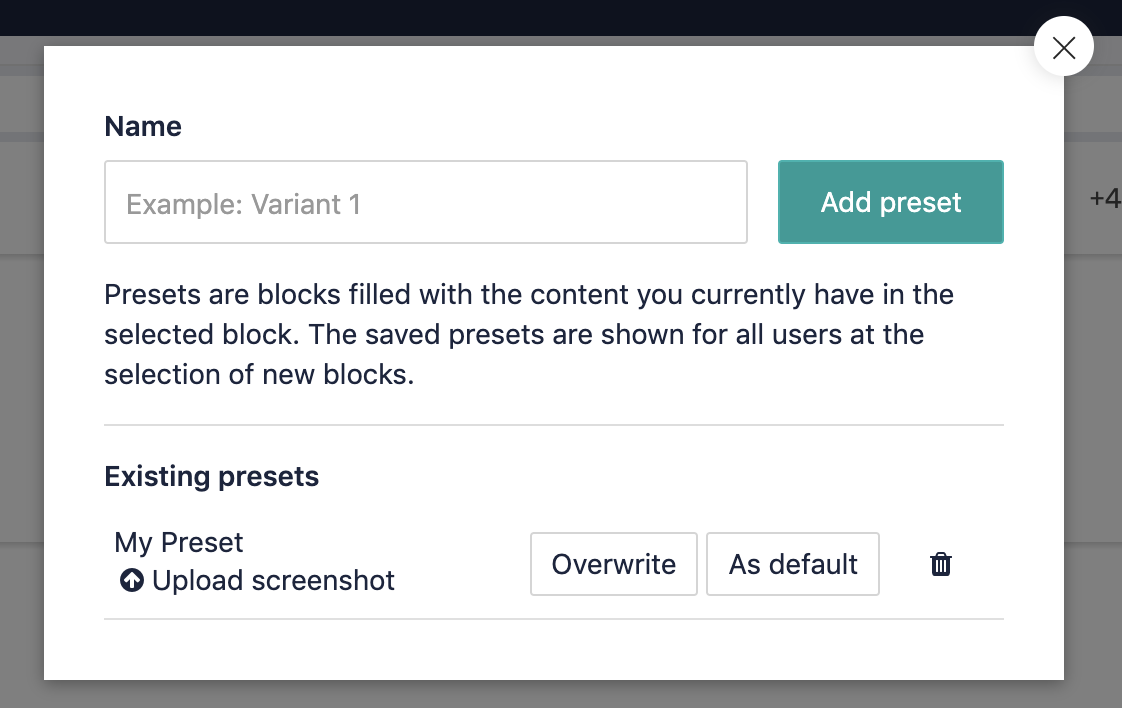
## Presets support
Writing your own predefined data (presets) for components can be a pain, so with `sb-mig` you can create presets for your components in the storyblok gui, and then export them to a schema based `.sb.js` file to be picked up while syncing.
To do so, first create a preset for your component in storyblok:
then run
```
sb-mig backup component-presets --one text-block // component you've created preset for
```
The tool will now download all presets related to the `text-block` component.
Now you can go to your folder structure (by default: `./sbmig/component-presets/`), and rename the generated file to (for example): `text-block-preset`.
You should remove the id field from the preset (it will be looked up by name)
Finally, add the `all_presets` field to your `text-block` component schema.
```
import allPresets from './presets/_text-block-preset.json'
export default {
...
schema: {
title: {
type: "text",
pos: 1
},
},
all_presets: allPresets,
...
};
```
Now, sync your component
```
sb-mig sync components text-block --presets
```
output:
```
Checking preset for 'text-block-2' component
Trying to get all 'text-block-2' presets.
Trying to get all components.
Trying to get preset by id: 437086
Preset: 'My Preset' with '437086' id has been updated.
```
---
_This feature is still quite experimental, that's why it's not completely straightforward to do. Workin on it :)_
---
## Development
To develop and make changes to the library:
```
git clone git@github.com:sb-mig/sb-mig.git
```
Install packages
```
npm install
```
Run development command
```bash
npm run build:dev
```
It will watch a file change, and on every change, will rebuild typescript and build the whole lib/cli.
The you can use
```
node dist/index.js debug
```
to access `sb-mig`
For your conveniece, you can also, link it to proper `sb-mi` name:
```
npm link
```
And then you can use it like that:
```
sb-mig debug
```
# Releasing
## Flow of branching out and merging
- Before creating feature branch from beta, make sure you have newest beta. (by `git pull origin beta`).
- Create feature branch from beta
- Do your changes
- Create PR from feature branch to beta (it will run checks on your feature branch)
- Merge PR to beta (it will release beta channel)
- Create PR from beta to master (it will run checks on beta branch)
- Merge PR to master (it will release stable channel)
- After release properly done, make sure to pull master to beta (by `git pull origin master`), Push directly, resolve conflicts in favor of master.
## Roadmap
- [x] Sync / Migrate content (stories)
- [x] Improve preset creation/update
- [x] Sync Roles
- [x] Sync / Migrate datasources
- [x] Sync components with extensions
- [x] Sync presets
- [x] Sync single component
- [x] Sync all components
- [x] Sync components using schema based .sb.js file (based on idea from [storyblok-migrate](https://github.com/maoberlehner/storyblok-migrate))
- [x] Component groups
- [x] Sync custom fields
The general purpose of this package is to manage creation and maintenance of components from code/command line, to be able to create a whole space and project structure without using GUI.
---
_Source: https://npm.io/package/sb-mig · Machine-readable twin of the npm.io package page. Health data is recomputed on every publish._


 then run
```
sb-mig backup component-presets --one text-block // component you've created preset for
```
The tool will now download all presets related to the `text-block` component.
Now you can go to your folder structure (by default: `./sbmig/component-presets/`), and rename the generated file to (for example): `text-block-preset`.
You should remove the id field from the preset (it will be looked up by name)
Finally, add the `all_presets` field to your `text-block` component schema.
```
import allPresets from './presets/_text-block-preset.json'
export default {
...
schema: {
title: {
type: "text",
pos: 1
},
},
all_presets: allPresets,
...
};
```
Now, sync your component
```
sb-mig sync components text-block --presets
```
output:
```
Checking preset for 'text-block-2' component
Trying to get all 'text-block-2' presets.
Trying to get all components.
Trying to get preset by id: 437086
Preset: 'My Preset' with '437086' id has been updated.
```
---
_This feature is still quite experimental, that's why it's not completely straightforward to do. Workin on it :)_
---
## Development
To develop and make changes to the library:
```
git clone git@github.com:sb-mig/sb-mig.git
```
Install packages
```
npm install
```
Run development command
```bash
npm run build:dev
```
It will watch a file change, and on every change, will rebuild typescript and build the whole lib/cli.
The you can use
```
node dist/index.js debug
```
to access `sb-mig`
For your conveniece, you can also, link it to proper `sb-mi` name:
```
npm link
```
And then you can use it like that:
```
sb-mig debug
```
# Releasing
## Flow of branching out and merging
- Before creating feature branch from beta, make sure you have newest beta. (by `git pull origin beta`).
- Create feature branch from beta
- Do your changes
- Create PR from feature branch to beta (it will run checks on your feature branch)
- Merge PR to beta (it will release beta channel)
- Create PR from beta to master (it will run checks on beta branch)
- Merge PR to master (it will release stable channel)
- After release properly done, make sure to pull master to beta (by `git pull origin master`), Push directly, resolve conflicts in favor of master.
## Roadmap
- [x] Sync / Migrate content (stories)
- [x] Improve preset creation/update
- [x] Sync Roles
- [x] Sync / Migrate datasources
- [x] Sync components with extensions
- [x] Sync presets
- [x] Sync single component
- [x] Sync all components
- [x] Sync components using schema based .sb.js file (based on idea from [storyblok-migrate](https://github.com/maoberlehner/storyblok-migrate))
- [x] Component groups
- [x] Sync custom fields
The general purpose of this package is to manage creation and maintenance of components from code/command line, to be able to create a whole space and project structure without using GUI.
---
_Source: https://npm.io/package/sb-mig · Machine-readable twin of the npm.io package page. Health data is recomputed on every publish._
then run
```
sb-mig backup component-presets --one text-block // component you've created preset for
```
The tool will now download all presets related to the `text-block` component.
Now you can go to your folder structure (by default: `./sbmig/component-presets/`), and rename the generated file to (for example): `text-block-preset`.
You should remove the id field from the preset (it will be looked up by name)
Finally, add the `all_presets` field to your `text-block` component schema.
```
import allPresets from './presets/_text-block-preset.json'
export default {
...
schema: {
title: {
type: "text",
pos: 1
},
},
all_presets: allPresets,
...
};
```
Now, sync your component
```
sb-mig sync components text-block --presets
```
output:
```
Checking preset for 'text-block-2' component
Trying to get all 'text-block-2' presets.
Trying to get all components.
Trying to get preset by id: 437086
Preset: 'My Preset' with '437086' id has been updated.
```
---
_This feature is still quite experimental, that's why it's not completely straightforward to do. Workin on it :)_
---
## Development
To develop and make changes to the library:
```
git clone git@github.com:sb-mig/sb-mig.git
```
Install packages
```
npm install
```
Run development command
```bash
npm run build:dev
```
It will watch a file change, and on every change, will rebuild typescript and build the whole lib/cli.
The you can use
```
node dist/index.js debug
```
to access `sb-mig`
For your conveniece, you can also, link it to proper `sb-mi` name:
```
npm link
```
And then you can use it like that:
```
sb-mig debug
```
# Releasing
## Flow of branching out and merging
- Before creating feature branch from beta, make sure you have newest beta. (by `git pull origin beta`).
- Create feature branch from beta
- Do your changes
- Create PR from feature branch to beta (it will run checks on your feature branch)
- Merge PR to beta (it will release beta channel)
- Create PR from beta to master (it will run checks on beta branch)
- Merge PR to master (it will release stable channel)
- After release properly done, make sure to pull master to beta (by `git pull origin master`), Push directly, resolve conflicts in favor of master.
## Roadmap
- [x] Sync / Migrate content (stories)
- [x] Improve preset creation/update
- [x] Sync Roles
- [x] Sync / Migrate datasources
- [x] Sync components with extensions
- [x] Sync presets
- [x] Sync single component
- [x] Sync all components
- [x] Sync components using schema based .sb.js file (based on idea from [storyblok-migrate](https://github.com/maoberlehner/storyblok-migrate))
- [x] Component groups
- [x] Sync custom fields
The general purpose of this package is to manage creation and maintenance of components from code/command line, to be able to create a whole space and project structure without using GUI.
---
_Source: https://npm.io/package/sb-mig · Machine-readable twin of the npm.io package page. Health data is recomputed on every publish._