# scan-hkeys
> Scan Redis keys using a pattern and show hkeys for hashes keys.
Latest version **0.1.3** (published 2017-03-09) · ISC license · 0 weekly downloads
## Install
```sh
npm install scan-hkeys
pnpm add scan-hkeys
yarn add scan-hkeys
bun add scan-hkeys
```
## Health
**Score 15/100 (F)** — status: abandoned.
Positive: no vulnerabilities.
Warnings: low downloads; no types; no esm support; pre 1.0.
Negative: abandoned; low maintenance score.
## Facts
| | |
|---|---|
| Version | 0.1.3 |
| Published | 2017-03-09 |
| First published | 2017-02-05 |
| Weekly downloads | 0 |
| License | ISC |
| TypeScript types | none |
| Module format | CommonJS |
| Dependencies | 3 |
| Known vulnerabilities | 0 |
| Install scripts | no |
| GitHub stars | 0 |
| Maintainers | evanx |
## Links
- npm: https://www.npmjs.com/package/scan-hkeys
- Repository: https://github.com/evanx/scan-hkeys
- Homepage: https://github.com/evanx/scan-hkeys#readme
- Issues: https://github.com/evanx/scan-hkeys/issues
- npm.io page: https://npm.io/package/scan-hkeys
## Dependencies (3)
- [cli-color](https://npm.io/package/cli-color.md) ^1.2.0
- [redis-app](https://npm.io/package/redis-app.md) ^0.9.16
- [multi-exec-async](https://npm.io/package/multi-exec-async.md) ^0.2.0
## Recent versions
- 0.1.3 (latest) — 2017-03-09
- 0.1.0 — 2017-02-05
## README
# scan-hkeys
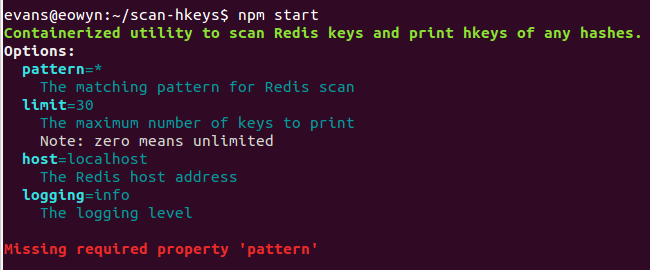
Containerized utility to scan Redis keys and print hkeys of any hashes.
 ## Config
See `lib/spec.js`
```javascript
pattern: {
description: 'the matching pattern for Redis scan',
example: '*'
},
port: {
description: 'the Redis port',
default: 6379
},
host: {
description: 'the Redis host',
default: 'localhost'
},
```
where the default Redis `host` is `localhost`
## Implementation
See `app/index.js`
```javascript
let cursor;
while (true) {
const [result] = await multiExecAsync(client, multi => {
multi.scan(cursor || 0, 'match', config.pattern);
});
cursor = parseInt(result[0]);
const keys = result[1];
const types = await multiExecAsync(client, multi => {
keys.forEach(key => multi.type(key));
});
const hashesKeys = keys.filter((key, index) => types[index] === 'hash');
if (hashesKeys.length) {
count += hashesKeys.length;
const results = await multiExecAsync(client, multi => {
hashesKeys.forEach(key => multi.hkeys(key));
});
hashesKeys.forEach((key, index) => {
const result = results[index];
console.log(`${clc.cyan(key)} ${result.join(' ')}`);
});
```
## Development
For development, you can run as follows:
```
git clone https://github.com/evanx/scan-hkeys.git
cat package.json
npm install
pattern='*' npm start
```
## Docker
```shell
docker build -t scan-hkeys https://github.com/evanx/scan-hkeys.git
```
where tagged as image `scan-hkeys`
```shell
docker run --network=host -e pattern='*' scan-hkeys
```
where `--network-host` connects the container to your `localhost` bridge. The default Redis host `localhost` works in that case.
Since the containerized app has access to the host's Redis instance, you should inspect the source.
See `Dockerfile`
```
FROM mhart/alpine
ADD package.json .
RUN npm install --silent
ADD lib lib
CMD ["node", "lib/index.js"]
```
### Demo script
See `scripts/demo.sh`
```shell
docker network create -d bridge test-hkeys-network
container=`docker run --network=test-hkeys-network \
--name test-hkeys-redis -d tutum/redis`
password=`docker logs $container | grep '^\s*redis-cli -a' |
sed -e 's/^\s*redis-cli -a \(\w*\) .*$/\1/'`
redisHost=`docker inspect $container |
grep '"IPAddress":' | tail -1 | sed 's/.*"\([0-9\.]*\)",/\1/'`
redis-cli -a $password -h $redisHost hset mytest:64:h name 'Pottery Place'
redis-cli -a $password -h $redisHost hset mytest:64:h address '48 High Street'
docker run --network=test-hkeys-network \
-e host=$redisHost -e password=$password \
-e pattern=mytest:*:h evanxsummers/scan-hkeys
docker rm -f `docker ps -q -f name=test-hkeys-redis`
docker network rm test-hkeys-network
```
where we create an isolated Redis container and use `redis-cli` to create hashes with the following two fields:
```
redis-cli -a $password -h $redisHost hset mytest:64:h name 'Pottery Place'
redis-cli -a $password -h $redisHost hset mytest:64:h address '48 High Street'
```
and invoke the utility from the Dockerhub image `evanxsummers/scan-hkeys`
```
docker run --network=test-hkeys-network \
-e host=$redisHost -e password=$password \
-e pattern=mytest:*:h evanxsummers/scan-hkeys
```
which prints a line for the key with its two field names from `hkeys`
```
mytest:64:h name address
```
## Config
See `lib/spec.js`
```javascript
pattern: {
description: 'the matching pattern for Redis scan',
example: '*'
},
port: {
description: 'the Redis port',
default: 6379
},
host: {
description: 'the Redis host',
default: 'localhost'
},
```
where the default Redis `host` is `localhost`
## Implementation
See `app/index.js`
```javascript
let cursor;
while (true) {
const [result] = await multiExecAsync(client, multi => {
multi.scan(cursor || 0, 'match', config.pattern);
});
cursor = parseInt(result[0]);
const keys = result[1];
const types = await multiExecAsync(client, multi => {
keys.forEach(key => multi.type(key));
});
const hashesKeys = keys.filter((key, index) => types[index] === 'hash');
if (hashesKeys.length) {
count += hashesKeys.length;
const results = await multiExecAsync(client, multi => {
hashesKeys.forEach(key => multi.hkeys(key));
});
hashesKeys.forEach((key, index) => {
const result = results[index];
console.log(`${clc.cyan(key)} ${result.join(' ')}`);
});
```
## Development
For development, you can run as follows:
```
git clone https://github.com/evanx/scan-hkeys.git
cat package.json
npm install
pattern='*' npm start
```
## Docker
```shell
docker build -t scan-hkeys https://github.com/evanx/scan-hkeys.git
```
where tagged as image `scan-hkeys`
```shell
docker run --network=host -e pattern='*' scan-hkeys
```
where `--network-host` connects the container to your `localhost` bridge. The default Redis host `localhost` works in that case.
Since the containerized app has access to the host's Redis instance, you should inspect the source.
See `Dockerfile`
```
FROM mhart/alpine
ADD package.json .
RUN npm install --silent
ADD lib lib
CMD ["node", "lib/index.js"]
```
### Demo script
See `scripts/demo.sh`
```shell
docker network create -d bridge test-hkeys-network
container=`docker run --network=test-hkeys-network \
--name test-hkeys-redis -d tutum/redis`
password=`docker logs $container | grep '^\s*redis-cli -a' |
sed -e 's/^\s*redis-cli -a \(\w*\) .*$/\1/'`
redisHost=`docker inspect $container |
grep '"IPAddress":' | tail -1 | sed 's/.*"\([0-9\.]*\)",/\1/'`
redis-cli -a $password -h $redisHost hset mytest:64:h name 'Pottery Place'
redis-cli -a $password -h $redisHost hset mytest:64:h address '48 High Street'
docker run --network=test-hkeys-network \
-e host=$redisHost -e password=$password \
-e pattern=mytest:*:h evanxsummers/scan-hkeys
docker rm -f `docker ps -q -f name=test-hkeys-redis`
docker network rm test-hkeys-network
```
where we create an isolated Redis container and use `redis-cli` to create hashes with the following two fields:
```
redis-cli -a $password -h $redisHost hset mytest:64:h name 'Pottery Place'
redis-cli -a $password -h $redisHost hset mytest:64:h address '48 High Street'
```
and invoke the utility from the Dockerhub image `evanxsummers/scan-hkeys`
```
docker run --network=test-hkeys-network \
-e host=$redisHost -e password=$password \
-e pattern=mytest:*:h evanxsummers/scan-hkeys
```
which prints a line for the key with its two field names from `hkeys`
```
mytest:64:h name address
```
https://twitter.com/@evanxsummers
---
_Source: https://npm.io/package/scan-hkeys · Machine-readable twin of the npm.io package page. Health data is recomputed on every publish._