# seeso
> Eye tracking module for browser and node.js
Latest version **0.2.4** (published 2025-03-12) · SEE LICENSE IN LICENSE license · 0 weekly downloads
## Install
```sh
npm install seeso
pnpm add seeso
yarn add seeso
bun add seeso
```
## Health
**Score 25/100 (F)** — status: maintenance-mode.
Positive: no vulnerabilities.
Warnings: low downloads; no types; no esm support; pre 1.0.
Negative: stale; low maintenance score.
## Facts
| | |
|---|---|
| Version | 0.2.4 |
| Published | 2025-03-12 |
| First published | 2021-04-05 |
| Weekly downloads | 0 |
| License | SEE LICENSE IN LICENSE |
| TypeScript types | none |
| Module format | CommonJS |
| Dependencies | 4 |
| Unpacked size | 633 KB |
| Known vulnerabilities | 0 |
| Install scripts | no |
| GitHub stars | 14 |
| Author | VisualCamp |
| Maintainers | visualcamp |
| Keywords | seeso, eyetracking, visualcamp, gazetracking |
## Links
- npm: https://www.npmjs.com/package/seeso
- Repository: https://github.com/visualcamp/SeeSoSample-Web
- Homepage: https://console.seeso.io
- Issues: https://github.com/visualcamp/SeeSoSample-Web/issues
- npm.io page: https://npm.io/package/seeso
## Dependencies (4)
- [axios](https://npm.io/package/axios.md) ^1.6.8
- [buffer](https://npm.io/package/buffer.md) ^6.0.3
- [wasm-check](https://npm.io/package/wasm-check.md) ^2.1.2
- [ua-parser-js](https://npm.io/package/ua-parser-js.md) ^2.0.0-beta.2
## Recent versions
- 0.2.4 (latest) — 2025-03-12
- 0.2.3 — 2024-03-25
- 0.2.2 — 2023-10-24
- 0.2.1 — 2023-10-17
- 0.2.0 — 2023-07-20
- 0.2.0-beta-25 — 2023-06-19
- 0.2.0-beta-15 — 2023-04-26
- 0.2.0-beta-14 — 2023-04-25
- 0.2.0-beta-13 — 2023-04-25
- 0.2.0-beta-12 — 2023-04-25
- 0.2.0-beta-11 — 2023-04-25
- 0.2.0-beta-10 — 2023-04-25
- 0.2.0-beta-9 — 2023-04-25
- 0.2.0-beta-8 — 2023-04-14
- 0.2.0-beta-7 — 2023-04-11
- … 19 more at https://npm.io/package/seeso/versions
## README
# SeeSo SDK Web - NPM Module
## **Supported Environment**
- Browser Support
|  |  |  |  |
| ------ | ------ | --- | --- |
| 80+ ✔︎ |ᅠLatest ✔︎︎ | ᅠLatest ✔︎︎ | 15.2 - 18.1 |
## **Environment Set-ups**
* Download SDK files directly. The Following files should exist:
1. Go to the path where you downloaded the SDK files.
There should be the following files below.
- SeeSo
- dist
- seeso.js
- easy-seeso.js
* Using npm:
```shell script
$ npm install seeso
```
* Using CDN: It will be available soon.
```html
```
### Issue License key (Required)
Get a license key from the SeeSo Console
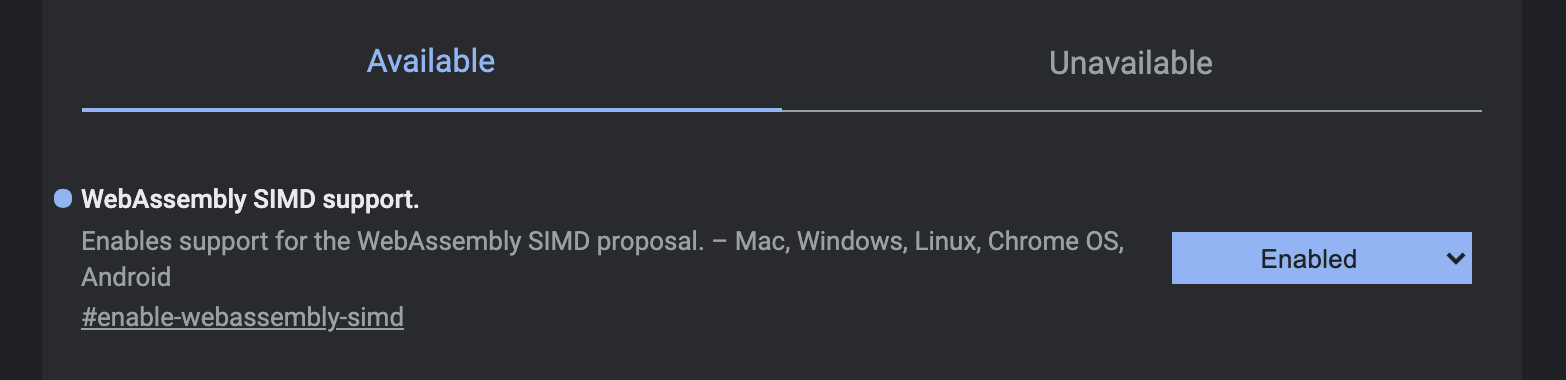
### SIMD Setting (Chrome Optional)
* Using this setting improves the performance of the SDK.
* If SIMD option is off, high fps setting (ex: `30`) may drop CPU performance.
1. in `chrome://flags/`
2. WebAssembly SIMD support set Enabled
## **Sample App Implemetation**
### Import SDK module and Check SDK status
- If "afterInitialized" function is called, it means SDK is ready to use.
```Javascript
// when SDK files download
import EasySeeSo from './seeso/easy-seeso.js'
// when npm or cdn import
import EasySeeSo from 'seeso/easy-seeso';
(async () => {
const seeso = new EasySeeSo();
// Don't forget to enter your license key.
await seeso.init('YOUR_LICENSE_KEY', afterInitialized, afterFailed)
})()
function afterInitialized () {
console.log('sdk init success!')
}
function afterFailed () {
console.log('sdk init fail!')
}
```
### Call Calibration Page
```Javascript
...
function callCalibrationPage() {
// static function.
// Because the web page is moved. (https://calibration.seeso.io/#/service)
EasySeeSo.openCalibrationPage('YOUR_LICENSE_KEY', 'YOUR_USER_ID', 'YOUR_REDIRECT_URL', 5); // 5 is number of calibration points
}
```
### Set Calibration Data
```Javascript
...
// in redirected page
function parseCalibrationDataInQueryString () {
const href = window.location.href
const decodedURI = decodeURI(href)
const queryString = decodedURI.split('?')[1];
if (!queryString) return undefined
const jsonString = queryString.slice("calibrationData=".length, queryString.length)
return jsonString
}
function setCalibrationDataOnSeeSoSDK() {
const calibrationData = parseCalibrationDataInQueryString();
seeso.setCalibrationData(calibrationData)
}
```
### Show Gaze Point
```Javascript
import { TrackingState } from 'seeso';
...
//GazeCallback implementation
function onGaze (gazeInfo) {
if (gazeInfo.trackingState === TrackingState.SUCCESS){
let canvas = document.getElementById("output")
canvas.width = window.innerWidth
canvas.height = window.innerHeight
let ctx = canvas.getContext("2d");
ctx.fillStyle = '#FF0000'
ctx.clearRect(0, 0, canvas.width, canvas.height )
ctx.beginPath();
ctx.arc(gazeInfo.x, gazeInfo.y, 10, 0, Math.PI * 2, true);
ctx.fill();
}
}
```
## **Sample Project**
Here is a sample [VanillaJS Demo](https://github.com/visualcamp/SeeSoSample-Web)
## Caution when deploying : Enable Cross-Origin Isolation
> * The content of this part is not necessary for `development`.
However, it is required for `deployment`.
seeso.js uses [SharedArrayBuffer Object](https://developer.mozilla.org/en/docs/Web/JavaScript/Reference/Global_Objects/SharedArrayBuffer).
Cross-Origin Isolation must be enabled to use SharedArrayBuffer in some browsers.
* Chrome: Optional, Soon Required after v91
> See [Chromium blog][chromiumblog]
* Firefox, Edge: Required.
> Some web APIs increase the risk of side-channel attacks like Spectre. To mitigate that risk, browsers offer an opt-in-based isolated environment called cross-origin isolated. With a cross-origin isolated state, the webpage will be able to use privileged features including SharedArrayBuffer
* For cross-origin-isolation, please refer to the documents below.
* [A guide to enable cross-origin isolation](https://web.dev/cross-origin-isolation-guide/)
* [Why you need “cross-origin isolated” for powerful features](https://web.dev/why-coop-coep/)
* [Making your website “cross-origin isolated” using COOP and COEP](https://web.dev/coop-coep/)
* [SharedArrayBuffer - JavaScript | MDN](https://developer.mozilla.org/en/docs/Web/JavaScript/Reference/Global_Objects/SharedArrayBuffer)
[chromiumblog]: https://blog.chromium.org/2021/02/restriction-on-sharedarraybuffers.html "Go chromium blog"
---
_Source: https://npm.io/package/seeso · Machine-readable twin of the npm.io package page. Health data is recomputed on every publish._