# sheet-best-templates
> Connect SpreadSheets to your HTML
Latest version **0.1.0** (published 2019-08-15) · MIT license · 0 weekly downloads
## Install
```sh
npm install sheet-best-templates
pnpm add sheet-best-templates
yarn add sheet-best-templates
bun add sheet-best-templates
```
## Health
**Score 30/100 (F)** — status: abandoned.
Positive: no vulnerabilities; high maintenance score.
Warnings: low downloads; no types; no esm support; pre 1.0.
Negative: abandoned.
## Facts
| | |
|---|---|
| Version | 0.1.0 |
| Published | 2019-08-15 |
| First published | 2019-08-14 |
| Weekly downloads | 0 |
| License | MIT |
| TypeScript types | none |
| Module format | CommonJS |
| Dependencies | 0 |
| Unpacked size | 69.7 KB |
| Known vulnerabilities | 0 |
| Install scripts | no |
| GitHub stars | 5 |
| Author | 0soft |
| Maintainers | nihey |
| Keywords | template, html, spreadsheet |
## Links
- npm: https://www.npmjs.com/package/sheet-best-templates
- Repository: https://github.com/0soft/sheet-best-templates
- Homepage: https://github.com/0soft/sheet-best-templates#readme
- Issues: https://github.com/0soft/sheet-best-templates/issues
- npm.io page: https://npm.io/package/sheet-best-templates
## Alternatives
- [@tsparticles/shape-image](https://npm.io/package/@tsparticles/shape-image.md) — 303.7K weekly downloads
- [@tsparticles/shape-line](https://npm.io/package/@tsparticles/shape-line.md) — 233.7K weekly downloads
- [stringify-attributes](https://npm.io/package/stringify-attributes.md) — 58.6K weekly downloads
- [mobile-drag-drop](https://npm.io/package/mobile-drag-drop.md) — 46.3K weekly downloads
- [@comunica/actor-rdf-parse-html](https://npm.io/package/@comunica/actor-rdf-parse-html.md) — 29.2K weekly downloads
## Recent versions
- 0.1.0 (latest) — 2019-08-15
- 0.0.0 — 2019-08-14
## README
# SheetBest Templates
[](https://travis-ci.org/0soft/sheet-best-templates)
[](https://coveralls.io/github/0soft/sheet-best-templates?branch=master)
Connect Google Sheets to your HTML
With SheetBest Templates you'll be able to:
- Use SpreadSheet data to display data on your HTML template
- Insert data from a HTML `
```
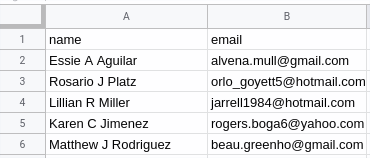
We will automatically add the information on your SpreadSheet once the user
submits the content:
## License
The files included in this repository are licensed under the MIT license.
---
_Source: https://npm.io/package/sheet-best-templates · Machine-readable twin of the npm.io package page. Health data is recomputed on every publish._
 ## License
The files included in this repository are licensed under the MIT license.
---
_Source: https://npm.io/package/sheet-best-templates · Machine-readable twin of the npm.io package page. Health data is recomputed on every publish._
## License
The files included in this repository are licensed under the MIT license.
---
_Source: https://npm.io/package/sheet-best-templates · Machine-readable twin of the npm.io package page. Health data is recomputed on every publish._