# sleet
> Sleetjs is little language that compiles into HTML
Latest version **0.1.1** (published 2016-06-03) · MIT license · 0 weekly downloads
## Install
```sh
npm install sleet
pnpm add sleet
yarn add sleet
bun add sleet
```
Provides the command `sleet`.
## Health
**Score 15/100 (F)** — status: abandoned.
Positive: no vulnerabilities.
Warnings: low downloads; no types; no esm support; pre 1.0.
Negative: abandoned; low maintenance score.
## Facts
| | |
|---|---|
| Version | 0.1.1 |
| Published | 2016-06-03 |
| First published | 2015-02-14 |
| Weekly downloads | 0 |
| License | MIT |
| TypeScript types | none |
| Module format | CommonJS |
| Dependencies | 1 |
| Known vulnerabilities | 0 |
| Install scripts | no |
| GitHub stars | 12 |
| Author | Jaco Koo |
| Maintainers | jacokoo |
## Links
- npm: https://www.npmjs.com/package/sleet
- Repository: https://github.com/JacoKoo/sleetjs
- Homepage: https://github.com/JacoKoo/sleetjs#readme
- Issues: https://github.com/JacoKoo/sleetjs/issues
- npm.io page: https://npm.io/package/sleet
## Dependencies (1)
- [commander](https://npm.io/package/commander.md) ^2.9.0
## Recent versions
- 0.1.1 (latest) — 2016-06-03
- 0.1.0 — 2016-06-03
- 0.0.11 — 2015-05-30
- 0.0.10 — 2015-04-10
- 0.0.9 — 2015-03-13
- 0.0.8 — 2015-03-12
- 0.0.7 — 2015-03-10
- 0.0.6 — 2015-03-09
- 0.0.5 — 2015-03-03
- 0.0.4 — 2015-03-02
- 0.0.3 — 2015-02-27
- 0.0.2 — 2015-02-15
- 0.0.1 — 2015-02-14
- 0.0.0 — 2015-02-14
## README
```
_____ _ _ _
/ ____| | | | | |
| (___ | | ___ ___| |_ | |___
\___ \| |/ _ \/ _ \ __| _ | / __|
____) | | __/ __/ |_ | |__| \__ \
|_____/|_|\___|\___|\__| \____/|___/
```
# Sleetjs
Sleetjs is a litte indent-based language that compiles into HTML/XML.
It is not a template engine , so it can't render data.
However, you can override tags to generate a output file that can be used to
render data with a template engine.
[Try it online](http://jacokoo.github.io/sleetjs)
[中文文档](https://github.com/JacoKoo/sleetjs/blob/master/README.cn.md)
## Resources
* [Sleet-Handlebars](https://github.com/JacoKoo/sleet-handlebars) A sleet extension that compiles Sleet file to Handlebars template.
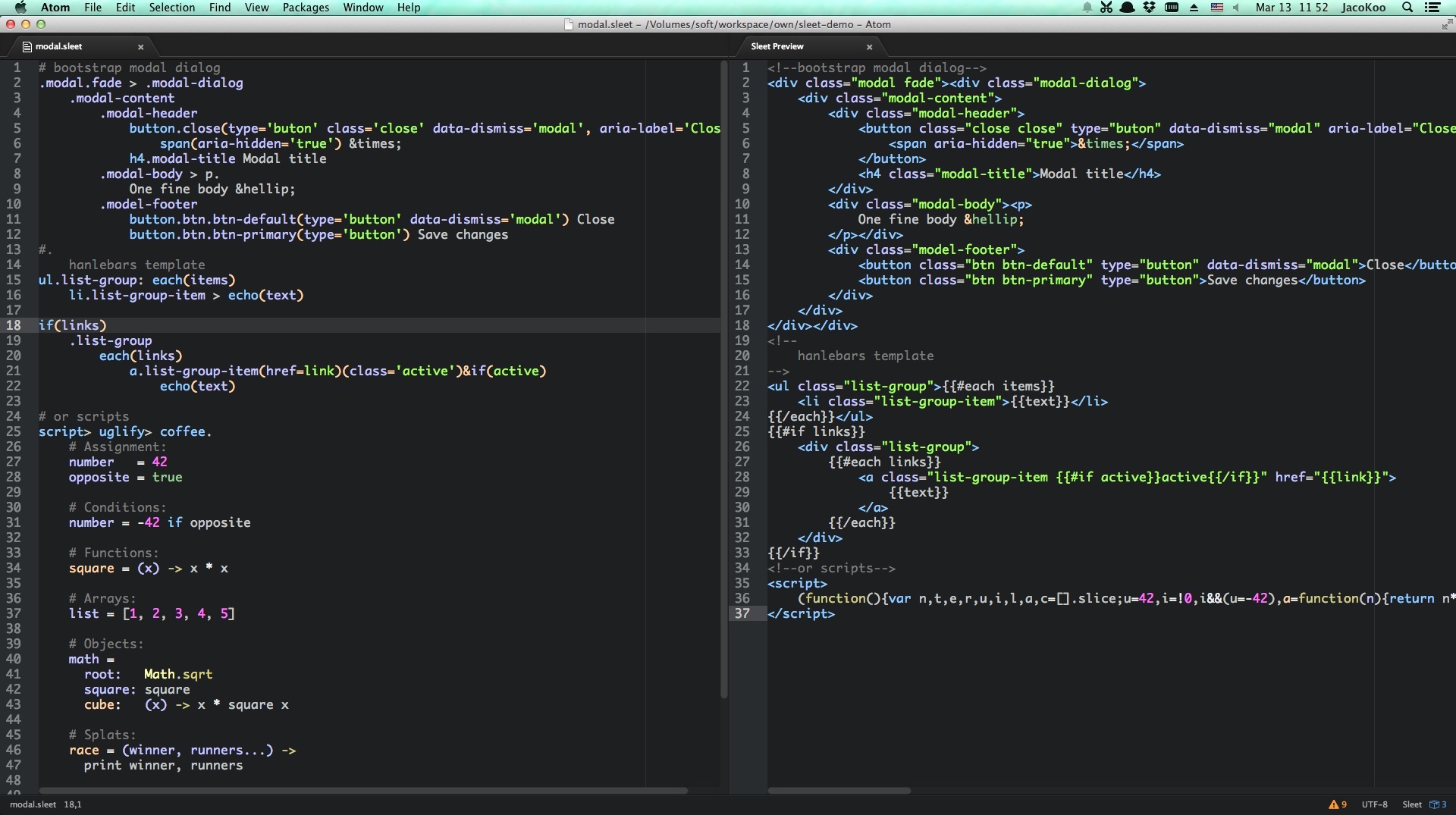
* [Atom-Sleet](https://github.com/JacoKoo/atom-sleet) Sleet and Sleet Handlebars plugin(Syntax highlight, Compile on save, Preview) for [Atom](https://atom.io).
* [Handlebars-Sleet](https://github.com/JacoKoo/handlebars-sleet) Convert exist HTML / HBS(Handlebars template) files to Sleet
## Screenshot
## Installation
Make sure you have npm installed, then
$ npm install -g sleet
## Command line usage
$ sleet [options] input1 [input2...]
Sleet compiles input files to html/xml files. It can take multiple inputs,
either file or directory. For the directory input, it will scan the directory
recursively to find these files whose extension is `.sleet` and compile them.
$ sleet -h
/usr/local/bin/sleet [options] input.st [input2.st...]
```
Options:
-o, --output The output directory
-w, --watch Watch file changes
-v, --version Show the version number
-h, --help Show this message
```
The option `-o, --output` is used to specify out folder. Any file inputs will be
placed in the destination folder flatly. And directory inputs will keep the sub
directory structure.
#### examples
- Compile a directory tree of `.sleet` files in `src` into a parallel tree of
`.html` files in `dest`
```
$ sleet src/ -o dest/
```
- Watch for changes, and compile file every time it is saved
```
$ sleet src/ -o dest/ -w
```
## First Line Declaration
Sleet use first-line-declaration to determinate which sleet extension is used to compile
the current file, the extension of output file and the options that the sleet extension uses.
By default, it use sleet as its compiler, and the extension of output file is `html`
```
#!sleet html
```
To config it to use `sleet-handlebars` to compile it with extension and options
```
#!sleet-handlebars html block=layout,view inline=date,shortDate
```
or
```
#!handlebars html block=layout,view inline=date,shortDate
```
## Grammar
Sleet is indent based, it checks indent strictly. You can indent with any number
of `spaces` or a single `tab` character. But you have to keep consistent within
a given file.
```
doctype html
html
head
meta(charset='utf-8')
title Welcom to Sleetjs
link(rel='stylesheet' href='index.css')
script(type='text/javascript') > uglify > coffee(bare=true).
number = 2
square = (x) -> x * x
console.log square number
body
.container > p.
This
is
a text block
#footer
p The end
```
compiles to:
```html
Welcom to Sleetjs
This
is
a text block
```
### Tag
The first character of a tag name can be `[a-zA-Z$@_]` and the rest can be
`[a-zA-Z0-9$_-]`.
```
html
@at1
$dollar2
_underscore3
```
compiles to
```html
<@at1>
<$dollar2>
<_underscore3>
```
Tag name, class literal, id literal are all optional. But you should specify one
of these at least.
```
#id
.class
#id2.class2
.class3#id3.class4
a#id3.class5
```
compiles to
```html
```
### Inline Tag
Inline tag could save indents. There are two types of inline tag: inline child(>) and inline sibling(+).
```
.container
div > #id > p text
#a1 + #a2
div > #a1 + #a2
```
compiles to
```html
text
```
### Attribute
A tag can have multiple attribute groups.
```
a.btn(href="#index")(class='btn-default') btn
```
compiles to
```html
btn
```
If attribute value only contains `[a-zA-Z0-9$@_-]`, the quotes are optional.
```
a.btn(href="#index")(class=btn-default target=_blank) btn
```
compiles to
```html
btn
```
Attribute groups could have multiple lines, each line present only one
attribute. And quotes are optional.
```
a#btn(
href = #index
class = btn btn-default and-something-else
)(target=_blank) btn
```
compiles to
```html
btn
```
__Each attribute group could have an attribute predict. But by default the
predicts are all ignored. It just for extension.__
For example, if you use `Handlebars` as template engine:
```
a(class=active)&if(data) text
```
could be compiled to
```html
text
```
or if you use `underscore` like template engine, it could be compiled to
```html
class="active"<% } %>>text
```
### Text
Inline text
```
p these are text
```
compiles to
```html
these are text
```
Text block, a dot immediately after tag
```
p.
the indent of
text block must
equal or greater than parent's indent + 1
```
compiles to
```html
the indent of
text block must
equal or greater than parent's indent + 1
```
Pipeline text and pipeline text block
```
p
| pipeline
| text
| multiple lines
.child-of-p
a
|.
pipeline
text block
.child-of-a
```
compiles to
```html
pipeline
text
multiple lines
pipeline
text block
```
### Comment
Single line comment and comment block
```
# single line comment
.container
#.
multiple
line
comments
.row
.col-md-12 text
```
compiles to
```html
text
```
### IE Conditional Comments
There is a buildin tag `ieif` to support Internet Explorer conditional comment
```sleet
ieif('lt IE 8') > script(src=hello.js)
@ieif('gte IE 8')
script(src=script.js)
```
compiles to
```html
```
### Buildin Tags
These tags are extended by default.
#### Self-closing Tags
All these tags are self-closing tag
```
'area', 'base', 'br', 'col', 'command'
'embed', 'hr', 'img', 'input', 'keygen'
'link', 'meta', 'param', 'source', 'track', 'wbr'
```
#### Doctype
doctype(html)
```
```
doctype(xml)
```
```
doctype(transitional)
```
```
doctype(strict)
```
```
doctype(frameset)
```
```
doctype(1.1)
```
```
doctype(basic)
```
```
doctype(mobile)
```
```
#### @include
@include is to include another sleet file into current file.
```
# a.sleet
.input-group
span.input-group-addon @
input.form-control(placeholder=Username)
# b.sleet
.panel.panel-default
.panel-heading
h3.panel-title Panel title
.panel-body
@include ./a.sleet
```
compiles to
```html
Panel title
@
```
#### Transformers
Transformers are used to transform text content to another format.
`coffee`, `markdown`, `uglify` are supported by default. Make sure you
have the corresponding lib installed to use them. `coffee` needs `coffee-script`,
`markdown` needs `marked` and `uglify` needs `uglify-js`.
##### Coffee
```
script
coffee.
foods = ['broccoli', 'spinach', 'chocolate']
eat food for food in foods when food isnt 'chocolate'
```
compiles to
```html
```
##### Uglify
```
script
uglify.
(function() {
var food, foods, _i, _len;
foods = ['broccoli', 'spinach', 'chocolate'];
for (_i = 0, _len = foods.length; _i < _len; _i++) {
food = foods[_i];
if (food !== 'chocolate') {
eat(food);
}
}
}).call(this);
```
compiles to
```html
```
or you can combine them
```
script > uglify > coffee.
foods = ['broccoli', 'spinach', 'chocolate']
eat food for food in foods when food isnt 'chocolate'
```
compiles to
```html
```
##### Markdown
```
html > body > markdown.
# Sleetjs
Sleetjs is a litte indent-based language that compiles into HTML/XML.
```
compiles to
```html
Sleetjs
Sleetjs is a litte indent-based language that compiles into HTML/XML.
```
## API
to be continued
## License
MIT
---
_Source: https://npm.io/package/sleet · Machine-readable twin of the npm.io package page. Health data is recomputed on every publish._